Hi .... Here is another afiliate journal (1350$ this month)

Status
Not open for further replies.

Florin94

BANNED
Joined
Sep 29, 2016
Messages
194
Reaction score
15
So as title say...... I was start an afiliate journal. Few point at advise:1). Pickup an good aproducts that you know the target buyers and focus on them; 2). Choose a good affiliate program that pay you!!! 3). Move your ASS and put hard work 4).Do smart analitycs of your audience.... See were other fails and why and explore this way.(this is more important than you think.... I will come back with explication)5). Make your dream reality!

Thats all the step :)

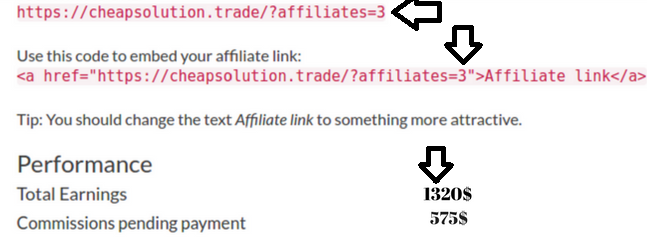
Here is my earnings..... If anyone are interested I will take time to explain all that I do in order to archive this earning . I will come later with what I do exactlly
 

Attachments

  • 1320$ (2).png
    1320$ (2).png
    149.4 KB · Views: 390
Such a genuine Site.
Umz9JKhJTKWWTSnchtZ7TA.png
 
I forgot to delete details about site from screenshot. Anyway this is not about the site used is about mindset. As in my mesage I didnt specified at all about the site used and I was not intend to do that (please note that site that Dokezar site posted was moved from another host and now post apear as new... was down 2 days but they pay me before) and yes these product I sell. . Come back with few details about method instead.
Here is the thing in order to sell anything:
For every product you need to target buyers: Some buyers are on low budget other may be on high.(Personally I think is easy to sell 1 products of 300$ instead of 300 with 1 $)
So on my niches I target diesel engine generator. For every products I sell I received a good comision without risk.
Sincerlly this niche is not even close as competition as other products on amazon like f*cking pets shop or other garbage products that have a ton of competition.

Now here is the thing !!! I was try before affiliate with amazon and ogads+youtube method and was not even close to that amount of money.
Why?! Because most people that buy on these platform are allready familiar with how enthernet work and are simple to SMART in recognize the ads and they can find another milion sellers that sell same things.
Come with part 2 tomorow. Here is 00.50 allready
PS: If some admin whant to delete all post refered to site are freely to do it and blur my photo details about link will be ok.
 
  • Like
Reactions: Psh
Come with part 2 tomorow. Here is 00.50 allready
PS: If some admin whant to delete all post refered to site are freely to do it and blur my photo details about link will be ok.
Thanks for sharing some information, it's appreciated.

I would PM a moderator on the forum and ask them to delete the screenshot etc. I will follow the thread for part 2, good luck!
 
Florin94, how much traffic daily do u have in your niche? I have small website in same niche, 30-50 hosts daily and 1-4 clicks to Amazon. Never received any sell :)
 
Here is part 2 or what I do myself in order to succesfull selling (the generator in my scenario):
1). Think who whant an generator and use one?! Well the response are simple :factory and big companys. So my target is to get my ads to this sector. Dont just spam everywere because you may not have any result from my experience. Focus just on your target and dont wasting time . Now lets take to second step:
2).How you deliver your offer to those peoples?! Well .......Your audience is not the normall buyer that waste his time on fb,ig and other social platform. They are just to busy to do that so you need to contact them more directlly in most case.
3). Once you know your buyer and his phylosophy you need to implement a stategy.... Here is one that in my case was work very efectiveley. Lock for the companys and best factorys in your area (there are numerous data on enthernet with registered company) and start sending a mesage to each of them on mail/phone . You can automate the proces with bots after but is important to understand the concept before.
Part3 soon.... Im too tired now

Florin94, how much traffic daily do u have in your niche? I have small website in same niche, 30-50 hosts daily and 1-4 clicks to Amazon. Never received any sell :)
I only use one acount of fb and instagram that post niche related article and from time to time I make a review on facebook about the (Che**solution in my case vs other providers were I credit offcourse company I promote and insert an afiliate link also).... not big deals but not here is made the gross profit.
On facebook you can join to bussines group and create a strong audience but is not vrealey targeted.

Part 3..... Sending mesages to factorys and companys. In order to do that you need to understand that no one want to be selled and they not thrust you ! So you need to be very carefull about your mesage content. And will need to focus more about you instead of products. So when I start to write a mesage to everyone I start like: Im (whatever) and I work from blablabla. Im vreally honored to can contact you because I hear from my asociate about your products/service. I would like to know if youre also interested to participate at a conference that will be free about generators , tehnical parameters, blabla. There are reserved free space and hear about you was thinking to ask if you whant to participate.We are honored to have such a great antreprenour here. - NOW YOUR POSIBLE BUYER WILL HAVE AN IDEA THAT YOU NOT ONLY SELL BUT YOURE PASIONATE ABOUT IT(imagination is the key). Say that are reserved space blabla. And in the end you let know your buyers about the site via affiliate link.
This is basically what I do and I use also a fb acount and instagram in order to make more orders but most efective seems to be mesages directlly via mail,telephone.
The best part abou earning is in program I used I received 3 * times comision from same buyers.
So that what I do. I agree Im not even far good but for me is a next step from ogads and amazon affiliate. Im not a native english speaker so if you have question I will try to response.

Got my money :) Im also interested if anyone from there was try other affiliate market for industry ? Lock as been easy money ..... I only spend few hours to colect the mail adress and post my mail to them. Blur the details this time.
 

Attachments

  • Payment from Cheapsolution.trade (1).png
    Payment from Cheapsolution.trade (1).png
    37.7 KB · Views: 123
Nice approach! You seem a dedicated person.

I only want to ask how do you get their emails? Do you pay for that or you collect them?
 
Nice approach! You seem a dedicated person.

I only want to ask how do you get their emails? Do you pay for that or you collect them?
Im locking casually on yellow page. Just locking for a directorys that have free mail adress or can show the list of company/factory in prefered area.
I will try to automatize next.... Lets see what happend :)
 
Interesting...

The only country where the dollar sign (or the cifrão as you used in the screenshot) is after the number is Canada, and even then it's only used occasionally.

Additionally, I'm calling shenanigans on the screenshot. You see, whenever you take a screenshot, there are usually compression artefacts noticeable at the pixel level surrounding most of the text and other objects ("funny colours"). Verily, this is true even in the case of your image as shown below.
Q4SVPtm


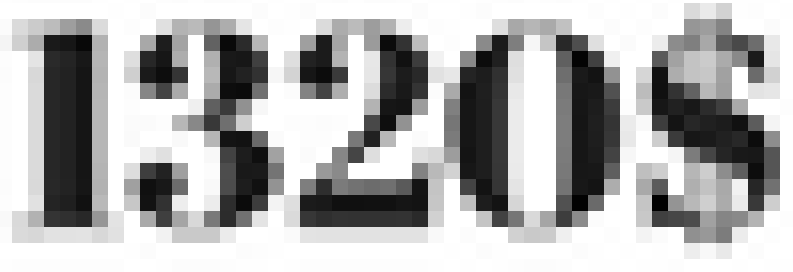
However, when I examined the numbers in your screenshot, I noticed that unlike the rest of the image, there were no compression artefacts. In fact, colour-wise it's very clean; too clean to have originally been part of the screenshot. Almost as if you used Photoshop and added a couple of clicks of the blur tool to the numbers, because even post-screenshot text in MS Paint will leave behind compression artefacts; albeit too many, making the edits even more obvious. Of course, the different fonts, sharpness, and the dollar signs after the numbers already gave away the illegitimacy of your screenshot.
dNnnQuB

Kxq3YTt

K5Sa6Qb


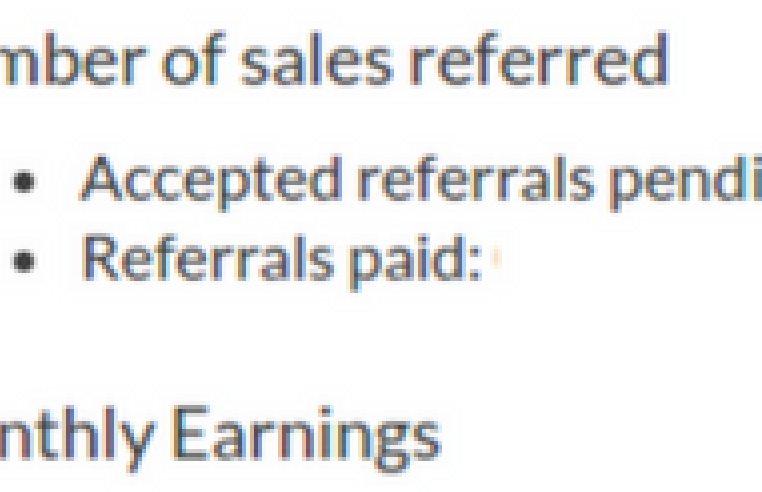
Next, there's this bit, which I found to be the most hilarious.
xdhpOTP


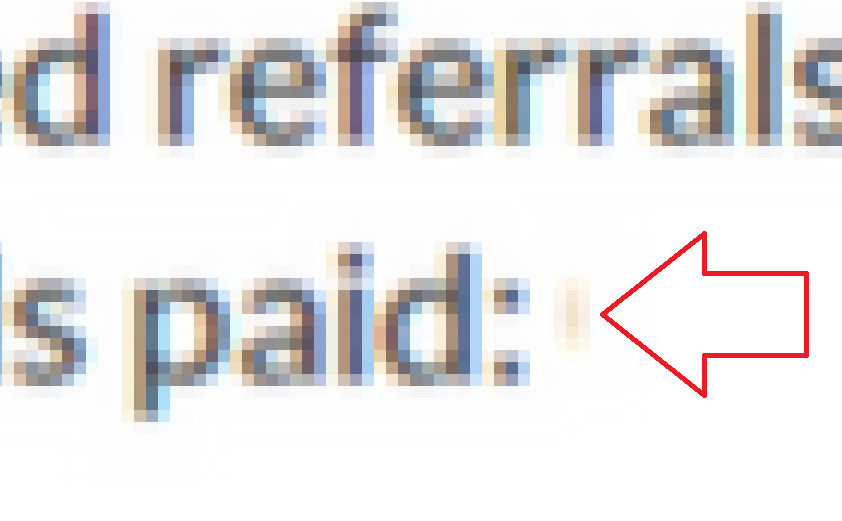
Do you see it, yet? Let me zoom in a little more.
uAF3rv9

That little brown smudge leftover from your sloppy work.

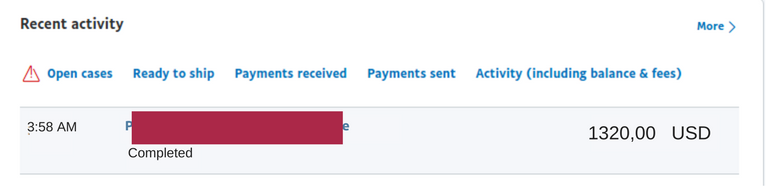
Speaking of smudges, let's discuss the second screenshot of your PayPal activity.
sPdfIkt

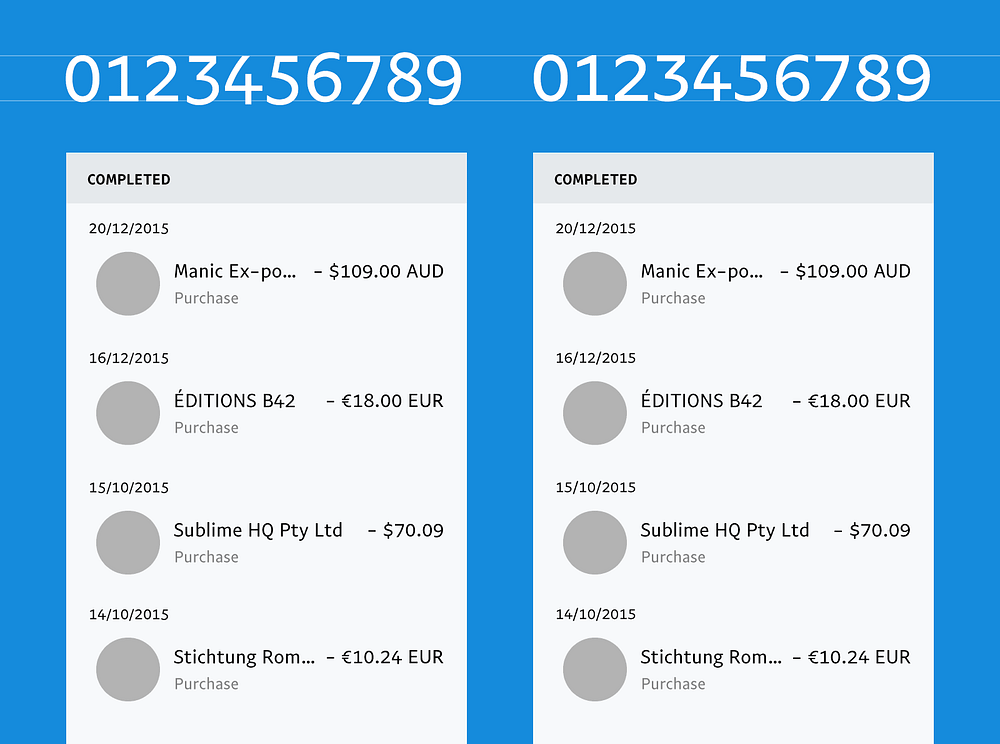
Unless Pay-Pal displays it differently in other countries, I'm sure I don't need to tell you that you're missing the dollar sign entirely or that PayPal doesn't use a comma for the decimal point, but that's not the problem either way. The problem is that font isn't PayPal-sans, the special font Paypal uses on their website.

This is PayPal-sans:
4pqqxJb

1*fHsKayzNSROFNGTGLMzquQ.png


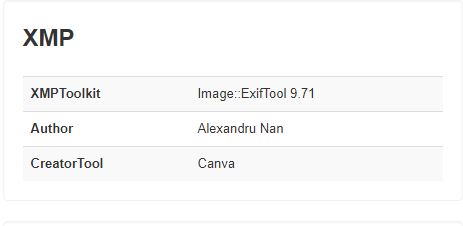
Finally, there's also the fact that you appear to have saved multiple copies of your screenshot on your computer, as denoted by the (1) and (2) in your images' titles. According to the EXIF data of the images, you exported both of the images with an online program called Canva, a piece of graphic design and photo editing software.
ce8a39f93120f537f0fdea489e228f8c.png


Oh, and learn to post in the correct section.

Thread Moved
 
Interesting...

The only country where the dollar sign (or the cifrão as you used in the screenshot) is after the number is Canada, and that's only occasionally.

Additionally, I'm calling shenanigans on the screenshot. You see, whenever you take a screenshot, there are usually compression artefacts noticeable at the pixel level surrounding most of the text and other objects ("funny colours"). Verily, this is true even in the case of your image as shown below.
Q4SVPtm


However, when I examined the numbers in your screenshot, I noticed that unlike the rest of the image, there were no compression artefacts. In fact, colour-wise it's very clean; too clean to have originally been part of the screenshot. Almost as if you used Photoshop and added a couple of clicks of the blur tool to the numbers, because even post-screenshot text in MS Paint leaves behind compression artefacts; albeit too many, making the edits even more obvious. Of course, the different fonts, sharpness, and the dollar signs after the numbers already gave away the illegitimacy of your screenshot.
dNnnQuB

Kxq3YTt

K5Sa6Qb


Next, there's this bit, which I found to be the most hilarious.
xdhpOTP


Do you see it, yet? Let me zoom in a little more.
uAF3rv9

That little brown smudge leftover from your sloppy work.

Speaking of smudges, let's discuss the second screenshot of your PayPal activity.
sPdfIkt

I'm sure I don't need to tell you that you're missing the dollar sign entirely or that PayPal doesn't use a comma for the decimal point, but that's not the problem. The problem is that font isn't PayPal-sans, the special font Paypal uses on their website.

This is PayPal-sans:
4pqqxJb

1*fHsKayzNSROFNGTGLMzquQ.png


Finally, there's also the fact that you appear to have saved multiple copies of your screenshot on your computer, as denoted by the (1) and (2) in your images' titles. According to the EXIF data of the images, you exported both of the images with an online program called Canva, a piece of graphic design and photo editing software.
ce8a39f93120f537f0fdea489e228f8c.png


Oh, and learn to post in the correct section.

Thread Moved
Woah, amazing! Here we've got a real CSI investigator. Maybe you are from FBI... I will delete my chrome historial just in case
 
Interesting...

The only country where the dollar sign (or the cifrão as you used in the screenshot) is after the number is Canada, and that's only occasionally.

Additionally, I'm calling shenanigans on the screenshot. You see, whenever you take a screenshot, there are usually compression artefacts noticeable at the pixel level surrounding most of the text and other objects ("funny colours"). Verily, this is true even in the case of your image as shown below.
Q4SVPtm


However, when I examined the numbers in your screenshot, I noticed that unlike the rest of the image, there were no compression artefacts. In fact, colour-wise it's very clean; too clean to have originally been part of the screenshot. Almost as if you used Photoshop and added a couple of clicks of the blur tool to the numbers, because even post-screenshot text in MS Paint leaves behind compression artefacts; albeit too many, making the edits even more obvious. Of course, the different fonts, sharpness, and the dollar signs after the numbers already gave away the illegitimacy of your screenshot.
dNnnQuB

Kxq3YTt

K5Sa6Qb


Next, there's this bit, which I found to be the most hilarious.
xdhpOTP


Do you see it, yet? Let me zoom in a little more.
uAF3rv9

That little brown smudge leftover from your sloppy work.

Speaking of smudges, let's discuss the second screenshot of your PayPal activity.
sPdfIkt

I'm sure I don't need to tell you that you're missing the dollar sign entirely or that PayPal doesn't use a comma for the decimal point, but that's not the problem. The problem is that font isn't PayPal-sans, the special font Paypal uses on their website.

This is PayPal-sans:
4pqqxJb

1*fHsKayzNSROFNGTGLMzquQ.png


Finally, there's also the fact that you appear to have saved multiple copies of your screenshot on your computer, as denoted by the (1) and (2) in your images' titles. According to the EXIF data of the images, you exported both of the images with an online program called Canva, a piece of graphic design and photo editing software.
ce8a39f93120f537f0fdea489e228f8c.png


Oh, and learn to post in the correct section.

Thread Moved
giphy.gif
 
Interesting...

The only country where the dollar sign (or the cifrão as you used in the screenshot) is after the number is Canada, and that's only https://en.wikipedia.org/wiki/Dollar_sign#Currencies_that_use_the_dollar_or_peso_sign.

Additionally, I'm calling shenanigans on the screenshot. You see, whenever you take a screenshot, there are usually compression artefacts noticeable at the pixel level surrounding most of the text and other objects ("funny colours"). Verily, this is true even in the case of your image as shown below.
Q4SVPtm


However, when I examined the numbers in your screenshot, I noticed that unlike the rest of the image, there were no compression artefacts. In fact, colour-wise it's very clean; too clean to have originally been part of the screenshot. Almost as if you used Photoshop and added a couple of clicks of the blur tool to the numbers, because even post-screenshot text in MS Paint leaves behind compression artefacts; albeit too many, making the edits even more obvious. Of course, the different fonts, sharpness, and the dollar signs after the numbers already gave away the illegitimacy of your screenshot.
dNnnQuB

Kxq3YTt

K5Sa6Qb


Next, there's this bit, which I found to be the most hilarious.
xdhpOTP


Do you see it, yet? Let me zoom in a little more.
uAF3rv9

That little brown smudge leftover from your sloppy work.

Speaking of smudges, let's discuss the second screenshot of your PayPal activity.
sPdfIkt

I'm sure I don't need to tell you that you're missing the dollar sign entirely or that PayPal doesn't use a comma for the decimal point, but that's not the problem. The problem is that font isn't PayPal-sans, the special font Paypal uses on their website.

This is PayPal-sans:
4pqqxJb

1*fHsKayzNSROFNGTGLMzquQ.png


Finally, there's also the fact that you appear to have saved multiple copies of your screenshot on your computer, as denoted by the (1) and (2) in your images' titles. According to the EXIF data of the images, you exported both of the images with an online program called Canva, a piece of graphic design and photo editing software.
ce8a39f93120f537f0fdea489e228f8c.png


Oh, and learn to post in the correct section.

Thread Moved

I think someone is applying water to the burned area as we speak....
 
Interesting...

The only country where the dollar sign (or the cifrão as you used in the screenshot) is after the number is Canada, and even then it's only used occasionally.

Additionally, I'm calling shenanigans on the screenshot. You see, whenever you take a screenshot, there are usually compression artefacts noticeable at the pixel level surrounding most of the text and other objects ("funny colours"). Verily, this is true even in the case of your image as shown below.
Q4SVPtm


However, when I examined the numbers in your screenshot, I noticed that unlike the rest of the image, there were no compression artefacts. In fact, colour-wise it's very clean; too clean to have originally been part of the screenshot. Almost as if you used Photoshop and added a couple of clicks of the blur tool to the numbers, because even post-screenshot text in MS Paint leaves behind compression artefacts; albeit too many, making the edits even more obvious. Of course, the different fonts, sharpness, and the dollar signs after the numbers already gave away the illegitimacy of your screenshot.
dNnnQuB

Kxq3YTt

K5Sa6Qb


Next, there's this bit, which I found to be the most hilarious.
xdhpOTP


Do you see it, yet? Let me zoom in a little more.
uAF3rv9

That little brown smudge leftover from your sloppy work.

Speaking of smudges, let's discuss the second screenshot of your PayPal activity.
sPdfIkt

I'm sure I don't need to tell you that you're missing the dollar sign entirely or that PayPal doesn't use a comma for the decimal point, but that's not the problem. The problem is that font isn't PayPal-sans, the special font Paypal uses on their website.

This is PayPal-sans:
4pqqxJb

1*fHsKayzNSROFNGTGLMzquQ.png


Finally, there's also the fact that you appear to have saved multiple copies of your screenshot on your computer, as denoted by the (1) and (2) in your images' titles. According to the EXIF data of the images, you exported both of the images with an online program called Canva, a piece of graphic design and photo editing software.
ce8a39f93120f537f0fdea489e228f8c.png


Oh, and learn to post in the correct section.


WOW!!!!

I just learnt a thing or two..... Can I be your student sensie 先生 ? :eek:
 
Interesting...

The only country where the dollar sign (or the cifrão as you used in the screenshot) is after the number is Canada, and even then it's only used occasionally.

Additionally, I'm calling shenanigans on the screenshot. You see, whenever you take a screenshot, there are usually compression artefacts noticeable at the pixel level surrounding most of the text and other objects ("funny colours"). Verily, this is true even in the case of your image as shown below.
Q4SVPtm


However, when I examined the numbers in your screenshot, I noticed that unlike the rest of the image, there were no compression artefacts. In fact, colour-wise it's very clean; too clean to have originally been part of the screenshot. Almost as if you used Photoshop and added a couple of clicks of the blur tool to the numbers, because even post-screenshot text in MS Paint will leave behind compression artefacts; albeit too many, making the edits even more obvious. Of course, the different fonts, sharpness, and the dollar signs after the numbers already gave away the illegitimacy of your screenshot.
dNnnQuB

Kxq3YTt

K5Sa6Qb


Next, there's this bit, which I found to be the most hilarious.
xdhpOTP


Do you see it, yet? Let me zoom in a little more.
uAF3rv9

That little brown smudge leftover from your sloppy work.

Speaking of smudges, let's discuss the second screenshot of your PayPal activity.
sPdfIkt

I'm sure I don't need to tell you that you're missing the dollar sign entirely or that PayPal doesn't use a comma for the decimal point, but that's not the problem. The problem is that font isn't PayPal-sans, the special font Paypal uses on their website.

This is PayPal-sans:
4pqqxJb

1*fHsKayzNSROFNGTGLMzquQ.png


Finally, there's also the fact that you appear to have saved multiple copies of your screenshot on your computer, as denoted by the (1) and (2) in your images' titles. According to the EXIF data of the images, you exported both of the images with an online program called Canva, a piece of graphic design and photo editing software.
ce8a39f93120f537f0fdea489e228f8c.png


Oh, and learn to post in the correct section.

Thread Moved


Battered lol

 
Status
Not open for further replies.
Back
Top