[Help] How to use a photoshop mockup?

JimHalpert

Supreme Member
Joined
Jan 16, 2016
Messages
1,345
Reaction score
292
Hey all, I downloaded this mockup to learn more about editing them.

The readme instruction seems to indicate that I should double click on the label and logo: https://i.imgur.com/7KMLgTF.png

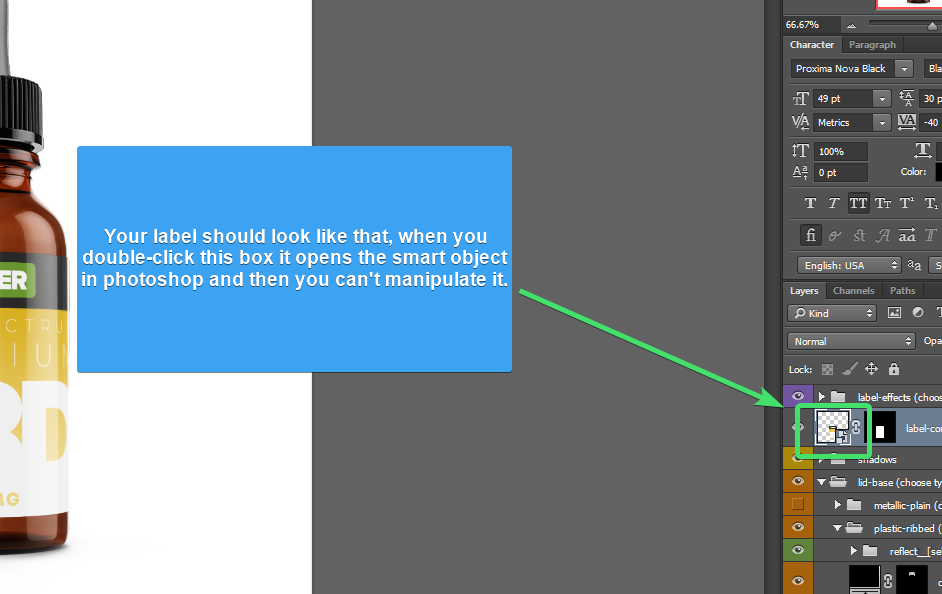
However, in my Photoshop CS6, when I try to double click on the label or logo (https://i.imgur.com/ABoiep4.png), all I get is this box that appears (https://i.imgur.com/r56nhQQ.png). I don't see any smart objects.

Can someone help me understand how to use it? Thanks.

Download link: https://www10.zippyshare.com/v/i2SSH2LH/file.html
Virustotal: https://www.virustotal.com/gui/url/...1c2ef7e8dd800349567eeb7b2a671cd6794/detection
 
Double click on layer "thumbnail" it will open layer separately and you insert your graphic element or text and click on Save.
Main file will be automatically updated.
 
Double click on layer "thumbnail" it will open layer separately and you insert your graphic element or text and click on Save.
Main file will be automatically updated.

Sorry, it isn't clear to me where exactly I should click. When I click where the orange arrow is pointed (https://i.imgur.com/1ThTkqu.png), there is no separate layer that appears. Rather this box just appears (https://i.imgur.com/r56nhQQ.png).

Can you please let me know where exactly I should click?
 
That's because the soap label and soap logo isn't linked to anything also its not smart object.. If you ever edit the file then you can ask new original untouched file.

To understand that try clicking choose bar style. That is the smart object...
 
Watch a beginners video tutorial it will help you out
 
That's because the soap label and soap logo isn't linked to anything also its not smart object.. If you ever edit the file then you can ask new original untouched file.

To understand that try clicking choose bar style. That is the smart object...

Thank you. But according to the instructions here (https://i.imgur.com/7KMLgTF.png), it should be linked to something? I have tried redownloading it but still face the same issue.

Watch a beginners video tutorial it will help you out

Dude, yes thats what I did. Watched this:
so I understand what to look out for. However, I can't click any smart object.
 
Thank you. But according to the instructions here (https://i.imgur.com/7KMLgTF.png), it should be linked to something? I have tried redownloading it but still face the same issue.


Dude, yes thats what I did. Watched this:
so I understand what to look out for. However, I can't click any smart object.
Yes that's why you cant double click the file. Either the file is edited or need open in different photoshop version..

Do you download the free version right? If not then try ask the creator.
 
Back
Top