GSA Search Engine Ranker - Extremely Powerful Linkbuilding Software (Free 5 Day Trial)

here are few examples of error character.

I can send you pm few keywords in my language, you just copy and paste it to new project, you will see that error when you start.

555680e2.jpg664bb4c5.jpg3344.jpg
 
Last edited:
i need a virtual windows pc, which is the best for gsa ?

You mean a virtual private server? Solidseovps and Poweruphosting are sellers here and have good VPS. I'm sure there are some other good brands as well, just have to do research around.

here are few examples of error character.

I can send you pm few keywords in my language, you just copy and paste it to new project, you will see that error when you start.

View attachment 64997View attachment 64998View attachment 64999

You are only showing examples of the log which I said is going to have the error due to the conversion being skipped here to speed up things.

I'm thinking this might be a proxy/setting issue, but yes please PM a sample of the keywords you're using and I'll give it a try on my end.
 
In one image you have some public proxy options configured but then in the other image you have it set to use private proxies. Are you using public or private proxies?

I'm using private proxies I purchased. Can you point out where I have it configured in the area where it's public proxy setting?
 
Last edited:
pm sent. Please check it for me :D.

Received and responded :)

I'm using private proxies I purchased. Can you point out where I have it configured in the area where it's public proxy setting?

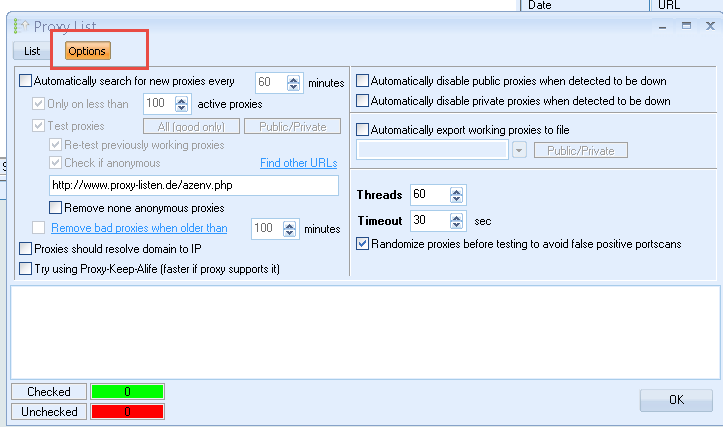
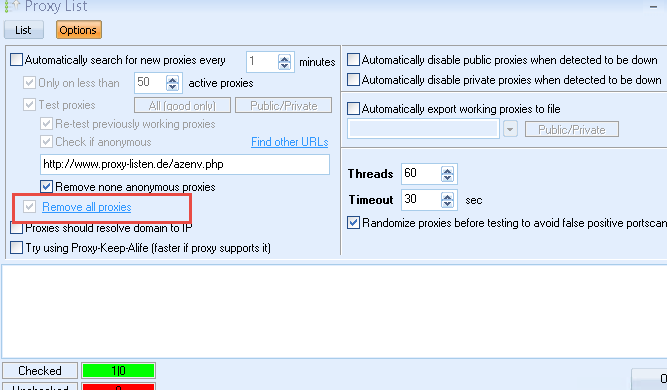
In your first image the options menu, you don't really need those options checked. (disable public proxies, etc) However, your other proxy window looks like its configured ok. What problem are you having with the proxies? I remember you mentioned you had them in the wrong format before, but what problem are you having with them now?
 
Received and responded :)


In your first image the options menu, you don't really need those options checked. (disable public proxies, etc) However, your other proxy window looks like its configured ok. What problem are you having with the proxies? I remember you mentioned you had them in the wrong format before, but what problem are you having with them now?

At my personal PC i somehow got it to work by pasting it through clipboard. However, when I try to set it the same at my office computer, I just can't seem to get it to work. I tried manually inputting the proxy, pasting to clipboard, every option of inserting the proxies and still no luck.

the only difference from the person PC was that the anonymous column showed as YES I think while my office computer is showing a "?"

So in the first image options menu, uncheck all except "use proxies?"
 
At my personal PC i somehow got it to work by pasting it through clipboard. However, when I try to set it the same at my office computer, I just can't seem to get it to work. I tried manually inputting the proxy, pasting to clipboard, every option of inserting the proxies and still no luck.

the only difference from the person PC was that the anonymous column showed as YES I think while my office computer is showing a "?"

So in the first image options menu, uncheck all except "use proxies?"

Hmm, are you sure your proxies aren't I.P. authenticated? If so you would need to set the I.P. of your office in the dashboard of the proxy service you signed up for, but if not, its hard to say without really seeing the format you're putting them in.

The anonymous column will show "YES" after they are actually tested, but stays ? until then.

If you want to PM me a proxy or a few, I can test it on my end, send back them back in the right format. Other then that its hard to say because the format is IP:PORT:USER:PASS and if they're imported in that format, they should test fine :/
 
I will continue to test and then assign it again with the proxy provider with the office IP. I can pm you a couple to test

**EDIT - omg. I think I just solved it. You were right. I double checked the provider and it seems the office IP changed and I didnt have it assigned. Thanks for knocking some sense into me and helping me get this worked out lol
 
Last edited:
I will continue to test and then assign it again with the proxy provider with the office IP. I can pm you a couple to test

**EDIT - omg. I think I just solved it. You were right. I double checked the provider and it seems the office IP changed and I didnt have it assigned. Thanks for knocking some sense into me and helping me get this worked out lol

Glad you got it figured out :)

S4ntos i pmed you please reply, thanks

Got it and responded.

-------

Use coupon code, "Spring" to get SER for $79 and Captcha Breaker for $110.
 
Hi,
i ordered yesterday both captcha breaker and gsa ser. Captcha breaker was avaible a few minutes after the order but i still have not recieved gsa ser. Is this normal it takes so long?
 
How to configure gsa ranker to use with gsa proxy scraper?

First click the add/edit proxy sites button, then choose the "parse file" option:

4utYKPw


Then you can click the options tab and configure any other options you want to use:

hr69M41


Hi,
i ordered yesterday both captcha breaker and gsa ser. Captcha breaker was avaible a few minutes after the order but i still have not recieved gsa ser. Is this normal it takes so long?

If you want to PM me your email address used when checking out I can try to resend it.

--------------------


9.84 - fix: minor issue on automatic verified export
- new: some engines improved
 
The GSA proxy scraper not very useful after using it the Lpm only increase 1lpm. and it can only find very limited working google proxy today i check only 13 working proxy in the export text file and it not automatic although I have set automatic export proxy to text file but it do not do it.
 
Last edited:
Hi Devin,

Got a question, when gsa proxy scraper export the list of proxies and GSA Search Engine Ranker loads them in. Looks like SER stores the old bad proxies and load the new ones. This way SER is stacking up the old and new proxies using both working and dead ones when running it. I might be wrong, but just realized that.

Any chance to make SER only loads the proxies from the file and replacing everything (But private proxies) in x minutes?
 
Hi Devin,

Got a question, when gsa proxy scraper export the list of proxies and GSA Search Engine Ranker loads them in. Looks like SER stores the old bad proxies and load the new ones. This way SER is stacking up the old and new proxies using both working and dead ones when running it. I might be wrong, but just realized that.

Any chance to make SER only loads the proxies from the file and replacing everything (But private proxies) in x minutes?

Did you try this:

aQ364Sn


I'll talk to Sven and see what the best way is of doing this.
 
Well that works, but it removes everything including Private Proxies.

Feature should be added in todays update:

9.85 - new: gui improved a bit for query popups
- new: ability to delete all public proxies before importing new ones
- new: improved macro usage
- new: ability to delete emails from the import file

--------

Use coupon code, "Spring" to get SER for $79 and Captcha Breaker for $110.
 
Back
Top