Google certified click tracker for direct to merchant affiliate links

p.s
What about the parameter : transparent_true?
And as I understand maxconv requires for a certified tracker to specify domain and description of activity, but if the domain is not mine, but another brand, and redirect is planned to my domain from the ad, how maxconv will let this pass?
Chat them on Skype. They’ll guide you through it.
 
Did you try to contact Conv's support. They may help you
No need. MaxConv’s customer service is great. But the whole point is MaxConv’s url is whitelisted with Google. We are paying them for access to use their domain as the tracking template.
 
After a lot of searching I found a solution how to redirect from a branded domain via template tracker to my domain, but it's not maxconv.
Can you cloak? I.E.: send some traffic to path A and other traffic to path B? If so, what is it? DM me. Thanks.
 
Google Ads Tracking Template (Run Ads With Any Domain Like Amaom.com) Step By Step:

We have two ways to run black or gray hat advertising on Google.

The first way is to use our own domain and run cloaking on it to create our advertising campaign, but the risk of the account getting suspended is very high.
However, if we use well-known and popular domains,
the likelihood of suspension is very, very low.
Additionally, we receive high-quality traffic.
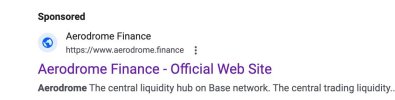
“Look at the picture below.”

2024-12-25 12.16.22.jpg

“Here is an ad with a main domain.”
“But after clicking, we are redirected to another domain. (Pay attention to the domain names)

2024-12-25 12.18.14.jpg
“Here, the advertiser has used a tracking template in the account, a very strong and Google Ads-approved pattern.”


2024-12-25 12.19.21.jpg

“Now, let me explain how you should do this.”
Here’s the updated step-by-step guide for setting up a tracking template with Adform.com:

### Step 1: Sign Up on Adform.com
1. Go to [Adform.com](https://www.adform.com) and create an account or log in if you already have one.
2. Once logged in, access the tools for tracking and analytics within the Adform dashboard.
### Step 2: Create Your Tracking Link in Adform
1. Inside Adform, navigate to the section for tracking link creation.
2. Set your final destination URL as the landing page you want users to reach, such as yourdomain.com.
3. Adform will generate a unique tracking link that includes necessary parameters for tracking clicks, sources, and other analytics data.
### Step 3: Add the Tracking Link in Google Ads
1. In your Google Ads account, go to the ad or campaign settings where you want to apply the tracking link.
2. Locate the Tracking Template field and paste the Adform-generated tracking link here.
3. Customize the link with Google Ads tracking parameters (such as `{lpurl}`) to pass data effectively to Adform.
Example Tracking Template:
https://tracking.adform.com?source=google&url={lpurl}
### Step 4: Test Your Tracking Link
1. In Google Ads, use the URL Builder to test that the tracking link correctly routes users from the ad to your intended final URL (`yourdomain.com`).
2. Preview the ad and confirm that the user flow goes from clicking on the ad (e.g., showing amazon.com as the display URL) through the Adform tracking link, and finally arriving at yourdomain.com.
### Step 5: Launch Your Campaign and Track Results
1. Save your settings and launch the campaign.
2. Adform will now collect data from each click, providing valuable metrics on user behavior and campaign performance.
This setup should help you effectively track and analyze user clicks and conversions through Adform.com, while delivering them to your desired landing page.


2024-12-25 12.22.08.jpg
 
Google Ads Tracking Template (Run Ads With Any Domain Like Amaom.com) Step By Step:

We have two ways to run black or gray hat advertising on Google.

The first way is to use our own domain and run cloaking on it to create our advertising campaign, but the risk of the account getting suspended is very high.
However, if we use well-known and popular domains,
the likelihood of suspension is very, very low.
Additionally, we receive high-quality traffic.
“Look at the picture below.”

View attachment 406314

“Here is an ad with a main domain.”
“But after clicking, we are redirected to another domain. (Pay attention to the domain names)

View attachment 406315
“Here, the advertiser has used a tracking template in the account, a very strong and Google Ads-approved pattern.”


View attachment 406316

“Now, let me explain how you should do this.”
Here’s the updated step-by-step guide for setting up a tracking template with Adform.com:

### Step 1: Sign Up on Adform.com
1. Go to [Adform.com](https://www.adform.com) and create an account or log in if you already have one.
2. Once logged in, access the tools for tracking and analytics within the Adform dashboard.
### Step 2: Create Your Tracking Link in Adform
1. Inside Adform, navigate to the section for tracking link creation.
2. Set your final destination URL as the landing page you want users to reach, such as yourdomain.com.
3. Adform will generate a unique tracking link that includes necessary parameters for tracking clicks, sources, and other analytics data.
### Step 3: Add the Tracking Link in Google Ads
1. In your Google Ads account, go to the ad or campaign settings where you want to apply the tracking link.
2. Locate the Tracking Template field and paste the Adform-generated tracking link here.
3. Customize the link with Google Ads tracking parameters (such as `{lpurl}`) to pass data effectively to Adform.
Example Tracking Template:
https://tracking.adform.com?source=google&url={lpurl}
### Step 4: Test Your Tracking Link
1. In Google Ads, use the URL Builder to test that the tracking link correctly routes users from the ad to your intended final URL (`yourdomain.com`).
2. Preview the ad and confirm that the user flow goes from clicking on the ad (e.g., showing amazon.com as the display URL) through the Adform tracking link, and finally arriving at yourdomain.com.
### Step 5: Launch Your Campaign and Track Results
1. Save your settings and launch the campaign.
2. Adform will now collect data from each click, providing valuable metrics on user behavior and campaign performance.
This setup should help you effectively track and analyze user clicks and conversions through Adform.com, while delivering them to your desired landing page.


View attachment 406318
Is it possible to do it as I had originally suggested? For example, let’s I want to run ads for Expedia. I want the final url to be Expedia.com but I want the tracking url to be on my site. And there has to be an affiliate network tracking url in the middle. So I set tracking url to mysite.com/expedia which then would do cloaking (if I want) and then take two possible paths - 1.) go to some url on cj.com which then would go to Expedia.com/aid123 or 2.) go directly to Expedia.com.
 
Is it possible to do it as I had originally suggested? For example, let’s I want to run ads for Expedia. I want the final url to be Expedia.com but I want the tracking url to be on my site. And there has to be an affiliate network tracking url in the middle. So I set tracking url to mysite.com/expedia which then would do cloaking (if I want) and then take two possible paths - 1.) go to some url on cj.com which then would go to Expedia.com/aid123 or 2.) go directly to Expedia.com.
i send you pm and explain anything
 
anyone find the solution of click loss even after using certified click tracker
 
Google Ads Tracking Template (Run Ads With Any Domain Like Amaom.com) Step By Step:

We have two ways to run black or gray hat advertising on Google.

The first way is to use our own domain and run cloaking on it to create our advertising campaign, but the risk of the account getting suspended is very high.
However, if we use well-known and popular domains,
the likelihood of suspension is very, very low.
Additionally, we receive high-quality traffic.
“Look at the picture below.”

View attachment 406314

“Here is an ad with a main domain.”
“But after clicking, we are redirected to another domain. (Pay attention to the domain names)

View attachment 406315
“Here, the advertiser has used a tracking template in the account, a very strong and Google Ads-approved pattern.”


View attachment 406316

“Now, let me explain how you should do this.”
Here’s the updated step-by-step guide for setting up a tracking template with Adform.com:

### Step 1: Sign Up on Adform.com
1. Go to [Adform.com](https://www.adform.com) and create an account or log in if you already have one.
2. Once logged in, access the tools for tracking and analytics within the Adform dashboard.
### Step 2: Create Your Tracking Link in Adform
1. Inside Adform, navigate to the section for tracking link creation.
2. Set your final destination URL as the landing page you want users to reach, such as yourdomain.com.
3. Adform will generate a unique tracking link that includes necessary parameters for tracking clicks, sources, and other analytics data.
### Step 3: Add the Tracking Link in Google Ads
1. In your Google Ads account, go to the ad or campaign settings where you want to apply the tracking link.
2. Locate the Tracking Template field and paste the Adform-generated tracking link here.
3. Customize the link with Google Ads tracking parameters (such as `{lpurl}`) to pass data effectively to Adform.
Example Tracking Template:
https://tracking.adform.com?source=google&url={lpurl}
### Step 4: Test Your Tracking Link
1. In Google Ads, use the URL Builder to test that the tracking link correctly routes users from the ad to your intended final URL (`yourdomain.com`).
2. Preview the ad and confirm that the user flow goes from clicking on the ad (e.g., showing amazon.com as the display URL) through the Adform tracking link, and finally arriving at yourdomain.com.
### Step 5: Launch Your Campaign and Track Results
1. Save your settings and launch the campaign.
2. Adform will now collect data from each click, providing valuable metrics on user behavior and campaign performance.
This setup should help you effectively track and analyze user clicks and conversions through Adform.com, while delivering them to your desired landing page.


View attachment 406318
Hey Mate,

I got some questions for you here, can you pm and explain please, thank you
 
Hello,
I provide discounted Google ads accounts that help you to save from 25% off your ads spending. DM me to get accounts.
 
Back
Top