
We're moving into an interesting time when it comes how Google establishes the best pages to rank in its search engines, more and more they've realized that rather than rank individual pages in methods that can be manipulated regardless of the algorithm, they should find away to establish who is an authority on a subject.
This is where "Google Authorship" began.

In this method rather than focus on building authority on a single page by various SEO methods, I'm going to show you a method to build authority to an identity and ultimately use that to compliment the SEO on any site you own. The following guide is broken down into a few sections to help those unfamiliar with the process be able to complete it still.
The Method: The primary goal of this method is to use Google+, Gravatar, and other social media properties to convince Google that you are an industry expert in your niche so that your site deserves an extra push.
Part 1: Setting Up Google+
Step 1: The first step is configuring your Google+ profile, it is key to note that if you were to do this method for multiple websites you would want to ensure you have one profile per niche so in some cases you may not be using your real G+

Step 2: Go to "edit profile" and fill in information, using your keywords and related niche words. Here's an example if my niche was "dog training"
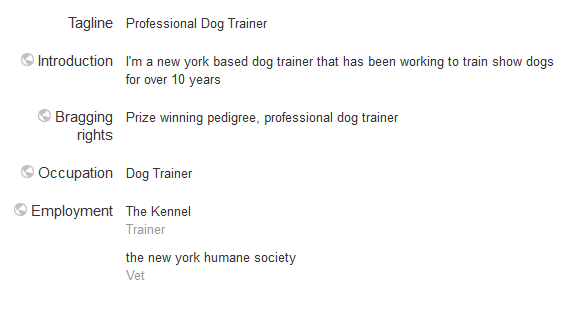
Step 3: Go to "Other Profiles and click "Managed Connected Accounts" in this spot you will be able to verify other profiles you are creating for this authority persona


You will want to create and verify profiles on as many of the sites as possible, take the time to fill in the profiles with variations of your keywords, and on sites like flickr upload and tag pictures related to your niche.
Once you've created and verified those make sure to keep a list of the URLs as we will need them again soon for Gravatar.
Step 4: Next on your G+ profile you are going to fill in the "Contributor To:" section with your websites name, this will allow you to verify it in the authorship markup later on.

Part 2: Setting Up Gravatar
Step 1: Navigate to the Gravatar website and on the home page simply enter your email (the one you used for the Google+ profile) and hit "get your gravatar"

After this you will be asked to validate the email and pick a username, the username does not have to match your profile name as it is being linked by email address, but once your gravatar profile is set up it is worth while going back and setting it up on your Google+ profile under "other accounts"
Step 2: Set up your public profile to match you G+ name and fill in some information related to your niche, this example is a little light, I would normally try and aim for 50 - 100 words in that field, but feel free to add even more.

Step 3: Next go to the "Verified Links" section and verify the various secondary profiles that you set up before, it's also important to set up and link an account on wordpress.com as we will be using that later

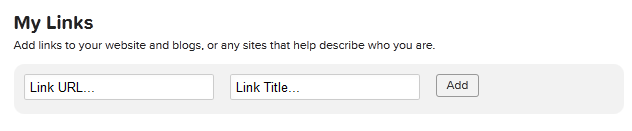
Step 4: Finally go to "My Links" and add in websites or blogs related to your niche (even better if you can find ones on wordpress.com so that you can use your gravatar account to comment on them later).
Part 3: Configuring Authorship
For Wordpress Users: If you are using wordpress its nice and easy to set up Google Authoriship, simply install "Google Author Link" plugin by "HelpForWP" - it's by far the best plugin that I've ever used for managing authorship, not only does it allow you to set a homepage author simply by including their Google+ profile link in their account profile, but it also allows you to set different author bindings for each Wordpress account you have, meaning if your site has multiple writers (which may represent more authority profiles) each can have a unique rel=author easily set for them.
For Non-Wordpress Users: If you aren't using wordpress there are two methods you can use to set up Google Authorship:
1. Navigate to https://plus.google.com/authorship and validate your domain by using an email on that domain i.e. [email protected] if I were to try and validate an authorship on this site.
2. If this option isn't available, simply edit the html of the page and add in the following:
As long as your website is listed in the "Contributor To:" section on your G+ profile it should be all set up, you can test it by going here:
http://www.google.com/webmasters/tools/richsnippets
And typing in your domain
Part 4: Building Authority
Now that you've got all the ground work in place it's time to continue to expand the authority, just like in traditional SEO where keywords are only half the battle we need to look onward to other metrics.
First, for your profiles it's important to add in some social signals, for properties like Facebook and Twitter this is as simple as buying some fake likes, for G+ you obviously want to be a bit more careful as they are kind of the central pillar we are focusing on here. When dealing with G+ I simply search for individuals who are interested in my niche and add them to my circles en masse, often you find that a number of them are happy to add you back. Also I like to post a few articles or weblinks related to my niche from all of my social media properties just to help push along the content relation and to show that there is activity on these profiles.
Next, go to wordpress.com and search for blogs related to your niche, take the time to comment on these pages with well crafted comments to ensure they go live and you'll be helping to add great authority to your profile and back to your website through Gravatar.
Last but not least, it's important to note that this method alone isn't going to rank you over night for competitive terms, but what it does do is when combined with proper SEO on-site and off-site practices is help to deliver a powerful blow to combating other sites for those top spots. Why would Google post Joe Schmoe's blog when they can listen to the individual who is clearly a well established industry expert!
This is where "Google Authorship" began.
In this method rather than focus on building authority on a single page by various SEO methods, I'm going to show you a method to build authority to an identity and ultimately use that to compliment the SEO on any site you own. The following guide is broken down into a few sections to help those unfamiliar with the process be able to complete it still.
The Method: The primary goal of this method is to use Google+, Gravatar, and other social media properties to convince Google that you are an industry expert in your niche so that your site deserves an extra push.
Part 1: Setting Up Google+
Step 1: The first step is configuring your Google+ profile, it is key to note that if you were to do this method for multiple websites you would want to ensure you have one profile per niche so in some cases you may not be using your real G+
Step 2: Go to "edit profile" and fill in information, using your keywords and related niche words. Here's an example if my niche was "dog training"
Step 3: Go to "Other Profiles and click "Managed Connected Accounts" in this spot you will be able to verify other profiles you are creating for this authority persona
You will want to create and verify profiles on as many of the sites as possible, take the time to fill in the profiles with variations of your keywords, and on sites like flickr upload and tag pictures related to your niche.
Once you've created and verified those make sure to keep a list of the URLs as we will need them again soon for Gravatar.
Step 4: Next on your G+ profile you are going to fill in the "Contributor To:" section with your websites name, this will allow you to verify it in the authorship markup later on.
Part 2: Setting Up Gravatar
Step 1: Navigate to the Gravatar website and on the home page simply enter your email (the one you used for the Google+ profile) and hit "get your gravatar"
After this you will be asked to validate the email and pick a username, the username does not have to match your profile name as it is being linked by email address, but once your gravatar profile is set up it is worth while going back and setting it up on your Google+ profile under "other accounts"
Step 2: Set up your public profile to match you G+ name and fill in some information related to your niche, this example is a little light, I would normally try and aim for 50 - 100 words in that field, but feel free to add even more.
Step 3: Next go to the "Verified Links" section and verify the various secondary profiles that you set up before, it's also important to set up and link an account on wordpress.com as we will be using that later
Step 4: Finally go to "My Links" and add in websites or blogs related to your niche (even better if you can find ones on wordpress.com so that you can use your gravatar account to comment on them later).
Part 3: Configuring Authorship
For Wordpress Users: If you are using wordpress its nice and easy to set up Google Authoriship, simply install "Google Author Link" plugin by "HelpForWP" - it's by far the best plugin that I've ever used for managing authorship, not only does it allow you to set a homepage author simply by including their Google+ profile link in their account profile, but it also allows you to set different author bindings for each Wordpress account you have, meaning if your site has multiple writers (which may represent more authority profiles) each can have a unique rel=author easily set for them.
For Non-Wordpress Users: If you aren't using wordpress there are two methods you can use to set up Google Authorship:
1. Navigate to https://plus.google.com/authorship and validate your domain by using an email on that domain i.e. [email protected] if I were to try and validate an authorship on this site.
2. If this option isn't available, simply edit the html of the page and add in the following:
Code:
<a href="https://plus.google.com/[YOUR-PROFILE-ID-HERE]?rel=author">Google</a>As long as your website is listed in the "Contributor To:" section on your G+ profile it should be all set up, you can test it by going here:
http://www.google.com/webmasters/tools/richsnippets
And typing in your domain
Part 4: Building Authority
Now that you've got all the ground work in place it's time to continue to expand the authority, just like in traditional SEO where keywords are only half the battle we need to look onward to other metrics.
First, for your profiles it's important to add in some social signals, for properties like Facebook and Twitter this is as simple as buying some fake likes, for G+ you obviously want to be a bit more careful as they are kind of the central pillar we are focusing on here. When dealing with G+ I simply search for individuals who are interested in my niche and add them to my circles en masse, often you find that a number of them are happy to add you back. Also I like to post a few articles or weblinks related to my niche from all of my social media properties just to help push along the content relation and to show that there is activity on these profiles.
Next, go to wordpress.com and search for blogs related to your niche, take the time to comment on these pages with well crafted comments to ensure they go live and you'll be helping to add great authority to your profile and back to your website through Gravatar.
Last but not least, it's important to note that this method alone isn't going to rank you over night for competitive terms, but what it does do is when combined with proper SEO on-site and off-site practices is help to deliver a powerful blow to combating other sites for those top spots. Why would Google post Joe Schmoe's blog when they can listen to the individual who is clearly a well established industry expert!


