
You are using an out of date browser. It may not display this or other websites correctly.
You should upgrade or use an alternative browser.
You should upgrade or use an alternative browser.
Incogniton V5: Multi-Accounting Anti-Detect Browser [Starter Package At No Cost]

- May 22, 2009
- 626
- 349
It is desktop only for now!Does Incogniton support mobile browser emulation too, or is it desktop-only for now?
neoncipher
BANNED
- Oct 23, 2024
- 75
- 22
I'm locked in on this one!

Clicks Digital
Previously banned member
- Feb 19, 2023
- 104
- 23
Is there any roadmap visibility? For example, upcoming Linux support or mobile browser emulation?

- May 22, 2009
- 626
- 349
We have released a lot of updates recently, definitely worth checking out!

- May 22, 2009
- 626
- 349
Yes, mobile proxies work fine but we do not emulate a mobile phone.Does Incogniton work well with mobile proxies, and how are they configured per profile?
- May 22, 2009
- 626
- 349
We are still publishing loads of updates! Don't forget to ask for a coupon!

- May 22, 2009
- 626
- 349
Best is with a proxy. You can also use one of our free proxies.Just Downloaded free version I have to use proxy in it or direct work
- May 22, 2009
- 626
- 349
Trials are free!i want trail

- May 22, 2009
- 626
- 349
Depends on your hardware, it is a chromium based browser so pretty resource intensive.How many browser profiles can be run simultaneously without slowing down performance?
- May 22, 2009
- 626
- 349
Browser core 141 is released!

Google Partner
BANNED
- Nov 10, 2025
- 44
- 7
How well does Incogniton handle long-term profile aging—do browser fingerprints stay consistent over months, or do they refresh automatically?
- May 22, 2009
- 626
- 349
The fingerprints stay consistent, we only update the useragent to stay up to date with the browser updates.How well does Incogniton handle long-term profile aging—do browser fingerprints stay consistent over months, or do they refresh automatically?

- Jul 26, 2016
- 14,258
- 13,138
Update: Thread Edited
The seller has contacted us to change the content of the opening post in their sales thread. The old content and the new content can be found in the spoilers below.
Title: [Free Starter Package] Incogniton, anti detect browser - Manage multiple unique browser profiles without detection!

Incogniton anti detect browser, a modern tool with all the features you need to manage your browser profiles safely. The tool has unique fingerprint protection for each browser profile. As a user on BHW, you have the privilege to enjoy a 20% discount for one year.
Are you an online entrepreneur who needs to manage multiple accounts on social media networks such as Facebook, Twitter or Instagram? Are you somebody who needs to stay undetected by websites while still managing multiple identities? Stop risking those identities with difficult browser management and get organized. We have the solution, Incogniton, a tool which enables you to manage multiple browser profiles. Each browser profile is unique and will make you untraceable for a website. The only thing you need to do is attach a proxy.
Incogniton is a reliable anti detect browser and works great with Facebook, Instagram, Google, Coinlist, OF Management, Reddit, Youtube, TikTok and any other platform.
How to create a browser profile with a proxy?:
Core features:
 Manage multiple browsers
Accessing multiple unique internet browsers from an application in a structured overview.
Cookies & Cookie Collector
All cookies will be securely saved in a database and won't be lost when closing a browser. Also you can automatically generate Cookies for your browser profiles to increase reliability. See this Guide for more information.
Browser profile sync across your computers
Access your browser profiles from all your devices.
Synchronizer, automation for everyone
Automate browser actions easily by copying actions from one profile to others. This feature can be easily used by everyone with a paid package. See the video below for more information.
Browser fingerprint protection
All of your profiles have a unique identity and are protected with browser fingerprint protection. This means that it is impossible for websites to find out who you are based on the features of your browser. This identity is almost completely customizable to your wishes but we also offer an easy to use fingerprint generator.
How do we make your profile unique?
Browser profiles sorting and management tools
The browser profiles are structured simply and efficiently so that they can be opened easily and quickly.
Bulk feature
Incogniton allows you to create multiple accounts at the same time. The tool allows for a lot of customization. See the video for more information about the bulk feature.
REST API (included in package entrepreneur and above)
The REST API makes you able to manage your browser profiles more efficiently. See for more information our Knowledge Center.
Selenium and Puppeteer integration (included in package entrepreneur and above)
Browser automation is a feature which allows you to automate processes online. This can be as simple as a simple button click to complex automated login and registration systems. The Incogniton browser automation uses the selenium WebDriver. See for more information our Knowledge Center.
Team feature
Team member functionality, create team members with seperate logins and and assign them roles with specific permissions. (Available from package professional and above). For more information about the team member feature see this guide.
Easy to use
Designed in a user-friendly way and easy to use for everyone.
Cloud savings or local savings of data
We let you decide whether you want to use our encrypted cloud savings or store their data locally on your own device. Note! Saving your data on your own device is at your own risk.
Pricing:
We offer a FREE starter plan which allows people to explore Incogniton. With this plan you will be able to create 10 unique browser profiles and all Incogniton core features are included. If you need more than 10 profiles you can take a look at the prices below. Please note that you as a BHW user can receive a 20% discount coupon for the first 12 months. Reply "I want an Incogniton coupon" to this thread. We will send you a personal coupon as soon as possible.
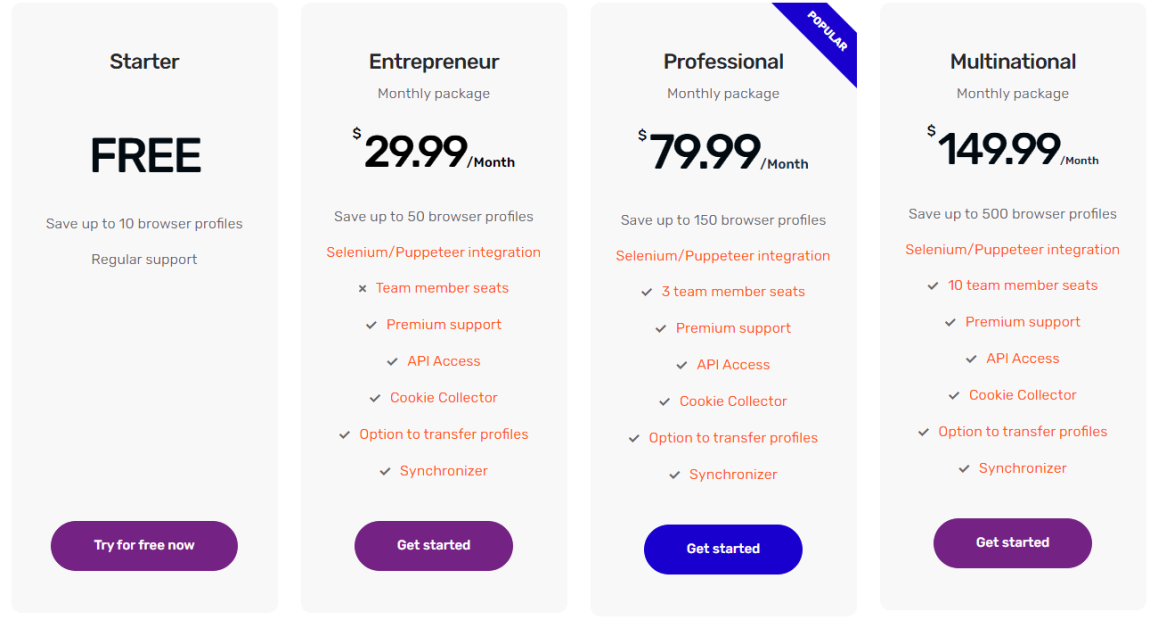
Click here to go pricing!
The only official website to buy: https://incogniton.com/
Currently we support Incogniton on Windows and MAC.
Wrap up:
Incogniton is the solution for online entrepreneurs who need a tool to manage their online identities. From now, you can stay anonymous with your accounts and don’t need to worry that your valuable accounts get linked with each other. You as a BHW user can receive a 20% discount coupon for the first 12 months. Reply "I want an Incogniton coupon" to this thread. We will send you a personal coupon as soon as possible. Please note that this coupon is unique for each user and can’t be shared.
If you still have any questions please do not hesitate to reply to this thread or use the contact form on the website.
We are also always available via email on [email protected]
Q&A
Screenshots:
Refund policy:
A refund is possible in the case of the software not working as intended. Please use the contact form on the website to request such a refund. We reserve the right to cancel your subscription with a refund.
Disclaimer:
The software is in active development and there will be bugs. Please use the contact form when you find such a bug or have any other problem. New features get added constantly and we will try to keep people in the loop!
Support:
We offer support via Blackhatworld PM, Telegram and email ([email protected]).
Incogniton anti detect browser, a modern tool with all the features you need to manage your browser profiles safely. The tool has unique fingerprint protection for each browser profile. As a user on BHW, you have the privilege to enjoy a 20% discount for one year.
Are you an online entrepreneur who needs to manage multiple accounts on social media networks such as Facebook, Twitter or Instagram? Are you somebody who needs to stay undetected by websites while still managing multiple identities? Stop risking those identities with difficult browser management and get organized. We have the solution, Incogniton, a tool which enables you to manage multiple browser profiles. Each browser profile is unique and will make you untraceable for a website. The only thing you need to do is attach a proxy.
Incogniton is a reliable anti detect browser and works great with Facebook, Instagram, Google, Coinlist, OF Management, Reddit, Youtube, TikTok and any other platform.
How to create a browser profile with a proxy?:
Core features:
Manage multiple browsersAccessing multiple unique internet browsers from an application in a structured overview.
Cookies & Cookie CollectorAll cookies will be securely saved in a database and won't be lost when closing a browser. Also you can automatically generate Cookies for your browser profiles to increase reliability. See this Guide for more information.
Browser profile sync across your computersAccess your browser profiles from all your devices.
Synchronizer, automation for everyoneAutomate browser actions easily by copying actions from one profile to others. This feature can be easily used by everyone with a paid package. See the video below for more information.
Browser fingerprint protectionAll of your profiles have a unique identity and are protected with browser fingerprint protection. This means that it is impossible for websites to find out who you are based on the features of your browser. This identity is almost completely customizable to your wishes but we also offer an easy to use fingerprint generator.
How do we make your profile unique?Normally your browser contains various features which, when combined, make you identifiable for websites. By changing most of these features we can make your browser look unique to a website. The list of features which we control are:
- Geolocation
- Timezone
- A proxy
- WebRTC
- Navigator properties
- Font masking
- Canvas information
- WebGL
- Audio Context
- And more
Browser profiles sorting and management toolsThe browser profiles are structured simply and efficiently so that they can be opened easily and quickly.
Bulk featureIncogniton allows you to create multiple accounts at the same time. The tool allows for a lot of customization. See the video for more information about the bulk feature.
REST API (included in package entrepreneur and above)The REST API makes you able to manage your browser profiles more efficiently. See for more information our Knowledge Center.
Selenium and Puppeteer integration (included in package entrepreneur and above)Browser automation is a feature which allows you to automate processes online. This can be as simple as a simple button click to complex automated login and registration systems. The Incogniton browser automation uses the selenium WebDriver. See for more information our Knowledge Center.
Team featureTeam member functionality, create team members with seperate logins and and assign them roles with specific permissions. (Available from package professional and above). For more information about the team member feature see this guide.
Easy to useDesigned in a user-friendly way and easy to use for everyone.
Cloud savings or local savings of dataWe let you decide whether you want to use our encrypted cloud savings or store their data locally on your own device. Note! Saving your data on your own device is at your own risk.
Pricing:
We offer a FREE starter plan which allows people to explore Incogniton. With this plan you will be able to create 10 unique browser profiles and all Incogniton core features are included. If you need more than 10 profiles you can take a look at the prices below. Please note that you as a BHW user can receive a 20% discount coupon for the first 12 months. Reply "I want an Incogniton coupon" to this thread. We will send you a personal coupon as soon as possible.
Click here to go pricing!
The only official website to buy: https://incogniton.com/
Currently we support Incogniton on Windows and MAC.
Wrap up:
Incogniton is the solution for online entrepreneurs who need a tool to manage their online identities. From now, you can stay anonymous with your accounts and don’t need to worry that your valuable accounts get linked with each other. You as a BHW user can receive a 20% discount coupon for the first 12 months. Reply "I want an Incogniton coupon" to this thread. We will send you a personal coupon as soon as possible. Please note that this coupon is unique for each user and can’t be shared.
If you still have any questions please do not hesitate to reply to this thread or use the contact form on the website.
We are also always available via email on [email protected]
Q&A
Q: Do you provide proxies?
A: No, we don’t provide proxies. We only sell the tooling which makes you able to browse anonymous with proxies. Go to https://incogniton.com/proxies/ for proxy deals.
Q: Do you provide free trials?
A: No, we don’t offer a free trial, but we do offer a ‘Free 10 browser profiles’ plan. Please note that you as a BHW user can receive a 20% discount coupon for the first 12 months for any paid plan. Just reply "I want an Incogniton coupon" to this thread. We will send you a personal coupon as soon as possible.
Q: Besides the proxy which settings do I need to configure as a user by myself?
A: You don't have to do anything yourself, except for adding a proxy. Incogniton will create random fingerprints for each profile you create. These fingerprints are unique and automatically generated for every profile. Adjusting fingerprints manually is only for experienced users.
Q: Is every browser profile unique?
A: Yes, it is! Some features like user agent can be the same but since there are always certain features which are different the resulting profile will be unique.
Q: How do I create a new browser profile?
You can create a new browser profile by pressing “new browser profile” in the left menu. In the overview tab you can enter a name for the profile and select which operating system the profile should emulate. Next, you can configure settings like proxy, timezone, geolocation and WebRTC by going through the “new browser profile” menu. You can check the validity of your proxy in the proxy tab by pressing “check proxy”. When you are finished with the configuration, you can press “create browser profile” in the right menu.
Q: Can I customize fingerprints?
If you want to customize your browser profile with self-chosen fingerprints Incogniton has some extra features for you. You can customize your Geolocation, add some fonts or change the amount of media devices. Please note that these steps aren’t necessary if you just want a regular browser profile with browser profile fingerprinting automatically managed by Incogniton. We can ensure you that a browser profile with your Proxy and browser fingerprinting management by Incogniton will make you able to manage your browsers safely with no leaks.
Be aware that if you don’t manage the fingerprint settings correctly it may cause extra risks for your profiles. We therefore recommend that you only change these settings when you know what you’re doing.
Q: Can I access my Incogniton browser profile sessions on multiple devices?
Another big advantage of Incogniton is that you can open your browser sessions on any device. For example, do you have a laptop but also a desktop? No problem, you just have to log in on both devices and your browser data will be synchronized between both devices. This means you can use Incogniton on any device and switch between devices. When you work in a team you can also invite your colleagues to collaborate on your browser profile sessions. This is possible through the team functionality of Incogniton.
A: No, we don’t provide proxies. We only sell the tooling which makes you able to browse anonymous with proxies. Go to https://incogniton.com/proxies/ for proxy deals.
Q: Do you provide free trials?
A: No, we don’t offer a free trial, but we do offer a ‘Free 10 browser profiles’ plan. Please note that you as a BHW user can receive a 20% discount coupon for the first 12 months for any paid plan. Just reply "I want an Incogniton coupon" to this thread. We will send you a personal coupon as soon as possible.
Q: Besides the proxy which settings do I need to configure as a user by myself?
A: You don't have to do anything yourself, except for adding a proxy. Incogniton will create random fingerprints for each profile you create. These fingerprints are unique and automatically generated for every profile. Adjusting fingerprints manually is only for experienced users.
Q: Is every browser profile unique?
A: Yes, it is! Some features like user agent can be the same but since there are always certain features which are different the resulting profile will be unique.
Q: How do I create a new browser profile?
You can create a new browser profile by pressing “new browser profile” in the left menu. In the overview tab you can enter a name for the profile and select which operating system the profile should emulate. Next, you can configure settings like proxy, timezone, geolocation and WebRTC by going through the “new browser profile” menu. You can check the validity of your proxy in the proxy tab by pressing “check proxy”. When you are finished with the configuration, you can press “create browser profile” in the right menu.
Q: Can I customize fingerprints?
If you want to customize your browser profile with self-chosen fingerprints Incogniton has some extra features for you. You can customize your Geolocation, add some fonts or change the amount of media devices. Please note that these steps aren’t necessary if you just want a regular browser profile with browser profile fingerprinting automatically managed by Incogniton. We can ensure you that a browser profile with your Proxy and browser fingerprinting management by Incogniton will make you able to manage your browsers safely with no leaks.
Be aware that if you don’t manage the fingerprint settings correctly it may cause extra risks for your profiles. We therefore recommend that you only change these settings when you know what you’re doing.
Q: Can I access my Incogniton browser profile sessions on multiple devices?
Another big advantage of Incogniton is that you can open your browser sessions on any device. For example, do you have a laptop but also a desktop? No problem, you just have to log in on both devices and your browser data will be synchronized between both devices. This means you can use Incogniton on any device and switch between devices. When you work in a team you can also invite your colleagues to collaborate on your browser profile sessions. This is possible through the team functionality of Incogniton.
Screenshots:
The profile overview section.
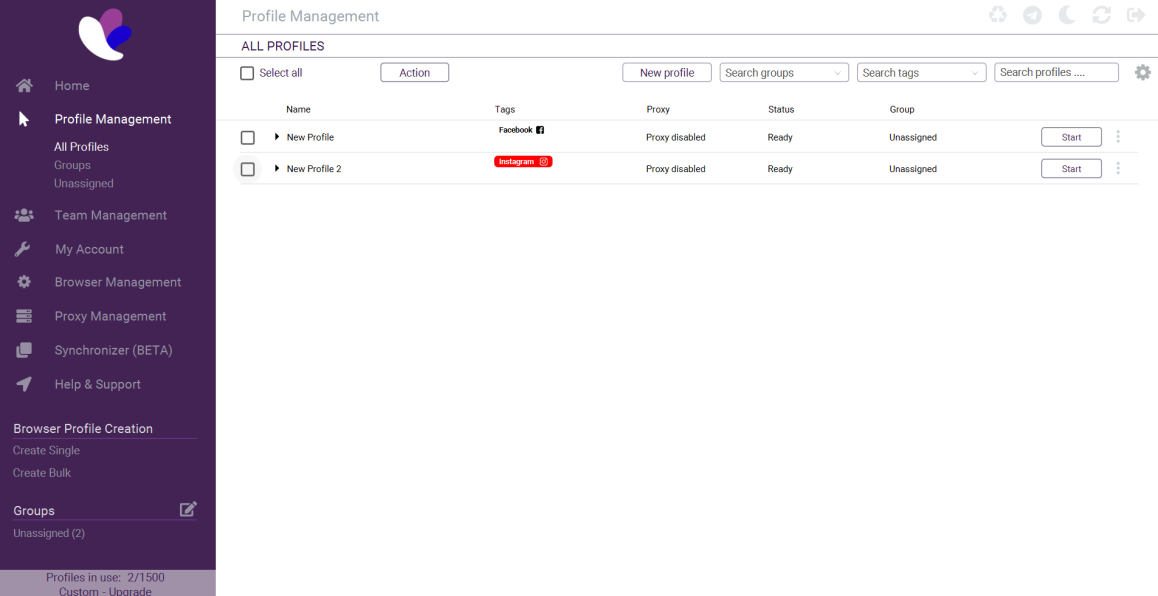
The start of creating a profile.

WebRTC fingerprint settings
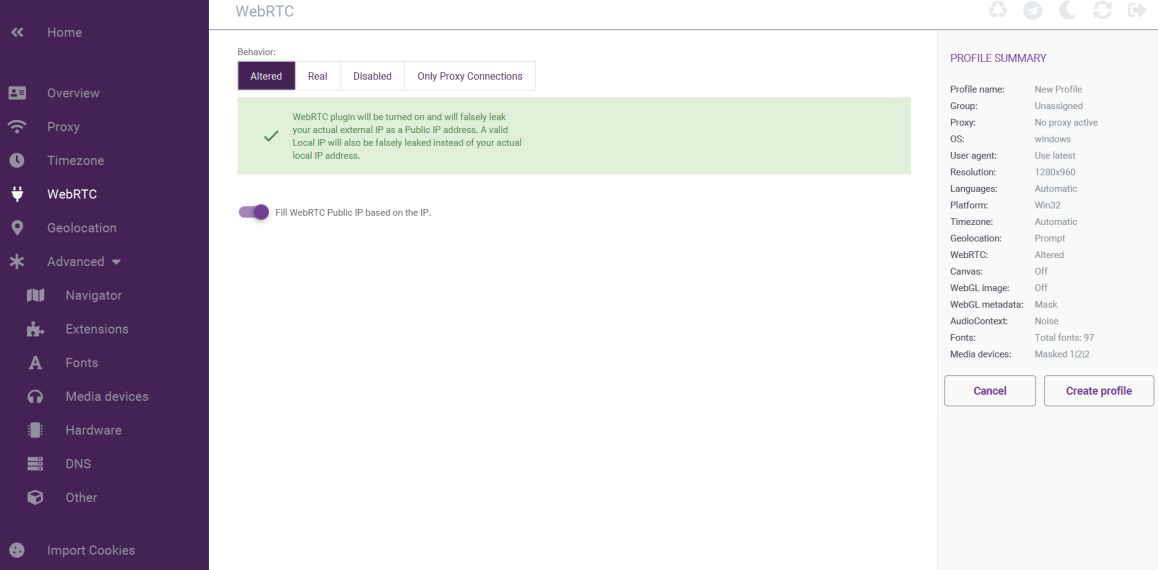
Navigator fingerprint settings
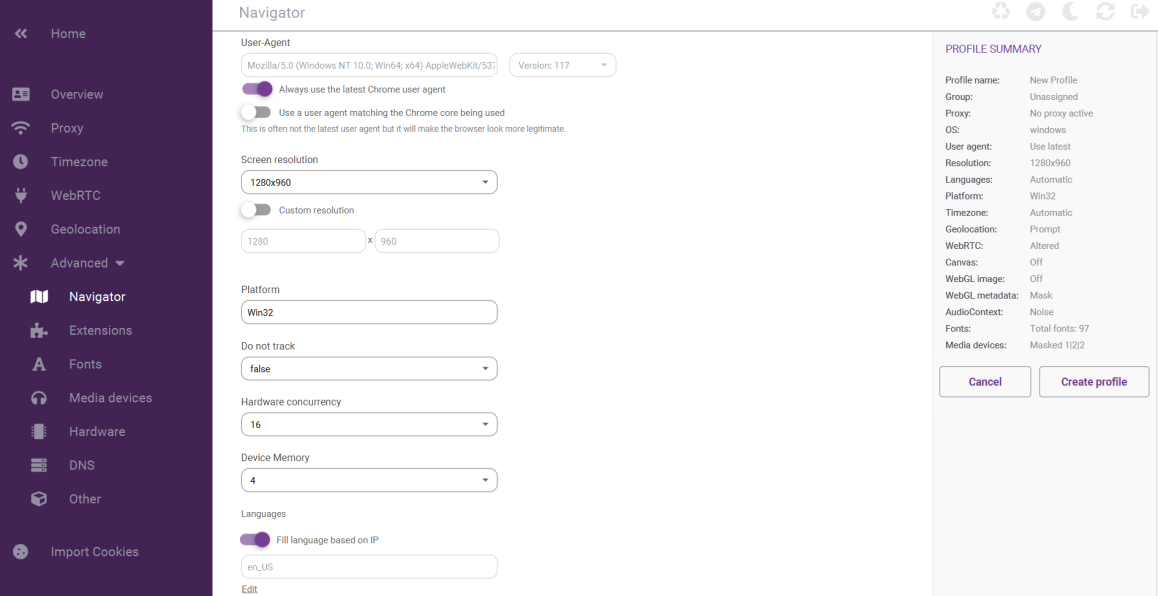
The start of creating a profile.
WebRTC fingerprint settings
Navigator fingerprint settings
Refund policy:
A refund is possible in the case of the software not working as intended. Please use the contact form on the website to request such a refund. We reserve the right to cancel your subscription with a refund.
Disclaimer:
The software is in active development and there will be bugs. Please use the contact form when you find such a bug or have any other problem. New features get added constantly and we will try to keep people in the loop!
Support:
We offer support via Blackhatworld PM, Telegram and email ([email protected]).
Title: Incogniton: Multi-Accounting Anti-Detect Browser [Starter Package At No Cost]

Incogniton: Multi-Accounting Anti-Detect Browser [FREE Starter Package]
Incogniton is an anti-detect browser with all the features you need to manage multiple accounts anonymously. The tool has unique fingerprint protection for each browser profile. This results in completely isolated profiles, making it look like you’re operating from different devices and being untraceable for websites.
Whether you’re running e-commerce stores, managing multiple ad accounts, scaling affiliate campaigns, or operating several client projects at once, Incogniton gives you the tools to grow without limits.
With isolated browser profiles, unique fingerprints, and rock-solid anti-detect technology, you can:
Incogniton removes the barriers that slow online marketers down so you can focus on optimizing, scaling, and making more revenue.
Get Started With Incogniton - Create Your First Browser Profile
Why Choose Incogniton?
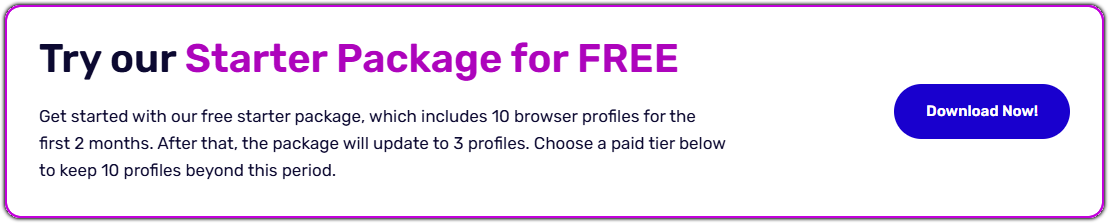
Starter package at no cost- Get started with 10 browser profiles for 2 months, after that go to 3 profiles.
User-friendly - Designed in a user-friendly way, easy to use for everyone
Enhanced privacy - Stay undetected using unique IP addresses for each profile
Core Features
Team Management feature - Create team members, assign roles with specific permissions and share your account.
Cookie Collector - Build authentic browser histories and import and export cookies.
Synchronizer - Automate browser actions easily by copying actions across profiles.
Browser fingerprint protection - Create profiles with a unique identity and browser fingerprint protection. Customize it to your wishes or use a fingerprint generator.
Bulk feature - Create multiple browser profiles at the same time. Customize profiles and save time.
REST API - Manage your browser profiles more efficiently with the REST API. See for more information our API documentation.
Selenium and Puppeteer integration - Automate processes online with the browser automation integrations. Incogniton uses the selenium WebDriver.
Pricing
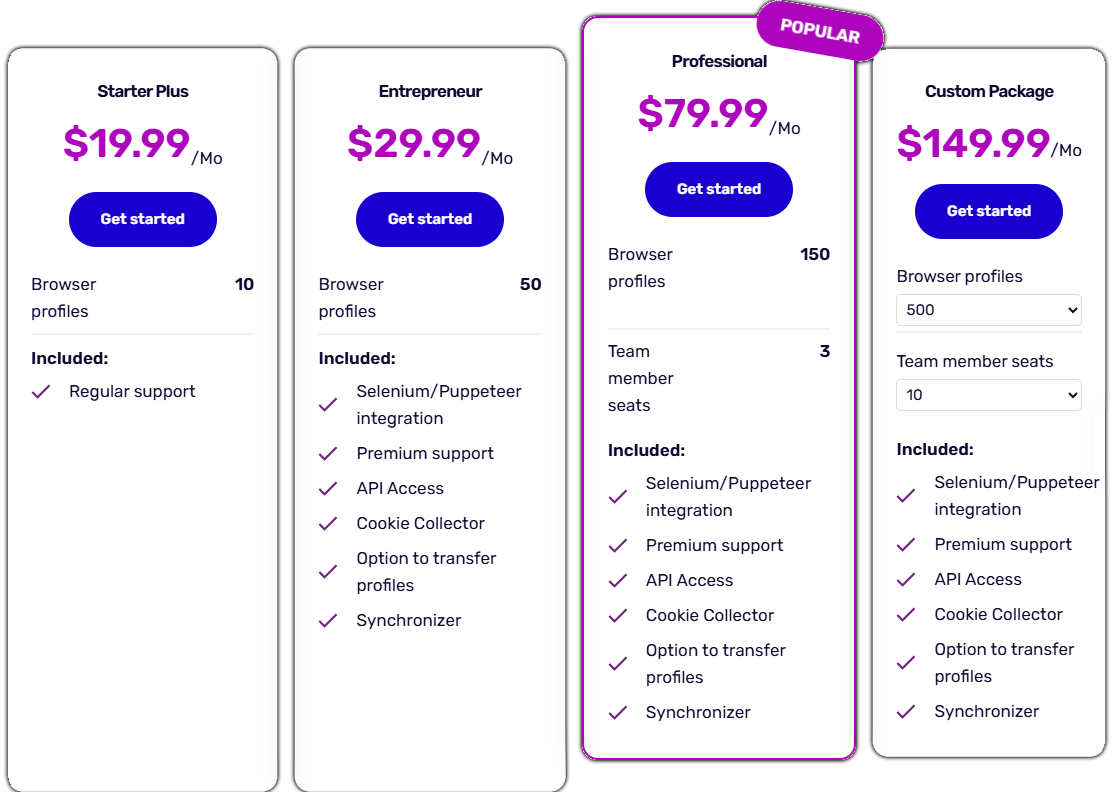
We offer a FREE starter package with 10 browser profiles for 2 months. This includes all the core features. Need more than 10 profiles? We offer several packages. Take a look at our pricing below or visit the pricing page on our website.
Get a 20% Discount
As a BHW user you receive a 20% discount coupon for the first 12 months. Reply "I want an Incogniton coupon" to this thread. We will send you a personal coupon as soon as possible.
 [/CENTER
FAQ
Refund policy
A refund is possible in case of the software not working as intended. Please use the contact form on the website to request a refund. We reserve the right to cancel your subscription with a refund.
Support
Official website: https://incogniton.com/
Get in touch: https://incogniton.com/contact/
Get started today: https://incogniton.com/download-incogniton/
Incogniton: Multi-Accounting Anti-Detect Browser [FREE Starter Package]
Incogniton is an anti-detect browser with all the features you need to manage multiple accounts anonymously. The tool has unique fingerprint protection for each browser profile. This results in completely isolated profiles, making it look like you’re operating from different devices and being untraceable for websites.
Whether you’re running e-commerce stores, managing multiple ad accounts, scaling affiliate campaigns, or operating several client projects at once, Incogniton gives you the tools to grow without limits.
With isolated browser profiles, unique fingerprints, and rock-solid anti-detect technology, you can:
- Run multiple Facebook, Google, TikTok & X ads accounts
- Manage separate storefronts on platforms like Amazon without cross-contamination
- Test offers across different platforms with zero footprint
- Handle client accounts securely and professionally
- Scale campaigns aggressively while keeping your accounts protected
Incogniton removes the barriers that slow online marketers down so you can focus on optimizing, scaling, and making more revenue.
Get Started With Incogniton - Create Your First Browser Profile
Why Choose Incogniton?
Starter package at no cost- Get started with 10 browser profiles for 2 months, after that go to 3 profiles. User-friendly - Designed in a user-friendly way, easy to use for everyone Enhanced privacy - Stay undetected using unique IP addresses for each profileCore Features
Team Management feature - Create team members, assign roles with specific permissions and share your account.
Cookie Collector - Build authentic browser histories and import and export cookies.
Synchronizer - Automate browser actions easily by copying actions across profiles.
Browser fingerprint protection - Create profiles with a unique identity and browser fingerprint protection. Customize it to your wishes or use a fingerprint generator.
Bulk feature - Create multiple browser profiles at the same time. Customize profiles and save time.
REST API - Manage your browser profiles more efficiently with the REST API. See for more information our API documentation.
Selenium and Puppeteer integration - Automate processes online with the browser automation integrations. Incogniton uses the selenium WebDriver.
Pricing
We offer a FREE starter package with 10 browser profiles for 2 months. This includes all the core features. Need more than 10 profiles? We offer several packages. Take a look at our pricing below or visit the pricing page on our website.
Get a 20% Discount
As a BHW user you receive a 20% discount coupon for the first 12 months. Reply "I want an Incogniton coupon" to this thread. We will send you a personal coupon as soon as possible.
FAQ
Do you provide trials?
Yes, we offer a starter package at no cost, which gives you 10 browser profiles for 2 months. After that you it goes to 3 profiles.
Do you provide special discount for BHW members?
As a BHW user you receive a 20% discount coupon for the first 12 months for any paid plan. Just reply "I want an Incogniton coupon" to this thread. We will send you a personal coupon as soon as possible.
Which settings do I need to configure myself?
You don't have to do anything yourself, except for adding a proxy to the browser profile. Incogniton will create random fingerprints for each profile you create. These fingerprints are unique and automatically generated for every profile.
How do I create a new browser profile?
If you downloaded the app and are logged in to your account, click on the ‘Go to profile creation’ button in the middle, ‘New profile’ button at the top or ‘Create Single’ in the left-side menu. Choose the name, operating system, browser version and settings, and add a proxy. Click on ‘Create profile’ on the right to finish. See this article for more information.
Can I customize fingerprints?
You can customize your geolocation, add some fonts or change the amount of media devices. Please note that these steps aren’t necessary if you just want a regular browser profile, the browser fingerprints are automatically managed by Incogniton.
Can I access my Incogniton browser profiles on multiple devices?
You can open your browser sessions on any device. You just have to log in on the devices in question and your browser data will be synchronized between both devices.
How many browser profiles can I get with Incogniton?
We offer several packages with different numbers of browser profiles. You can choose a custom package and get up to 5.000 profiles in total. Please get in touch with us if you’re interested in a custom package.
Yes, we offer a starter package at no cost, which gives you 10 browser profiles for 2 months. After that you it goes to 3 profiles.
Do you provide special discount for BHW members?
As a BHW user you receive a 20% discount coupon for the first 12 months for any paid plan. Just reply "I want an Incogniton coupon" to this thread. We will send you a personal coupon as soon as possible.
Which settings do I need to configure myself?
You don't have to do anything yourself, except for adding a proxy to the browser profile. Incogniton will create random fingerprints for each profile you create. These fingerprints are unique and automatically generated for every profile.
How do I create a new browser profile?
If you downloaded the app and are logged in to your account, click on the ‘Go to profile creation’ button in the middle, ‘New profile’ button at the top or ‘Create Single’ in the left-side menu. Choose the name, operating system, browser version and settings, and add a proxy. Click on ‘Create profile’ on the right to finish. See this article for more information.
Can I customize fingerprints?
You can customize your geolocation, add some fonts or change the amount of media devices. Please note that these steps aren’t necessary if you just want a regular browser profile, the browser fingerprints are automatically managed by Incogniton.
Can I access my Incogniton browser profiles on multiple devices?
You can open your browser sessions on any device. You just have to log in on the devices in question and your browser data will be synchronized between both devices.
How many browser profiles can I get with Incogniton?
We offer several packages with different numbers of browser profiles. You can choose a custom package and get up to 5.000 profiles in total. Please get in touch with us if you’re interested in a custom package.
Refund policy
A refund is possible in case of the software not working as intended. Please use the contact form on the website to request a refund. We reserve the right to cancel your subscription with a refund.
Support
Official website: https://incogniton.com/
Get in touch: https://incogniton.com/contact/
Get started today: https://incogniton.com/download-incogniton/
Notes: This service was re-tested.