Facebook Select All

fbfbfb

Elite Member
Joined
Oct 13, 2010
Messages
2,892
Reaction score
939
Hi,
Here is a working select all addon for firefox and chrome.

Invite all your friends to your fanpage /event / group with just a single click.

Firefox
Code:
[URL]https://addons.mozilla.org/en-us/firefox/addon/facebook-select-all/[/URL]


Chrome
Code:
[URL]https://chrome.google.com/webstore/detail/auto-select-all-facebook/ppcjiigginhdhihbdlejjoekeemjaiml?hl=en[/URL]


Thanks,
fbfbfb
 
Last edited:
I am using Chrome and here is mine:
javascript:elms=document.getElementsByName("checkableitems[]");for (i=0;i<elms.length;i++){if (elms.type="checkbox" )elms.click()};

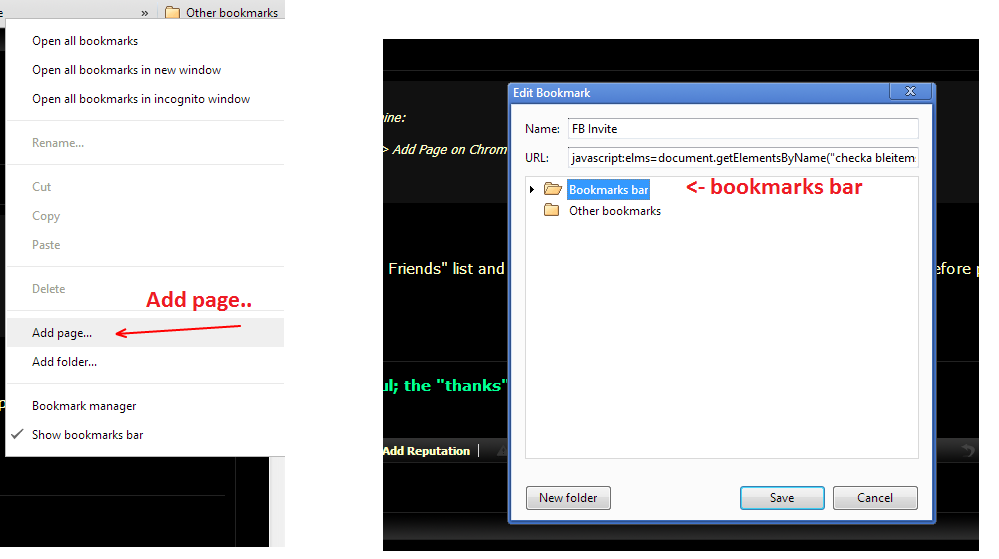
Copy the code above, Right click > Add Page on Chrome Bookmarks and paste.

Simple and no addons.
 
I am using Chrome and here is mine:

Copy the code above, Right click > Add Page on Chrome Bookmarks and paste.

Simple and no addons.

can you tell me how it works?

I know I must be on the "Invite Friends" list and paste the code above on my browser. I have used this before perhaps i forgot something. Im using chrome.

can you tell me how?
 
can you tell me how it works?

I know I must be on the "Invite Friends" list and paste the code above on my browser. I have used this before perhaps i forgot something. Im using chrome.

can you tell me how?

I have added chrome extension above.
Its just a single click .
 
can you tell me how it works?

I know I must be on the "Invite Friends" list and paste the code above on my browser. I have used this before perhaps i forgot something. Im using chrome.

can you tell me how?

1. Copy the code
2. Go to Chrome and on Bookmarks bar right click and select "Add Page..."
3. Enter the code in "URL", and enter some name. Pick where you want to be stored (bookmarks bar for example).
4. Done, now open fb invite window and press the bookmarked link it will instantly select all friends.
GeQiAZB
 
Hi,
Here is a working select all addon for firefox and chrome.

Invite all your friends to your fanpage /event / group with just a single click.

Firefox


Chrome


Thanks,
fbfbfb


It just select all but doesn't sent to all :)

Thanks
 
It just select all but doesn't sent to all :)

Thanks

None of the script sent invites totally.
Facebook have changed the limits to 45-50 per invites.
you have to repeat the process till all your invites has been sent.
 
Than use my method and you will avoid installing addons :)
Also i tested the Chrome extension and it redirects to some links and i removed.

I will try yours in noon :)

Sent from my GT-I9100 using Tapatalk 2
 
It's not work...
1. Copy the code
2. Go to Chrome and on Bookmarks bar right click and select "Add Page..."
3. Enter the code in "URL", and enter some name. Pick where you want to be stored (bookmarks bar for example).
4. Done, now open fb invite window and press the bookmarked link it will instantly select all friends.
 
Back
Top