

- Dec 3, 2015
- 5,390
- 6,059
"I've been looking at doing this for some days now, So today I have the strength to have it completed. Been running email guest posting outreach for years, I thought sharing with my minimal yet effective outreach process would save you some money. Without further Aldo, Let get started ;
Before I dive deeper into this guide, I would want you to take a look at this thread by @tracksrail , it's really a comprehensive guide for finding niche prospects and we'll be using the prospects we have to simulate our learning process.

Table of Contents
Chapter 1
1.1 Introduction to Link Building
1.2 Intro to link quality: Authority Check (AC)
1.3 Intro to link quality: Relevancy Check (RC)
1.4 Intro to link quality: Quality Check (QC)
1.5 Intro to link quality: White hat SEO
Chapter 2
2.1 Outreaching Via Email
2.2 Canned Responses
2.3 Accessing canned responses
2.4 Sample Outreaching Templates that will increase Response Rate
2.5 Tips to Increase Response rate
2.6 Tracking Sent Emails
Chapter 1: Introduction
1.1 Intro to link building: Why you should Start Link Building the Right way.
Link Building is the Process that allows other websites to link to your website
More Referral Domain (RD) your website has – The higher it ranks on SERP.
Quality and Relevancy of the Domain Linking to your website plays a Vital Role.
1.2 Intro to link quality: Authority Check (AC)
You should always do QUALITY over QUANTITY
Not All Links are made equal
You do want to get links from websites with a good amount of RD.
1.3 Intro to link quality: Relevancy Check (RC)
The term “Relevancy” also works with the Website Authority
A Web Design Agency would want links from Web design, marketing related websites.
Building Unhealthy links could get your website harmed in a long run.
1.4 Intro to link quality: Quality Check (QC)
Since links are regarded as the most powerful ranking signals. SEO marketers has learned the process of acquiring link through Private Blog Networks (PBNs) and Shady acts
This is also known as “black hat” SEO practice
Black hat SEO is generally short-lived and not as effective as white hat SEO
1.5 Intro to link quality: White hat SEO.
Link building done right is all about the exchange of value
If you want to get featured on someone’s website, you have to add value
Value comes in a number of forms:
• Guest posting – providing value through adding awesome content to their website
• Blogger outreach – providing value through a relevant pitch/value proposition
• Reporter outreach – providing value through offering a news tip or quote for an article
Everything we do is based on research and outreach:
• Researching the prospects website, understanding their content
• Outreach via email with a value proposition/pitch
Having reading basic knowledge needed to kick-start your journey, You will need prospects to reach out to for links, I recommend going through this post as it dishes out all information needed in acquiring your targets, I have few personal changes I always make ( I'll be looking at drafting up a post about it in next couple days...
Chapter 2: Outreaching the Best Way
2.1 Outreaching Via Email
In this chapter, we talk about outreaching process Via Email. We’ll be discussing how to use Google canned responses feature as one the best efficient way to send emails to people for backlinks without getting fed up quickly mailing out thousands.
2.2 Canned Responses
Canned Responses is a Lab that allows you to insert pre-formatted content you create into your messages. Canned responses feature enables you to save updrafts for outreach. Which on a long run saves the time of copy-pasting as you would have all messages drafted already.
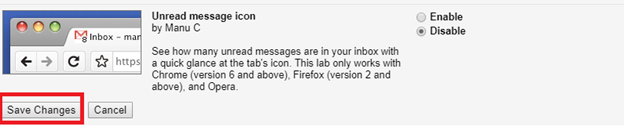
To enable Canned Responses, click on the gear in the upper right of the Google Mail window, select Mail Settings, click on the Labs link, Locate Canned Responses, Enable then SAVE.
STEP 1 :

STEP 2:

STEP 3:

STEP 4:

STEP 5:
2.3 Accessing Canned responses
Click on Compose
You can always go to canned responses area to make use of your template again or add new mailing templates.
I’ll be providing some templates I’ve used that increase response rate – It wouldn’t be a bad idea wording it differently just make sure it conveys the same message.
Sample 1:
Using the sample above get them to respond to you & not blatantly ask for links. You can grow rapport first then demand them linking to a particular post on your website.
Sample 2: From a friend (Chris)
Sample 3:
2.5 Tips to Increase Response rate
Have a good looking profile: … I don’t know how much I can emphasize on this. Having a good profile increases response as that speaks much about you.
You want to create the gmail account in likeness of your profession. If you know about legal stuff you want to create something to law/attorney
An example would be: [email protected] , a good alternative is "[email protected]"
Having a Good Signature: Putting up a signature that links to your profiles helps increases chances of response and approval.
I personal link out to clients Website, LinkedIn and Twitter.
Facebook would also work... Just make sure you work with channels where your clients are active.
2.6 Tracking Sent Emails
So I thought it wouldn’t make much sense finishing this guide without talking about how best you can track sent emails.
The Popular add-in I use is called STREAK.
Streak allows you to track, schedule and respond to emails.
Get the CRM for Gmail by going through this Link: https://www.streak.com/. (In no way affiliated )
It’s easy to get started with.
Get it integrated to your Gmail account for the Guest Posting Process or if you are using "[email protected] " you can have it linked to your Gmail account to have it easily tracked.
3.0 Conclusion:
Yeah, I’ve added the section so that you wouldn’t be missing out on opportunities.. Try as much as possible to get your contents ready in 24-48 hrs.
It’s an opportunity you DON’T want to miss.
NB: If you need help please send me a Message... I’ll also want to hear hear your comments the guide..
Before I dive deeper into this guide, I would want you to take a look at this thread by @tracksrail , it's really a comprehensive guide for finding niche prospects and we'll be using the prospects we have to simulate our learning process.
Chapter 1
1.1 Introduction to Link Building
1.2 Intro to link quality: Authority Check (AC)
1.3 Intro to link quality: Relevancy Check (RC)
1.4 Intro to link quality: Quality Check (QC)
1.5 Intro to link quality: White hat SEO
Chapter 2
2.1 Outreaching Via Email
2.2 Canned Responses
2.3 Accessing canned responses
2.4 Sample Outreaching Templates that will increase Response Rate
2.5 Tips to Increase Response rate
2.6 Tracking Sent Emails
Chapter 1: Introduction
1.1 Intro to link building: Why you should Start Link Building the Right way.
Link Building is the Process that allows other websites to link to your website
More Referral Domain (RD) your website has – The higher it ranks on SERP.
Quality and Relevancy of the Domain Linking to your website plays a Vital Role.
1.2 Intro to link quality: Authority Check (AC)
You should always do QUALITY over QUANTITY
Not All Links are made equal
You do want to get links from websites with a good amount of RD.
1.3 Intro to link quality: Relevancy Check (RC)
The term “Relevancy” also works with the Website Authority
A Web Design Agency would want links from Web design, marketing related websites.
Building Unhealthy links could get your website harmed in a long run.
1.4 Intro to link quality: Quality Check (QC)
Since links are regarded as the most powerful ranking signals. SEO marketers has learned the process of acquiring link through Private Blog Networks (PBNs) and Shady acts
This is also known as “black hat” SEO practice
Black hat SEO is generally short-lived and not as effective as white hat SEO
1.5 Intro to link quality: White hat SEO.
Link building done right is all about the exchange of value
If you want to get featured on someone’s website, you have to add value
Value comes in a number of forms:
• Guest posting – providing value through adding awesome content to their website
• Blogger outreach – providing value through a relevant pitch/value proposition
• Reporter outreach – providing value through offering a news tip or quote for an article
Everything we do is based on research and outreach:
• Researching the prospects website, understanding their content
• Outreach via email with a value proposition/pitch
Having reading basic knowledge needed to kick-start your journey, You will need prospects to reach out to for links, I recommend going through this post as it dishes out all information needed in acquiring your targets, I have few personal changes I always make ( I'll be looking at drafting up a post about it in next couple days...
Chapter 2: Outreaching the Best Way
2.1 Outreaching Via Email
In this chapter, we talk about outreaching process Via Email. We’ll be discussing how to use Google canned responses feature as one the best efficient way to send emails to people for backlinks without getting fed up quickly mailing out thousands.
2.2 Canned Responses
Canned Responses is a Lab that allows you to insert pre-formatted content you create into your messages. Canned responses feature enables you to save updrafts for outreach. Which on a long run saves the time of copy-pasting as you would have all messages drafted already.
To enable Canned Responses, click on the gear in the upper right of the Google Mail window, select Mail Settings, click on the Labs link, Locate Canned Responses, Enable then SAVE.
STEP 1 :
STEP 2:
STEP 3:
STEP 4:
STEP 5:
Click on Compose
STEP 1

STEP 2:

STEP 2:
STEP 3:

STEP 4 :

STEP 5 :

Press OK to Save your new template.
STEP 4 :
STEP 5 :
You can always go to canned responses area to make use of your template again or add new mailing templates.
2.4 Sample Outreaching Templates that will increase Response Rate. I’ll be providing some templates I’ve used that increase response rate – It wouldn’t be a bad idea wording it differently just make sure it conveys the same message.
Sample 1:
Hi/Hey/Greetings < Name >
I just read your article explaining XXXXXX (A topic on their website).Thanks for Sharing - I learned so much from it.
By the way, what do you think XXXXXXX (Suggest a related topic in here). It's something I get asked by my readers often. Would Love to know what you might think about it.
Regards
(Your Name here)
Using the sample above get them to respond to you & not blatantly ask for links. You can grow rapport first then demand them linking to a particular post on your website.
Sample 2: From a friend (Chris)
Title: You’re missing out a link
Hey (Their Name),
I realized you are linking to a handful of {Related Niche/Topic} websites but you’re not linking out to (Your Blog here).
Have you seen it yet? It provides a ton of value to anyone who …. {Value that his website provides}
Hope you’re having a lovely day! Keep up the good work. I really enjoy (Insert their site name}
Sincerely.
[Your Name]
Sample 3:
Simply ask straight up --- if they still accept guest posting and you will be putting up a draft for approval.
Simple and Straight.
2.5 Tips to Increase Response rate
Have a good looking profile: … I don’t know how much I can emphasize on this. Having a good profile increases response as that speaks much about you.
You want to create the gmail account in likeness of your profession. If you know about legal stuff you want to create something to law/attorney
An example would be: [email protected] , a good alternative is "[email protected]"
Having a Good Signature: Putting up a signature that links to your profiles helps increases chances of response and approval.
I personal link out to clients Website, LinkedIn and Twitter.
Facebook would also work... Just make sure you work with channels where your clients are active.
2.6 Tracking Sent Emails
So I thought it wouldn’t make much sense finishing this guide without talking about how best you can track sent emails.
The Popular add-in I use is called STREAK.
Streak allows you to track, schedule and respond to emails.
Get the CRM for Gmail by going through this Link: https://www.streak.com/. (In no way affiliated )
It’s easy to get started with.
Get it integrated to your Gmail account for the Guest Posting Process or if you are using "[email protected] " you can have it linked to your Gmail account to have it easily tracked.
3.0 Conclusion:
Yeah, I’ve added the section so that you wouldn’t be missing out on opportunities.. Try as much as possible to get your contents ready in 24-48 hrs.
It’s an opportunity you DON’T want to miss.
NB: If you need help please send me a Message... I’ll also want to hear hear your comments the guide..


