BrowserAutomationStudio. Create multi-threaded applications for free without any programming skills.

Status
Not open for further replies.
I'm getting "Entry Point Not Found" error

Probably archive gets damaged. I'll send you dropbox link.

Its a really impressive tool.. Ive tried ubot and zenno.. and couldnt finish my script without some more advanced knowledge.. it seems i can do it easily with your software :)

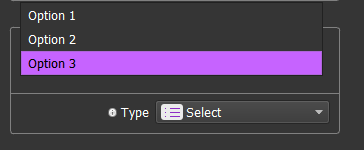
You could add an option to resize value box in resources.. now its only 1 line.. also adding dropdown menu option..in "resource - select" would be nice :)

Thanks for your reply!

I'll add multiline mode, also dropdown select option is present:

aLzw6j3

0v1JbQc


Amazingly simple. I did a quick google search for something and compiled it just to test and took maybe 30seconds to create from first open. I do have a question though. Is there a way once you compile it to see it happen with a web browser? I just personally like seeing more than reading logs. A+ product though.

Thanks, really appreciate your reply
You can check whats going on inside each thread by pressing browser checkboxes inside compiled script.

gLsNlUe
 
1. Why can't I continue manually after script is finished? I want script to run right before Recaptcha and from there start manual browsing. (I don't want to use Recaptcha Solve Module - It's kindda buggy)
2. The Recaptcha Module - When script send image to me what should I type? like 0246? But it seems the module can't handle 4x4 Recaptcha and Continue-Click Recaptcha. How to solve this?
 
1. Why can't I continue manually after script is finished? I want script to run right before Recaptcha and from there start manual browsing. (I don't want to use Recaptcha Solve Module - It's kindda buggy)

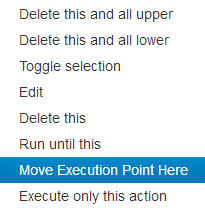
You can continue from any point and move execution point anywhere.
Just click bring any action context menu and click "Move Execution Point Here"
Pb6iq5f


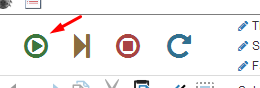
Or the fast way - click on red mark near every action:

YMtOirc


You can also force any action to stop at any time.

wPJZ8CK


2. The Recaptcha Module - When script send image to me what should I type? like 0246? But it seems the module can't handle 4x4 Recaptcha and Continue-Click Recaptcha. How to solve this?

Recaptcha module recognizes digits separated by comas or spaces. and first image is one, not zero.

Look at this picture, it should be self explanatory

CLH4rgq


Bas will accept 9,13 or 9 13

Do you make custom bots as well?

All my time is dedicated to BAS improvements. I'll start to make custom bots only if I run out of money(
 
You can continue from any point and move execution point anywhere.
Just click bring any action context menu and click "Move Execution Point Here"
Pb6iq5f


Or the fast way - click on red mark near every action:

YMtOirc


You can also force any action to stop at any time.

wPJZ8CK


Recaptcha module recognizes digits separated by comas or spaces. and first image is one, not zero.

Look at this picture, it should be self explanatory

CLH4rgq


Bas will accept 9,13 or 9 13


All my time is dedicated to BAS improvements. I'll start to make custom bots only if I run out of money(
No, what i meant was why i can't browse like normal browser user. Whenever i click left mouse button, it always shows me context menu. Sometimes i just want to click fast and browse manually without recording or context menu.
 
Does the thread tool and success tool work on the free version? I am following the "poster" tutorial and im stuck at this part as i dont see the same options as they show in the video or in the tutorial.
 
No, what i meant was why i can't browse like normal browser user. Whenever i click left mouse button, it always shows me context menu. Sometimes i just want to click fast and browse manually without recording or context menu.

It is not implemented right now, but scheduled for march.

Does the thread tool and success tool work on the free version? I am following the "poster" tutorial and im stuck at this part as i dont see the same options as they show in the video or in the tutorial.

Yes, it is available in free version, you can change thread number, successes and fails here:
zQZRiet
 
I tried this software out, but the manual on your webpage doesn't match what actually happens in the program unfortunately.

Software looks great, but there are some hickups.

For some reason if I record and ask it to do move and click on element it takes 25 seconds to complete that action when in the record window. And repeating the recording is the same thing, it seems broken.
Once the recording is compiled it works in a normal speed.
And before you say hardware, I am running it on i5 6600k@4GHz, 24GB DDR4, 256GB SSD and GTX970.

When compiling your manual says this:
http://wiki.bablosoft.com/doku.php?id=how_to_compile_script_and_give_to_customer

"After inputting script name and version you will have folder with executable with no dependencies, and which works absolutely the same, as in Browser Automation Studio. You can archive it and give to your customer, he will not need to install BAS to run script:"

That is not what I am seeing:

805fc900b478400e8fc18c20bf9fa341.jpeg


b4d7bd9ec7784ae79231565159694e68.jpeg


Could you guide me to achieve this:

I want the script to run once every day on a fixed schedule, without any interaction from me.
 
For some reason if I record and ask it to do move and click on element it takes 25 seconds to complete that action when in the record window. And repeating the recording is the same thing, it seems broken.

Once the recording is compiled it works in a normal speed.
And before you say hardware, I am running it on i5 6600k@4GHz, 24GB DDR4, 256GB SSD and GTX970.

That is known issue, happens because of windows defender on windows 10. BAS adds exception on first start, but apparently some error occured on your PC. Can you attach %AppData%\BrowserAutomationStudio\apps\16.8.0\AddAVExclusion.log ? I'll try to figure what is going on. You can also add exception manually for BAS folder from that page https://support.microsoft.com/en-us...f64c0af8/add-an-exclusion-to-windows-defender . In that case action will be executed instantly in record mode.

Could you guide me to achieve this:

I want the script to run once every day on a fixed schedule, without any interaction from me.

To schedule your script, you need to run it without user interface(with command line parameter --silent).
  1. Compile your script.
  2. Run it first time with user interface. Let it download engine files.
  3. Add RemoteExecuteScript.exe --silent command inside folder where script is compiled to your scheduler.
Here is also wiki article with video. http://wiki.bablosoft.com/doku.php?id=how_to_schedule_bas_script

And here is how default windows scheduler settings looks like(sorry for Russian text).
3CgC0Rf
 
Version 16.8.0 has been released.
Fixed issues with youtube uploads more than 100 mb.
Fixed issues, with facebook post preview.
Also fixed drag and drop support on google site constructor.
Removed http reqest ip leak.
And many more less significant fixes.

Added support of xpath queries for element searching and complex element search syntax support.
http://wiki.bablosoft.com/doku.php?id=how_to_search_for_element

Thanks to BlackHatWorld members for your support!
 
That is known issue, happens because of windows defender on windows 10. BAS adds exception on first start, but apparently some error occured on your PC. Can you attach %AppData%\BrowserAutomationStudio\apps\16.8.0\AddAVExclusion.log ? I'll try to figure what is going on. You can also add exception manually for BAS folder from that page https://support.microsoft.com/en-us...f64c0af8/add-an-exclusion-to-windows-defender . In that case action will be executed instantly in record mode.


To schedule your script, you need to run it without user interface(with command line parameter --silent).
  1. Compile your script.
  2. Run it first time with user interface. Let it download engine files.
  3. Add RemoteExecuteScript.exe --silent command inside folder where script is compiled to your scheduler.
Here is also wiki article with video. http://wiki.bablosoft.com/doku.php?id=how_to_schedule_bas_script

And here is how default windows scheduler settings looks like(sorry for Russian text).
3CgC0Rf

Hi Twaego and thanks for your reply :)

I am not running windows 10, but I am running microsoft security essentials, which probably has something in common with it.

Log says:

The term 'Add-MpPreference' is not recognized as the name of a cmdlet, function
, script file, or operable program. Check the spelling of the name, or if a pat
h was included, verify that the path is correct and try again.
At C:\Users\dpo\AppData\Roaming\BrowserAutomationStudio\apps\16.7.0\AddAVExclus
ion.ps1:1 char:17
+ Add-MpPreference <<<< -ExclusionPath 'C:\Users\user\AppData\Roaming\BrowserAu
tomationStudio\apps\16.7.0'
+ CategoryInfo : ObjectNotFound: (Add-MpPreference:String) [], Co
mmandNotFoundException
+ FullyQualifiedErrorId : CommandNotFoundException
 
Yes, it is because microsoft security essentials.
I tried to install it on clean windows 7 virtual machine and BAS sarted to behave exactly like you described.
After I added exclusion for Worker.exe process, problem disappeared.
 
Nice tool ! Is it possible to configure it to do something X times a day?
 
Yes, it is because microsoft security essentials.
I tried to install it on clean windows 7 virtual machine and BAS sarted to behave exactly like you described.
After I added exclusion for Worker.exe process, problem disappeared.

You are correct, it now works like a charm when it comes to recording steps! :D
 
Nice tool ! Is it possible to configure it to do something X times a day?

Thanks. Yes can use --silent param and any scheduler, including windows default.
Follow these steps:

  1. Compile your script.
  2. Run it first time with user interface. Let it download engine files.
  3. Add RemoteExecuteScript.exe --silent command inside folder where script is compiled to your scheduler.
 
Thought I'd test your traffic bot but when I open it, I get a black screen?
 
I see it is a QT + HTML5 in the code; any chance of a Mac & Linux version?

Yes, there some parts, which uses winapi rest code is portable. Linux and Mac versions are planned but not first priority.

Thought I'd test your traffic bot but when I open it, I get a black screen?

If you mean black screen in "Record" mode,

KkoLNfN


it means, that browser didn't load any page yet. You need to start script to make it work

hpAEufS


If you mean black screen after using "Run"(multithreaded) mode, than you need to check each browser content to see whats going on there, or check log

cCoT1WK
 
Yes, there some parts, which uses winapi rest code is portable. Linux and Mac versions are planned but not first priority.


If you mean black screen in "Record" mode,

KkoLNfN


it means, that browser didn't load any page yet. You need to start script to make it work

If you mean black screen after using "Run"(multithreaded) mode, than you need to check each browser content to see whats going on there, or check log


No sorry - when I download and install your traffic bot. All I get is the frame of the window, a green link back to your website and a black screen, no buttons, nothing just a black filled window
This is for https://bablosoft.com/shop/SiteVisitor

Like this -

Even after windows updates, reboot blah

Screen Shot 2017-01-28 at 23.06.27.png
 
Last edited:
Status
Not open for further replies.
Back
Top