
You are using an out of date browser. It may not display this or other websites correctly.
You should upgrade or use an alternative browser.
You should upgrade or use an alternative browser.
BrowserAutomationStudio. Create multi-threaded applications for free without any programming skills.
- Thread starter Twaego
- Start date
-
- Tags
- automate browser free opensource
- Status
- Not open for further replies.


back2basics
Power Member
- Nov 11, 2012
- 781
- 515
You're a mind reader man, i was literally just scouring the internet on how to make double clicking work. Thank you!

Kevoss
Junior Member
- Apr 24, 2018
- 107
- 23
I'm trying to create a bot/script in BAS to signup to a website automatically.
I need username + password. Is it possible to use an or many excel file(s) (or other spreadsheet software) containing usernames and passwords and make BAS choose from the file randomly when the signup bot is executed?
If not is there another way to make it not use the same text every time it's executed?
I need username + password. Is it possible to use an or many excel file(s) (or other spreadsheet software) containing usernames and passwords and make BAS choose from the file randomly when the signup bot is executed?
If not is there another way to make it not use the same text every time it's executed?

DanDD
Senior Member
- Mar 10, 2014
- 963
- 331
yes it is possible, watch these videos https://www.youtube.com/channel/UC_fHAkJk4dNj8gnFbt55tHgI'm trying to create a bot/script in BAS to signup to a website automatically.
I need username + password. Is it possible to use an or many excel file(s) (or other spreadsheet software) containing usernames and passwords and make BAS choose from the file randomly when the signup bot is executed?
If not is there another way to make it not use the same text every time it's executed?

Twaego
Registered Member
- Oct 7, 2014
- 72
- 109
Version 21.8.0 has been released.
This version contains one major change - it introduces a task scheduler. Scheduler allows you to work with several applications written in BAS environment at a same time. Scheduler has following properties:
Scheduler basics.
On a first application start scheduler is installed on the user's PC and added to startup. Such an architecture is necessary in order to be able to perform tasks when BAS is not running. To get started, you need to click on this button in the menu:

Window which appeares afterwards is the control center, it manages all tasks on current machine, there you can create tasks and get information about their implementation. This is how the scheduler looks when opened for a first time:

And this is the production version:
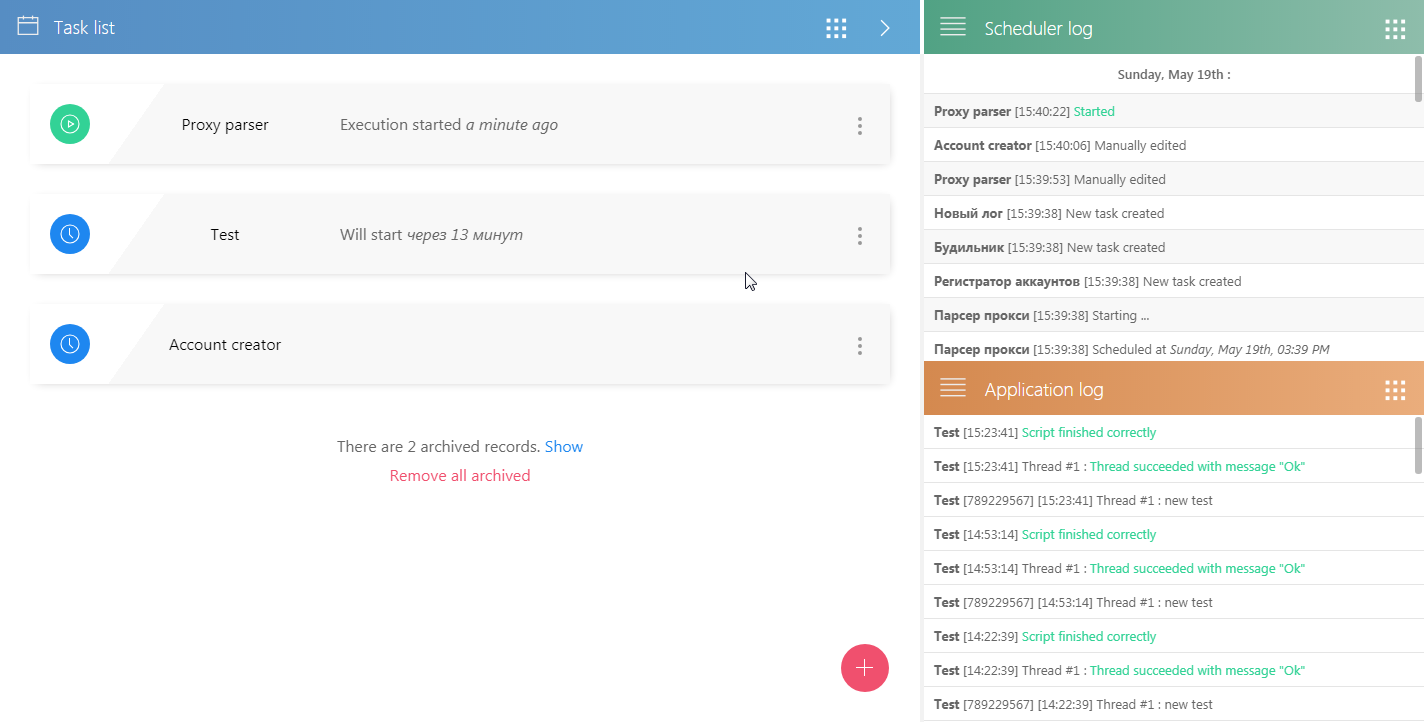
Creating new task occurs by clicking on the "+" button in the lower right corner. User needs to fill out information about the project, enter data, and set the execution time. Data is set only when editing or creating, and the entered values will then be used when task starts.

There are many different ways to set schedule time, in order to help you to do that there is a tab which contains preview with predicted start time and also a tab with typical setups:


Obtaining execution reports.
The main area contains logs and a list of tasks. To receive a report on a specific task, you must click on the menu button for that task:

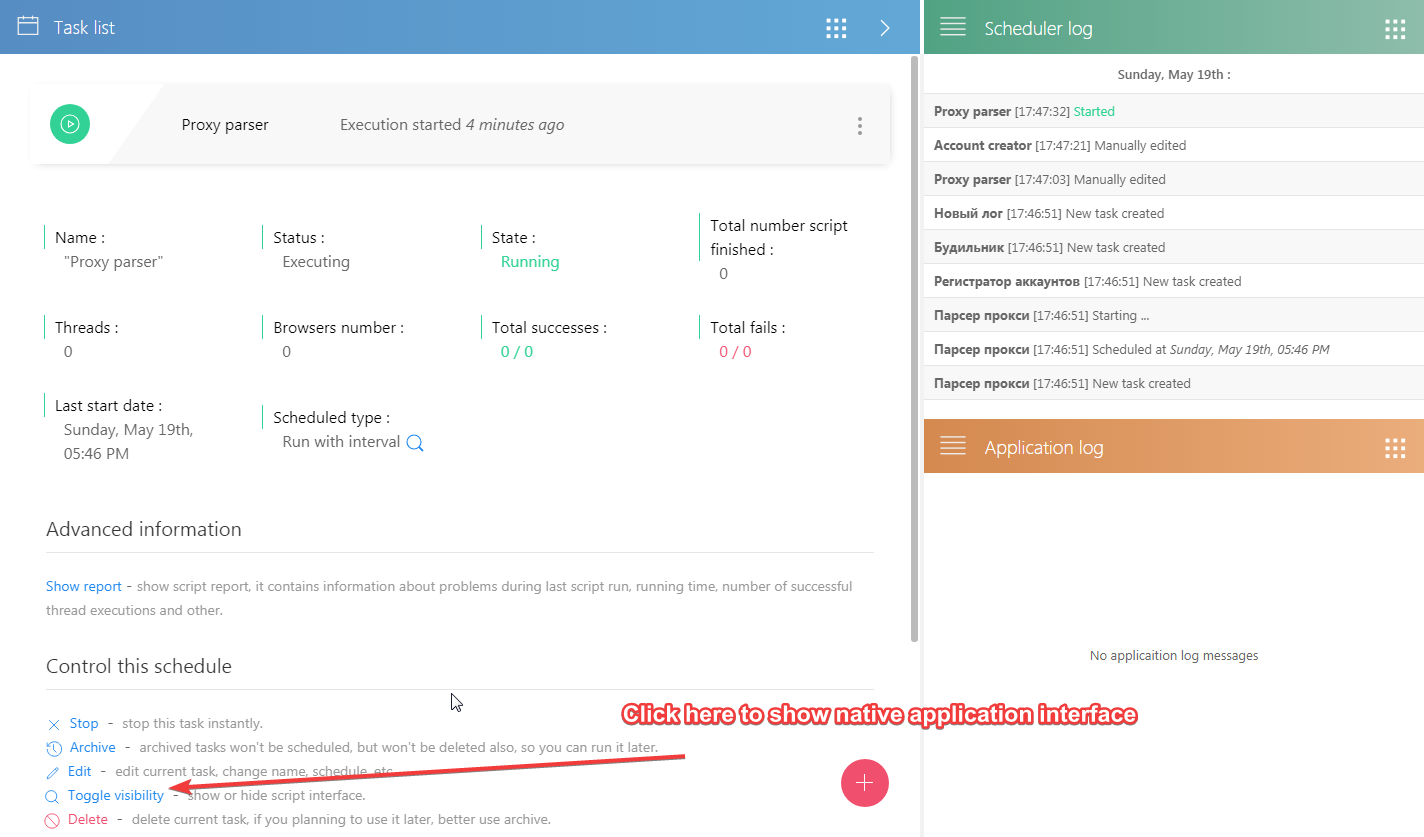
Application menu contains more detailed information: a link to the log, results, a report. By clicking on the "Toggle visibility" link you can open the familiar script interface running with BAS:
Task archive.
Any task, after its run cycle is completed, gets archived. Tasks from the archive will not be scheduled, but they are also not deleted. The user can restore the task from the archive, or leave it there until he change his mind. Thus, the archive can be used as a catalog of tasks available on this PC.
Moving task list on other PC.
Software supports tasks transfering to another machine, in order to do that just go to the menu and select "Save all tasks":

All tasks, including loaded from file, will be transferred. This applies to both projects and project schedules. After this update, creating VPS bundled with BAS scripts gets easier than ever!
This version contains one major change - it introduces a task scheduler. Scheduler allows you to work with several applications written in BAS environment at a same time. Scheduler has following properties:
- Ability to add scripts from a running instance of BAS, from cloud or from a single file.
- Flexible scheduler settings.
- Collect information on task performance.
- Control your tasks in both automatic and manual mode.
- Integration with compiled applications and with web interface.
- Fast task list transfer to any machine.
- Convenient friendly interface.
- Ability to run the scheduler as a separate application.
Scheduler basics.
On a first application start scheduler is installed on the user's PC and added to startup. Such an architecture is necessary in order to be able to perform tasks when BAS is not running. To get started, you need to click on this button in the menu:
Window which appeares afterwards is the control center, it manages all tasks on current machine, there you can create tasks and get information about their implementation. This is how the scheduler looks when opened for a first time:
And this is the production version:
Creating new task occurs by clicking on the "+" button in the lower right corner. User needs to fill out information about the project, enter data, and set the execution time. Data is set only when editing or creating, and the entered values will then be used when task starts.
There are many different ways to set schedule time, in order to help you to do that there is a tab which contains preview with predicted start time and also a tab with typical setups:
Obtaining execution reports.
The main area contains logs and a list of tasks. To receive a report on a specific task, you must click on the menu button for that task:
Application menu contains more detailed information: a link to the log, results, a report. By clicking on the "Toggle visibility" link you can open the familiar script interface running with BAS:
Task archive.
Any task, after its run cycle is completed, gets archived. Tasks from the archive will not be scheduled, but they are also not deleted. The user can restore the task from the archive, or leave it there until he change his mind. Thus, the archive can be used as a catalog of tasks available on this PC.
Moving task list on other PC.
Software supports tasks transfering to another machine, in order to do that just go to the menu and select "Save all tasks":
All tasks, including loaded from file, will be transferred. This applies to both projects and project schedules. After this update, creating VPS bundled with BAS scripts gets easier than ever!


Twaego
Registered Member
- Oct 7, 2014
- 72
- 109
is this still possible?
Possible to do what?

GoGuerilla
Power Member
- Oct 15, 2018
- 744
- 440
Possible to do what?
Sir is it still possible?

Twaego
Registered Member
- Oct 7, 2014
- 72
- 109
Hi, is it possible to add another thread or terminate thread while the script is running? If not, would you consider implementing this feature?
Yes, use action "Call function in several threads" and "Fail" with "Don't restart thread."

sean815
Junior Member
- Nov 19, 2009
- 118
- 180
You have to export your excel file as CSV and import as a resource. Then BAS will be able to read it line by line from file.I'm trying to create a bot/script in BAS to signup to a website automatically.
Is it possible to use an or many excel file(s) (or other spreadsheet software) containing usernames and passwords and make BAS choose from the file randomly when the signup bot is executed?
If not is there another way to make it not use the same text every time it's executed?
It would really be nice if I could grab data from Google Sheets

cacats
Power Member
- Mar 9, 2016
- 742
- 326
Or export the data to Google sheets and sync that with a pre made Google data studio Dashboard.You have to export your excel file as CSV and import as a resource. Then BAS will be able to read it line by line from file.
It would really be nice if I could grab data from Google Sheets
sean815
Junior Member
- Nov 19, 2009
- 118
- 180
Ive never used Google data studio. Ill have to look into that. ThanksOr export the data to Google sheets and sync that with a pre made Google data studio Dashboard.
Twaego
Registered Member
- Oct 7, 2014
- 72
- 109
Reworked canvas changing mechanism.
The method by which canvas fingerprint is changed has been significantly improved. This is done to prevent antidetect systems from detecting fingerprint change. This changes includes a whole set of measures, here is only one example - instead of replacing the color for each pixel, the whole image is now analyzed, its outlines are located, finally pixel colors are changed only "on the border":

Borders on the image above is highlighted with red color.
This allows you to pass browser tests with positive results:

(navigator test gives a false positive result also in a normal browser, dns depends on the proxy).
Canvas changing now works with the alpha channel.
This means that if canvas contains a black and white image, browser fingerprint will still change.
The new BAS version draws browser content using GPU for rendering.
The old implementation used only CPU, but this approach can be detected. You can revert to the previous rendering method by replacing the values
to
In chrome_command_line.txt file
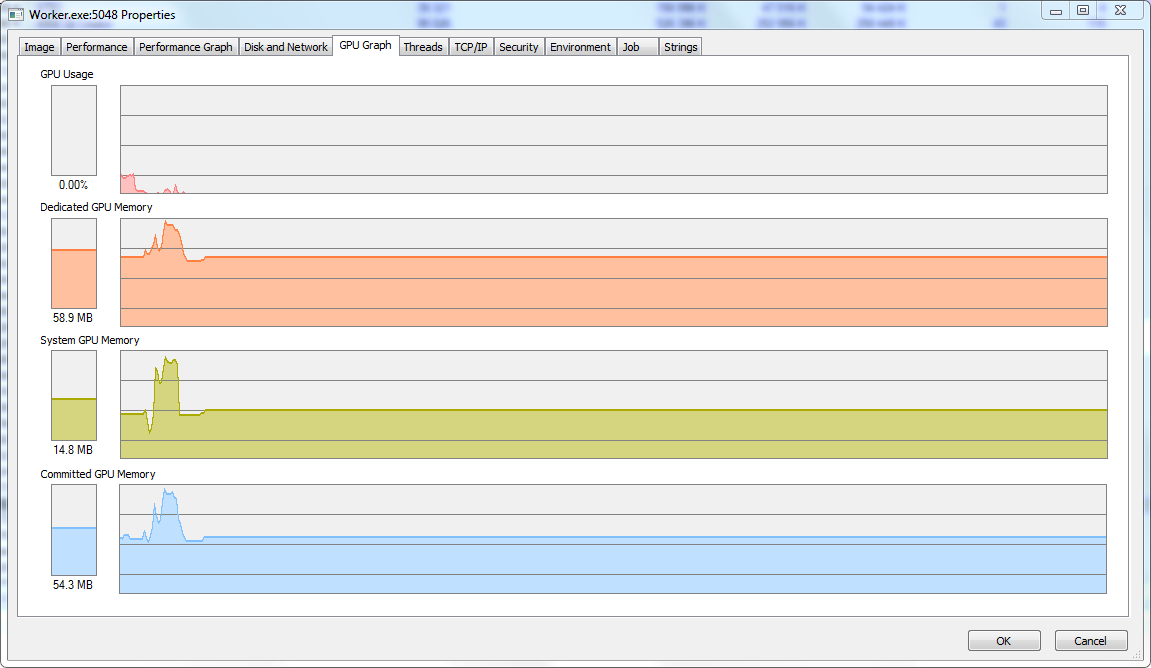
CPU usage while changing fingerprints has been significally decreased.
BAS does not slow down when visiting sites that work intensively with graphics, such as streaming services.
Added a new factor for FingerprintSwitcher: ClientRectangles.
This method allows you to get device fingerprint by obtaining the size of a specially composed elements. Unlike canvas, only the width, height, and coordinates are analyzed, not the colors of each pixel. These values are platform-dependent and can be used to compose fingerprints. After update BAS adds noise to them, big enough to change the fingerprint, but not too big to break site functionality.
You can test it here:
https://browserleaks.com/rects
Fixed date change issues when using daylight saving time.
The date is calculated according to the current rules of daylight saving time in the country and region where the ip is located.
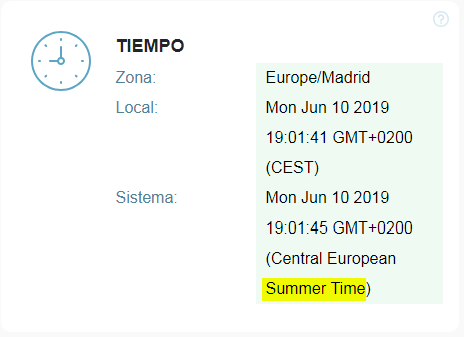
Here is a simple test that shows whether there is a daylight saving time in your country or region. It does not depend on the current date, and it is a good place to check whether your fingerprint change system can replace system date correctly:
https://jsfiddle.net/jp6rkcs4/
Task scheduler has been updated.
The new 1.2.0 version contains a redesigned mechanism to interrupt tasks. Any task will be stopped instantly, no matter at what stage of execution or installation it was.
The scheduler will not be updated automatically. You need to agree to update it, because all tasks must be stopped during scheduler update.

"Ignore errors" block will catch errors when executing javascript.
These can be: JSON parsing errors, nonexistent variables, etc.

Native combobox are now supported.

However, it is still necessary to automate the selection of an element in the old way. This change will be very useful for use in manual mode.
And many other changes:
The method by which canvas fingerprint is changed has been significantly improved. This is done to prevent antidetect systems from detecting fingerprint change. This changes includes a whole set of measures, here is only one example - instead of replacing the color for each pixel, the whole image is now analyzed, its outlines are located, finally pixel colors are changed only "on the border":
Borders on the image above is highlighted with red color.
This allows you to pass browser tests with positive results:
(navigator test gives a false positive result also in a normal browser, dns depends on the proxy).
Canvas changing now works with the alpha channel.
This means that if canvas contains a black and white image, browser fingerprint will still change.
The new BAS version draws browser content using GPU for rendering.
The old implementation used only CPU, but this approach can be detected. You can revert to the previous rendering method by replacing the values
Code:
--disable-gpu-deleted
--disable-gpu-compositing-deleted
to
Code:
--disable-gpu
--disable-gpu-compositingCPU usage while changing fingerprints has been significally decreased.
BAS does not slow down when visiting sites that work intensively with graphics, such as streaming services.
Added a new factor for FingerprintSwitcher: ClientRectangles.
This method allows you to get device fingerprint by obtaining the size of a specially composed elements. Unlike canvas, only the width, height, and coordinates are analyzed, not the colors of each pixel. These values are platform-dependent and can be used to compose fingerprints. After update BAS adds noise to them, big enough to change the fingerprint, but not too big to break site functionality.
You can test it here:
https://browserleaks.com/rects
Fixed date change issues when using daylight saving time.
The date is calculated according to the current rules of daylight saving time in the country and region where the ip is located.
Here is a simple test that shows whether there is a daylight saving time in your country or region. It does not depend on the current date, and it is a good place to check whether your fingerprint change system can replace system date correctly:
https://jsfiddle.net/jp6rkcs4/
Task scheduler has been updated.
The new 1.2.0 version contains a redesigned mechanism to interrupt tasks. Any task will be stopped instantly, no matter at what stage of execution or installation it was.
The scheduler will not be updated automatically. You need to agree to update it, because all tasks must be stopped during scheduler update.
"Ignore errors" block will catch errors when executing javascript.
These can be: JSON parsing errors, nonexistent variables, etc.
Native combobox are now supported.
However, it is still necessary to automate the selection of an element in the old way. This change will be very useful for use in manual mode.
And many other changes:
- The site domain is now obtained through a proxy when using the http client.
- Fixed errors when working with nested loops for elements.
- Removed mention of BAS from logs and other files of compiled scripts.
- Fixed issues when working with database and column date type.
- Any errors without block "Ignore errors" in OnApplicationStart will stop application.
- When you select an alternative server for the captcha solving, BAS automatically adds a slash to the server url.
- If you use negative coordinates to move the mouse, events about moving the mouse off the screen will be automatically triggered.
- Fixed issues with visibility events of the browser in the web interface.

blinggam
Regular Member
- Jul 27, 2017
- 280
- 149
Program crashes upon opening, error ntdll.dll. Windows 7 x64 Professional. Latest version.
Oddly, the error message appears, I click "close program," but the program seems to stay open... though not sure if this is going to effect functionality.
I'm testing it now.
Oddly, the error message appears, I click "close program," but the program seems to stay open... though not sure if this is going to effect functionality.
I'm testing it now.
blinggam
Regular Member
- Jul 27, 2017
- 280
- 149
People still use Windows 7? lol
Yes, Windows 10 is a bloated piece of trash. You can’t even uninstall the bloatware that’s forced upon you.
Why anyone would choose to use Windows 10 is beyond me, 7 is a superior OS in speed and every other factor.
- Status
- Not open for further replies.