Authority Site Case Study

Status
Not open for further replies.
Day 15

Yesterdays UVs : 67
Yesterdays Pageviews : 84


It's been slow going so far, but I think I'm starting to make headway. I've mostly been working on backend coding to get things loading a bit faster. Google/Cutts has hinted in the past that site speed is a determining factor in the Google algorithm. With that in mind, I should probably get off shared hosting sooner rather than later, but I can't really justify the cost at the moment when I'm only starting this site up. Every other project of mine is on a windows VPS I rent, but I don't really want to move this there. So instead I checked out this https://developers.google.com/speed/pagespeed/insights/ . It's a tool by Google to tell you what you need to fix on your page to make it user/speed friendly. What better way to benchmark your site for speed than Google! It's all easy stuff to fix too.

Today I posted a new article to reddit that people lapped up. I'm always worried that it's going to be downvoted to hell, but it seems to hold up well. It'll be reflected in tomorrows stats (Currently over 200 UV's...). Now that I have a source of views that I can basically pick at when I have a new article, I need to start working on a way to retain them! I'm thinking a split test with an opt in form on the actual article page (Near the bottom).

It's currently Wednesday here, and I've got a busy couple of days coming up. So it'll probably be the weekend before I really start writing interesting stuff :)
 
I'm going to change how I'm giving out stats to this. Because I'm not working on the site everyday, or sometimes I'm "waiting for things to happen", then I can't really be doing updates everyday. Not only that, But I feel by doing a decent weeks wrapup, we can actually see how the stats are improving (If they are at all). I'll still provide updates throughout the week if something big happens, but other than that, let's keep the stats to a weekly thing.

Weeks Stats :
Unique Visitors : 545
Pageviews : 785
Pages / Session : 1.34


Not a terrible week. I was buoyed by a reddit post doing well, other than that, there wasn't a lot of improvement. My SERP's are slowly improving, but going from 50th position to 30th doesn't make a whole heap of difference. In my niche it seems it's first place or nothing, but watch this space.

The competition ended today, which meant just drawing a winner and shipping the price from Amazon. The entries ended up like this :

fEyEFaA


In reality what we end up with is slightly less on each because people will follow you on facebook to enter, and then unfollow you immediately after. Especially mailing lists. They will subscribe, and then first email they get unsub. But for the most part, the majority of people have stayed on. When you think that the prize was worth approx $15USD. I didn't do too badly. I got a bit of buzz out of the competition, And I got in total 147 entries. Dividing the $15 up, it ends up about $0.10 an entry. Not great, but not bad either. If you translate that into the various likes I got on facebook for example, paying $0.10 a like for TARGETED likes isn't that bad of a deal.

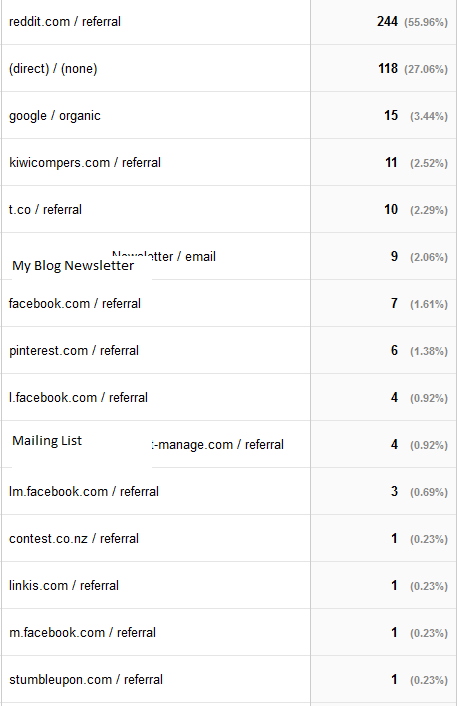
Just because it may interest a couple of people. Here's how people landed on the competition page.

h0CArke


All I can say is thank god for Reddit! All I did was post in the relevant subreddits, ONE post a day. I also contribute a lot to those subreddits that isn't my content so I think it's more accepted. I didn't try and "game" the system or anything like that, I just posted relevant content. Most of the "Direct" visitors are actually people from Social Media networks (FB, Twitter, Reddit), that use clients on their phones/tablets. These show up as Direct. Also interesting is the fact that Google was sending me visitors for a competition that only ran for a week. Unfortunately my competition widget provider doesn't give out stats on who entered from where on their free plan, so it's hard to tell which people actually entered from where.

A couple of things I've learned about competitions along the way.


- Viral entries aren't as common as you think. The whole reason I used Gleam.io to run the competition was for their viral options (e.g. mail to a friend and if that person enters, you get a free entry!). And there was actually no entries reported using this method. I know people did use them, I could see people posting them on Twitter etc. But very rarely did someone follow that link and enter.
- Reddit is a goldmine... Seriously.
- I need to work on getting entries over time. I get a huge surge in entries in the first couple of days, then nothing. I thought viral entries would solve this, but obviously not.
- The more entry options the better. People very rarely do one entry then leave and actually, on average, they will do just under 3 options each. Some people do everything (follow on FB, Twitter, Mailing List, Pinterest etc). I probably could have gotten them to view various pages on my blog and answer questions about them, just to rack up pageviews.
- Entries from sites that care about your content, are more valuable than "freebie hunters". I posted on a couple of competition sites just to get some more entries, but when you think about it, these people are not at all interested in your brand or what you do. They are very unlikely to continue following you on Facebook and actually may be detrimental in the long run as they will "unfollow" pretty quickly. This looks bad in Facebook's eyes.

As I always say. We are getting there. Slowly :)
 
Last edited:
Day 22

No stats for today, that will come later on. But a small update with what I've been doing.

One thing I found was that some pages that I really wanted to rank, were hidden deep in my wordpress structure. To get to them, you had to follow a labyrinth of links to get there. Which not only is bad for user experience, it's bad for getting things noticed by Google since internally, these pages were linked by ONE page. So to combat this I created a small PHP widget that I added to my sidebar of every page. This widget just shows the latest "guides" which are a subcategory of pages. In reality you could show any pages on here, I just made it so they were childs of a specific page. Actually... Here's the code for it if you want to do it.

Create a file called "recentpagewidget.php". Then add this to it. Change the text of PARENT PAGE TITLE HERE to the title of the parent page you want to get the children of. Obviously if you don't want children pages and instead want all pages, you will need to edit this accordingly.

Put this file in your themes root directory of Wordpress.

Code:
<?php
class recentpagewidget extends WP_Widget
{
    

	public function recentpagewidget() {
		parent::WP_Widget(false, $name = __('Recent pages', 'recent_page_widget') );
	}

	public function widget( $args, $instance ) {
		$parentPage = get_page_by_title( 'PARENT PAGE TITLE HERE' );
		if(!isset($parentPage))
			return;
		
		$recentPages = get_pages( array( 'child_of' => $parentPage->ID, 'sort_column' => 'post_date', 'sort_order' => 'desc', 'number' => 15 ) );
		$widgetTitle = apply_filters( 'widget_title', "Recent Pages", $instance, $this->id_base );
		
		echo $args['before_widget']; 
		echo $args['before_title'] . $widgetTitle . $args['after_title'];
		?>
		<ul>
		<?php
		foreach($recentPages as $recentPage)
		{
			?>
			<li>
			<a href="<?php echo get_permalink($recentPage->ID); ?>"><?php echo $recentPage->post_title; ?></a>
			</li>
			<?php
		}
		?>
		</ul>
		<?php
		echo $args['after_widget'];
	}

	public function form( $instance ) {
	}

	public function update( $new_instance, $old_instance ) {
	}
}
?>

Then in your functions.php file of your theme add this.
Code:
require_once ('recentpagewidget.php');
add_action('widgets_init',
     create_function('', 'return register_widget("recentpagewidget");')
);

Now log into wordpress, go to your widgets section, and you should see a new recent page widget. Move that onto your sidebar and you are good to go!

I was going to write more for today... but that's probably enough copy and pasting hacky code for one day. Tomorrow I'll share a Twitter script I whipped up to auto favourite tweets based on a keyword.
 
Weeks Stats :
Unique Visitors : 432
Pageviews : 684
Pages / Session : 1.58


A low week this week. Everything was a bit down, but that's ok! I made some good strides. So first up...

Twitter
I ended up writing some custom twitter scripts to start churning through some followers. Previously I was using unfollowers.me and doing this bit manually, but the twitter api is SO simple. At the moment I am doing just favourites and following people based on a keyword. For favourites, all I do is favourite a random tweet in a PHP script. I set the script to run a cron job and just fire every now and again, keeping it nice and random. I also only run it between 9 - 6, and only Monday - Friday. For following, I kinda do the same, but I store the people I followed (And the time I followed them), in a database. I do this because eventually I will write a script to unfollow these people if they haven't followed me back in say 5 days. Eventually I'll release these scripts out, but they are incredibly simple, they aren't that amazing anyway. People can PM me if you really want them.

Site Speed
I've been using https://developers.google.com/speed/pagespeed/insights/ quite a bit to try and measure how fast my site is loading. As I work on it, and add random plugins, it slowly turns to crap which in turn I then have to speed up again. The big problem seems to actually be social network buttons, they load soooo slow. And the CSS/JS files aren't GZIP'ed or minified, which gives you a bit of a blackmark on google's tool.

A couple of plugins I installed to try and combat that are...

Better Wordpress Minify :
Just a simple Minify plugin that minifies all your enqueue scripts/CSS. Seems to work well for me.
EWWW Image Optimizer : Optimizes all the images I upload to my site. Seems to get a MUCH better job done than the usual smush.it plugin.
Use Google Libraries : Makes use of Google's CDN when it can. This is because Wordpress uses JQuery no matter what on the front page it seems, so it's better to load it from a CDN.

I also added the following to my HTAccess file :

Code:
## EXPIRES CACHING ##
<IfModule mod_expires.c>
ExpiresActive On
ExpiresByType image/jpg "access plus 1 year"
ExpiresByType image/jpeg "access plus 1 year"
ExpiresByType image/gif "access plus 1 year"
ExpiresByType image/png "access plus 1 year"
ExpiresByType text/css "access plus 1 month"
ExpiresByType text/js "access plus 1 years"
ExpiresByType text/javascript "access plus 1 years"
ExpiresByType application/javascript "access plus 1 years"
ExpiresByType application/x-javascript "access plus 1 years" 
</IfModule>
## EXPIRES CACHING ##

<ifModule mod_gzip.c>
mod_gzip_on Yes
mod_gzip_dechunk Yes
mod_gzip_item_include file .(html?|txt|css|js|php|pl)$
mod_gzip_item_include handler ^cgi-script$
mod_gzip_item_include mime ^text/.*
mod_gzip_item_include mime ^application/x-javascript.*
mod_gzip_item_exclude mime ^image/.*
mod_gzip_item_exclude rspheader ^Content-Encoding:.*gzip.*
</ifModule>

<IfModule mod_deflate.c>
AddOutputFilterByType DEFLATE text/html text/plain text/xml text/css text/javascript application/javascript application/x-javascript
</IfModule>

It enables GZIP/Deflate aswell as setting expires headers.

With all of these steps, I managed to get my site into the "green" with Google pagespeed, which is great! But still a bit to go. Someone told me today that W3Cache does most of this for you, instead of having to do it manually. But I've always had issues with W3Cache to be honest (I still use the ol' trusty WP Super Cache).

Next update I'll have a bit of info about the SEO work that's been going on.
 
I am always excited to see an experienced guy doing everything really the hard way. Shortcuts are not an option if you are interested in building something to last.

I am on my way to make my projects faster as well, so thanks a lot for your previous post. It's all green on my side :)

Cheers!
 
Last edited:
Weeks Stats :
Unique Visitors : 324
Pageviews : 526
Pages / Session : 1.62


The trend continues. Less unique visitors, but more high quality visitors (Pages per session). Although I'm not entirely pleased, I spent the entire week working on Twitter and setting that up to run on auto pilot rather than working on writing articles (ugh). Next week will be a bit different but, here's where I'm at.

Twitter
This week has all been about Twitter! Or atleast trying to set it up so I don't have to worry about it anymore. So here's the steps I took.

1. I wrote a script to talk to the twitter API and favourite tweets based on keywords. This script runs every 15 mins or so and favs up to 15 posts. It also only runs between 9am - 6PM. I honestly don't think favourites are that great anymore. The general idea is that if you favourite someone's tweet, they will come check out your profile wondering who you are (They also get an email letting them know you favourited something). These are pretty spammed though, I mean people are favouriting a crap tonne of my stuff and a lot of it is just bots.

2. I wrote a script to talk to the twitter API and follow people based on keywords. This script runs every minute (On a cron), but actually in reality only runs every 30 minutes as it has a random check at the start. In reality I end up following just over 100 people a day. This is REALLY low. Most people say you can usually get up to 1000 per day, but I want to always have more followers than people I'm following. So steady as she goes from now. I also make sure I only follow people that don't use the default egg picture as their profile pic, and are not following twice as much as their followers. This is important, some people think that you should only follow people that have more followers than following. Ahh, no. A real everyday person will always be following more people than they have followers as they are an average joe....

Anyway, the follow script also writes to a database the users id, name, and when I followed them. This is used later on for another script, but I thought it would be useful to see analytics on just how much following other people work to make them follow you back.

3. My last script took the longest because I'm a C# developer not a PHP one, so it took me a while to get it right. But basically, it goes to the database and gets all people that A. I have not unfollowed in the past. And B. I followed more than 3 days ago. The reason for the 3 days, is to give people a chance to follow me back. I will extend this number in the future, but for now 3 days is enough to keep my following/follower ratio just right. I then compare all these people with Twitter's list of people that are following me back, and unfollow anyone that isn't now following me.

So how about the results?


Good question. Here's how I started :

Followers : 1012
Reach : 734227
Klout : 43.30
Link Clicks : 16 per week

Here's how I am right now :

Followers : 1235
Reach : 752400
Klout : 48.04
Link Clicks : 30 per week

So not a whole lot right? Well.. Kinda... You see that I've only been running all of these scripts for approx 5 days now. And from now on, I actually don't have to touch them at all. Also note that "link clicks" is simply derived from Google Analytics using the referrer of t.co. But in reality, I get A LOT more than that that come through as direct traffic (Some estimates say you should double your t.co traffic to see how much traffic you actually get from Twitter). So all in all, I'm happy with where my Twitter account is going.

I was going to include how I create content for Twitter, but I'll leave that for another post :)


SEO
SEO has kind of stagnated. I'm building good high quality links (IMO). They are contextual and mostly ********. So what's the problem? I seem to basically be jammed in the same spots. Infact I seem to not even be number 1 for my exact match domain (Although it is kinda generic so not too surprisingy). The biggest thing I think is onpage content. My homepage is basically like "Pinterest". That is it has boxes of images on the homepage so you can quickly click through, but not that much actual onpage textual content.

I need to fix this, but it's going to be a pain. I can probably pull through some of the posts content, like a snippet, onto the homepage but then the whole pinterest and easy browsing thing gets lost. I could have some static content (Like 200 words or so to begin with), either above or below the main posts on the homepage. But if it's above, then mobile users suffer because they have to scroll further past the static content every time. If it's below the content, then it's just kinda pointless obvious crappy text.

It's interesting, I've heard this talked about before. But the way that Google runs things now, it's almost like real users have to suffer, just so I can get some good SEO. My site is perfect for users atm. They can just view a selection of images on the homepage, and click through to the one they want. Instead now I have to spam it with crappy snippets of text from the article (Which the user probably isn't going to pay attention to anyway), just to get my rankings up. Ugh. But this is what I will be working on this week.
 
Twitter Content

So last time I posted, I said I would talk a bit more about what content I'm using on my twitter account to generate a bit of buzz, gain natural followers, and then obviously get them to view traffic.

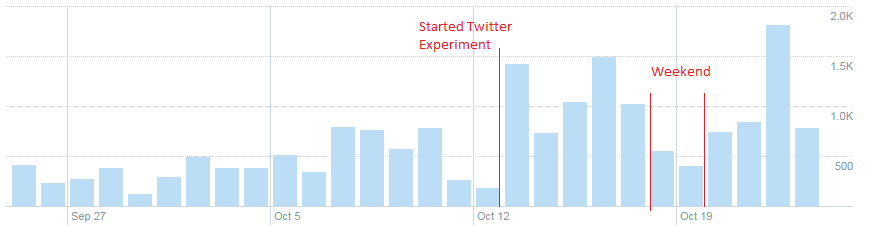
So first a graph of tweet impressions since I started this whole twitter thing.

LMESUIz


As you can see, I've really started ramping up the impressions, and the great thing is that it's only going to get bigger and bigger with very little work. Most of my tweets that I tweeted out at the start of this experiment are STILL getting retweets/favourites/mentions. So for content I have...

  • My own content (Obviously). This gets tweeted out once every 2 days, at the same time each day. This is just auto tweeted from my blog using SNAP social plugin. There is nothing special about these posts.
  • Infographics. The best way is to search in google "*niche* infographic". I try and find ones that have NO watermarks. I tweet out these on days where my own content doesn't get tweeted out.
  • Memes. Again, search in google "*niche memes". No watermarks. Tweeted out on days where my own content isn't going out.
  • FollowFriday. Every friday I send out a message with the hashtag of #FF and #FollowFriday. I schedule these via SocialOomph.com. I just recommend someone else within my niche, that is smallish in size. The small size usually means that they will retweet me if they see my post.
  • Random links. On some days, instead of sending out a meme or infographic, I send out a link to a news article. I usually find these on reddit.com in a related niche subreddit.

Usually from these, I will send out ONE tweet per day. On days where my content has gone out, I will not tweet out anything else on that day because I want my actual content to be seen by as many people as possible. With the infographic/meme tweets, If I have an article that relates directly to that meme, I will try and work a link to my site into the tweet. Otherwise I'm happy for the tweet to go out without my link, and be retweeted as much as possible.

Another thing is always try and use hashtags where possible, if they fit within the content you are sending out. Such as "Has anyone seen the new #nissan primera?" or something like that.

Time your tweets!
I can't stress this enough. The best time to tweet your links is around 5PM EST. This also allows you to run into the people in PST. If this means that it's the middle of the night where you are, then find a service (Or pay for one), that will tweet out your link at that time. Honestly, it's probably one of the most important things you can do.

Be engaged!
I use tweetdeck (https://tweetdeck.twitter.com/) to try and keep engaged with people. Here you can set preset searches, and have them presented right infront of you. People sometimes use Buzzbundle but honestly I find that thing to be a bloated POS. Set your searches to be narrow searches. If only one or two people are worth replying per day within those searches, that's fine. I sometimes reply to people without links, but usually I reply with links, but they are ALWAYS helpful. I mostly just check tweetdeck every now and again and reply a couple of times then close it, it doesn't take much to look engaged with people :)

That's about it for now. The best thing you can do is to be regular with your tweeting and the engagement will come. On some of my tweets I'm getting 150+ engagements, which with how little followers I have right now is amazing. Some of this stuff spreads like wild fire, so you just have to see what works well with your followers.
 
SEO has kind of stagnated. I'm building good high quality links (IMO). They are contextual and mostly ********. So what's the problem? I seem to basically be jammed in the same spots. Infact I seem to not even be number 1 for my exact match domain (Although it is kinda generic so not too surprisingy). The biggest thing I think is onpage content. My homepage is basically like "Pinterest". That is it has boxes of images on the homepage so you can quickly click through, but not that much actual onpage textual content.

Any chance you can SEO those images like this:

Yj8GymS


That would help your On-Site.


Any chance you can SEO those images like this:

That would help your On-Site.

Where would you put that text? Underneath the image or as an alt etc? I'll talk a bit more on what I did do earlier this week, but it's very similar to what you described (Only it's attached to the actual post not the image). So far doing that my SERP positions have shot up dramatically, although I take some of that is my linklure campaign kicking in and probably the penguin update destroying other sites and promoting mine!

I actually need to do your category description method too :)
 
Where would you put that text? Underneath the image or as an alt etc?

In WP you can go to dashboard ----> Media -----> Library and hit "edit" under any of your images and then you have the chance to make all kinds of Image SEO adjustments.

It can be a little annoying if you have not done it and you have 50 images (I get that all the time with my SEO clients so I know first hand) but it is well worth the effort.

Be sure to change the name of the image also, don't let the name be image12345. Make it a KW phrase as well.
 
Weeks Stats :
Unique Visitors : 479
Pageviews : 804
Pages / Session : 1.68


Everything is well up this week! Traffic is up 48% which is huge! The biggest reason has been twitter. Week on week Twitter traffic is up 126%. That's amazing. And right now it just runs on auto pilot, I literally do nothing to it and I'm getting retweets and follows naturally now.

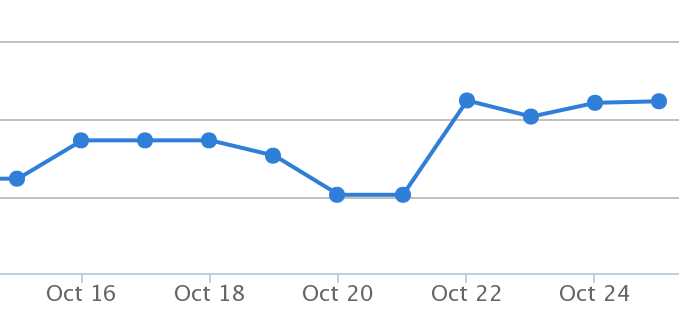
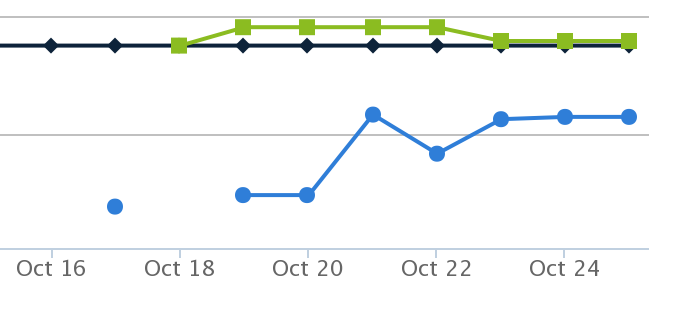
Penguin also hit this week. So that's been interesting to see. Along with LinkLure and a few changes I made around the site, I didn't seem to notice the hit. Infact, if anything, I've been doing better in the SERPs this week than ever before. There is a bit more work to do to rank as number 1, but I definitely think within the next month I'll start seeing a lot more SEO traffic coming my way. There is a saying that goes something along the lines of "Google wants to rank popular sites, but it doesn't want to be the reason your site is popular". I actually think if anything, all my social signals that I've been working on will be the biggest influencer in moving up in the results in the coming months.

M4Vpy09


VYvXP2n


KBEoLe2


It may not look like much, but some of these are huge leaps. Here's hoping it continues the trend!

I also worked on getting more unique content onto the homepage. I talked about previous that my homepage was sort of "pinterest" like, whereby the homepage was made up of a collage of images, but without much written content. I needed a way to get textual content on there, but still make it so the images were the main focus. It got me thinking that the text on there should be attention grabbing. It should be long enough to provide enough text for search engines to like, but short enough to make people read it and then click immediately. So what I actually settled on, was pulling through the meta description. Let me explain...

I use the Yoast SEO plugin on my blog. With this, you can provide a meta description for each post you write. For each post, I (sometimes) write a short description in this box to be more "clickbait" like when it gets shown in the SERPs. Since I'm writing basic clickbait in this headline, I wrote some code to also pull this onto the homepage. So now I also show this clickbait tagline on the homepage, and it's usually laden with keywords aswell. Perfect! In times when there is no meta description written, I simply pull the first sentence or two from the post. This doesn't look as good, but it provides a fall back.

With this, I now have rich content on my homepage without overloading it with text!

The next week I'm going to focus on adding more textual content to my site. Finding where my "thin content" is, and trying to bulk it out a bit more. At times this is probably going to mean going back through my 200+ posts, and trying to work out where I can add value, but I feel it's definitely worth it in the long run. I get the feeling most of my SERP improvements have been down to more quality content, rather than any backlinking strategy (Although that has certainly helped!)
 
Week Stats :
Unique Visitors : 384
Pageviews : 586
Pages / Session : 1.53


Yeah... Not such a good week. I've been incredibly busy with my 9 - 5 (Which I absolutely love), and other things going on. What I did try and do was work around some of my optin forms, and get a better email subscription rate. At the moment, 2% of my traffic comes from my email newsletter that I send out weekly, that has new posts etc (Automated, it comes off my RSS feed). At the moment I've only ever emailed them one thing that wasn't a newsletter, and that was to tell them to come and enter a competition on my site (Which many did come back and do via the email). What kicked this off, was I read this post by Matthew Woodard (Well.. On his blog, written by someone else) : http://www.matthewwoodward.co.uk/experiments/stuart-walker-vs-matthew-woodward/

It kicked off me trying to be a cheap ass and implement some things without having to pay. It hasn't gone 100% according to plan, but I've got half way there. So what I did was...

  • I found some PDF's on the internet, related to my niche, and I'm now offering them as a "starter pack" within my niche. All they have to do is opt in. That seemed to be the biggest takeaway from the article, was that you need to offer something in return for their email. They won't just sub for the hell of it. So I packaged these up and added an "Automation Workflow" in Mailchimp. Unfortunately you can't do this on their free plan, so I did have to upgrade there. It's $10 a month though... And really that's nothing compared to how good they actually are (I've used Aweber in the past and it's been pretty bad...)
  • I created an incontent email subscription box. They recommended some plugins in the article, but at this point I'm not looking to dish out money for a few extra subs a month. I ended up installing "Optin Forms by Codeleon". It definitely had the easiest integration with Mailchimp, my maillist provider. And also some really cool designs right out of the box which for someone as lazy as me was great.
  • I was unable to find a free exit popup mailchimp integration plugin. There were some that were just exit popups, and you just paste your code in the box. These did the popups well, but I would have to do most of the styling myself. Other plugins were vice versa, good integration design but crappy popup solutions. In the end, I'm probably going to roll my own. I can definitely make it nicer looking with lightbox etc. It's not hard (Kinda blows my mind what some people charge for this stuff... I obviously program in the wrong industry).

I'll share some of my conversion ratios later on. I'm still trying to figure out the best way to track these. At the moment I'll just count the email subscribers to pageviews ratio. But obviously there must be better ways because in the future I will want to split test etc.

Just another note on how Twitter has gone. I'm still growing followers at a pretty steady rate. Most of my content gets 20 - 30 retweets and about the same number of favourites. So I'm definitely growing in that area. Not to mention I'm getting a lot of natural interaction. People sending me their content, asking me to feature them etc.
 
Week Stats :
Unique Visitors : 380
Pageviews : 590
Pages / Session : 1.55


I didn't color code the stats this week as it's more or less the same as last week. That kinda sucks, but I had some good notes this week.

As I said in my last post here, I created a better email signup box on the website, and offered a "starter guide gift" as a reward for signing up for the mailing list. Last month, with a simple "Signup to our newsletter" box, I got a grand total of 2 email subs. Obviously crap. This week, I've managed to get 10 subs. On a per visitor basis, that's 2.6% conversion rate which is amazing! The strange thing is, I'm pretty sure I can get an even better subscription rate with a bit of tweaking. I'm sure some niches would absolutely die for a conversion rate that good!

These people get mailed a "collection" of posts each week automatically based on the RSS feed from my blog. I actually have a pretty good open/click rate on this email. My initial goal is to keep these people coming back. I see email in a bit of the same light as a social network, just keeping connected with my readers. Ofcourse eventually, I'll try selling them something in this list/add ads to it.

I've made another really large "guide" page on my site. Next week I will do the usual rounds of posting it to Reddit/Social Networks. I like to create the page and have it sit for a while, usually until it gets indexed naturally. THEN start building links to it. Expect a huge jump in unique visitors next week.

I'm sure this post is kinda an echo chamber for me, but it keeps me a tiny bit motivated to keep going :)
 
kinda a silly question but are you worried about using other people's content like this? or did you give them credit with a link or something?

and i know mailchimp has a pop up option, you have check off "evil sign up mode" when building a form. not sure about the exit page though

It kicked off me trying to be a cheap ass and implement some things without having to pay. It hasn't gone 100% according to plan, but I've got half way there. So what I did was...

  • I found some PDF's on the internet, related to my niche, and I'm now offering them as a "starter pack" within my niche. All they have to do is opt in. That seemed to be the biggest takeaway from the article, was that you need to offer something in return for their email. They won't just sub for the hell of it. So I packaged these up and added an "Automation Workflow" in Mailchimp. Unfortunately you can't do this on their free plan, so I did have to upgrade there. It's $10 a month though... And really that's nothing compared to how good they actually are (I've used Aweber in the past and it's been pretty bad...)
I was unable to find a free exit popup mailchimp integration plugin. There were some that were just exit popups, and you just paste your code in the box. These did the popups well, but I would have to do most of the styling myself. Other plugins were vice versa, good integration design but crappy popup solutions. In the end, I'm probably going to roll my own. I can definitely make it nicer looking with lightbox etc. It's not hard (Kinda blows my mind what some people charge for this stuff... I obviously program in the wrong industry).
 
kinda a silly question but are you worried about using other people's content like this? or did you give them credit with a link or something?

and i know mailchimp has a pop up option, you have check off "evil sign up mode" when building a form. not sure about the exit page though

Good question! I'm not too sure at this stage. What I did was search "*niche* guide pdf". Then I picked a few that were shared around multiple places, and usually didn't seem to belong to any one website. One did belong to a particular website, but it was rehosted in a myriad of places so I don't think they are too concerned about it getting shared around. Plus the PDF is linked to hell back to their site and watermarked down the bottom with their URL. If it comes to it, I would remove it, but I don't think it will happen.

The email I send them has about 3 PDF's, and one URL link back to my website. So it's good content atleast!

What I mean by popup. Is that after viewing say 2 pages on your website, it then popups on your screen as a lightbox on that page, with the offer in the middle of the screen. All the WP plugins I looked at had reaalllyyy crap design, or they were just lacking some pretty basic features you would expect. I mean, you can just code your own lightbox, and jam a mailchimp form embedded on it, but I wanted to be a bit smarter than that. The main issue I have is that a large portion of my visitors are mobile, and creating a lightbox effect that looks good on your phone can be a challenge at times.
 
It's nice to see someone who's actually taking a hands-on approach to authority site creation. I think a lot of people assume an authority site is just a site with a lot of content on a given subject, not a site that actually exudes authority because it provides value to the users. Definitely looking forward to following your journey. You've already made a lot of progress since starting.
 
Looks interesting. Subscribed.
 
Status
Not open for further replies.
Back
Top