Spammy Google Selected Canonical In Search Console

Starblazer

Elite Member
Jr. VIP
Joined
Feb 28, 2019
Messages
7,679
Reaction score
8,095
You can use the URL inspection tool on GSC (Google Search Console) to check the crawl/index status of a URL. The report contains a "Google-selected canonical" value that points to the actual webpage that Google chose for the content. Google can & will display some other webpage from the same or an external website in some cases. Sometimes the URL can point to a spammy or dangerous site.

Dan Lauer wrote on BlueSky, "I have never seen Google selected canonical to be a spammy site before like this? This is for a new clients blog and its not indexed yet. I discovered this inspecting it in GSC."

Here is the screenshot from the post:
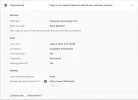
spammy google selected canonical search console.webp

John Mueller from Google responded:
These things are impossible to say without more details. Sometimes domains have used the same interstitial / parked page, which can easily lead to this. I'd check back after a few weeks to see how it settles down, otherwise post in the help community with the full details.

I have personally faced such a situation multiple times and here is what I noticed:
  1. If you have multiple home pages for a website with each pointing to a different language using hreflang attributes, Google may treat all these pages as duplicates of the main home page.
  2. If an authority site or a parasite copy-pastes the exact same contents of your webpage, Google may treat that as the selected canonical to your webpage and choose to display that webpage in SERPs instead of yours.
  3. If a document or media from your webpage is uploaded to an authority site (for example, pdf to archive.org or video to youtube), Google will choose the authority site.
If it happens to your webpages, you'll receive “Duplicate, Google chose different canonical than user” message in GSC. You can check the URLs and try to fix them by adding a canonical (if it doesn't exist) or by updating the content.
 
A quick way to tell them apart is to inspect a few other URLs on the site. If they all point to the same external canonical URL, then it's leftover clustering from the parked state. If only one page's content was duplicated, then yes, it's a scraper.

For a new site that isn't indexed yet, submit the sitemap, request indexing on the important URLs, and wait two weeks before taking drastic action. A self-referencing canonical tag plus real internal links pointing to the URL usually solves the issue.
 
usually means the content got scraped and google indexed the copy first, on a new site that is not indexed yet is very easy to happen. self referencing canonical + get the page indexed fast (indexnow / api) before the scrapers. if it stays, a dmca on the copy is the only thing that moved it for me.
In one of my sites, Google replaced my indexed page with that of an authority site. Although we can add canonical tag for html, it's not possible for docs & media. So, an alternative is to pass canonical tag through response headers that won't show up in content source but Google bot can decipher them and properly add canonical tags. However, it's difficult to do so if you have a lot of docs/media webpages without a standard URL structure.
 
I’d also compare the rendered HTML against the original source code especially if the website relies heavily on JS.
 
I have seen similar indexing isues before. I think checking the cenonical tags, duplicate content, and any previous domain history is a good starting point. sometimes google needs more time to index a URL.
 
I fetch the canonical URL Google picked myself first, because a canonical that redirects tells Google the page moved.
 
You can use the URL inspection tool on GSC (Google Search Console) to check the crawl/index status of a URL. The report contains a "Google-selected canonical" value that points to the actual webpage that Google chose for the content. Google can & will display some other webpage from the same or an external website in some cases. Sometimes the URL can point to a spammy or dangerous site.

Dan Lauer wrote on BlueSky, "I have never seen Google selected canonical to be a spammy site before like this? This is for a new clients blog and its not indexed yet. I discovered this inspecting it in GSC."

Here is the screenshot from the post:
View attachment 540673

John Mueller from Google responded:


I have personally faced such a situation multiple times and here is what I noticed:
  1. If you have multiple home pages for a website with each pointing to a different language using hreflang attributes, Google may treat all these pages as duplicates of the main home page.
  2. If an authority site or a parasite copy-pastes the exact same contents of your webpage, Google may treat that as the selected canonical to your webpage and choose to display that webpage in SERPs instead of yours.
  3. If a document or media from your webpage is uploaded to an authority site (for example, pdf to archive.org or video to youtube), Google will choose the authority site.
If it happens to your webpages, you'll receive “Duplicate, Google chose different canonical than user” message in GSC. You can check the URLs and try to fix them by adding a canonical (if it doesn't exist) or by updating the content.
I would first open the selected URL nd see if it is redirecting, has similar content or is connected to an old parked domain. there have been instances where people have changed the canonicals to soon without seeing how that works first. So I would compare a few of the URLs in GSC first.
 
I would first open the selected URL nd see if it is redirecting, has similar content or is connected to an old parked domain. there have been instances where people have changed the canonicals to soon without seeing how that works first. So I would compare a few of the URLs in GSC first.
This is totally unrelated to the webmaster. Most people won't have any idea how it happened. Google finds 2 webpages on the internet and chooses one of them (usually high authority page) to display in search results. The other webpage will have this error.

If I copy your article, paste it into a medium blog, and publish it, Google will display Medium article and hides your own post. You can only find it once you check "Crawled, currently not indexed" error on GSC, otherwise you wouldn't even know it.
 
check if the canonical tag has the right URL. even a small mistake can cause google to index the wrong page.
 
Back
Top