Thanks for sharing. Incogniton looks useful for organizing profiles and keeping workflows separated. Quick question, does the starter package still include enough profiles for basic testing, and is it stable with proxies + cookie imports? Would love to hear recent experiences from others.
In our latest update, we’ve introduced Cas, our built-in AI assistant for Incogniton.
Cas helps you manage your workflow faster and easier. You can ask it to create, edit, and launch browser profiles, or provide a list of proxies and have them automatically added to your profiles.
Running into issues? Cas can analyze your profiles and proxies to help diagnose and resolve problems.
Whether you’re setting things up or optimizing your workflow, Cas is there to assist you every step of the way.
Hi, I've contact via telegram but no reply via bot, I have sent also a message on the website.. I make a test on fingerprint after a profile creation with default settings, and they detect the browser like a bot. Even with a real mobile proxy with real fingerprint win10, let me know.. thanks
Hi, I've contact via telegram but no reply via bot, I have sent also a message on the website.. I make a test on fingerprint after a profile creation with default settings, and they detect the browser like a bot. Even with a real mobile proxy with real fingerprint win10, let me know.. thanks
The seller has contacted us to change the content of the opening post in their sales thread. The old content and the new content can be found in the spoilers below.
Title: Incogniton: Multi-Accounting Anti-Detect Browser [Starter Package At No Cost]
Incogniton is an anti-detect browser with all the features you need to manage multiple accounts anonymously. The tool has unique fingerprint protection for each browser profile. This results in completely isolated profiles, making it look like you’re operating from different devices and being untraceable for websites.
Whether you’re running e-commerce stores, managing multiple ad accounts, scaling affiliate campaigns, or operating several client projects at once, Incogniton gives you the tools to grow without limits.
With isolated browser profiles, unique fingerprints, and rock-solid anti-detect technology, you can:
Run multiple Facebook, Google, TikTok & X ads accounts
Manage separate storefronts on platforms like Amazon without cross-contamination
Test offers across different platforms with zero footprint
Handle client accounts securely and professionally
Scale campaigns aggressively while keeping your accounts protected
Incogniton removes the barriers that slow online marketers down so you can focus on optimizing, scaling, and making more revenue.
Get Started With Incogniton - Create Your First Browser Profile
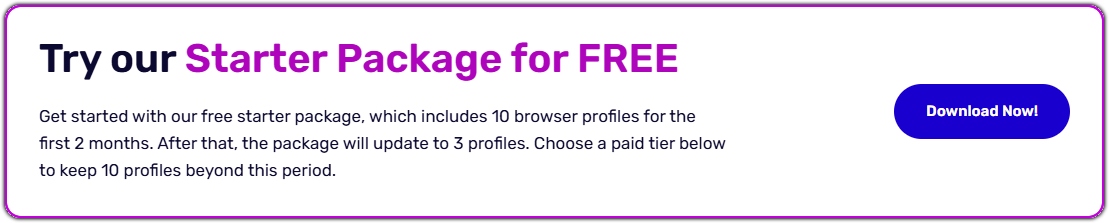
Why Choose Incogniton? Starter package at no cost- Get started with 10 browser profiles for 2 months, after that go to 3 profiles. User-friendly - Designed in a user-friendly way, easy to use for everyone Enhanced privacy - Stay undetected using unique IP addresses for each profile
Core Features Team Management feature - Create team members, assign roles with specific permissions and share your account. Cookie Collector - Build authentic browser histories and import and export cookies. Synchronizer - Automate browser actions easily by copying actions across profiles. Browser fingerprint protection - Create profiles with a unique identity and browser fingerprint protection. Customize it to your wishes or use a fingerprint generator. Bulk feature - Create multiple browser profiles at the same time. Customize profiles and save time. REST API - Manage your browser profiles more efficiently with the REST API. See for more information our API documentation. Selenium and Puppeteer integration - Automate processes online with the browser automation integrations. Incogniton uses the selenium WebDriver.
Pricing
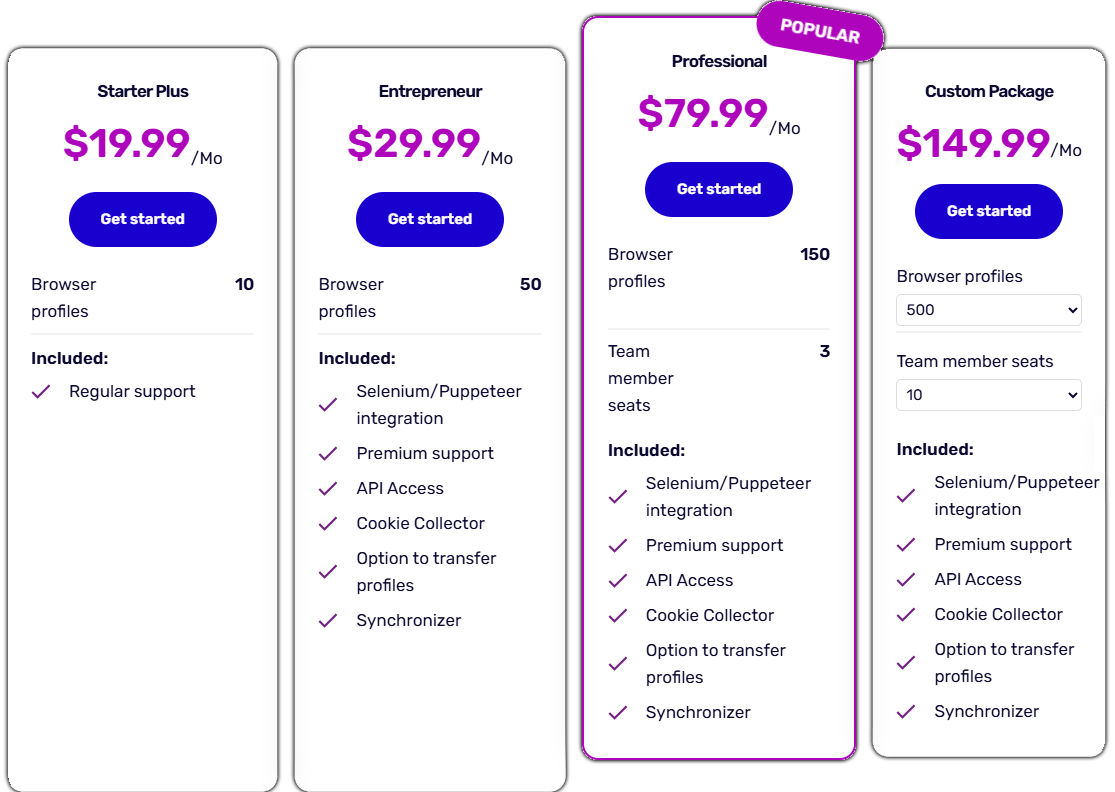
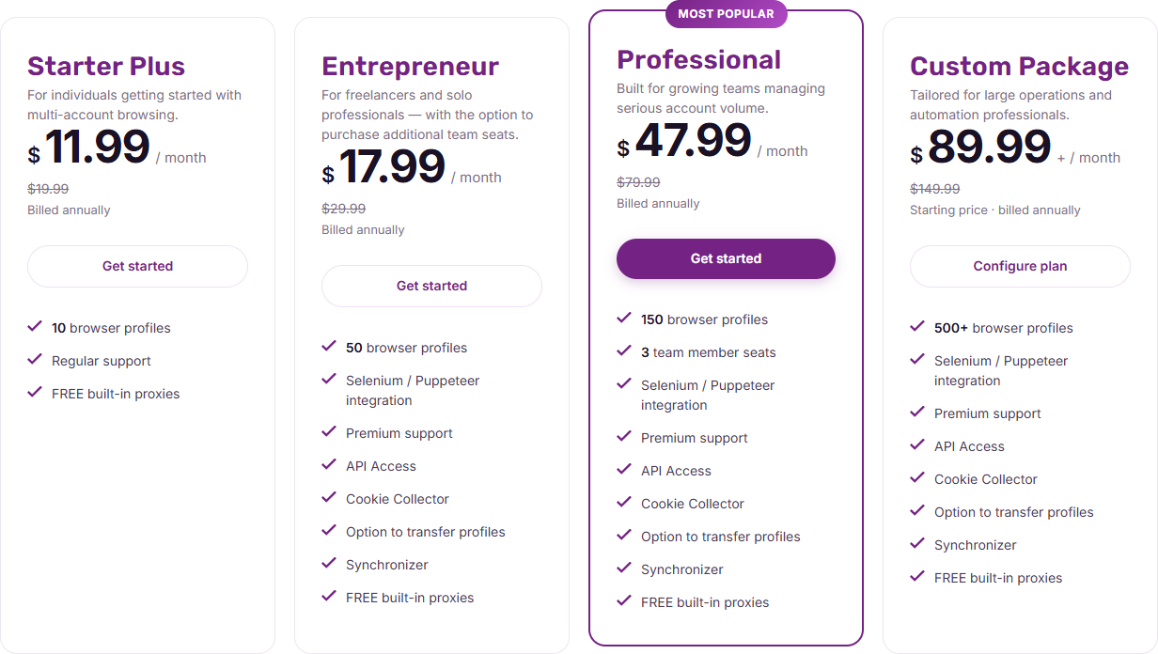
We offer a FREE starter package with 10 browser profiles for 2 months. This includes all the core features. Need more than 10 profiles? We offer several packages. Take a look at our pricing below or visit the pricing page on our website.
Get a 20% Discount
As a BHW user you receive a 20% discount coupon for the first 12 months. Reply "I want an Incogniton coupon" to this thread. We will send you a personal coupon as soon as possible.
FAQ
Do you provide trials?
Yes, we offer a starter package at no cost, which gives you 10 browser profiles for 2 months. After that you it goes to 3 profiles. Do you provide special discount for BHW members?
As a BHW user you receive a 20% discount coupon for the first 12 months for any paid plan. Just reply "I want an Incogniton coupon" to this thread. We will send you a personal coupon as soon as possible. Which settings do I need to configure myself?
You don't have to do anything yourself, except for adding a proxy to the browser profile. Incogniton will create random fingerprints for each profile you create. These fingerprints are unique and automatically generated for every profile. How do I create a new browser profile?
If you downloaded the app and are logged in to your account, click on the ‘Go to profile creation’ button in the middle, ‘New profile’ button at the top or ‘Create Single’ in the left-side menu. Choose the name, operating system, browser version and settings, and add a proxy. Click on ‘Create profile’ on the right to finish. See this article for more information. Can I customize fingerprints?
You can customize your geolocation, add some fonts or change the amount of media devices. Please note that these steps aren’t necessary if you just want a regular browser profile, the browser fingerprints are automatically managed by Incogniton. Can I access my Incogniton browser profiles on multiple devices?
You can open your browser sessions on any device. You just have to log in on the devices in question and your browser data will be synchronized between both devices. How many browser profiles can I get with Incogniton?
We offer several packages with different numbers of browser profiles. You can choose a custom package and get up to 5.000 profiles in total. Please get in touch with us if you’re interested in a custom package.
Refund policy
A refund is possible in case of the software not working as intended. Please use the contact form on the website to request a refund. We reserve the right to cancel your subscription with a refund.
Incogniton is an anti-detect browser with all the features you need to manage multiple accounts safely and anonymously. The tool has unique fingerprint protection for each browser profile. This results in completely isolated profiles, making it look like you’re operating from different devices and staying untraceable for websites.
Whether you’re running e-commerce stores, managing multiple ad accounts, scaling affiliate campaigns, or operating several client projects at once, Incogniton gives you the tools to grow without limits.
With isolated browser profiles, unique fingerprints, and rock-solid anti-detect technology, you can safely:
Run multiple Facebook, Google, TikTok & X ads accounts
Manage separate storefronts on platforms like Amazon without cross-contamination
Test offers across different platforms with zero footprint
Handle client accounts securely and professionally
Scale campaigns while keeping your accounts protected
Incogniton removes the barriers that slow online marketers down so you can focus on optimizing, scaling, and making more revenue.
Get Started With Incogniton - Create Your First Browser Profile
Why Choose Incogniton?
FREE trial - Get started with 10 free browser profiles for 2 months User-friendly - Designed in a user-friendly way, easy to use for everyone Enhanced privacy - Stay undetected using unique IP addresses for each profile
Core Features
Team Management feature - Create team members, assign roles with specific permissions and share your account.
Cookie Collector - Build authentic browser histories and import and export cookies.
Synchronizer - Automate browser tasks easily by copying actions across profiles.
Browser fingerprint protection - Create profiles with a unique identity and browser fingerprint protection. Customize it to your wishes or use a fingerprint generator.
Bulk feature - Create multiple browser profiles at the same time. Customize profiles and save time.
REST API - Manage your browser profiles more efficiently with the REST API. See our API documentation for more information.
Selenium and Puppeteer integration - Automate processes online with the browser automation integrations. Incogniton uses the Selenium WebDriver.
Pricing
We offer a FREE starter package with 10 browser profiles for 2 months. This includes all the core features. Need more than 10 profiles? We offer several packages. Take a look at our pricing below or visit the pricing page on our website.
Get a 20% Discount
As a BHW user you receive a 20% discount coupon for the first 12 months. Reply "I want an Incogniton coupon" to this thread. We will send you a personal coupon as soon as possible.
Yes, we offer a free starter package, which gives you 10 free browser profiles for 2 months.
Do you provide special discount?
As a BHW member you receive a 20% discount coupon for the first 12 months for any paid plan. Just reply "I want an Incogniton coupon" to this thread. We will send you a personal coupon as soon as possible.
Which settings do I need to configure myself?
You don't have to do anything yourself, except adding a proxy to the browser profile. Incogniton will create random fingerprints for each profile you create. These fingerprints are unique and automatically generated for every profile.
How do I create a new browser profile?
Log in to the app and click New profile at the top or Create profile in the middle. Choose the name, browser version and settings, and add a proxy. Click on Create to finish. See this article for more information.
Can I customize fingerprints?
If you click Advanced while creating or editing a browser profile, you can customize fingerprint settings. Please note that these steps aren’t necessary if you just want a regular browser profile. The browser fingerprints are automatically managed by Incogniton.
Can I access my Incogniton browser profiles on multiple devices?
You can open your browser sessions on any device. You just have to log in on the devices in question and your browser data will be synchronized between both devices.
How many browser profiles can I get with Incogniton?
We offer several packages with different numbers of browser profiles. You can choose a custom package and get up to 5,000 profiles in total. Please get in touch with us if you’re interested in a custom package.
Refund policy
A refund is possible in case of the software not working as intended. Please use the contact form on the website to request a refund. We reserve the right to cancel your subscription with a refund.
This site uses cookies to help personalise content, tailor your experience and to keep you logged in if you register.
By continuing to use this site, you are consenting to our use of cookies.



 Starter package at no cost- Get started with 10 browser profiles for 2 months, after that go to 3 profiles.