• Please take a moment to look over the Suggestions & Feedback rules before making a post: READ RULES HERE

Accessing Banned a Members Profiles

sirmeep

Registered Member
Joined
Jan 16, 2017
Messages
98
Reaction score
44
Once a member is banned, their user profile is no longer accessible. Meaning, it's really difficult to go back and see any threads that they have started via the 'Information' subsection.

I understand the motivation for doing this (preventing future users from getting scammed). But the consequence is that a lot of great information is no longer accessible. Not sure if there is a good solution here, maybe a work around with the search that I am not aware of.

Nonetheless figured I mention it.
 
Try searching for the account in Google. You won't be able to search for threads started by them specifically, but if you're looking a specific thread they created, then it should be pretty easy to find.
Code:
"Member Name" site:blackhatworld.com

Here's an example you can search for if you want to.
Code:
"oxonbeef" site:blackhatworld.com

We can't make the permanently banned profiles accessible to non-moderators as we sometimes leave notes in the profile posts section.
 
Thanks Zwielicht. I've been using the 'site:blackhatworld.com ' to search against a users profile... but it's still a little difficult to find the really juicy threads.

I figured there was probably a reason to not make the profiles viewable. Appreciate the response.
 
In the search box - there's an option to 'post by member' - put the member's id and use that option
 
We can't make the permanently banned profiles accessible to non-moderators as we sometimes leav

Just spotted this thread as I was about to make a similar one.

Fully understand the reason behind this but would it not be possible to have the banned members profile page viewable but any other information hidden?

Reason I suggest this if it's possible, I frequently search for previously banned members via various snippets they leave in their posts such as skype, URLs & emails. If their profile is unavailable it sometimes makes it a little trickier to delve deeper into researching the possible linked membership.

Or am I just suggesting the impossible here??
 
Just spotted this thread as I was about to make a similar one.

Fully understand the reason behind this but would it not be possible to have the banned members profile page viewable but any other information hidden?

Reason I suggest this if it's possible, I frequently search for previously banned members via various snippets they leave in their posts such as skype, URLs & emails. If their profile is unavailable it sometimes makes it a little trickier to delve deeper into researching the possible linked membership.

Or am I just suggesting the impossible here??
That's something an admin might be able to answer.

As for the previously banned members, you can PM me the profiles and I can tell you what info is on their profiles for you.
 
That's something an afmin mght be able to answer.

As for the previously banned members, you can PM me the profiles and I can tell you what info is on their profiles for you.

OK fair enough. I'm not too bothered by it because I can usually gather enough information anyway from the few remnants that remain public on the forum but I seem to remember on the old forum banned member profiles were available and just wondered if limited information could still be made publicly available.

Maybe drag @Apricot into this and see if it could be done.
 
OK fair enough. I'm not too bothered by it because I can usually gather enough information anyway from the few remnants that remain public on the forum but I seem to remember on the old forum banned member profiles were available and just wondered if limited information could still be made publicly available.

Maybe drag @Apricot into this and see if it could be done.

akUGxey

If you insist ;)

Selectively leaving parts of the profile publicly available: yes it's possible but not core. There's a lot of implications with custom development, so it'd need a very good use case to justify the development time, bug testing and potential impact on existing functionality.

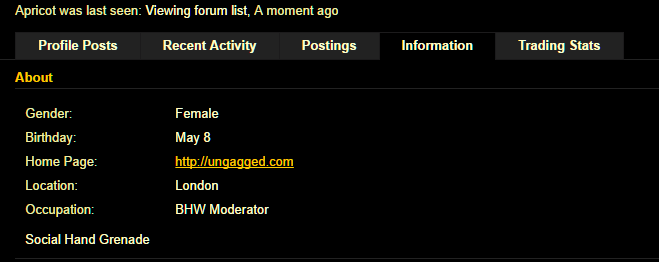
The profile pages don't display much more information than the posting history and this is still available using the search function (instructions below). Outside this, it's mostly the profile posts (which is where the mod notes are sometimes posted), trading stats and personal information which members can choose to selectively display in the account settings.

254f7dcd3846b83d877f99316af113b3.png


You can easily find a banned member's posting history - @Zwielicht mentioned using this --> site:blackhatworld.com "membername"

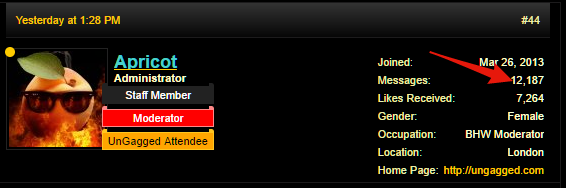
Alternatively, if you're already viewing one of their posts, you can bring up the others by clicking on the message:number at the top of the post:

486e78a1aff9343349cfbcd82647941a.png


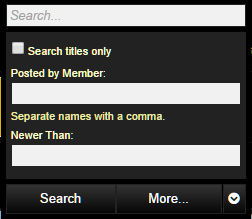
Another way to do this is by using the search box. When you click in the text field, you'll see additional options that allow you to see all posts by a member (if you enter a username, you don't need to provide a keyword in the top search box)
b4965d1a745947ef26c37c9f3f1a144a.png


You can also get the more detailed search page here which lets you narrow it down further: https://www.blackhatworld.com/search/

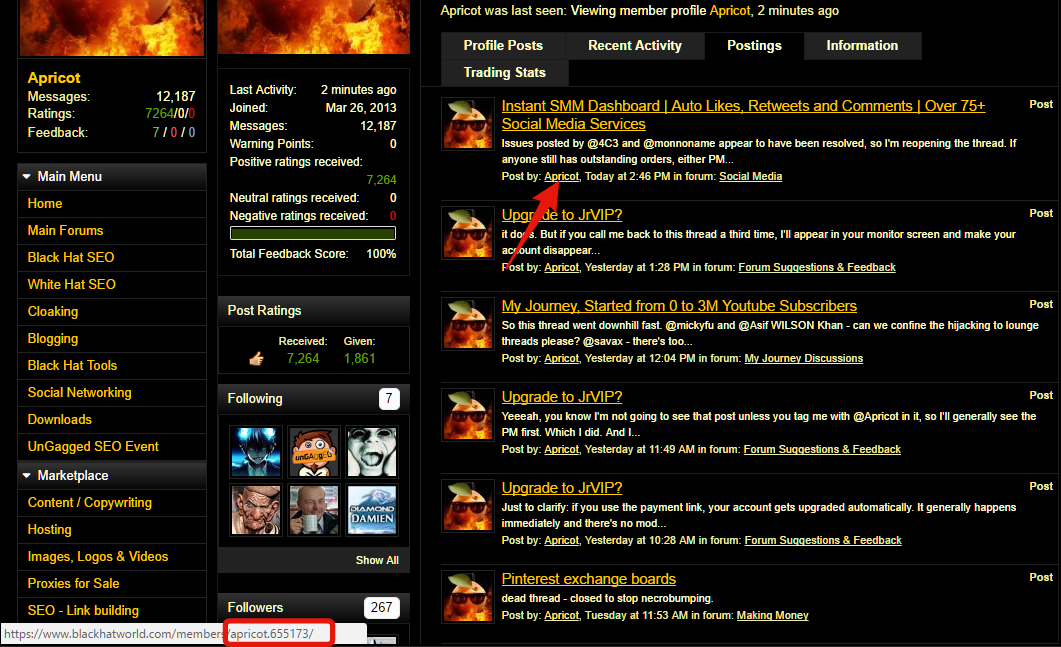
Trading stats for banned members are still visible - just not through the profile page and getting to these is a little more complicated as you need the username and unique ID. You can get this by going to any of the banned member's posts - either in the search list (the results from doing the search above) or in the actual post itself. You need to right click on the link to the user's profile and select "copy link address". (I've screenshotted my profile postings list but you'll get the same link from any post or search result.)


0452334d01810801352bf898cf4c4c4d.png


Paste it in a text file, memorise it, screenshot it - whatever works best. You can see the member's trade by adding their username and ID to this url:
https://www.blackhatworld.com/trade/

For example, to see my trading profile you'd use this link: https://www.blackhatworld.com/trade/apricot.655173/ - this works in the same way for any member, whether you're able to view their profile page or not.

If you're interested in seeing the information that's available, it's worth looking at the "Forums" "Trade" and "Members" dropdowns in the main menu bar on the top.


Bet you're wishing you hadn't dragged me in now...

N1IVO2j
 
Bet you're wishing you hadn't dragged me in now...

How did you guess!!:confused::confused::confused:

How about we just leave things as they are and I'll just bug @Zwielicht with PMs if I want some info on a banned member as he suggested.:rolleyes:

Thanks for the detailed explanation anyway, if nothing else it may help some if they do need to search a banned members profile. I'll just stick with the methods I currently use.
 

akUGxey

If you insist ;)

Selectively leaving parts of the profile publicly available: yes it's possible but not core. There's a lot of implications with custom development, so it'd need a very good use case to justify the development time, bug testing and potential impact on existing functionality.

The profile pages don't display much more information than the posting history and this is still available using the search function (instructions below). Outside this, it's mostly the profile posts (which is where the mod notes are sometimes posted), trading stats and personal information which members can choose to selectively display in the account settings.

254f7dcd3846b83d877f99316af113b3.png


You can easily find a banned member's posting history - @Zwielicht mentioned using this --> site:blackhatworld.com "membername"

Alternatively, if you're already viewing one of their posts, you can bring up the others by clicking on the message:number at the top of the post:

486e78a1aff9343349cfbcd82647941a.png


Another way to do this is by using the search box. When you click in the text field, you'll see additional options that allow you to see all posts by a member (if you enter a username, you don't need to provide a keyword in the top search box)
b4965d1a745947ef26c37c9f3f1a144a.png


You can also get the more detailed search page here which lets you narrow it down further: https://www.blackhatworld.com/search/

Trading stats for banned members are still visible - just not through the profile page and getting to these is a little more complicated as you need the username and unique ID. You can get this by going to any of the banned member's posts - either in the search list (the results from doing the search above) or in the actual post itself. You need to right click on the link to the user's profile and select "copy link address". (I've screenshotted my profile postings list but you'll get the same link from any post or search result.)


0452334d01810801352bf898cf4c4c4d.png


Paste it in a text file, memorise it, screenshot it - whatever works best. You can see the member's trade by adding their username and ID to this url:
https://www.blackhatworld.com/trade/

For example, to see my trading profile you'd use this link: https://www.blackhatworld.com/trade/apricot.655173/ - this works in the same way for any member, whether you're able to view their profile page or not.

If you're interested in seeing the information that's available, it's worth looking at the "Forums" "Trade" and "Members" dropdowns in the main menu bar on the top.


Bet you're wishing you hadn't dragged me in now...

N1IVO2j

That's legitimate eBook quality.

If only it could be sold in a recurring subscription model.
 
Back
Top