
You are using an out of date browser. It may not display this or other websites correctly.
You should upgrade or use an alternative browser.
You should upgrade or use an alternative browser.
[Method] Create Unlimited Instagram Accounts through your Desktop.
- Thread starter Cryogenesis
- Start date

HAkorehdeh
Power Member
- Feb 21, 2015
- 550
- 228
This really worth my try. Thanks OP!!

FixYourSelf
Regular Member
- Jun 17, 2016
- 216
- 46
how do u change ip?..

rrd84
Junior Member
- Oct 9, 2011
- 120
- 10
overall great method...
to make this method work,
one need :
1. dynamic ip ISP (very important)
2. email service for unlimited instagram accounts creation, with no phone or no additional mail verification,
3. phone verification service for instagram accounts
4. rooted or pre-rooted bluestacks compatible with BS tweaker latest ver.
5. few friends, at least 3, who can help you managing & run tons of accounts, manually or by using automation tools.
if someone can suggest best working services, for unlimited email creation & unlimited phone verification, reliable, doesnt matters if paid.
also working unlimited phone verification service for twitter.
 @ op thank you for sharing this !!
to make this method work,
one need :
1. dynamic ip ISP (very important)
2. email service for unlimited instagram accounts creation, with no phone or no additional mail verification,
3. phone verification service for instagram accounts
4. rooted or pre-rooted bluestacks compatible with BS tweaker latest ver.
5. few friends, at least 3, who can help you managing & run tons of accounts, manually or by using automation tools.
if someone can suggest best working services, for unlimited email creation & unlimited phone verification, reliable, doesnt matters if paid.
also working unlimited phone verification service for twitter.
@ op thank you for sharing this !! 
tehsmz
Newbie
- Sep 1, 2016
- 4
- 0
Hello guys and thank you @Cryogenesis for sharing this. Great advice!
First of all this is my first post here so please be gentle. I've run into some problems that are spoiling all the fun. Taking into consideration that others in here saying this is working just fine ... the issue is clearly on my end. Long story short, I'm getting this error message no matter what i do.
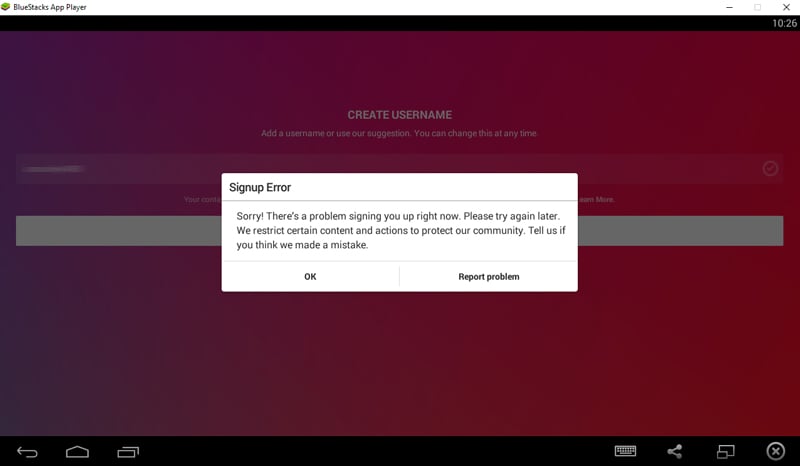
I've followed op's guide step by step.
1. Get a rooted version of BlueStacks (0.9.30.4239) and Bluestacks Tweaker (3.12)
2. Change IP (double checked)
3. Update (in this very order): GUID, Android ID, Google Advertising ID, Phone Model
4. Installed Instagram via Google Play (via downloaded .apk also, to bypass the Google Play login)
5. Cleaning Instagram cache after every attempt
6. Using gmail, hotmail, yandex
7. Using randon name generator for accounts
I've even tried to create a Facebook account first (which worked) and after that log-in in Instagram. The account was suspended instantly.
It's getting ridiculous. In like 6 hours I've just made a single working account. I've running out of options. Any ideas?
Thanks
First of all this is my first post here so please be gentle. I've run into some problems that are spoiling all the fun. Taking into consideration that others in here saying this is working just fine ... the issue is clearly on my end. Long story short, I'm getting this error message no matter what i do.
I've followed op's guide step by step.
1. Get a rooted version of BlueStacks (0.9.30.4239) and Bluestacks Tweaker (3.12)
2. Change IP (double checked)
3. Update (in this very order): GUID, Android ID, Google Advertising ID, Phone Model
4. Installed Instagram via Google Play (via downloaded .apk also, to bypass the Google Play login)
5. Cleaning Instagram cache after every attempt
6. Using gmail, hotmail, yandex
7. Using randon name generator for accounts
I've even tried to create a Facebook account first (which worked) and after that log-in in Instagram. The account was suspended instantly.
It's getting ridiculous. In like 6 hours I've just made a single working account. I've running out of options. Any ideas?
Thanks
Last edited:


kingvestor
Regular Member
- Jun 26, 2016
- 483
- 303
I have two questions
1. Is there any way to use phone instead of bluestack, if there is any then what is the similar software to bluestack tweaker for android phone ?
2. Is it safe to use a software to change your IP (like Hideman VPN) ?
1. Is there any way to use phone instead of bluestack, if there is any then what is the similar software to bluestack tweaker for android phone ?
2. Is it safe to use a software to change your IP (like Hideman VPN) ?

alucard666
Newbie
- Sep 4, 2016
- 2
- 0
nice post Thanks OP...


kingvestor
Regular Member
- Jun 26, 2016
- 483
- 303
Why would you need BlueStacks for creating IG accounts? You can create accounts via PC/laptop.
I think the risk is higher if you register through Instagram website, I compare all of my accounts and most of the accounts registered through android devices still running good by the website/pc one is banned

seymour
Newbie
- Jun 3, 2014
- 29
- 8
Hello guys and thank you @Cryogenesis for sharing this. Great advice!
First of all this is my first post here so please be gentle. I've run into some problems that are spoiling all the fun. Taking into consideration that others in here saying this is working just fine ... the issue is clearly on my end. Long story short, I'm getting this error message no matter what i do.
I've followed op's guide step by step.
1. Get a rooted version of BlueStacks (0.9.30.4239) and Bluestacks Tweaker (3.12)
2. Change IP (double checked)
3. Update (in this very order): GUID, Android ID, Google Advertising ID, Phone Model
4. Installed Instagram via Google Play (via downloaded .apk also, to bypass the Google Play login)
5. Cleaning Instagram cache after every attempt
6. Using gmail, hotmail, yandex
7. Using randon name generator for accounts
I've even tried to create a Facebook account first (which worked) and after that log-in in Instagram. The account was suspended instantly.
It's getting ridiculous. In like 6 hours I've just made a single working account. I've running out of options. Any ideas?
Thanks
Seems instagram is harder to create accounts now. Without proxy works perfecly. But with proxy Is always getting this message. Take a look here buddy, more people are like you and me --> i-cant-create-instagram-accounts-something-went-wrong-try-again-later.873249/
Still no final solution.
------------
Thanks to the creator of the post. Method works OK and the idea of change model, id, etc. Is a must needed!
Regards
rrd84
Junior Member
- Oct 9, 2011
- 120
- 10
Hello guys and thank you @Cryogenesis for sharing this. Great advice!
First of all this is my first post here so please be gentle. I've run into some problems that are spoiling all the fun. Taking into consideration that others in here saying this is working just fine ... the issue is clearly on my end. Long story short, I'm getting this error message no matter what i do.
I've followed op's guide step by step.
1. Get a rooted version of BlueStacks (0.9.30.4239) and Bluestacks Tweaker (3.12)
2. Change IP (double checked)
3. Update (in this very order): GUID, Android ID, Google Advertising ID, Phone Model
4. Installed Instagram via Google Play (via downloaded .apk also, to bypass the Google Play login)
5. Cleaning Instagram cache after every attempt
6. Using gmail, hotmail, yandex
7. Using randon name generator for accounts
I've even tried to create a Facebook account first (which worked) and after that log-in in Instagram. The account was suspended instantly.
It's getting ridiculous. In like 6 hours I've just made a single working account. I've running out of options. Any ideas?
Thanks
OMG.. did they got a fix for this method ?
I dont have any problem at my end..
Is your ISP providing you a dynamic IP? each time you restart your modem/router?
or you are using some other service to change your IP?
seymour
Newbie
- Jun 3, 2014
- 29
- 8
Nope, but keep this thread clean because here is for talking about the method not about the problems. Just follow the thread I put before (I can't post links yet) . The link is from this forum. Just search at you will see palOMG.. did they got a fix for this method ?
I dont have any problem at my end..
I will tell you if I found something!
socialsouk
Registered Member
- Nov 15, 2015
- 69
- 4
Its possible to create using this method but detection is the prob. Instagram detects you via behavior forget about content even. The seconds you spend, the places you touch mobile etc... These will get you uncovered its just in Instagram hands to do purge from time to time especially when some scam goes viral forcing them to reply with a purge. ex. http://www.bbc.com/news/technology-37172022 Such spammers coz us to suffer. We help local startups grow and then someone thinks he is smart with some spam stealing money from people affecting everyone in the business ...

MajorDork
Newbie
- Sep 3, 2014
- 26
- 2
You don't have to change your IP to make new accounts. You can just uninstall Bluestacks and reinstall it. Just use a different gmail account each time you register Bluestacks. Also when making accounts you can use a gmail account like this to save on emails. [email protected] [email protected] [email protected] etc. Gmail sees it as the same email even with periods as does IG. Hope that saves people some time. Now unless you are making accounts to sell, you might want to use a different OG email.

SuppWhitey
BANNED
- Jul 3, 2016
- 289
- 108
Don't claim things you haven't tried, you need to change your ip address when creating IG accounts whether you change the device or not even with unique devices(not talking about Bluestacks but real phones) .You don't have to change your IP to make new accounts. You can just uninstall Bluestacks and reinstall it. Just use a different gmail account each time you register Bluestacks. Also when making accounts you can use a gmail account like this to save on emails. [email protected] [email protected] [email protected] etc. Gmail sees it as the same email even with periods as does IG. Hope that saves people some time. Now unless you are making accounts to sell, you might want to use a different OG email.