Permanently Closed Marketplace Sales Thread

Status
Not open for further replies.
Interface Guide + Bonus Code

I'm back and it's that time again! Based off of feedback from you we've put together Quick Start Guides to help everyone get familiar with the new SERPWoo v3 Interface. I know it's been a lot of exploring and surprise learning, but thanks to your feedback we've been able to create these guides to help users get started faster and fully control the SERPWoo v3 interface to maximize crushing their competition - I mean dominating the SERPs. :wink:

The first guide in this series is for the Main Interface (click the image to read the quick start guide):

xTeVRqv

I know some of you just want the bonus code so here it is (there will be a bonus code everyday for every guide):

Bonus Code (Expires within 48 hours): (ONLY-AVAILABLE-WITHIN-THE-NEWSLETTER-SORRY)

mOlkHZo
 
Is there a free trial?
Yes you can create a free account and will be supplied with 3 free keywords to get started. You have that free account forever, whenever you feel you are ready to upgrade there is a simply "Upgrade My Account" button. Click here to get started with a free account. Message us back whenever you get a paid plan and I'll shoot you over a bonus code.
 
This looks good, will give it a try, tired of Positionly reporting inaccurate stuff.

Thank you for the kind words! If you need anything don't hesitate to give me a shout!

--

Project Wizard Guide + Bonus Code

I'm back with another guide and bonus code. The next quick start guide in this series is the Project Wizard. In the past it was a bit less intuitive but taking your feedback we've transformed it's ability to help you control SERPWoo more easily.

Project Wizard allows you to create multiple projects targeting multiple different countries, and localities (local SEO) as well. You can create variations of projects which normally might take you multiple attempts at duplicating. So for example now you can create a project that's targeting National wide terms and then create a variation for those same terms with a locality within your city, and the surrounding cities and suburbs of your business/clients' business.

Another new feature is you can also import other project's keywords and/or domains as well as upload textfiles of keywords directly into the project wizard. So if you have an already created project and simply want to start tracking those same keywords with a new location or on a mobile, you can now simply import the project's data without a lot of hoops to jump through.

So let's get started with this guide and let us know what you think!:


And yes for those of you who asked, videos are in the works, Christina is working overtime to get them here!

Past Quick Start Guides:


To the top of the... wait I guess you guys want that bonus code for today?

Bonus Code (Expires within 48 hours): (ONLY-AVAILABLE-WITHIN-THE-NEWSLETTER-SORRY)
 
Online Reputation Repair: White Hat SEO Guide

As promised we've got Jacob Hagberg here to help kick off the first in a series of hyper-focused ORM topics: The White Hat SEO's Guide to Online Reputation Repair!

Jacob goes over the dos and don'ts of ORM (online reputation management) client work, the varying differences between regular SEO, where you are trying to rank a single domain for a keywords, versus ORM, where you are trying to take over complete control of page 1 and 2 = pushing down negative rankings while moving up the positive ones.

This is a great piece for anyone starting out or thinking about entering the ORM space, even I learned a couple of new tactics I'll be utilizing in the future. So lets get started:

NU1HtuE
 
Disable Sitelinks/Local Maps From Keyword Dashboard (SERP View)

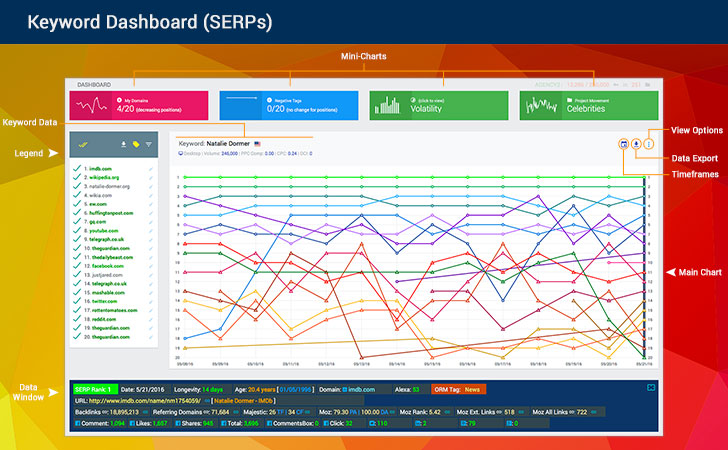
Are those pesky sitelinks / local maps messing up your ranking count? Now you can get rid of them from your view within the Keyword Dashboard! Simply click on the Options icon in the top right corner and un-select "View Sitelinks/Maps", example:

lNhtu5v
 
SERPWoo Keyword Finder Taking Home The Gold?!

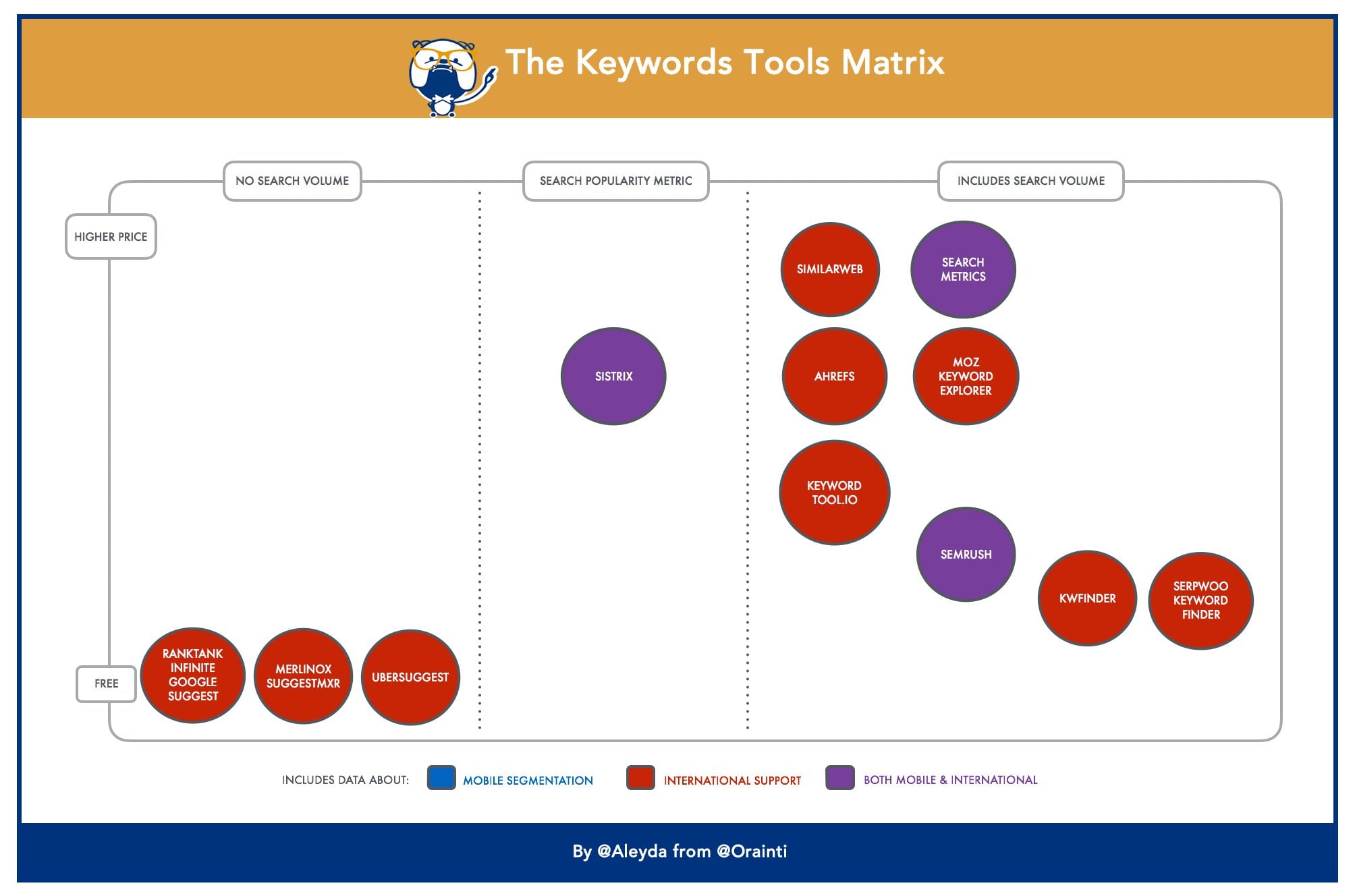
Due to recent events with Google Keyword planner, International SEO Consultant & Keynote speaker, Aleyda Solís, is creating a Keyword Tools Matrix (coming out soon), https://twitter.com/aleyda/status/753899968293896192, and SERPWoo seems to be the current best offer in terms of pricing and value:

47q0zIf

Thank you Aleyda and to all SERPWoo customers who made this possible with their suggestions, feedback, comments, and brutal honesty. KWFinder 2.0 just came out onto the scene, but I can tell you right now we are already working on making it even better with some new features no other keyword tool in HISTORY has ever provided. Stay Tuned!!

5S8Ykms

Click Here to Sign Up Today and get a 20% keyword increase bonus when using the Bonus Code "BHW" with your paid account. (Quick Start Guide: How To Enter a Bonus Code)
 
New Feature:
Export SERP Rankings For Every Keyword Within A Project

We had a bit of difficulty naming this feature, but I guess explaining it is alot easier. If you've ever had a project with several keywords who's SERP rankings, top 10 results for example, you wanted to export in one go - Now you can!

Introducing: "Project Keywords Search Engine Results Export!"

cTL1Ai0

1. First step. Go into a project, then click on the export link:

qOc2Mou

2. 2nd step. Select the View Range (default = just yesterday) for the date(s) you would like to export top ranking positions - for ALL keywords inside said project, and click the Generate button!

oI8sH5l

3. 3rd step. The system will start processing (yes you can leave the page) and when it's done you will get an alert for your new download link. Click on the download link and you'll get a nicely formatted CSV with the following columns:

  1. SERP date
  2. SERP Rank
  3. Keyword
  4. Volume
  5. Domain ranking
  6. Exact URL ranking
  7. Page Title

1pNgSHa

I tried it on a project with 500+ keywords, went with a wide View Range of January 1st, 2016 to yesterday, July 18, and got back a 1.1GB file - Excel is still trying to open that file. You probably don't want something that expansive. It's setup to do a single day - yesterday's rankings, as the default, so you'll get a nice clean list of data.

You can select the #1 positioned URLs - or Top 3, 5, 10, 20, 30, 50, or 100+.

Most projects will come in less than 200kb in size, so you should be good to go, but I can tell you if you've got a large project and then expand the view range... it might take several minutes before you get that notification that your CSV download is ready.

There is a checkbox called "Strict Position Results", you can check that in cases where you want exactly those position amounts. In situations where keywords have sitelinks, local maps, or images the rankings can be off, so when we pull top 20, we might get back 26 results. "Strict Position Results" will only show you exactly the top 20 positions if you select it.


GiGoqw4

As always, let us know what you think - and if you find any bugs or quirks just let us know within the in-app messaging system so we can stomp em out!

Bonus Code (Expires within 48 hours): (ONLY-AVAILABLE-WITHIN-THE-NEWSLETTER-SORRY)
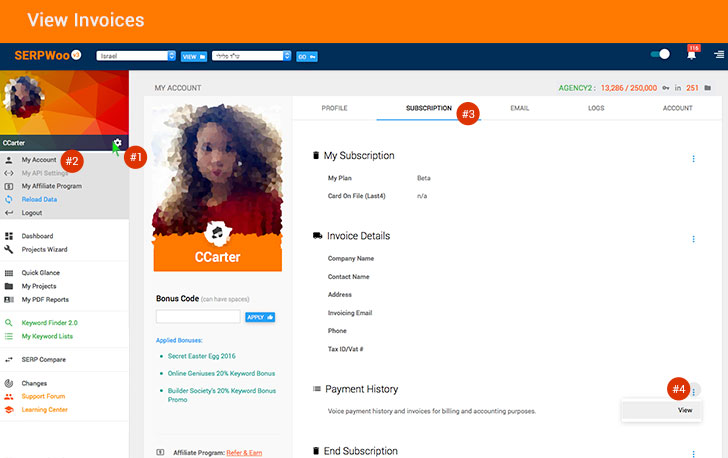
(How To Enter A Bonus Code)

To The Top of The SERPs,
Carter, Jason, and Tommy
 
How do I get the bonus code? I'm a newsletter subscriber (I get emails from you). Thanks.
 
How do I get the bonus code? I'm a newsletter subscriber (I get emails from you). Thanks.

In the newsletter email the bonus codes appear (95% of them usually apply to paid accounts):

QK4e7qP
 
Yo. Save me trawling through the thread/internet - is this accurate for local, UK SERPS? (i.e. Google.co.uk, UK post codes, UK cities)
 
Never mind. I've signed up. Incoming PM for 20% more keywords.
 
Never mind. I've signed up. Incoming PM for 20% more keywords.

Cool, let me know if you need anything else!
--

Updated: Email Notifications

The Problem = Alerts were all over the place, no organization, no way of knowing what you should concentrate on, and if you had multiple keywords in multiple projects - forget about it.

We went back to the drawing board and using customer feedback and suggestions we redesigned the email alerts to help you get organized and focused faster. Here is a screenshot as well as some quick explanations of what we implemented:

lOGxz0r


1. Colors - We scrapped the old coloring system which wasn't really explained and went with simple colors: Red = Bad, Green = Good, Blue or Gray = New/Neutral/Other.

2. Project Grouping - Alerts are now grouped by their respective projects. In total you will be shown the most recent 40 alerts which are now segmented by projects. The project's will either have a green, red, or blue background to help distinguish good news from bad news or neutral news. This data is simply based off alerts detected from current new alerts waiting for you inside SERPWoo.

3. Tags - If you tagged a URL you'll see it state that the URL is either a positive or negative, and the colors coordinate accordingly - but most importantly the logic that follows helps you understand your campaigns better.

If a negative tag declines that's considered GOOD news! If a positive URL's tag increases that's also good news - those two instances are going to have green borders for the alert.

It works the other way around too, if a negative tag increases that's BAD news, and if a positive tag decreases that's also BAD news - actually I'm going to use doublespeak and call it "Not Good" news.

4. Summary - At the top of each project section there is a summary of the total new alerts found within the system - remember we only display the most recent 40 (previously was only 20), but we will state exactly how many other 'Good' and 'Not Good' Alerts there are waiting for you within SERPWoo.

5. Really Negative stuff gets more emphasis. Example:

VjMPUsP


^^ You'll notice that since usmagazine.com was tagged negative, and now it has been detected that is has started to re-rank for the keyword "angelina jolie", it's red borders are thicker. This thickening also happens if a negative tagged URL/domain starts to increase it's position (from rank #20 to #10 - based on your alert settings for the keyword and domain/url) for example. This thickening will help when you are quickly scrolling through alerts to check on what's important and what's not.

If you've never tagged a URL negative you don't know what you are missing, we've got some more in-depth magic coming specifically around the tagged state of a URL, so stay tuned!

Here is what we are working on for this summer:

  1. Email Notification Update
  2. Sharing Options
  3. SERPWoo API
  4. Global Stats
  5. SERP Sightings
  6. Classic Quick Glance Feature
  7. 3rd party metrics recode
  8. Reporting Module
  9. Client Feature (sub-accounts)
  10. Keyword Grouping Feature

As always, if you have any questions, comments, feedback - let us know within the in-App messaging system!

Bonus Code (Expires within 48 hours): (ONLY-AVAILABLE-WITHIN-THE-NEWSLETTER-SORRY)

(How To Enter A Bonus Code)

To The Top of The SERPs,
Carter and Jason
 
Does Google Bombing Still Work in 2016?

LWehoX8

So does Google bombing still work in 2016? Apparently?!?! ORM Consultant Brandon Hopkins (@BHopkins) stops by SERPWoo to show us one of his latest experiments within the SERPs and "you'll be shocked at what he reveals!"

Well actually nothing surprises me now a days but Google's got some explaining to do.

mQRqZtl

Even a GSA SER blast can push someone into the top #4 position without "higher quality" content. Google's got A LOT of explaining to do!

Here are the juicy details: Does Google Bombing Still Work in 2016?
 
Local SEO Rank Tracking Using GPS Coordinates

I'll let Christina take it away regarding the new GPS Coordinate feature for Local SEO:

IC77THY


--

Re-Imagined Global Stats v3

Global Stats is back. Now we've segmented the data so you can do comparison of volatility for local versus non-local, desktop, mobile, and the overall. But wait there is more! You can now compare volatility for up to 5 locations, and get the stats for the overall volatility, local, non-local, desktop, mobile and search volumes (under 1K, 1K+, 10K+, 100K+, and 1MM+) too!

FYI - Data is real-time within the last 10-20 mins, so if you happen to check it a little after midnight, you might not see any data yet for the current day mate :wink:

Check it out and let me know what you think!

QZWBSqf


--

Here is what we are working on for the late summer/early fall:

  1. Email Notification Update
  2. Global Stats
  3. SERP Sightings
  4. Sharing Options
  5. SERPWoo API
  6. Classic Quick Glance Feature
  7. 3rd party metrics recode
  8. Reporting Module
  9. Client Feature (sub-accounts)
  10. Keyword Grouping Feature

As always, let us know what you think - and if you find any bugs or quirks just let us know within the in-app messaging system so we can stomp 'em out!

To The Top of The SERPs,
CCarter, Jason, and t0mmy
 
please pm me a discount coupon

We do not have "discount coupons"; However clicking the link https://www.serpwoo.com/#BHW will get you an 20% keyword capacity increase to whatever paid plan you sign up for. As well I PMed you an additional bonus code for more keyword capacity.

Let me know if you need anything else!
 
I don't see any change in the keyword capacity on the pricing page. Can you share the bonus code?

Thanks!
 
Status
Not open for further replies.
Back
Top