Permanently Closed Marketplace Sales Thread

Status
Not open for further replies.
All this is caused because the backconnect proxies company found a problem and they are looking for a solution. Its not on our side.
.

no it is not as my proxies work fine.
the proxies work, not blocked by google and I get the visits. I can see in analytics, server log etc. also in Analytics i see them coming from the keyword.
only NOT counting in webmaster tools

look my screenshot form IGR. has to be something different. any idea ?
Bildschirmfoto 2015-08-10 um 19.28.34.png
 
you have to wait at least 2-3 days to be shown on your webmasters. Check again on 13th and then you will be able to see traffic from 10th.Webmaster tools always has a delay of 2-3 days.I checked my webmasters tools.Today i can see traffic made on 8th.Put your mouse over blue and red line and check the date shown.Hope that helps
 
Last edited:
no it is not as my proxies work fine.
the proxies work, not blocked by google and I get the visits. I can see in analytics, server log etc. also in Analytics i see them coming from the keyword.
only NOT counting in webmaster tools

look my screenshot form IGR. has to be something different. any idea ?
View attachment 68820

Same issue. I see the traffic everywhere (Analytics, server logs, DNS logs) and even I see it working through the show internal browser option in the tool itself. The number of impressions is up but the actual click is not being seen by Webmaster tools. Everything else, including analytics, is seeing the click.

This is dating back to the 5th August so more than 2-3 days, plus as said webmaster tools has already updated and shown the increased impressions. Its just not showing the clicks, even though they are there.
I am doing 1000 clicks a day according to every single metric I have except webmaster tools.

So to put this in simple terms.

Setup is OK. Everything working good. Proxies great. Visually verified searched taking place and all logs show the traffic. Anayltics recorded the increased impressions of the search term. Does not record the clicks.

So the question simply "Under what circumstances does webmaster tools not record clicks but does record the impression?".
 
Last edited:
The only odd thing, and this might explain the issues of course is this.

I have the 'show internal browser' function on so I can see what it is doing.
When Insane Google Ranker finds the site is visits it, the page opens OK.
Then it goes back to Google and displays the message '
"Redirect Notice
The previous page is sending you to http://www.domain.com


If you do not want to visit that page, you can return to the previous page."

Then it clicks again and loads the page again, then it goes through and clicks through internal pages etc etc as normal.

So what is this stage where it first fully loads the clicked page and then goes back to Google with the redirection warning, then clicks and loads the page again. That bit seems really odd and I am wondering if that's why we are seeing the data everywhere except webmaster tools somehow?

insane-ranker-odd-thing.png
 
Last edited:
Same issue. I see the traffic everywhere (Analytics, server logs, DNS logs) and even I see it working through the show internal browser option in the tool itself. The number of impressions is up but the actual click is not being seen by Webmaster tools. Everything else, including analytics, is seeing the click.

This is dating back to the 5th August so more than 2-3 days, plus as said Analytics has already updated and shown the increased impressions. Its just not showing the clicks, even though they are there.
I am doing 1000 clicks a day according to every single metric I have except analytics.

So to put this in simple terms.

Setup is OK. Everything working good. Proxies great. Visually verified searched taking place and all logs show the traffic. Anayltics recorded the increased impressions of the search term. Does not record the clicks.

So the question simply "Under what circumstances does analytics not record clicks but does record the impression?".

The only odd thing, and this might explain the issues of course is this.

I have the 'show internal browser' function on so I can see what it is doing.
When Insane Google Ranker finds the site is visits it, the page opens OK.
Then it goes back to Google and displays the message '
"Redirect Notice
The previous page is sending you to http://www.domain.com


If you do not want to visit that page, you can return to the previous page."

Then it clicks again and loads the page again, then it goes through and clicks through internal pages etc etc as normal.

So what is this stage where it first fully loads the clicked page and then goes back to Google with the redirection warning, then clicks and loads the page again. That bit seems really odd and I am wondering if that's why we are seeing the data everywhere except analytics somehow?

View attachment 68828

Please i ask the people to read the thread, because we can't answer all the time the same things.

1.- Analytics does not have nothing to do here. Its Google Webmaster Tools... why? Because we are measuring what happends on Google and the only way to know the impressions and clicks on the Google's pages is using Webmaster Tools.

2.- Google Webmaster Tools are delayed. Its easy to corroborate. Just login and see exactly the stats that are being showed and you will notice that are stats from some days ago.
Usally, according to our experience, you should notice what really is happenning in Google, 5 days latter.

3.- The redirect page is a page that Google uses to track the clicks, is something that we cannot bypass or it could harm your CTR. But, again is a page from Google that they always uses to track. Maybe a lot of times the people does no see it, but its there always. In our software is more visible for some reasons that we can not disclose but, again, is nothing strange, is the typicall redirect page that Google uses to control theur numbers.

4.- If Analytics register or not the clicks does not have any importance and this has being tested in many Case Studies. Is just what Webmaster Tools shows what matters.

5.- During the past week the backconnect proxies was having some problems and this could affect the perfomance on the clicks. But people could use HMA or the public proxies in this cases. However the backconnect proxies are working at 90% now, so the problem is resolved.

Finally, and most important thing: dont use this thread a s a support thread. BHW rules does not allow us to answer more than once every 24 to 72 hours. We have a HelpDesk to provide support, posting here only drives to unasnwered questions, support needs that does not are answered, etc. because we dont monitor this forum all the time , since we can't post in shorter intervals.
So, please do not post here all this things that should be answered in the Help Desk. Thanks.
 
Last edited:
Sorry my mistake. Every time I wrote Analytics I should have said 'Webmaster Tools' ... I have over complicated it now with that mistake.

It is Webmaster tools that does not show the clicks. Actually analytics does show them.

Should have had my coffee before posting :)
 
3.- The redirect page is a page that Google uses to track the clicks, is something that we cannot bypass or it could harm your CTR. But, again is a page from Google that they always uses to track. Maybe a lot of times the people does no see it, but its there always. In our software is more visible for some reasons that we can not disclose but, again, is nothing strange, is the typicall redirect page that Google uses to control theur numbers.

OK thanks for that. I know they show it all the time for certain browser headers, but I have never seen that it loads the site first and then goes back to google to show this warning... ie I have always seen this warning before it goes to the site, so seemed a bit odd. However you say its normal, so OK.

Can you update the help documents at some point to reflect the latest version, they are quite old and you still have references to things that don't exist anymore yet other things like 'Old Search Mode' dont seem to be mentioned at all. It's hard to work your way through the thread to find all these things.

Perhaps add a version change log to your site, and then each time just list the new features there so people can quickly reference it.

Anyway talk in a week.
 
bought and very regret for making the purchase. Need to pay addition for HMA service to get the thing run. Test on public proxy for whole days not even get 1 click happen. With HMA, click is rather slow, let it runs for half day only generate about 100+ impression, from the report, only 5 clicks are unique, the rest all are impressions. Some even show my own IP. I would think serpify is doing better with even I just use the serpify free version. I got click, and no proxy is needed and it still make me some unique clicks of IP from different countries.

If can have refund I will definitely ask for it. Can I?
 
From my experience: DON'T block all cookies in internet explorer!
If you block coookies, webmaster tools will not show clicks.
 
From my experience: DON'T block all cookies in internet explorer!
If you block coookies, webmaster tools will not show clicks.

Thanks for your information.

Probably you are right, also there could be another reasons in the IE settings, VPS settings or IGR's Projects configuration. Thats why we release more than once the basic instructions to succesfully achieve the results.

I guess that if someone do not follow that instructions will take more time to see results on Webmaster Tools.

We cant disclose here some information (because we dont want that Google or anyone understand what we are doing and can block it), but believe us that our recommendations or instructions have some reason. Its not only because we want you to run it in that way. There are reasons behind, believe us. Make the test.

---------------------------------------

Great News: NEW UPDATE.

Notice that this update will let you run upto 5 threads of one project (only if you are running just one project). That will be usefull spoecially running backconnects, since it will give you a lot of clicks and it will help you to achieve faster hight CTR in Webmaster Tools (as long as you run one keyword).

Also this new update have many fixes and improvements.

H0Tzgmv


------------------------------------------

Some testimonials (in this same thread and real users stats)... there are more in this same thread...


In Google Webmaster Tools, doing a Case Study in the website of a customer that is a member of BHW we get this, per example: (Its not BETA testers)

z3cdaUd


OTk6sZi


YXvcu8B


vfrlTAD


.
 
Last edited:
Can someone post some real life results using IGR? It will probably be over a longer period of time, but where you started in the serps and where you wound up?
 
Well this doesnt work for me:

the Impressions are going up but the Clicks are not counted.

Look how for the keyword impressions go up like crazy but clicks not.
So this actually is having NEGATIVE impact as my CTR is lower now !

9BnwNae


hope this can be resolved. If not I will have to stop using this software.
 
Last edited:
Well this doesnt work for me:

the Impressions are going up but the Clicks are not counted.

Look how for the keyword impressions go up like crazy but clicks not.
So this actually is having NEGATIVE impact as my CTR is lower now !

9BnwNae


hope this can be resolved. If not I will have to stop using this software.

What i see is that the clicks grows too. Its the blue line.
For some reason (maybe the normal ups and downs) it had a down in the last days, but you have to wait to see if its not just some ups & downs.

However, if i am not confusded, we offer you to connect to your VPS to check everything... and we dont get any response.

Also, did you follow the instructions? The lower CTR increment usually is seeing when the user runs more than one URL and more than one keyword.
But with the clicks, there is no problem. The impressions grows and the clicks too... in fact a few days ago both get its highest point, that was the same for both.

And then, the CTR, the impressions and the clicks goes down. Its important to see in the server whats going on.

We offer again to connect to your server using Team Viewer and check everything to make it run with a hight performance.

----------------------------------------------------

We dont release yet the update because we are testing it, because we made some big changes.
The update will be a BETA, because it has not being tested by many users, so it could contains bugs, please report it using the HelpDesk and NOT the forum.

If someone dont want to BETA test, just skipp the update and wait until its tested and we release the stable version.

------------------------

Today we had (now its 13:00 hours here) only ONE ticket in the Help Desk.
I don't think that using a HelpDesk is nothing new. Most software developers offers something similar to offer support.
Its strange that we have some trouble to make people use that support channel.
We even add a LiveChat a week ago, to let the users have a fast contact if needed.

---------------------------------

This was the only ticket:

support connected to my VPS today and checked my settings, IGR settings and webmaster tools.

They agree that it looks weird but we now have set up more threads with same keyword and url to see what happens. maybe those are the usual up and downs, we will know in 5 days.
will report back then.

support very nice with teamviewer, that is a great service.

Thank you. Your open mind to listen and cooperate was great.

I am absolutely sure that he will get a great CTR, its taking some days (but the clicks are start showing!).
Something that i learned is that getting high CTRs from Rome, Paris, London, California, etc takes a little more time.

Not much time ago we work with some webmaster that is ranking a good position in a high competitive niche: A very well know island in Spain (Palma de Mallorca) and we need to get really many clicks to get results. Because his page is in the tourist niche in one of the top targets of tourism in Europe!!

We needed to run 3 VPS with many backconnects, when, as a comparision, we needed only one VPS, 5 backconnecxts and 5 days to get 90% of CTR in less competitive niches.


Last edited:
support connected to my VPS today and checked my settings, IGR settings and webmaster tools.

They agree that it looks weird but we now have set up more threads with same keyword and url to see what happens. maybe those are the usual up and downs, we will know in 5 days.
will report back then.

support very nice with teamviewer, that is a great service.
 
support connected to my VPS today and checked my settings, IGR settings and webmaster tools.

They agree that it looks weird but we now have set up more threads with same keyword and url to see what happens. maybe those are the usual up and downs, we will know in 5 days.
will report back then.

support very nice with teamviewer, that is a great service.

I already answer in other post. Im positive sure that this user will get a very high ranking soon. He is a kind person that are very open to listen.

In fact he could use this new feature:

sKxkaFi


This is the perfect tools for ranking high. You create your ONE keyword project, with mobile user agents. And if you get 5 backconnects you make it run 5 threads and if you have more than 5 backconnects you make it run 10 threads.

You will get A LOT of clicks.
We tested all the past days and we get really high number of clicks.

Google will love it !!

Just lets keep it in secret...

.
Shame limited to one project.. Then Max is 10 threads total... Already running 30 threads with 250 back connects so this would be a step back :(

You need to understand that not everyone have 250 backconnects!! :)

However, you will need a lot of RAM and a powerfull VPS to run many threads.

Its a good idea to run several VPS, sharing the backconnects.

We run, 3 VPS with 15 backconnects shared in the 3 VPS and we get really great results!

For everyone that have 10 or more backconnects, we recommend to run into 2 or more VPS (one VPS for every 5 backconnects), sharing the backconnects. In TrustVM we get cheap but good VPS (something like 18 USD for 2 cores, and 3 gigas with W7)


.
 
Last edited:
Shame limited to one project.. Then Max is 10 threads total... Already running 30 threads with 250 back connects so this would be a step back :(
 
You need to understand that not everyone have 250 backconnects!! :)

However, you will need a lot of RAM and a powerfull VPS to run many threads.

Its a good idea to run several VPS, sharing the backconnects.

We run, 3 VPS with 15 backconnects shared in the 3 VPS and we get really great results!

Actually this is one area you should be quite happy with, the low resource requirements. I used another tool about 5 months ago and that used 150-200mb a thread! I find your tool averages 15-20mb a thread in the background processes, and rarely goes over 40mb a thread with CPU use so low it hardly registers.

So nice work to be efficient!
 
Last edited:
Again receiving Error Page message on both Reverse proxies and HMA.
Tried version 2.14 and 2.17...please fix this ASAP.
 
Actually this is one area you should be quite happy with, the low resource requirements. I used another tool about 5 months ago and that used 150-200mb a thread! I find your tool averages 15-20mb a thread in the background processes, and rarely goes over 40mb a thread with CPU use so low it hardly registers.

So nice work to be efficient!

Thanks.

If you look the software is very small executable compared with today standards, because we use ASM and get non bloated and fast executables, and our coding standards are always keeping an eye in keep it with the same idea: fast and efficient code.


Again receiving Error Page message on both Reverse proxies and HMA.
Tried version 2.14 and 2.17...please fix this ASAP.

We take very seriously all this kind of reports, because many times it implies a change in Google. (Google changes once a month more or less)

I made some tests and everything works fine in our VPS, but we will continue checking.

--------------------------------

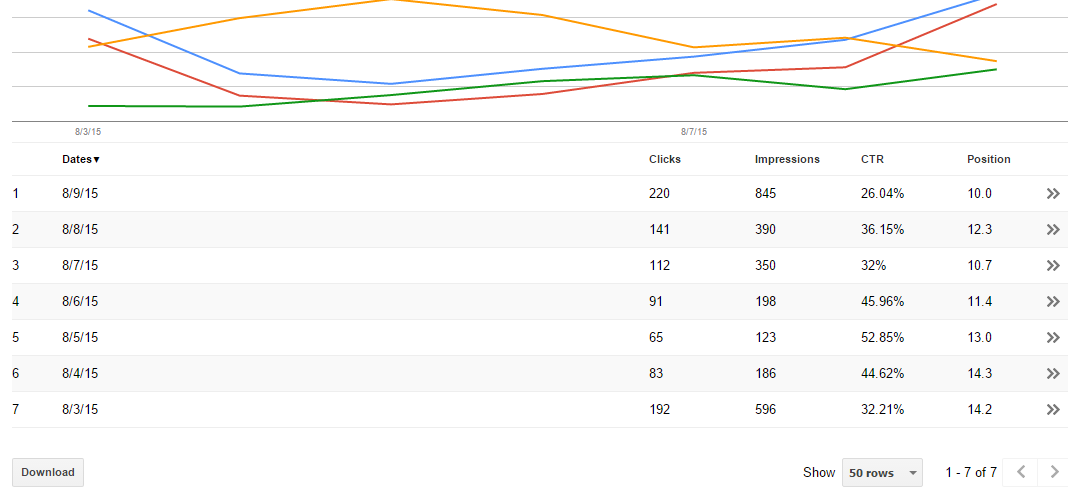
I run IGR on VPS.Those are my results from 3Aug-9Aug.
Last days like all i had serious problems with back connect proxies but even with problems position from 14.2 goes to 10

Dye8K3B


Hope it will go better after IGR updates and after backconnect proxies fix the problem

Backconnect proxie's problem was something outside our area. Reverseproxies is a different company, we dont have any kind of agreement with them, we are just customers and nothing more, we are not even affiliates.
But as far as we notice, it looks like the backconnect problems are almost fixed or close to be fixed.
We are releasing, as always new updates often, this weekend we will release a new one that fixes some minor bugs and the next week we will release some update with some improvements

Thanks for sahring your stats :)

-----------------------

UPDATE READY TO DOWNLOAD (Its a BETA, just download it if you want to test it) post any problem/bug/etc. in Help Des, not here please.

 
Last edited:
I run IGR on VPS.Those are my results from 3Aug-9Aug.Last days like all i had serious problems with back connect proxies but even with problems position from 14.2 goes to 10 .googl1.png.Hope it will go better after IGR updates and after backconnect proxies fix the problem
 
Last edited:
Status
Not open for further replies.
Back
Top