Google see mt real IP

GangsterWilly

Regular Member
Joined
Jul 2, 2013
Messages
416
Reaction score
122
Guys i bought dedicated proxys ( private proxy) paid 13$ for 5 proxyes. I made 5 firefox profiles and conected 1 proxy to each profile. Used ccleaner and checked my ip

RESULTS: Google shows my real ip but other wbsites shows proxy ip adres.

Why google see my real IP? I dont get it is it a shity proxy that i bought?
 
Install Better Privacy and try again. ;)

https://addons.mozilla.org/en-US/firefox/addon/betterprivacy/
 
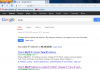
Ok so here is google results thats my real IP

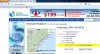
and there is some website ip test which is my proxy ip how is this possible?

2013-07-31_1942.png2013-07-31_1944.jpg
 
Are you sure you are not using transparent proxies? You should be using high anonymous proxies.
 
Last edited:
http://whatismyipaddress.com/staticpages/index.php/advanced-proxy-test

http://www.whoer.net/ext

Check your proxies there and post results.

I'm not sure if Google is using advance proxy detection but that should give you an idea what is going on.

Here are results

[TABLE="class: big_tbl, align: center"]
[TR]
[TD="class: wtlt, align: left"]IP address[/TD]
[TD="class: wtrt"][TABLE="align: left"]
[TR]
[TD]209.148.48.51[/TD]
[TD]
us.png
United States[/TD]
[/TR]
[/TABLE]
[/TD]
[/TR]
[TR]
[TD="class: wtr_z, align: left"]Java[/TD]
[TD="class: wtr_z"][/TD]
[/TR]
[TR]
[TD="class: wtl, align: left"]TCP[/TD]
[TD="class: wtr"][TABLE="width: 300, align: left"]
[TR]
[TD="width: 100"] 86.45.58.80[/TD]
[TD]
ie.png
Ireland[/TD]
[/TR]
[/TABLE]
[/TD]
[/TR]
[TR]
[TD="class: wtl_z, align: left"]UDP[/TD]
[TD="class: wtr_z"][TABLE="width: 300, align: left"]
[TR]
[TD="width: 100"]86.45.58.80[/TD]
[TD]
ie.png
Ireland[/TD]
[/TR]
[/TABLE]
[/TD]
[/TR]
[TR]
[TD="class: wtl, align: left"]Flash[/TD]
[TD="class: wtr"][TABLE="width: 300, align: left"]
[TR]
[TD="width: 100"] 86.45.58.80[/TD]
[TD]
ie.png
Ireland[/TD]
[/TR]
[/TABLE]
[/TD]
[/TR]
[TR]
[TD="class: wtr, align: left"]DNS[/TD]
[TD="class: wtr"][/TD]
[/TR]
[TR]
[TD="class: wtl_z, align: left"]Browser[/TD]
[TD="class: wtr_z"][TABLE="width: 300, align: left"]
[TR]
[TD="width: 100"]216.213.159.107[/TD]
[TD]
us.png
United States[/TD]
[/TR]
[/TABLE]
[/TD]
[/TR]
[TR]
[TD="class: wtr, align: left"]Java[/TD]
[TD="class: wtr"][/TD]
[/TR]
[TR]
[TD="class: wtl_z, align: left"]system[/TD]
[TD="class: wtr_z"]N/A[/TD]
[/TR]
[TR]
[TD="class: wtl, align: left"]resolve[/TD]
[TD="class: wtr"][TABLE="width: 300, align: left"]
[TR]
[TD="width: 100"]216.213.159.107[/TD]
[TD]
us.png
United States[/TD]
[/TR]
[/TABLE]
[/TD]
[/TR]
[TR]
[TD="class: wtl_z, align: left"]Flash[/TD]
[TD="class: wtr_z"][TABLE="width: 300, align: left"]
[TR]
[TD="width: 100"]159.134.0.41[/TD]
[TD]
ie.png
Ireland[/TD]
[/TR]
[/TABLE]
[/TD]
[/TR]
[/TABLE]

I gues my flash is giving my real IP any ideas how to fix it?

Oh an i got proxyes on: changemyip dot com
 
Yes turn flesh off.
Other IPs are your ISP's DNS IPs I guess so use google's DNS or other public DNS service.
 
Are you using proxies for all protocols?

EDIT: Like toptoptop said, try these for DNS:

Google Public DNS
8.8.8.8
8.8.4.4

I use that when my VPN is leaking DNS.
 
Last edited:
according to http://www.whoer.net/ext with a private proxy i get my real IP discovered by the Flash... i didn't know that.. anyway to prevent it except turning flash off? If that site is doing it, probably G is doing it as well
 
Are you using proxies for all protocols?

EDIT: Like toptoptop said, try these for DNS:

Google Public DNS
8.8.8.8
8.8.4.4

I use that when my VPN is leaking DNS.
Emmm and how do i do that? :D How to change it? And i tried to disable flash but then Youtube is not working but i need YT it would be grate if could use YT with proxy...
 
you need socks proxies to cover google eye.

Am total newbie in proxy stuff. could u tell me where to buy them and will it 100% work that google will not be abble to see my real ip? Cos i need to spam a YT a lot :D
 
You have to disable Flash and Java plugins in Firefox. Disable Silverlight if you have it too. For best results change your time zone to proxy time zone, because websites can check your OS time zone if javascript is enabled.

And you have to make sure that your proxy is elite proxy (websites don't know that it's proxy and you are anonymous) or at least anonymous proxy (you are anonymous but website can see that it may be a proxy) and not transparent proxy.

Delete all cookies, restart browser and try again.
 
Back
Top