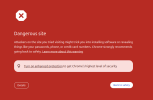
My ip is marked as dangerous

shahab3

Newbie
Joined
Apr 21, 2026
Messages
6
Reaction score
1
Google accidentally marked my VPS IP address as dangerous. I host a website on that server, and the website itself is fine. However, when I try to log in to my dashboard, Google says I'm using a dangerous IP address.
Is there any way to find out the exact reason why my IP was flagged? What can I do to fix this?
 

Attachments

  • 2026-07-14_17-37.png
    2026-07-14_17-37.png
    34.4 KB · Views: 20
Ask the vps provider to change the ip, fastest route . Also check if your site was hacked and it's used for phishing or something, that's one of the reasons google would do that
 
Google Search Console doesn't report any issues with my website or domain. The problem appears to be with the VPS IP address itself, not the website. I also use that VPS as a VPN endpoint, so I'm wondering if that could be the reason the IP was flagged.
 
Maybe I misunderstood the situation. If the warning only appears when you log in, Cloudflare won't help, the VPS IP should be changed. In that case, you can just ignore the warning.
 
Small update: I ordered a new IP and configured my system to use it. The new IP got flagged after about 8 hours. Then I noticed that my old IP had been unflagged, and eventually the new IP was unflagged as well.

Some strange things are happening.
 
Start by pinning down what Google saw, because on a VPS the flag rarely means your current site is dirty. Check Google's Safe Browsing Site Status for both the IP and the domain. If the domain's verified in Search Console, the Security Issues report names the exact problem, malware, deceptive pages, or hacked content. Run the IP through MXToolbox and AbuseIPDB to see which lists carry it, then scan the server itself, since "the site looks fine" often hides an injected include or a forgotten subdomain script.

If Safe Browsing comes back clean for both, the block you hit only at dashboard login is likely account-level sign-in reputation, which you'd trace separately.

Why it happens: datacenter IPs carry less trust than residential and get recycled; a previous tenant's phishing can poison an address you inherited.

To fix, clean anything compromised first, Safe Browsing won't clear a still-infected host, then request review through Search Console and delisting from each list. Ask your host about its abuse history. Honestly, a badly poisoned IP can be slow to rehabilitate or never clear, so a fresh clean IP is often the pragmatic move.

Best,
Floqal
 
if it's a shared vps then another customer may have burned that ip before u got it. google rarely tells u the exact reason. check a few reputation sites and if nothing obvious shows up, just request a new ip from the provider. i've seen that solve it pretty fast.
 
Google accidentally marked my VPS IP address as dangerous. I host a website on that server, and the website itself is fine. However, when I try to log in to my dashboard, Google says I'm using a dangerous IP address.
Is there any way to find out the exact reason why my IP was flagged? What can I do to fix this?
this will normally be related to the history of the IP address rather than the actual website. The VPS IP could have been abused before hence trigering securitty alarms. i would invesstigate the server for any abnormal traffic ensure that the server has no hacked files or accounts nd conduct an investigatiion on the reputation of the IP.
 
Small update: I ordered a new IP and configured my system to use it. The new IP got flagged after about 8 hours. Then I noticed that my old IP had been unflagged, and eventually the new IP was unflagged as well.

Some strange things are happening.

strange this afoot at the circle K. glad its resolved
 
Back
Top