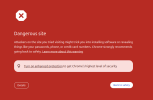
Start by pinning down what Google saw, because on a VPS the flag rarely means your current site is dirty. Check Google's Safe Browsing Site Status for both the IP and the domain. If the domain's verified in Search Console, the Security Issues report names the exact problem, malware, deceptive pages, or hacked content. Run the IP through MXToolbox and AbuseIPDB to see which lists carry it, then scan the server itself, since "the site looks fine" often hides an injected include or a forgotten subdomain script.
If Safe Browsing comes back clean for both, the block you hit only at dashboard login is likely account-level sign-in reputation, which you'd trace separately.
Why it happens: datacenter IPs carry less trust than residential and get recycled; a previous tenant's phishing can poison an address you inherited.
To fix, clean anything compromised first, Safe Browsing won't clear a still-infected host, then request review through Search Console and delisting from each list. Ask your host about its abuse history. Honestly, a badly poisoned IP can be slow to rehabilitate or never clear, so a fresh clean IP is often the pragmatic move.
Best,
Floqal