SMTasker - Automate Instagram, TikTok & Threads From Android Devices | Follow/Unfollow/DM/Publish | From $19/mo

SmTasker

Elite Member
Jr. VIP
Joined
Oct 26, 2007
Messages
3,171
Reaction score
951
SMTasker - Android-Based Social Media Automation

Automate Instagram, TikTok, and Threads workflows from connected Android phones or emulators: Follow, Unfollow, Like, Comment, DM/Contact, Story/Reels/Video viewing, Save, Like Comments, and Publish.


Start 5-Day Free Trial | Ask a Question


WHAT IS SMTasker?

SMTasker is social media automation software for operators, agencies, and account managers who want to run repeatable Instagram, TikTok, and Threads activity from connected Android phones or Android emulators.

Instagram, TikTok, and Threads are the current focus, but more platforms are planned. Active SMTasker users will get access to newly added supported platforms as they are released inside the software.

You control the accounts, devices, sources, limits, active hours, filters, content, and messages. SMTasker handles the repetitive execution and gives you logs, results, statistics, summaries, and device/account visibility from one dashboard.

This is not a follower-selling service, bot traffic service, account shop, or done-for-you agency. It is software access for running your own automation stack.


EXACT TOOLS YOU CAN AUTOMATE

Engagement tools
  • Like - like posts from source pools such as hashtags, explore/discovery-style sources, account search, and selected accounts where supported.
  • Comment - run controlled comment workflows with limits, sources, and AI-assisted or prepared comment logic depending on setup.
  • Like Comments - engage with comment sections where this workflow fits the platform/account.
  • Save Posts - save relevant posts as part of content-interest and engagement routines.

Audience growth tools
  • Follow - follow targeted users from sources such as competitor audiences, users who interacted with target accounts, account search, hashtag/search-style sources, and saved lists where supported.
  • Unfollow - clean up following lists, unfollow users previously followed by SMTasker, use holding periods, and protect followers with "do not unfollow followers" style logic.

Visibility and warm-up tools
  • StoryViewer - view Instagram stories from relevant sources.
  • ReelViewer - watch Instagram Reels from niche-relevant sources.
  • VideoViewer - watch TikTok videos from niche hashtag, explore/feed, and account-search sources to build a more relevant content pattern before heavier actions.

Outreach and publishing tools
  • Contact / DM workflows - send outreach/contact messages from selected sources, with skip logic for accounts already contacted or already interacted with where configured.
  • Publish - publish from prepared media/content folders, use platform-specific posting routines, and support content-led growth instead of only engagement activity.

Supported platforms
  • Instagram - Like, Follow, Unfollow, Comment, Contact, Save Posts, StoryViewer, ReelViewer, Like Comments, Publish.
  • TikTok - VideoViewer, Like, Follow, Unfollow, Comment, Contact, Save Posts, Publish, and related account workflows.
  • Threads - posting, engagement, account activity, and Threads-specific workflows where supported by the current toolset.
  • More platforms planned - new supported platforms will be added over time, and active SMTasker users will get access to them as they are released.


SOURCE TARGETING AND FILTERS

The value of automation is not just "run actions". The value is choosing better targets, pacing the activity, and reviewing what actually happened.

Source types can include:
  • Hashtag search and niche hashtag lists.
  • Competitor accounts and target account followers.
  • Users that interacted with target accounts.
  • Specific users / saved account lists.
  • Account search by keywords or creator/account type.
  • Explore, feed, Reels, Video, or discovery-style sources where supported.
  • Media/content folders for Publish workflows.

Restriction and quality filters can include:
  • Skip private accounts.
  • Skip accounts already followed.
  • Skip accounts already interacted with.
  • Minimum and maximum follower counts.
  • Minimum and maximum following counts.
  • Minimum and maximum post counts.
  • Ignore lists for accounts you never want touched.
  • Auto-suspend style handling when an action block/restriction is detected.

Pacing controls include:
  • Min/max action ranges.
  • Daily caps.
  • Active days.
  • Active hours.
  • Holding periods for Follow/Unfollow cleanup.
  • Per-tool settings instead of one global setting for every action.


GROWTH STACKS YOU CAN BUILD

Follower growth stack

Follow targeted users from competitor/audience sources, add light visibility with StoryViewer/ReelViewer or Like, then use Unfollow with a holding period to clean up non-followers while protecting people who followed back.

Lead generation stack

Use Follow to warm the touchpoint, then use Contact/DM workflows on selected sources. Add skip logic so the same account is not hit repeatedly.

Engagement stack

Use Like, Comment, Save Posts, Like Comments, StoryViewer, and ReelViewer around the same niche source pools so the account is active around the market you actually care about.

TikTok warm-up and content signal stack

Start with VideoViewer on niche sources, then layer Like, Follow, Comment, Save Posts, and Publish after the account has a content consumption pattern.

Content-led stack

Use Publish to keep the account active, then use Like/Follow/Comment/Contact tools to push discovery and conversations toward an account that has recent content.


DASHBOARD FEATURES FOR MANAGING MULTIPLE ACCOUNTS

  • Connected device dashboard - see which Android phones/emulators are available.
  • Account dashboard - manage accounts without jumping from device to device.
  • Automations dashboard - see active tools, actions today, and current status.
  • Results tab - review accounts/posts acted on by each tool.
  • Statistics tab - see activity trends over time.
  • Summary log - review detailed run events, errors, blocks, and source usage.
  • Tags - group accounts by client, niche, platform, or stack type.
  • Copy Settings - copy one tuned tool setup to the same tool on other accounts.
  • Clone With - copy a full automation stack from one account to other accounts.


WHY ANDROID DEVICES?

Many automation tools hide the execution layer. SMTasker is built around a more visible setup: a Windows computer, connected Android phones or Android emulators, and a dashboard that controls the workflows. Mac support is also being worked on and is planned for a future release.

That means you can separate accounts by device, test one account before scaling, troubleshoot a device session, and build a setup that is easier to understand than a black-box cloud panel.


WHO THIS IS FOR

  • BHW users who want social automation software, not fake follower packages.
  • Agencies managing multiple Instagram, TikTok, or Threads accounts.
  • Operators building follow/unfollow, DM/contact, viewing, and publishing stacks.
  • People who prefer Android phone or emulator workflows over browser extensions.
  • Users who want sources, filters, limits, logs, and repeatable account setups.


WHO THIS IS NOT FOR

  • Anyone expecting fixed follower, reach, sales, or revenue results.
  • Anyone trying to buy followers, likes, views, or accounts.
  • Anyone who wants a fully managed agency service.
  • Anyone who wants to run uncontrolled volume without sources, limits, or review.


PRICING

All plans include:
  • Instagram, TikTok, and Threads support.
  • Access to newly added supported platforms in the future, as they are released for active SMTasker users.
  • Engagement, viewing, outreach, and publishing automations.
  • Connected device workflows.
  • Limits, active hours, logs, and setup support.
  • 5-day free trial.

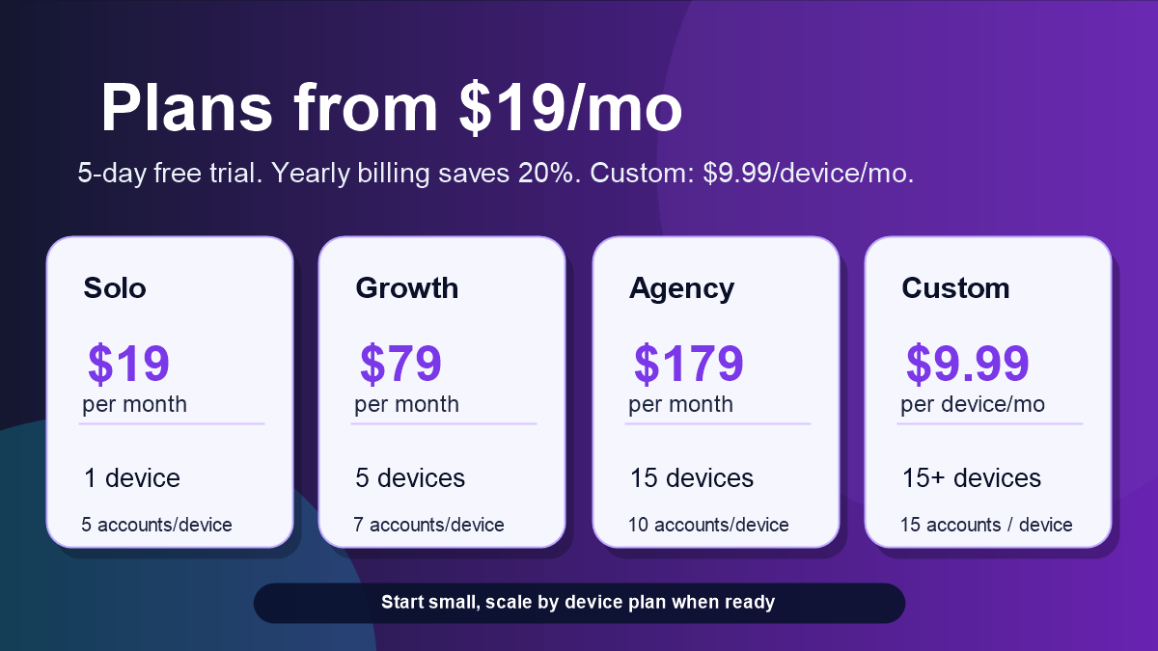
Solo Plan - $19/month
  • 1 connected device.
  • Up to 5 accounts per device.
  • Good for one operator testing the workflow on a focused setup.

Growth Plan - $79/month
  • 5 connected devices.
  • Up to 7 accounts per device.
  • Good for growing agencies and multi-account workflows.

Agency Plan - $179/month
  • 15 connected devices.
  • Up to 10 accounts per device.
  • Good for teams that need more device capacity and repeatable stacks.

Custom Plan - $9.99/month per device
  • For larger setups starting at 15+ connected devices.
  • Includes up to 15 accounts per device.
  • Fixed custom price: $9.99/month per device.
  • Example: 20 devices would be $199.80/month.

Yearly billing saves 20%.


FREE TRIAL

You can start with a 5-day free trial before committing to a paid subscription.

Start here:
https://smtasker.com/get-started/


REFUND POLICY

SMTasker offers a 5-day free trial before any charge is made.

For new subscribers, a refund may be requested within 7 days of the initial purchase date when eligible under the SMTasker refund policy.

To request a refund, contact us through the contact form and include the account email connected to the purchase:
https://smtasker.com/contact-us/

Approved refunds are typically processed within 5-10 business days, depending on the payment provider.

Renewals, unused subscription time after cancellation, downgraded plans, and accounts suspended for violation of the Terms of Service are generally not refundable.

If a technical issue prevents you from accessing or using SMTasker, contact support during the eligibility window so we can help review the account and setup.


DELIVERY AND SETUP

Access is created through the SMTasker website flow after you choose a plan and enter your account email.

To begin using SMTasker, you will need:

  • A Windows computer. Mac support is being worked on and is planned soon.
  • An Android phone or Android emulator.
  • A stable internet connection.
  • Access to the social accounts you want to manage.
  • The SMTasker local client and dashboard access.

Start with one device, one account, and one small workflow. Review logs and device behavior before adding more tools, accounts, or devices.


PLATFORM AND RISK DISCLOSURE

This is automation software. Social platform rules and tolerance can change. You are responsible for how you use your own accounts, devices, sources, settings, limits, content, and messages.

SMTasker provides workflow controls, device-based execution, logs, limits, filters, and setup support. It does not promise follower growth, account status, reach, revenue, platform approval, or any specific social media outcome.

Use realistic settings, relevant sources, active hours, logs, and manual review. The software gives you control; it does not replace judgment.


CONTACT DETAILS

BHW DM:
SMTasker - contact me by direct message on BlackHatWorld if you have any questions.

Email:
[email protected]


REVIEW COPIES

No public free review copies are offered in the thread.

Marketplace staff review access will be provided during BHW approval if required by the marketplace rules.


FAQ

Is SMTasker a managed service?

No. SMTasker is software access. You manage your own devices, accounts, workflows, settings, sources, content, and platform usage.

Do I need an Android phone?

An Android phone is the recommended starting point for most users. Android emulators can also be used when they fit your setup.

Can I run multiple accounts?

Yes. The number of devices and accounts depends on the plan. Solo includes 1 connected device, Growth includes 5 devices, Agency includes 15 devices, and the Custom Plan starts at 15+ devices for $9.99/month per device.

Can I automate DMs?

SMTasker includes Contact/DM-style workflows for outreach where supported. You should use relevant sources, skip logic, and messages that fit your audience.

Can I automate follow/unfollow?

Yes. SMTasker includes Follow and Unfollow workflows with sources, limits, holding periods, and cleanup logic.

Can I use it for TikTok warm-up?

Yes. TikTok VideoViewer can run niche video viewing workflows before you layer heavier actions such as Follow, Comment, Contact, or Publish.

Does SMTasker promise growth or account results?

No. SMTasker does not promise followers, reach, sales, account status, or platform outcomes.

Do you sell followers, likes, views, or accounts?

No. SMTasker sells software access for managing automation workflows from your own devices and accounts.


Build your first automation stack

Connect one Android device, choose one platform, select one workflow, and test SMTasker with a 5-day free trial.

Start Free Trial | Ask a Question
 
Marketplace Thread Approved

Summary
This automation tool has been tested by the Marketplace team to ensure that it meets the standards for the Marketplace. We cannot guarantee any satisfaction for the tool you receive. Please do your own due diligence in looking into the seller and seeing if this tool is what you are looking for.

Service Information
  • The automation tool delivered for the review did contain the advertised features for the top-level plan of this software.
  • The tool and its GUI were functional with little to no errors.
  • The tool was able to carry out the tasks given to it for the purpose of the review.
Thread Edit Log
  • The 5 most recent thread edits will appear here
With anything more than 5 going in here
Information For Buyers:
  • Service Quality: The quality of the product or service that we receive is what you should expect, or better. If you feel that the quality of the service has dropped significantly, please let us know via the report button.
  • Disputes: If you do not receive a product or service as advertised, or at all in the event of a dispute, do not be afraid of a "no refunds" refund policy as you are allowed to request a refund through the Dispute Resolution process. For more information and to see whether or not your dispute qualifies, refer to the dispute rules and procedures.
    IMPORTANT: To initiate a dispute, all orders must be started on BHW, and proof of that will be required.
  • Review Copies: Per the Marketplace rules, if a seller does not offer trials or review copies, please do not request them in the sales thread, otherwise your post will be removed and further action may be taken.
 
Thank you for the review and approval of the thread!

I'm here if anyone has any questions about the product, just write here or DM me.
 
Still here ready to help :)
 
Can you explain how this is different from normal F/UF instagram automation devices ? Like Jarvee/MassPlanner and etc?

Sure - we are doing all the actions on an andoid phone. That leaves no footprints, it's exactly as if you would use the phone yourself and did the actions by hand. It always uses the latest app updates from IG, TikTok and so on. Unless you go overboard with the number of actions you do, there is no way of them knowing it's not a regular person doing these action. This means safer accounts and the possibility of having a long term growth and strategy without the fear of account blocks.
 
Sure - we are doing all the actions on an andoid phone. That leaves no footprints, it's exactly as if you would use the phone yourself and did the actions by hand. It always uses the latest app updates from IG, TikTok and so on. Unless you go overboard with the number of actions you do, there is no way of them knowing it's not a regular person doing these action. This means safer accounts and the possibility of having a long term growth and strategy without the fear of account blocks.
But don't other automation softwares like Jarvee/Massplanner use an android phone too?
 
But don't other automation softwares like Jarvee/Massplanner use an android phone too?

No, most use either a version of their api or the web version of the app, those are harder to maintain and can leave more footprints if not done correctly

Can you share more details?

Of course, however there are a lot to say, can you tell me a little more about what you want to know?

Is customer support included?

Yes, you can write to customer support with your questions

Can you explain the service?

It's an app that allows you to automate your social media marketing actions on Instagram, Tiktok and Threads in order to grow your accounts easier

Do I need to pay in advance?

There is a 5 days free trial, after that if the app suits you, you will need to pay, yes
 
Can you explain the service?
Ok im willing to give your software a try and see if it works. In the past, other softwares have gotten my accounts action blocked and didnt work well. Do you have suggestions on what proxy to use with your software? I plan to just use it for like 3-4 accounts only so im willing to pay a premium for the proxy
 
But many cloud phone services already have this automation, and we don’t need to download anything. So what is the difference between your service and theirs?
 
Hey @SmTasker I have a few questions

I mainly used Pixel phones with GrapheneOS. Any issues running SMTasker on that? Or does it play nice with custom ROMs?

When you say up to 5 accounts per device (on the Solo plan for example), does that mean 5 Instagram accounts, or is it 5 total across IG + TikTok + Threads? Like could I mix them (e.g. 2 IG + 2 TT + 1 Threads on one phone)?

If I'm running multiple IG accounts on the same device, how well are they separated? Do they stay properly isolated (no cookie/data leaking between them) or is there anything extra I should do for better separation?

BTW i'm glad to see you're back, I really enjoyed using MP in the "good'ol days" lol
 
Hello, your service looks really interesting. I’d like to learn more details about it.
 
Ok im willing to give your software a try and see if it works. In the past, other softwares have gotten my accounts action blocked and didnt work well. Do you have suggestions on what proxy to use with your software? I plan to just use it for like 3-4 accounts only so im willing to pay a premium for the proxy

Glad to hear you want to give it a try, let me know how it goes and if you need help with anything contact support

As for your question, any good residential proxy should work, though for just 3-4 accounts they would be able to run on the same phone with no problems, if you absolutely want them separated you can use different phones with 3g connectivity thus no need for proxies or any other troubles

But many cloud phone services already have this automation, and we don’t need to download anything. So what is the difference between your service and theirs?

Can you give me an example of such a service so i check them out and see what they provide?

I can say though that we specialize in automation, I am quite sure no cloud service can offer the extent of tools and platforms we do
I mainly used Pixel phones with GrapheneOS. Any issues running SMTasker on that? Or does it play nice with custom ROMs?

When you say up to 5 accounts per device (on the Solo plan for example), does that mean 5 Instagram accounts, or is it 5 total across IG + TikTok + Threads? Like could I mix them (e.g. 2 IG + 2 TT + 1 Threads on one phone)?

If I'm running multiple IG accounts on the same device, how well are they separated? Do they stay properly isolated (no cookie/data leaking between them) or is there anything extra I should do for better separation?

BTW i'm glad to see you're back, I really enjoyed using MP in the "good'ol days" lol

It works with GrapheneOS and different profiles on it.
5 of any accounts, in any combinations you want.
Multiple accounts on the same device means: either a different GrapheneOS profile where a separate instagram is installed, or one instagram account with multiple profiles logged in (they allow up to 5-10 accounts),
or using cloned instagram apps - where each clone appears as a separate app on the phone.
Regarding custom roms - if they work well with adb - it shoudnt be a problem.

hehe, gald to be back! :)

Hello, your service looks really interesting. I’d like to learn more details about it.

Thank you, let me know what more details you need exactly and I will do my best to expand on them
 
Glad to hear you want to give it a try, let me know how it goes and if you need help with anything contact support

As for your question, any good residential proxy should work, though for just 3-4 accounts they would be able to run on the same phone with no problems, if you absolutely want them separated you can use different phones with 3g connectivity thus no need for proxies or any other troubles


Can you give me an example of such a service so i check them out and see what they provide?

I can say though that we specialize in automation, I am quite sure no cloud service can offer the extent of tools and platforms we do


It works with GrapheneOS and different profiles on it.
5 of any accounts, in any combinations you want.
Multiple accounts on the same device means: either a different GrapheneOS profile where a separate instagram is installed, or one instagram account with multiple profiles logged in (they allow up to 5-10 accounts),
or using cloned instagram apps - where each clone appears as a separate app on the phone.
Regarding custom roms - if they work well with adb - it shoudnt be a problem.

hehe, gald to be back! :)


Thank you, let me know what more details you need exactly and I will do my best to expand on them
1. Can you give me a suggestion for a good residential proxy that has worked for you? Can you PM me a provider that will 100% work? I am willing to pay more to make sure it works with no issues. I am planning to signing up for the 5 day free trial and want to make sure there are no issues

2. What do you mean by using accounts on separate phones? How would that be possible? I am curious what you mean by that. Is there a guide or where can I find more info by using accounts on separate phones?

Thanks for your help.
 
1. Can you give me a suggestion for a good residential proxy that has worked for you? Can you PM me a provider that will 100% work? I am willing to pay more to make sure it works with no issues. I am planning to signing up for the 5 day free trial and want to make sure there are no issues

2. What do you mean by using accounts on separate phones? How would that be possible? I am curious what you mean by that. Is there a guide or where can I find more info by using accounts on separate phones?

Thanks for your help.
1. I cannot vouch for anyone 100% at the moment, will do some testing about this and have a few recommended sources soon though

2. This service works by automating your phone. You can have 5 different phones coonected to your computer, each account on one phone, and you can automate each account and phone separately, depending on where you live you can get a cheaper andoid phone for like $50 and a 3g sim card for a few $ per month and each phone would work independently with its own internet connection no need for proxies or any other issue with footprints. You can run them on your wifi as well if you want , for only 5 accounts there should be no issues, but if you want to be absolutely sure you can use proxies when using them on wifi
 
1. I cannot vouch for anyone 100% at the moment, will do some testing about this and have a few recommended sources soon though

2. This service works by automating your phone. You can have 5 different phones coonected to your computer, each account on one phone, and you can automate each account and phone separately, depending on where you live you can get a cheaper andoid phone for like $50 and a 3g sim card for a few $ per month and each phone would work independently with its own internet connection no need for proxies or any other issue with footprints. You can run them on your wifi as well if you want , for only 5 accounts there should be no issues, but if you want to be absolutely sure you can use proxies when using them on wifi
Hi, I want to try your software but I want to make sure I fully understand everything first. I have only 4 Instagram accounts that I want to run.

I want to make sure there are no action blocks or issues and I've been told by BHW users to get an android phone and buy a 4G/5G SIM plan and I shouldn't have any issues. I plan to go this route.

With your software, is it a mobile app software that I will install onto this android phone? Or is it a desktop app? How would I set it up your software with the above plan with buying an android phone and getting a 4G/5G SIM plan?

If it's a desktop app, how do I manage my android phone and connect it with the desktop app - aren't they completely separate things? I'm struggling to figure out how this would all work, apologies if i sound like a beginner. Thanks so much for your help.
 
Hi, I want to try your software but I want to make sure I fully understand everything first. I have only 4 Instagram accounts that I want to run.

I want to make sure there are no action blocks or issues and I've been told by BHW users to get an android phone and buy a 4G/5G SIM plan and I shouldn't have any issues. I plan to go this route.

With your software, is it a mobile app software that I will install onto this android phone? Or is it a desktop app? How would I set it up your software with the above plan with buying an android phone and getting a 4G/5G SIM plan?

If it's a desktop app, how do I manage my android phone and connect it with the desktop app - aren't they completely separate things? I'm struggling to figure out how this would all work, apologies if i sound like a beginner. Thanks so much for your help.


No worries, glad you asked since many people might have the exact same question.

The route with the android phone and the SIM card is the best plan at this time, it guarantees low to no blocks if you don't set it to do too many/agressive actions.

Let me explain exactly how this works:

You don't need to install anything on your phone, it will use the actual instagram app to do everything, all you have to do is enable the developer options on your phone.

There is an app that you install on your computer and then connect your phone to your computer. All the automation actions are done on your phone, the app on your pc just connects the phone to the automation dashboard on our server where you login and control everything. This way you can have your computer and phone at home and control them from wherever you go at any time, even if you're on vacation.

We've created a full tutorial about everything if you want to go more in depth into everything : https://smtasker.com/knowledge-base/getting-started/

Hope this helps, let me know if I haven't explained everything in detail or you have other questions.
 
No worries, glad you asked since many people might have the exact same question.

The route with the android phone and the SIM card is the best plan at this time, it guarantees low to no blocks if you don't set it to do too many/agressive actions.

Let me explain exactly how this works:

You don't need to install anything on your phone, it will use the actual instagram app to do everything, all you have to do is enable the developer options on your phone.

There is an app that you install on your computer and then connect your phone to your computer. All the automation actions are done on your phone, the app on your pc just connects the phone to the automation dashboard on our server where you login and control everything. This way you can have your computer and phone at home and control them from wherever you go at any time, even if you're on vacation.

We've created a full tutorial about everything if you want to go more in depth into everything : https://smtasker.com/knowledge-base/getting-started/

Hope this helps, let me know if I haven't explained everything in detail or you have other questions.
Wow! This is AMAZING and exactly what i want to do! Thank you so much for the explanation. So if I follow this guide, it will do exactly what i'm looking for with everything you mentioned? Do you have telegram or whatsapp to discuss if i have further questions as I plan to follow your guide step by step
 
Wow! This is AMAZING and exactly what i want to do! Thank you so much for the explanation. So if I follow this guide, it will do exactly what i'm looking for with everything you mentioned? Do you have telegram or whatsapp to discuss if i have further questions as I plan to follow your guide step by step

Best way would be to contact support either though our contact for at https://smtasker.com/contact-us/ or directly emailing at [email protected]

How can I place an order?

Here you go : https://smtasker.com/get-started/
 
What payment methods do you accept?
On the website we have integrated with Paddle, so all the payment methods they offer, like paypal, gpay and CC . If you can't use these and require additional payment methods we can talk about it, just contact support with your available options.
 
Back
Top