CArolineBecks
Regular Member
- May 25, 2022
- 408
- 146
My verification was very quick and easy. Thanks moderator for this.


Why doesn't BHW support Google/Github or FB login? It would be more secure.


What do you mean by "something"?can i have something about two step verification

I was so lost until I read this thanks lol2.0 Update!
In order to keep your account secure, we suggest that you set up two-step verification on your account. Essentially, this will check that you are the owner of the account twice; the first time will be via your password, and the second time via an app (something like Authy or Google Authenticator) or via email.
You can https://www.blackhatworld.com/account/security, but I'll walk you through it too.
To set up two-step verification, click on your username in the top right corner and click on 'Password and security':
View attachment 137961
You will then be taken to this screen, where you can click 'Enable' to set up verification via an app:
View attachment 137962
You will be prompted to confirm your password. Enter your password and click 'Confirm':
View attachment 137963
You will then be taken to a screen with a QR code:
View attachment 137964
Use Authy or Google Authenticator (or equivalent) to scan the QR code. The app will then generate a verification code that you will need to type into the box at the bottom. Then click 'Confirm'.
You will be taken back to this screen, where you can now enable email confirmation:
View attachment 137965
You will then be taken to this screen:
View attachment 137966
Enter the code that is emailed to you and click 'Confirm'.
And finally, we recommend you copy your backup codes, just in case you lose access to your phone or authenticator app. When you are taken back to this screen, click 'Manage' and save your backup codes somewhere safe:
View attachment 137967
Should you ever lose access to your account entirely, you can http://support.blackhatworld.com and, once we have confirmed that you are the owner of the account, we will help you regain access.
Don't have a mobile phone? https://authy.com/download/
Support desk guide: https://support.blackhatworld.com/support/solutions/articles/48001186470-2-step-verification


As far as I'm aware, if you choose the email option, you can only use one email address.Thanks for this. With that said, can I have two emails receiving the code? Since, I would be needing it for backup purposes.


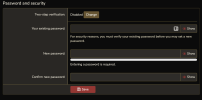
Click the "Change" button at the topView attachment 500728
It appears differently for me. Am I activating it, or has this setting changed?

Thank you very much for the information. I’ve only enabled email verification and received a list of backup codes to use if other verification methods aren’t available. I haven’t activated the verification codes in the app — is email verification by itself sufficient?