Need Help with Payoneer Beneficiary Name Verification

ulquiorra09

Newbie
Joined
Aug 19, 2020
Messages
10
Reaction score
6
Hey everyone, I’m running into an issue with Payoneer and could really use some advice. I manage multiple accounts on a marketplace, under different names and receive payments through Payoneer. Recently, they flagged a payment because the beneficiary name didn’t match the name on my Payoneer account. Now, they’re asking me to clarify the beneficiary name and provide verification documents.

Here’s the message from Payoneer:
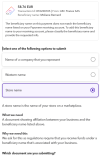
The beneficiary name on this payment does not match the beneficiary name listed on your Payoneer receiving account. To add this beneficiary name to your receiving account, please classify the beneficiary name and provide the requested info.

The options they’ve given me are:
  1. Store name: Provide a screenshot of my marketplace account profile, an invoice, or proof of order/delivery.
  2. Name of a company that you represent: Submit a letter from the company authorizing me to receive funds on their behalf.
  3. Western name: Not applicable in my case.
I’ve been dealing with this issue for a while now and always ended up paying someone to create a fake invoice, website screenshot, or sales history just to get it resolved. It’s becoming a hassle, and I’d really love to learn how to do it myself.

Does anyone know an easy way to create a convincing invoice or have a template I can edit? Any guidance would be greatly appreciated!
 

Attachments

  • 1.PNG
    1.PNG
    56.9 KB · Views: 76
  • 2.PNG
    2.PNG
    40 KB · Views: 76
Have you tried reaching out to Payoneer support and explaining your situation in detail? They might be more accommodating if you provide valid supporting documents and clarify everything. Alternatively, would it be simpler to set up a separate Payoneer business account?
 
Have you tried reaching out to Payoneer support and explaining your situation in detail? They might be more accommodating if you provide valid supporting documents and clarify everything. Alternatively, would it be simpler to set up a separate Payoneer business account?
Yeah, I’ve tried reaching out to Payoneer support multiple times, but they always ask for documents that I just can’t provide. Does a Payoneer business account require beneficiary verification, or is it more flexible in that regard?
 
Ugh, Payoneer can be such a pain sometimes. Have you tried just explaining to them the different storefront names and how it all connects back to you? Might save you the hassle of faking stuff.
 
Hey everyone, I’m running into an issue with Payoneer and could really use some advice. I manage multiple accounts on a marketplace, under different names and receive payments through Payoneer. Recently, they flagged a payment because the beneficiary name didn’t match the name on my Payoneer account. Now, they’re asking me to clarify the beneficiary name and provide verification documents.

Here’s the message from Payoneer:


The options they’ve given me are:
  1. Store name: Provide a screenshot of my marketplace account profile, an invoice, or proof of order/delivery.
  2. Name of a company that you represent: Submit a letter from the company authorizing me to receive funds on their behalf.
  3. Western name: Not applicable in my case.
I’ve been dealing with this issue for a while now and always ended up paying someone to create a fake invoice, website screenshot, or sales history just to get it resolved. It’s becoming a hassle, and I’d really love to learn how to do it myself.

Does anyone know an easy way to create a convincing invoice or have a template I can edit? Any guidance would be greatly appreciated!
Hey I am having same issue right now
Do you mind to tell where do you buy the documents from because I need some now
also if you ever found a solution of how to make it rather than buy it
I would be glad to know too
 
Hey I am having same issue right now
Do you mind to tell where do you buy the documents from because I need some now
also if you ever found a solution of how to make it rather than buy it
I would be glad to know too
I solved the problem on my own at the end, I was able to do it by making a fake invoice using freeinvoicebuilder.com. Just make sure all the information matches (name, date, amount..)
 
I solved the problem on my own at the end, I was able to do it by making a fake invoice using freeinvoicebuilder.com. Just make sure all the information matches (name, date, amount..)
Can you explain how to get it done? I currently having the same issue
 
Yeah bro, totally get where you’re coming from — Payoneer’s been cracking down hard lately, especially when names don’t match. They’re trying to look more “compliant” now, so anything that looks off raises red flags.


If you’re going the “store name” route, your best bet is to mock up a simple Shopify or Etsy-style order confirmation. You don’t need to overdo it — clean invoice with buyer info, date, item, price, order number, and your store name. Then grab a quick profile screenshot from the marketplace (even if it’s just a clone or test store with the same name as the payee). Match names and keep formatting clean and simple.


You can use tools like Canva, Invoicely, or even Google Docs for this. If you want, I can give you a simple editable template you can customize. Just make sure everything looks consistent and not overdesigned — real stores usually keep it basic.


And yeah, it's always safer to have a few “backup” stores and rotate names slowly.
 
Yeah bro, totally get where you’re coming from — Payoneer’s been cracking down hard lately, especially when names don’t match. They’re trying to look more “compliant” now, so anything that looks off raises red flags.


If you’re going the “store name” route, your best bet is to mock up a simple Shopify or Etsy-style order confirmation. You don’t need to overdo it — clean invoice with buyer info, date, item, price, order number, and your store name. Then grab a quick profile screenshot from the marketplace (even if it’s just a clone or test store with the same name as the payee). Match names and keep formatting clean and simple.


You can use tools like Canva, Invoicely, or even Google Docs for this. If you want, I can give you a simple editable template you can customize. Just make sure everything looks consistent and not overdesigned — real stores usually keep it basic.


And yeah, it's always safer to have a few “backup” stores and rotate names slowly.
Thanks much appreciated.. do you have a sample of the Shopify or Etsy-style order confirmation. I will appreciate if I can get the editable template.
I have tried some and they always cancel the payment, it's tiring
 
Thanks much appreciated.. do you have a sample of the Shopify or Etsy-style order confirmation. I will appreciate if I can get the editable template.
I have tried some and they always cancel the payment, it's tiring
I using use the invoice and it's not been working.
Hey I am having same issue right now
Do you mind to tell where do you buy the documents from because I need some now
also if you ever found a solution of how to make it rather than buy it
I would be glad to know too
were you able to resolve it
 
Yeah bro, totally get where you’re coming from — Payoneer’s been cracking down hard lately, especially when names don’t match. They’re trying to look more “compliant” now, so anything that looks off raises red flags.


If you’re going the “store name” route, your best bet is to mock up a simple Shopify or Etsy-style order confirmation. You don’t need to overdo it — clean invoice with buyer info, date, item, price, order number, and your store name. Then grab a quick profile screenshot from the marketplace (even if it’s just a clone or test store with the same name as the payee). Match names and keep formatting clean and simple.


You can use tools like Canva, Invoicely, or even Google Docs for this. If you want, I can give you a simple editable template you can customize. Just make sure everything looks consistent and not overdesigned — real stores usually keep it basic.


And yeah, it's always safer to have a few “backup” stores and rotate names slowly.
I need help with they reject my store
 
I solved the problem on my own at the end, I was able to do it by making a fake invoice using freeinvoicebuilder.com. Just make sure all the information matches (name, date, amount..)
So, You used Molian Bernard as a store name?
 
Yeah bro, totally get where you’re coming from — Payoneer’s been cracking down hard lately, especially when names don’t match. They’re trying to look more “compliant” now, so anything that looks off raises red flags.


If you’re going the “store name” route, your best bet is to mock up a simple Shopify or Etsy-style order confirmation. You don’t need to overdo it — clean invoice with buyer info, date, item, price, order number, and your store name. Then grab a quick profile screenshot from the marketplace (even if it’s just a clone or test store with the same name as the payee). Match names and keep formatting clean and simple.


You can use tools like Canva, Invoicely, or even Google Docs for this. If you want, I can give you a simple editable template you can customize. Just make sure everything looks consistent and not overdesigned — real stores usually keep it basic.


And yeah, it's always safer to have a few “backup” stores and rotate names slowly.
Hi bro, thank you for your help on this, could you please share the template? im on the same issue right now!
 
Hey everyone, I’m running into an issue with Payoneer and could really use some advice. I manage multiple accounts on a marketplace, under different names and receive payments through Payoneer. Recently, they flagged a payment because the beneficiary name didn’t match the name on my Payoneer account. Now, they’re asking me to clarify the beneficiary name and provide verification documents.

Here’s the message from Payoneer:


The options they’ve given me are:
  1. Store name: Provide a screenshot of my marketplace account profile, an invoice, or proof of order/delivery.
  2. Name of a company that you represent: Submit a letter from the company authorizing me to receive funds on their behalf.
  3. Western name: Not applicable in my case.
I’ve been dealing with this issue for a while now and always ended up paying someone to create a fake invoice, website screenshot, or sales history just to get it resolved. It’s becoming a hassle, and I’d really love to learn how to do it myself.

Does anyone know an easy way to create a convincing invoice or have a template I can edit? Any guidance would be greatly appreciated!
I usually have different problems with Payoneer and that's why I started using Transferwise also known as Wise. I know that Payoneer is not the best today.
 
Yeah bro, totally get where you’re coming from — Payoneer’s been cracking down hard lately, especially when names don’t match. They’re trying to look more “compliant” now, so anything that looks off raises red flags.


If you’re going the “store name” route, your best bet is to mock up a simple Shopify or Etsy-style order confirmation. You don’t need to overdo it — clean invoice with buyer info, date, item, price, order number, and your store name. Then grab a quick profile screenshot from the marketplace (even if it’s just a clone or test store with the same name as the payee). Match names and keep formatting clean and simple.


You can use tools like Canva, Invoicely, or even Google Docs for this. If you want, I can give you a simple editable template you can customize. Just make sure everything looks consistent and not overdesigned — real stores usually keep it basic.


And yeah, it's always safer to have a few “backup” stores and rotate names slowly.
I am having same issues can you help me bro
 
I solved the problem on my own at the end, I was able to do it by making a fake invoice using freeinvoicebuilder.com. Just make sure all the information matches (name, date, amount..)
Hello everyone, how are you all? I'm also facing the same problem after submitting the documents. How long does it take Payoneer to respond with an acceptance or rejection? I would be very grateful. Thank you for your time. I hope to receive a response as soon as possible.
 
Hello everyone, how are you all? I'm also facing the same problem after submitting the documents. How long does it take Payoneer to respond with an acceptance or rejection? I would be very grateful. Thank you for your time. I hope to receive a response as soon as possible.
 
Hey everyone, I’m running into an issue with Payoneer and could really use some advice. I manage multiple accounts on a marketplace, under different names and receive payments through Payoneer. Recently, they flagged a payment because the beneficiary name didn’t match the name on my Payoneer account. Now, they’re asking me to clarify the beneficiary name and provide verification documents.

Here’s the message from Payoneer:


The options they’ve given me are:
  1. Store name: Provide a screenshot of my marketplace account profile, an invoice, or proof of order/delivery.
  2. Name of a company that you represent: Submit a letter from the company authorizing me to receive funds on their behalf.
  3. Western name: Not applicable in my case.
I’ve been dealing with this issue for a while now and always ended up paying someone to create a fake invoice, website screenshot, or sales history just to get it resolved. It’s becoming a hassle, and I’d really love to learn how to do it myself.

Does anyone know an easy way to create a convincing invoice or have a template I can edit? Any guidance would be greatly appreciated!
Yeah bro, totally understand what you’re dealing with Payoneer’s been super strict lately with mismatched beneficiary names. They’re pushing heavy on compliance now, so even small differences trigger verification checks.

If you’re using the “store name” option, the cleanest way is to just gather real store-related proof that actually matches your marketplace account. Keep it simple Payoneer usually accepts a profile screenshot, order list, or any activity that clearly shows the store name linked to the payment.

Tools like Canva, Google Docs, or even marketplace dashboard exports make it easy to format everything neatly if you need to organize your files. Just make sure whatever you submit reflects your actual store or account, and that names match across everything clean, consistent, and straightforward always works best.

And yeah, it helps to keep your store details organized so you can avoid these verification delays in the future.

If you need help preparing proper documentation, formatting screenshots, or organizing everything so Payoneer accepts it without issues, I can assist you with that as well. Just let me know happy to help you streamline the whole process.
 
Hey everyone, I’m running into an issue with Payoneer and could really use some advice. I manage multiple accounts on a marketplace, under different names and receive payments through Payoneer. Recently, they flagged a payment because the beneficiary name didn’t match the name on my Payoneer account. Now, they’re asking me to clarify the beneficiary name and provide verification documents.

Here’s the message from Payoneer:


The options they’ve given me are:
  1. Store name: Provide a screenshot of my marketplace account profile, an invoice, or proof of order/delivery.
  2. Name of a company that you represent: Submit a letter from the company authorizing me to receive funds on their behalf.
  3. Western name: Not applicable in my case.
I’ve been dealing with this issue for a while now and always ended up paying someone to create a fake invoice, website screenshot, or sales history just to get it resolved. It’s becoming a hassle, and I’d really love to learn how to do it myself.

Does anyone know an easy way to create a convincing invoice or have a template I can edit? Any guidance would be greatly appreciated!
How are you running multiple payoneer accounts? Do you use the same device or do you use different IPs, Proxies, etc.?
 
Back
Top