Status
Not open for further replies.

HenryObi

Elite Member
Executive VIP
Jr. VIP
Joined
Sep 7, 2017
Messages
7,167
Reaction score
6,414
Last edited by a moderator:
Marketplace Thread Approved

Summary
This online application has been tested by the marketplace moderation team to ensure that it meets the standards for the marketplace. We cannot guarantee any satisfaction for the online application you receive. Please do your own due diligence in looking into the seller and seeing if this online application is what you are looking for.

Service Information
  • The online application delivered for the review did contain the advertised features for the top-level plan of this software.
  • The online application and its GUI were functional with little to no errors.
  • The online application was able to carry out the tasks given to it for the purpose of the review.
Thread Edit Log
  • The 5 most recent thread edits will appear here
With anything more than 5 going in here
Information For Buyers:
  • Service Quality: The quality of the product or service that we receive is what you should expect, or better. If you feel that the quality of the service has dropped significantly, please let us know via the report button.
  • Disputes: If you do not receive a product or service as advertised, or at all in the event of a dispute, do not be afraid of a "no refunds" refund policy as you are allowed to request a refund through the Dispute Resolution process. For more information and to see whether or not your dispute qualifies, refer to the dispute rules and procedures.
    IMPORTANT: To initiate a dispute, all orders must be started on BHW, and proof of that will be required.
  • Review Copies: Per the marketplace rules, if a seller does not offer trials or review copies, please do not request them in the sales thread, otherwise your post will be removed and further action may be taken.
 
First 5 Persons To Choose Annual Sub Would Get 30% Off; A Total of 4 Months Off.
 
I received a review copy from Henry.
KeywordToPin is a very complete tool with several interesting resources, besides scheduling pins, you can do a keyword research filtering by different countries and niches, which is a great and useful way of discovering new trends, relevant for multiple different locations, not only the main used ones. You can also run a competitor analysis, which can be also useful to analyze reach, views and other details from your competitors. With several research tools and features to observe your competitors, this is a very recommended Pinterest solution if you are looking for this kind of Pinterest tool that may increase your chances to succeed in this social media platform.
 
I received a review copy from Henry.
KeywordToPin is a very complete tool with several interesting resources, besides scheduling pins, you can do a keyword research filtering by different countries and niches, which is a great and useful way of discovering new trends, relevant for multiple different locations, not only the main used ones. You can also run a competitor analysis, which can be also useful to analyze reach, views and other details from your competitors. With several research tools and features to observe your competitors, this is a very recommended Pinterest solution if you are looking for this kind of Pinterest tool that may increase your chances to succeed in this social media platform.
Thanks for your honest review of the app.

For Everyone Else, The Previous Discount Has Been Extended To Include More People

Get 30% Off Full Access To The Best Pinterest Keyword Research and Pin Scheduler App
 

Review


I got the chance to receive a review copy of 7-day trial for the tool

KeywordToPin is a very good tool for Pinterest users. It has both pin scheduling and keyword research in one place. (also competitor analysis)
The interface is simple, easy to use, and fast to browse. It helps with trends, competitor research, and finding keywords, which makes it very useful for people who want to grow on Pinterest - faster, and automate the process with scheduling pins.

Good Features for me are these:

  • Shows competitor’s pins that rank for a keyword.
  • Shows keywords used in a competitor’s pin.
  • Displays how many saves, comments, reactions, and shares a competitor’s pin has.
  • Competitor analysis by profile URL, with data like:
    • Profile Views
    • Profile Reach
    • Number of Pins
    • Number of Boards
  • And of course: Pin Scheduler.
And to make my review totally honest - as I usually do. The tool has only feeeew issues, and I believe they will be solved easily with future updates.

Issues to Fix:

Discover Keywords Section

  • When clicking "Save," I cannot see my previous lists, and I have to create a new list.
  • When selecting some keywords to export, the tool exports the whole list instead of just the selected ones.

Competitor Analytics Section:

  • Pins do not show the full image. It would be better if they did, so I don’t have to click each pin to see it fully. However, the data shown in each pin is really helpful.

Things to Add to make this tool even better:

  • Option to show more results on a page instead of just 10 with a pagination.

Overall, KeywordToPin is a great tool for Pinterest users. It has useful features for keyword research and competitor analysis + Pin Scheduler all in 1 tool.
 
is the keywords research based on Google or Pinterest internal search?

It's based on Pinterest of course and not google. Google results won't help that much with Pinterest (there are some ways though, but internal search is the base).

Have you try posting based on the tools? Any positive results?

Not yet actually, just used it 1 day so far, and I'm still gathering data for the moment.

Any hashtags/ trending research available? Thanks!

Yes, the tool has the feature of trending keywords (it's the same as https://trends.pinterest.com/).

You can actually have a 3-day trial and check it yourself and see.

faq.PNG


Hope I answered you.
 
It's based on Pinterest of course and not google. Google results won't help that much with Pinterest (there are some ways though, but internal search is the base).


Not yet actually, just used it 1 day so far, and I'm still gathering data for the moment.


Yes, the tool has the feature of trending keywords (it's the same as https://trends.pinterest.com/).

You can actually have a 3-day trial and check it yourself and see.

View attachment 423766

Hope I answered you.

3-day trial can't text much... anyway, thanks for the information!
 

Review


I got the chance to receive a review copy of 7-day trial for the tool

KeywordToPin is a very good tool for Pinterest users. It has both pin scheduling and keyword research in one place. (also competitor analysis)
The interface is simple, easy to use, and fast to browse. It helps with trends, competitor research, and finding keywords, which makes it very useful for people who want to grow on Pinterest - faster, and automate the process with scheduling pins.

Good Features for me are these:

  • Shows competitor’s pins that rank for a keyword.
  • Shows keywords used in a competitor’s pin.
  • Displays how many saves, comments, reactions, and shares a competitor’s pin has.
  • Competitor analysis by profile URL, with data like:
    • Profile Views
    • Profile Reach
    • Number of Pins
    • Number of Boards
  • And of course: Pin Scheduler.
And to make my review totally honest - as I usually do. The tool has only feeeew issues, and I believe they will be solved easily with future updates.

Issues to Fix:

Discover Keywords Section

  • When clicking "Save," I cannot see my previous lists, and I have to create a new list.
  • When selecting some keywords to export, the tool exports the whole list instead of just the selected ones.

Competitor Analytics Section:

  • Pins do not show the full image. It would be better if they did, so I don’t have to click each pin to see it fully. However, the data shown in each pin is really helpful.

Things to Add to make this tool even better:

  • Option to show more results on a page instead of just 10 with a pagination.

Overall, KeywordToPin is a great tool for Pinterest users. It has useful features for keyword research and competitor analysis + Pin Scheduler all in 1 tool.
Thank you very much for your honest review of the app. The issues you raised would be fixed. More features are being worked on and improvements are being made to existing features.

To see saved reports, you have to go to 'Saved Reports' page, click on the menu beside name/title of the saved list(report) you want to view, then click 'view'. If the keywords you want to see were saved from 'discover keyword' section, they'll be filed under '# Discovered', if they were saved from the standard 'keyword research' section, they'll be filed under '# Research'. This makes it easier to save keywords according to how they were sourced.

The export bug on the discover keyword would be worked on.

Thanks once again.
3-day trial can't text much... anyway, thanks for the information!
Check your DM, you can get a 7-day trial.
 
To see saved reports, you have to go to 'Saved Reports' page, click on the menu beside name/title of the saved list(report) you want to view, then click 'view'. If the keywords you want to see were saved from 'discover keyword' section, they'll be filed under '# Discovered', if they were saved from the standard 'keyword research' section, they'll be filed under '# Research'. This makes it easier to save keywords according to how they were sourced.

Alright. gonna try this. thanks for clarification.

Thanks once again.

You're very welcome.
 
Thank you very much for your honest review of the app. The issues you raised would be fixed. More features are being worked on and improvements are being made to existing features.

To see saved reports, you have to go to 'Saved Reports' page, click on the menu beside name/title of the saved list(report) you want to view, then click 'view'. If the keywords you want to see were saved from 'discover keyword' section, they'll be filed under '# Discovered', if they were saved from the standard 'keyword research' section, they'll be filed under '# Research'. This makes it easier to save keywords according to how they were sourced.

The export bug on the discover keyword would be worked on.

Thanks once again.

Check your DM, you can get a 7-day trial.

Thanks for the trial!
 
image_2025-02-23_173221710.png

The Keyword Discovery Tool as seen above gives you the ability to access to hidden keywords you ordinarily wouldn't be able to see or cover. This gives you an advantage over your competitors.
The feature offers some filter options to help you narrow the hidden keywords down to very specific niche and topics as you want.


Pinterest keyword research doesn't get easier or better than this.

More People Who Want To Take Advantage Of The BHW Special 30% Discount Should Indicate Interest Here Or Through DM. Meanwhile, we're working on implementing a coupon feature to make discounts easier to claim.
 
Good tool
Been using the trial as review copy.
- able to schedule pins is my favorite feature
I can just create 1000+ pin and have em scheduled for months.
Analysis is also good.
 
KeywordToPin Is The All-In-One Pinterest Tool That Unlocks Hidden Keywords, Spy On Your Competitors, Schedule Pins & Quickly Skyrocket Your Pinterest Traffic

Success on Pinterest primarily boils down to 3 things:
  • Keyword
  • Pin Design
  • Posting Consistency
For you to succeed, you MUST crack & dominate those 3 pillars of Pinterest marketing. Else, you'd be wasting your time thinking you’re being patient.

With my decade long experience in Pinterest marketing, I have cracked those three and now want to share it with you, so you would not be confused but be armed with the right set of tools and tips to succeed on Pinterest. I have built an all-in-one Pinterest marketing software that has simplified Pinterest Keyword Research, Pin Design Research & Discovery, and Posting Consistency maintenance.

This app is called KeywordToPin, the goal is to take you from discovering keywords on Pinterest, to discovering the right pin designs that are ranking, and finally enable you to schedule pins into the future to maintain your posting consistency.

It is actually easy to get traffic from Pinterest unlike Google, but you need the right tool to show you what is working on Pinterest. That is what KeywordToPin would do for you.
full

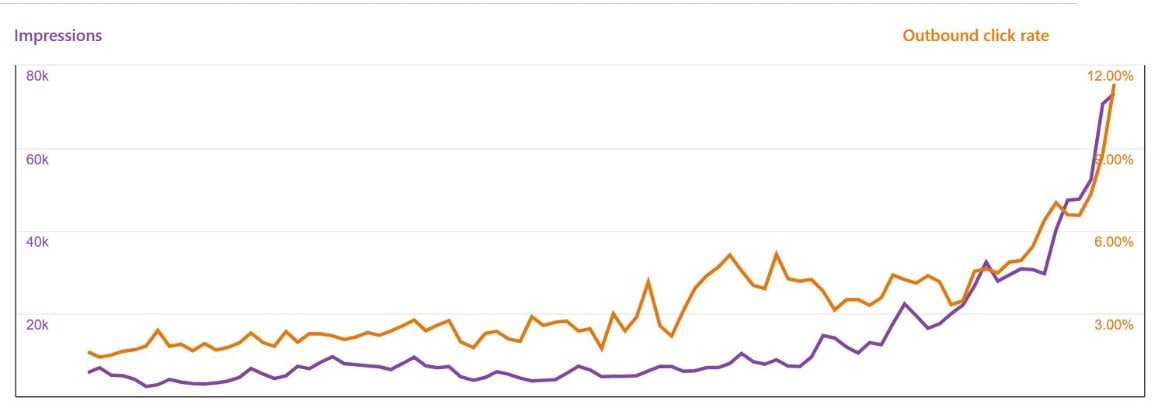
Results like this on Pinterest, are very possible with the tools on KeywordToPin.

Why You Need KeywordToPin

You need KeywordToPin because it has the tools that would make you successful on Pinterest. The tools are:
  1. Powerful Pinterest Keyword Research Tool
  2. Hidden Keyword Discovery Tool
  3. Easy-To-Use Pinterest Pin Scheduler
  4. Competitor Analysis Tool
  5. Competition Analysis Tool
  6. And a lot more

In a nutshell, KeywordToPin is a Pinterest promotion and marketing software that does keyword research, keyword discovery, pin scheduling, and all kinds of analysis to help you know what your competition is doing and how to dominate. These tools give you a massive edge over your competition.


full

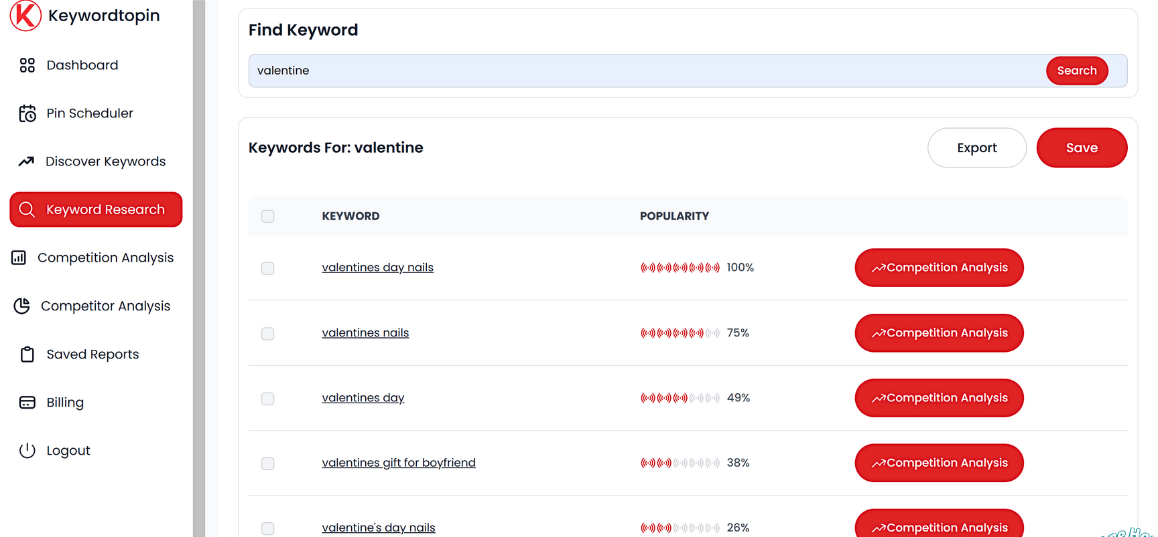
Keyword Research Tool For Pinterest
The keyword research tool on KeywordToPin, gives you a deep access into the millions of keywords on Pinterest, keywords that pinners are searching for in all niches possible. This tool oversimplifies the process, it's the Semrush/Ahrefs of Pinterest marketing.

full

Hidden Keyword Discovery Tool

The Hidden Keyword Discovery Tool is a tool like no other that exposes you to keywords that are hidden from you, keywords you ordinarily wouldn't have access to. There's no tool like this anywhere in any industry. With this tool, you get ahead of your competition becoming the first to discover new and hidden keywords.

full

Pin Scheduler Tool For Pinterest
This easy-to-use Pin Scheduler Tool makes scheduling posts on Pinterest super easy and straight forward. It helps you maintain your posting consistency without bothering yourself. This tool allows you schedule UNLIMITED number of pins.

full

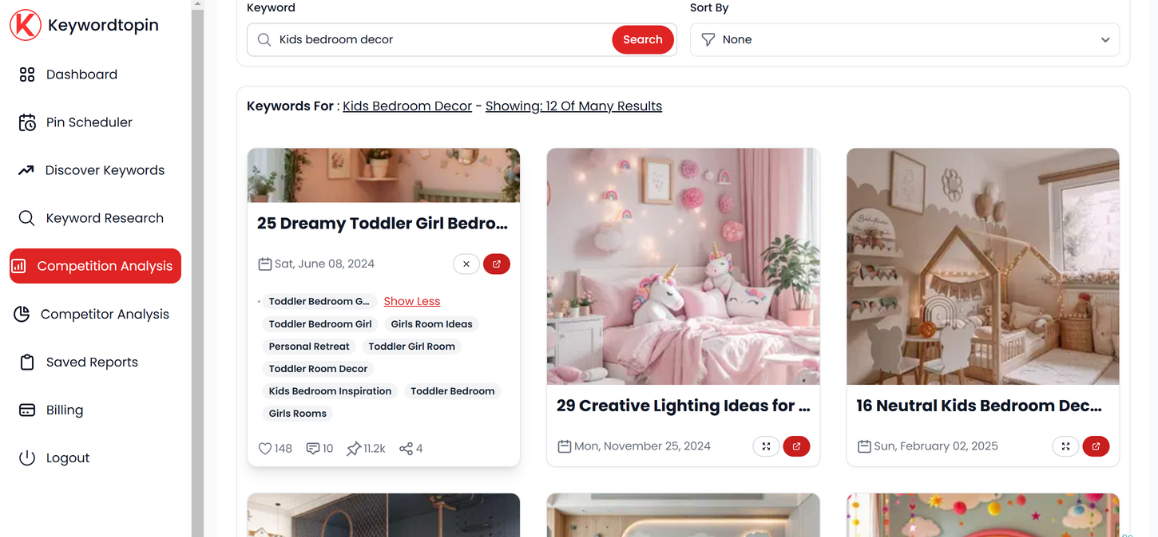
Deep Competition Analysis Tool
The Competition Analysis Tool arms you with access to every pin ranking for every keyword on Pinterest, exposing you to their pin design, titles, description and descriptive keywords. This is perhaps one of the most useful tool you could ever find anywhere that does Pinterest competition analysis.


With KeywordToPin, even an 11 year old can master Pinterest marketing because it’s easy-to-use and gets the job done.

I decided to put all these Pinterest tools you need into one package and make them immensely powerful and affordable for all. All these features you’ll get access to for just a single price unlike what you may be used to elsewhere.

PLANS AND PRICING
There's just one plan that gives you access to everything. This plan can be paid monthly or yearly(annual). When you choose annual, you pay for just 9 months and get 3 more months for free.

MONTHLY: $25
YEARLY: $225

Payment Methods
Credit/debit card
Crypto

REFUND POLICY
You get 100% refund if you were unable to access and use the tool and the issue wasn't resolved.

How To Subscribe
Just go to the KeywordToPin pricing page and choose your subscription option. Or, you can send me a DM here and I'll take care of your needs.

Contact Details
email: [email protected]

Turn Around Time
You get instant access to the tool. If any issues, I'm always here and the support team is always available on the support email to attend to your needs.
Congrats on ur tool bro, i will try definitively.
 
I received a 7 day trial in exchange for a review, and I am quite impressed with this tool and I will definitely sign-up for it in future if I am trying to get social traffic from Pinterest. The trends are presented in an attractive UI and the pin scheduling feature is good. Comparing popularity of keywords and finding hidden keywords is really good idea.
 

The Keyword Discovery Tool as seen above gives you the ability to access to hidden keywords you ordinarily wouldn't be able to see or cover. This gives you an advantage over your competitors.
The feature offers some filter options to help you narrow the hidden keywords down to very specific niche and topics as you want.


Pinterest keyword research doesn't get easier or better than this.

More People Who Want To Take Advantage Of The BHW Special 30% Discount Should Indicate Interest Here Or Through DM. Meanwhile, we're working on implementing a coupon feature to make discounts easier to claim.
I have a question about the Discover Keywords future, i want to know how the app processess these Informations, if it takes them from Pinterest Trends which one : Monthly Trends, Growing Trends etc,
does it have the capability to predict the future of Keyword, for example : if i enter an keyword from Pinterest Autocomplete it does not show on Pinterest Trends and if i type it at your Tool it says 0%
 
I have a question about the Discover Keywords future, i want to know how the app processess these Informations, if it takes them from Pinterest Trends which one : Monthly Trends, Growing Trends etc,
does it have the capability to predict the future of Keyword, for example : if i enter an keyword from Pinterest Autocomplete it does not show on Pinterest Trends and if i type it at your Tool it says 0%
Discover Keyword tool collates date from both trends and other backend keyword sources. Pinterest has many keyword data sources. For Keywords that show 0%, Pinterest has collected enough data on them reason why they still have zero, but that doesn't mean they're aren't being searched. You can put them into the competition analysis tool to get a feel of the kind of pins ranking for it.
The more close related the pins are to the keyword, the more likely it is being covered and an evidence people are searching for it.

More features are being added to the competition analysis tool to further breakdown keywords like this so you can see more about them and pins that rank for them.

The tool isn't meant to be a prediction tool rather a tool that gives you direct and quick access to data on what is actually going on. With seasonal keywords, it is expected that the demand/search for keywords related to topic to increase as the season approaches and progresses. Making it a prediction tool would make the tool less reliable and may mislead users into creating content for keywords that may never pickup because they predicted wrongly.


Those Who Want To Take Advantage Of The Ongoing Discount Indicate Here Or Via DM
 
Status
Not open for further replies.
Back
Top