- Feb 21, 2018
- 1,496
- 2,275
In this guide, I’ll be sharing a method which I personally use to come up with YouTube video ideas. This approach works particularly well for content with a longer shelf life, such as how-to / educational videos, but you can adapt it to suit your own content needs.
Disclaimer : I am not affiliated with VidIQ.
Step 3 - CSV Export
NOTE: For this Demo I'm using SNL Channel but as i mentioned earlier, this would work best with how-to / educational videos.
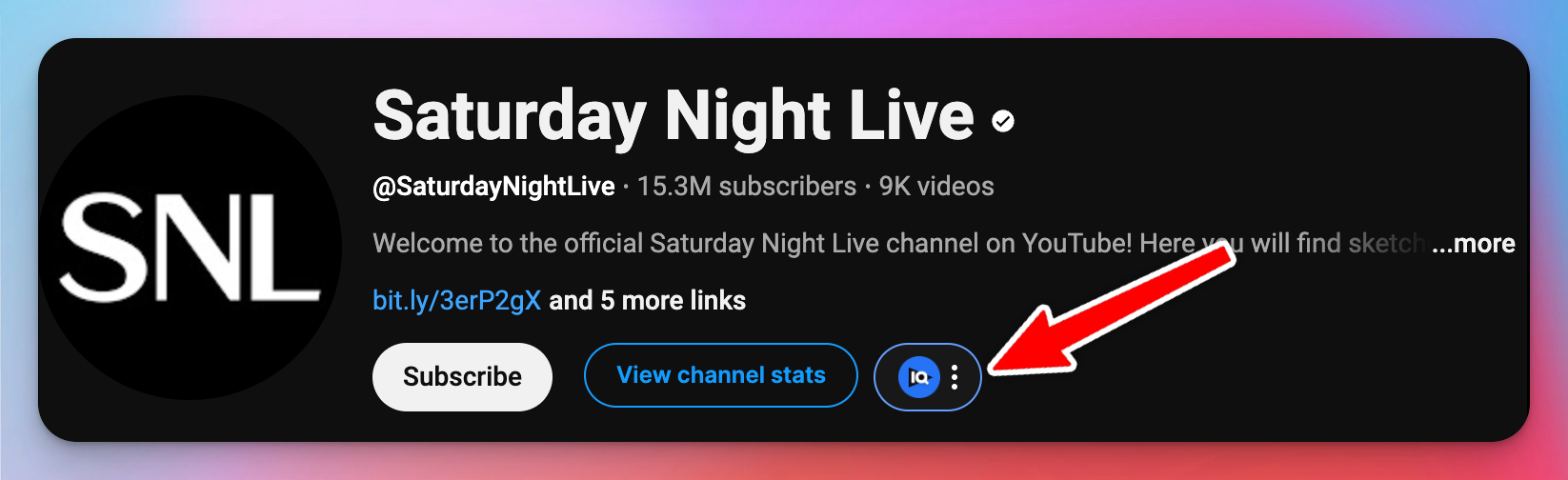
a) Open the Competitor channel and click on these 3 dots.
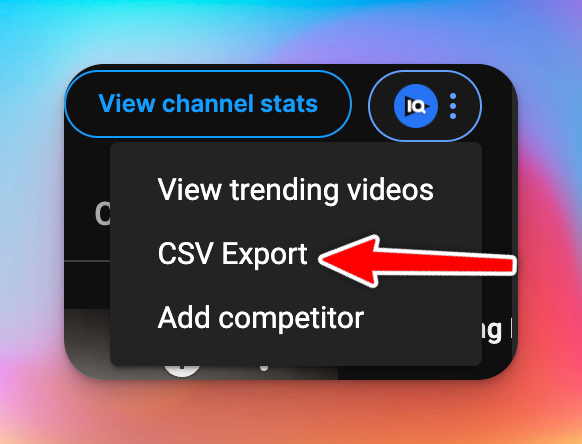
b) Click On CSV Export
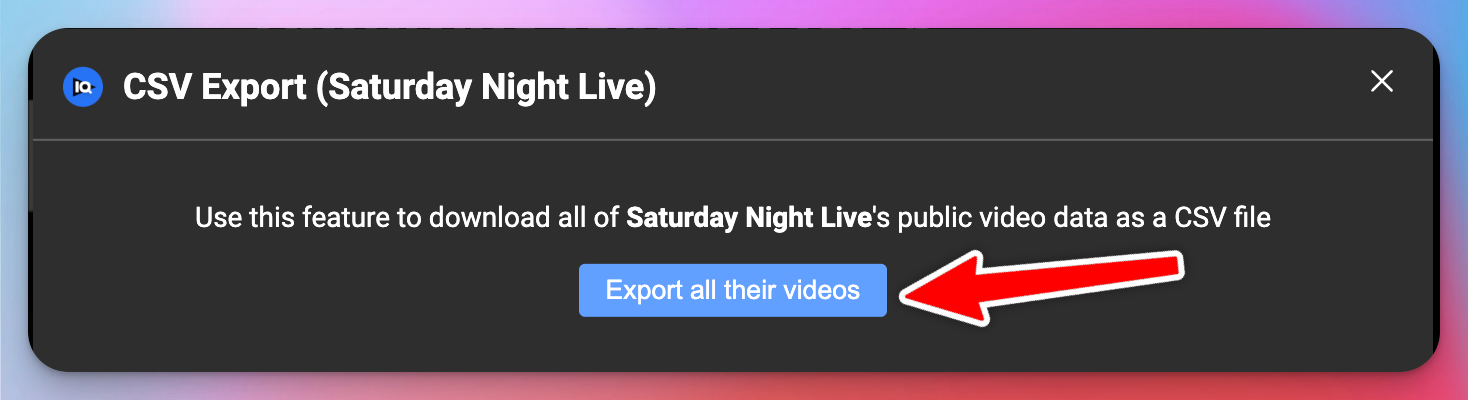
c) Click On Export All Their Videos
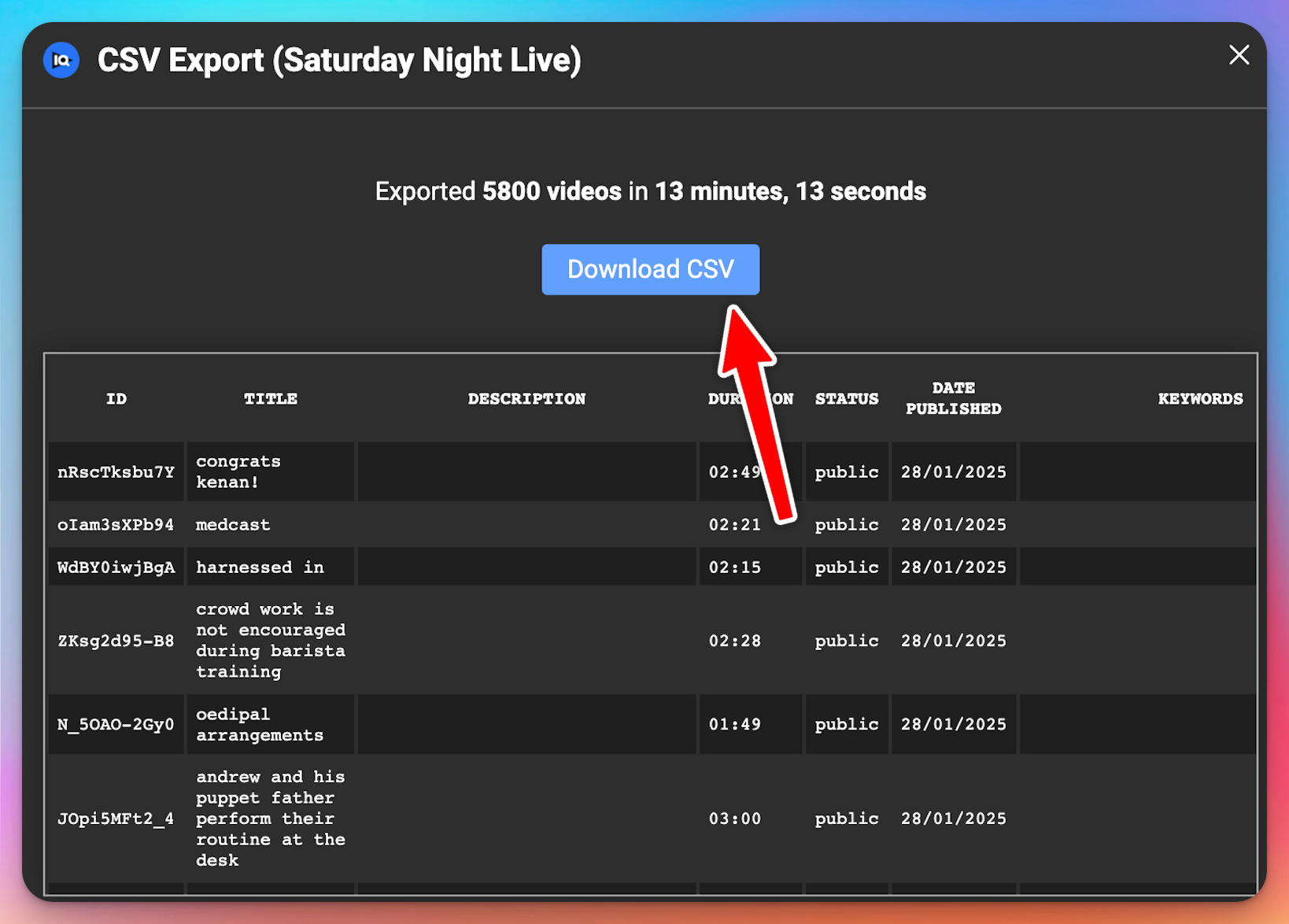
d) Click On Download CSV
Now Repeat this same process to all the Competitor channel's you have selected before.
Step 4 - Use ChatGPT/Deep Seek
Note: You can use any AI tool which suits you, I will be using Deep Seek, because at the time of writing this thread, I was running some tests on it. But you can expect same results with ChatGPT as well.
We have thousands of videos data exported from all the channels, so we will be using ChatGPT / Deep Seek to sort it.
Use This Prompt: Create a new document containing the titles and the number of views of the 100 most viewed videos from the list provided.

This Will give us a list of 100 most viewed videos based on that list, so save that & repeat the same process for other channels as well.
Now you will have a list of 100 videos from different channels, but there is a chance that there will be duplicate topics. So use Ai to give you a list of 100 unique video ideas based of the new lists.
Note: This is a method that I personally use & this is just a starting point, make changes to it as per your needs. You can make changes to the prompt and change the number of videos, change the minimum view count, change the time duration of videos etc.. Use your own brain and use this method as per your case.
Step 1 - Find Your Competitors
The first step is to identify the go-to channels in your niche. Look for channels that consistently get high views and have a solid following. Aim to find as many channels as you can, but try to focus on the top 5-10 with the highest engagement and views. These will give you the most valuable insights.Step 2 - Install VidIQ Plugin
I am sure every You-Tuber has this plugin already installed, but the only downside is for this method you need to have a paid version of it else it won't work properly.Disclaimer : I am not affiliated with VidIQ.
Step 3 - CSV Export
NOTE: For this Demo I'm using SNL Channel but as i mentioned earlier, this would work best with how-to / educational videos.
a) Open the Competitor channel and click on these 3 dots.
b) Click On CSV Export
c) Click On Export All Their Videos
d) Click On Download CSV
Now Repeat this same process to all the Competitor channel's you have selected before.
Step 4 - Use ChatGPT/Deep Seek
Note: You can use any AI tool which suits you, I will be using Deep Seek, because at the time of writing this thread, I was running some tests on it. But you can expect same results with ChatGPT as well.
We have thousands of videos data exported from all the channels, so we will be using ChatGPT / Deep Seek to sort it.
Use This Prompt: Create a new document containing the titles and the number of views of the 100 most viewed videos from the list provided.
This Will give us a list of 100 most viewed videos based on that list, so save that & repeat the same process for other channels as well.
Now you will have a list of 100 videos from different channels, but there is a chance that there will be duplicate topics. So use Ai to give you a list of 100 unique video ideas based of the new lists.
Note: This is a method that I personally use & this is just a starting point, make changes to it as per your needs. You can make changes to the prompt and change the number of videos, change the minimum view count, change the time duration of videos etc.. Use your own brain and use this method as per your case.