Problem with FB ADs, FB need pixel which has already been added

Festo

Registered Member
Joined
Sep 10, 2014
Messages
86
Reaction score
19
Hello,

I have a problem with creating an advertising campaign on Facebook. A few days ago I launched my first campaign. I wanted to add a new one but I have the following problem. Screenshot below. There is a problem connecting to the pixel. The pixel has already been generated and it is added to the website. Does anyone had such a problem and knows what to do about it?
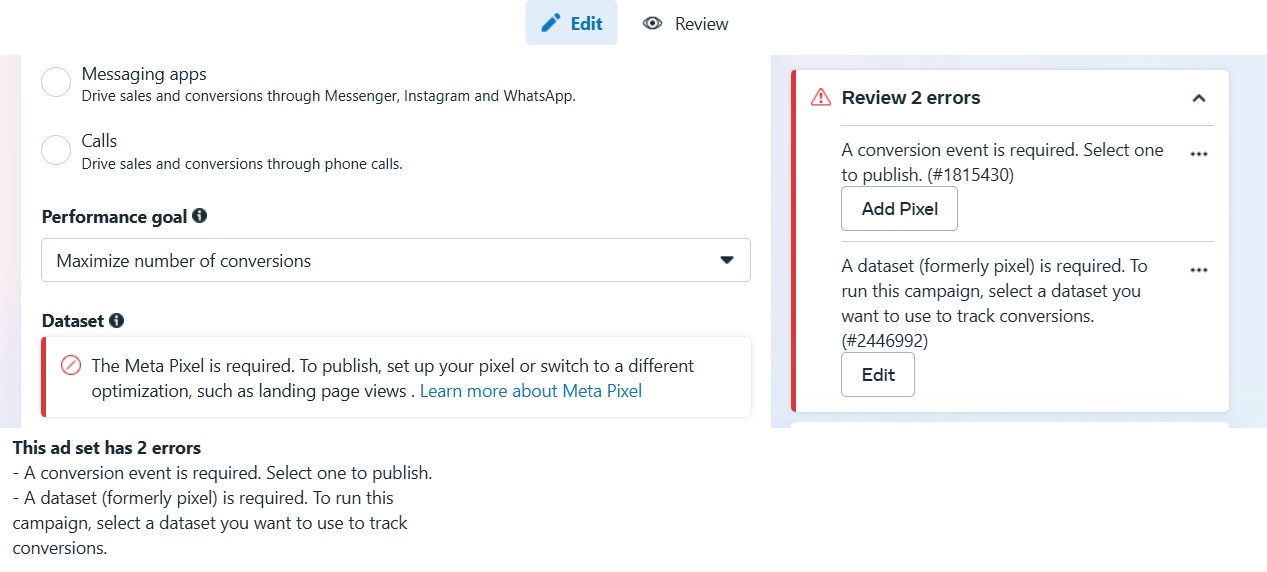
1737806089453.png
 

Attachments

  • 1737806051798.png
    1737806051798.png
    9.9 KB · Views: 36
Hello,

I have a problem with creating an advertising campaign on Facebook. A few days ago I launched my first campaign. I wanted to add a new one but I have the following problem. Screenshot below. There is a problem connecting to the pixel. The pixel has already been generated and it is added to the website. Does anyone had such a problem and knows what to do about it?

View attachment 415318
You need to connect your account asset to your pixel
 
If you are using custom conversions, ensure that the Pixel events are set up correctly to track those actions. You can set up custom conversions in Events Manager.

Cheers
 
Check the BM that is providing you that Pixel, maybe the BM has been banned or restricted, file a complaint and add another pixel to your ad account that is active
 
Hello again,

Thank you very much for all answears.

Yesterday I made the first campaign, I used graphics from feed products, this is campaign no. 1. Today I wanted to make a second campaign, it is marked as number 2, in it I would like to use graphics that I made myself. As you can see, campaign number one works. I used practically the same scheme, I only changed the graphics, the rest of the settings are the same.
 

Attachments

  • FB ADs problem 2.png
    FB ADs problem 2.png
    62.8 KB · Views: 68
Hello again,

Thank you very much for all answears.

Yesterday I made the first campaign, I used graphics from feed products, this is campaign no. 1. Today I wanted to make a second campaign, it is marked as number 2, in it I would like to use graphics that I made myself. As you can see, campaign number one works. I used practically the same scheme, I only changed the graphics, the rest of the settings are the same.
try sharing the pixel again, the image shows your pixel is not shared with the account
 

Attachments

  • FB ADs problem 3.png
    FB ADs problem 3.png
    140.8 KB · Views: 61
I have access to it, but this problem still occurs...

Did you select Datasets, and also Connect Assets?? Assets mean your pixel etc, it has to be added to the ad account you are running from.

If this doesn't work try re-creating a pixel or it has to get permission to be used from another BM.

It's kinda hard to track your setup.

helpBH0002.jpg
 
Please check the BM providing that pixel, it seems that that BM has been banned, if banned, please appeal and replace a new pixel in your account.
 
you need to add pixel to ad account. go to dataset -> find the right pixel -> connect asset
 
It's important that your ad account is connected to the pixel for the pixel to work.
 
Did you select Datasets, and also Connect Assets?? Assets mean your pixel etc, it has to be added to the ad account you are running from.
Hello again,

That's what I did, as in your photo I gave permissions in assign people and in connect assets, but it still don't working.
The first campaign is still running. I have not received any warning on my Facebook account or by email regarding my account or business manager
 
You need to set up the pixel then share it to your account.
Hello,

I have a problem with creating an advertising campaign on Facebook. A few days ago I launched my first campaign. I wanted to add a new one but I have the following problem. Screenshot below. There is a problem connecting to the pixel. The pixel has already been generated and it is added to the website. Does anyone had such a problem and knows what to do about it?

View attachment 415318
You need to set up the pixel then share it to your account.
 
Double check that your pixel is connected to your account and set up correctly
 
Back
Top