

Milbo Agency
Regular Member
- Oct 13, 2022
- 347
- 100
Fixing the "Can't Add Admin to Personal Account" Error
When granting access to another profile on a personal account, you may encounter the following errors:
Error: Profiles are not friends yet
Error: "This user can’t be added as an admin of this ad account. This may be because you lack permissions or the user you selected may not be authorized."
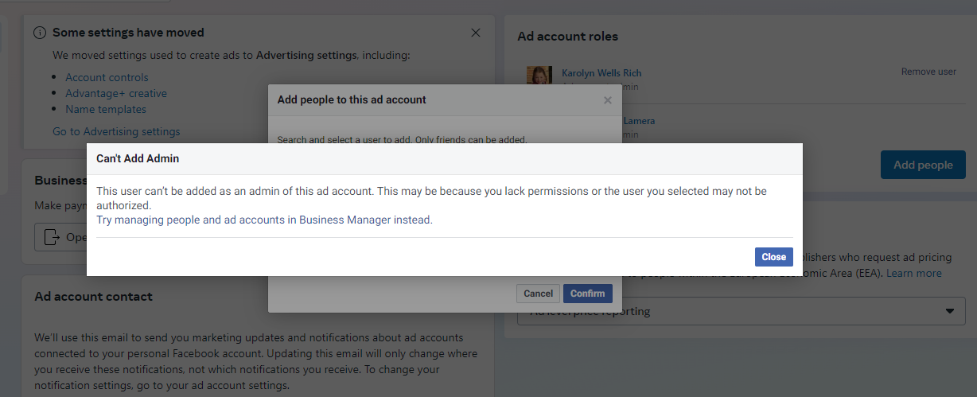
Error: Profile cannot receive any ad accounts
Steps to Resolve Each Error:
1. Error: Profiles are not friends yet
The solution is simple: just send a friend request between the two profiles. Once accepted, you should be able to grant access to the ad account.
2. Error: "This user can’t be added as an admin of this ad account..."
Open the browser where you are logged into the profile needing access and enable Incognito Mode (Ctrl + Shift + N) on that browser.
Log into the profile again through Incognito Mode and try sharing the ad account access once more.
Success rate: 50-60%. If successful, it will happen on the first attempt. If it doesn't work, the profile cannot receive ad account access as a personal account.
In that case, you’ll need to add the profile to a Business Manager (BM) and then grant access through BM instead of directly through the personal account.
3. Check Profile Status:
Before granting access, ensure that the profile is not restricted from advertising. If there are any restrictions, appeal to Facebook for review to lift the restriction.
By following these steps, you should be able to resolve the "Can't Add Admin to Personal Account" issue and successfully grant access to your ad accounts.
When granting access to another profile on a personal account, you may encounter the following errors:
Error: Profiles are not friends yet
Error: "This user can’t be added as an admin of this ad account. This may be because you lack permissions or the user you selected may not be authorized."
Error: Profile cannot receive any ad accounts
Steps to Resolve Each Error:
1. Error: Profiles are not friends yet
The solution is simple: just send a friend request between the two profiles. Once accepted, you should be able to grant access to the ad account.
2. Error: "This user can’t be added as an admin of this ad account..."
Open the browser where you are logged into the profile needing access and enable Incognito Mode (Ctrl + Shift + N) on that browser.
Log into the profile again through Incognito Mode and try sharing the ad account access once more.
Success rate: 50-60%. If successful, it will happen on the first attempt. If it doesn't work, the profile cannot receive ad account access as a personal account.
In that case, you’ll need to add the profile to a Business Manager (BM) and then grant access through BM instead of directly through the personal account.
3. Check Profile Status:
Before granting access, ensure that the profile is not restricted from advertising. If there are any restrictions, appeal to Facebook for review to lift the restriction.
By following these steps, you should be able to resolve the "Can't Add Admin to Personal Account" issue and successfully grant access to your ad accounts.


