Need advice for setting up a big mobile proxy farm

No, all that gear you listed is old as shit. How do you feel about 5mbps up and down for a proxy? For the same price I can use other stuff that's gonna give you 15mbps to 50mbps.
what other stuff? post it
 
@lucky.sparks mentioned (long time ago) using 2.0 usb hub instead of 3.0. Is it still a valid choice?
There is not many manufacturers offering 2.0 usb hub, I mean quality ones, not cheap useless stuff from cheap websites.
 
@lucky.sparks mentioned (long time ago) using 2.0 usb hub instead of 3.0. Is it still a valid choice?
There is not many manufacturers offering 2.0 usb hub, I mean quality ones, not cheap useless stuff from cheap websites.
It depends on dongles you use, if you use 2.0 dongles, there is no point of using 3.0 hubs.

There are more than couple good manufacturers for 2.0 hubs, best is sipolar and then orico. They are very good quality and are cheap if you buy from alibaba, not from resellers in amazon.
 
It depends on dongles you use, if you use 2.0 dongles, there is no point of using 3.0 hubs.

There are more than couple good manufacturers for 2.0 hubs, best is sipolar and then orico. They are very good quality and are cheap if you buy from alibaba, not from resellers in amazon.
Thanks.
Many of you mentioned ZTE MF79U (usb 2.0).
Does ZTE MF79N also a good choice (older version but cheaper)?
 
Thanks.
Many of you mentioned ZTE MF79U (usb 2.0).
Does ZTE MF79N also a good choice (older version but cheaper)?
You can get MF79U as low as 19$ per dongle on alibaba.

MF79N looks almost same so I expect it to be as good as U version. I haven't tested it.

Buy both and compare.
 
Um I'd rather not say, given I spent a large ammount of time developing hardware nobody uses in this industry curently and it is kinda a golden goose. I am a cellular geek and own a internet company. But it is something you have to program. I have a 3proxy server running this situation. I can run 20 fobs at a time on rpi4. I wrote all my own stuff.

But ill be honest, after a couple of these posts iv read. They all seem like advertising for proxidize to get people to buy into there service incognito. Which is a horrible service, they aren't helping people at all and are super shitty people. Because iv been trying to sell these for a year cheap and had no bites on any network at all.

Just feels like it's easyer and cheaper to get a residential proxy or a vpn to do anything now days. Hell a vps is cheaper and easyer now days rather thN mobile proxies.
why bring up the hardware if youre not even gonna talk about it and then complain that you arent making sales?
Ok that's what I thought.
And for those of you who are running proxy farm at home, are you not concerned about the sheer volume of radio transmissions?
concerned as in health defects? good question
 
which cat 12/16 models allow you to Repair The Imei? specifically with the command " AT+EGMR=1,7,"xxxxxxxxxxx" "? all I find is Cudy Cat12
 
Hello, I am planning to open a mobile proxy farm with 100 USB dongles, and I have a budget of 15,000 USD. I have a few questions and I hope some of you are able to answer them:

1. What CPU do you recommend for a proxy server?
2. Will 3proxy handle that much traffic on a single server?
3. How fast of an internet connection should I have? Fiber-optic internet cannot be installed there, so I can only have unlimited 5G internet with download speeds up to 5.4 Gb/s and upload speeds of 500 Mb/s, with a bandwidth of up to 3000 Mb/s assuming the best coverage.
4. Are there better dongles available than the Huawei e3372h-153 for this purpose?

Thank you for your help. I appreciate any advice or suggestions you can provide.

I was using a 50-dongle farm (huawei 3372h) for more than a year.
Dongles are quite stable and 3372h and MF79U have TTL and IMEI fixes (so you can use cheap smartphone tarrifs)

I was using a little bit different solution than you all have. With no local server and USB-hubs.

Every dongle was connected to a cheap small router which was handling a VPN connection to the remote server (the actual proxy server with 3proxy)
This solution is not cheaper but if you count the price of the local server with good usb hubs and fast connection - the price will be comparable.
The main advantage - that you don't need an expensive local server with static IP and high-speed optic fiber channel. Actually there is no fiber optics in many locations.

Later I had to switch to 5g networks and now I am using smartphones. There are several stable android applications that work fine, but I had to develop my own.

I would be grateful if anyone can advise any affordable 5g dongles with ability to change IMEI and/or TTL.
 
5g dongles
do they ever exist? "dongles" stopped being manufactured around 2018. Future 5G-capable mobile equipment are either Phones or MiFi routers (also almost ended) or 4G/5G-LAN routers.
 
do they ever exist? "dongles" stopped being manufactured around 2018. Future 5G-capable mobile equipment are either Phones or MiFi routers (also almost ended) or 4G/5G-LAN routers.
Exactly, That's why I ask.
But I know that there are some.
Maybe they don't look like classic sticks(they are bigger) but they are still USB devices based on SIM8202G or QUECTEL RG200U.
Some of them based on raspberry or somethig like that. But they are quite expensive.
Please let me know if you know any solutions.
 
Sure. I would recommend sticking with the idea of having more small clusters of mini PC's or SBC's than one large one just because of fault tolerance. But this depends on whether you will be around them or not and how good uptime you want to reach. If only for your botting setup and you plan to be around it so you can do maintenance I would recommend going with a good tower PC.

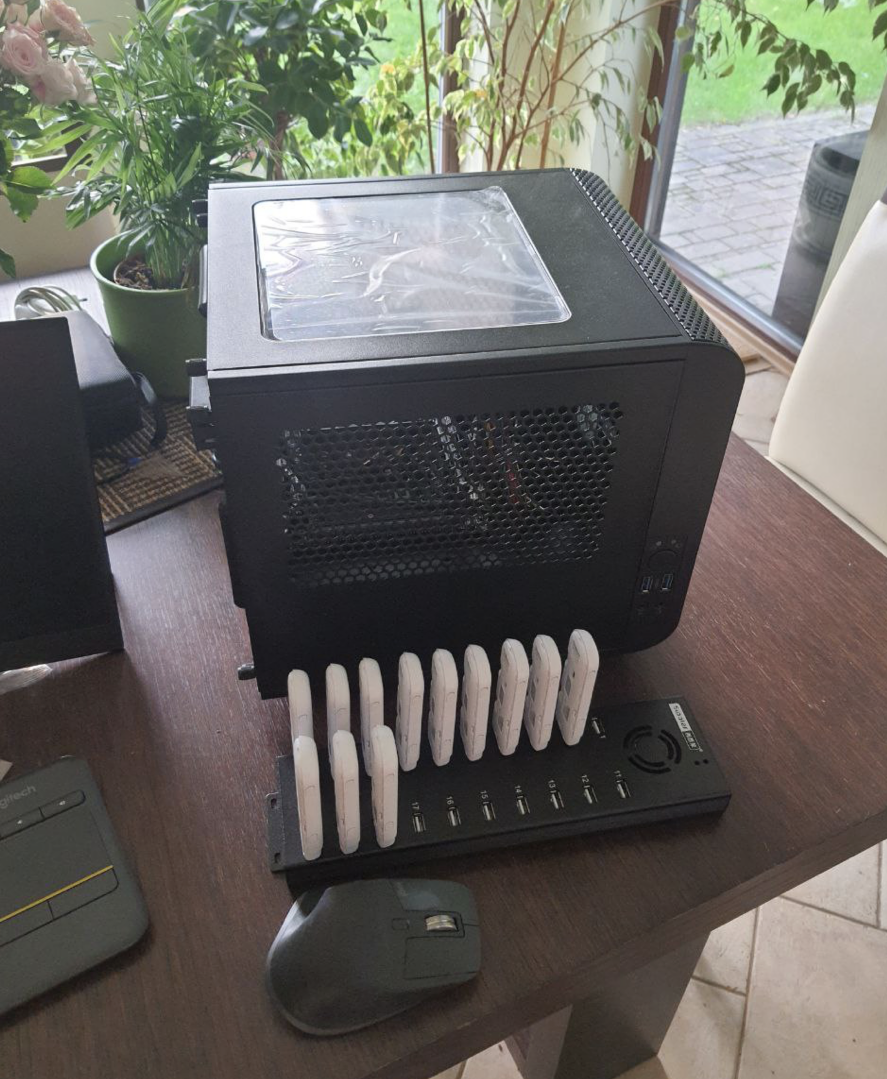
Right now my tower specs are:
- Intel, Core i5-12500
- Thermaltake, Core V1 Snow Edition / Black edition. Because it looks dope.
- motherboard Gigabyte, H610I
- cheapest ddr4 RAM and cheapest/smallest SSD

With these specs it shows 3k connections open to this box
# ss -o state established | wc -l
3044

and it's practically sleeping in terms of CPU load.

View attachment 324463

This is what it looks like:
image.png


So you really dont need a powerful box to run 100 dongles on a single PC.

For hubs just go with orico or sipolar USB hubs.

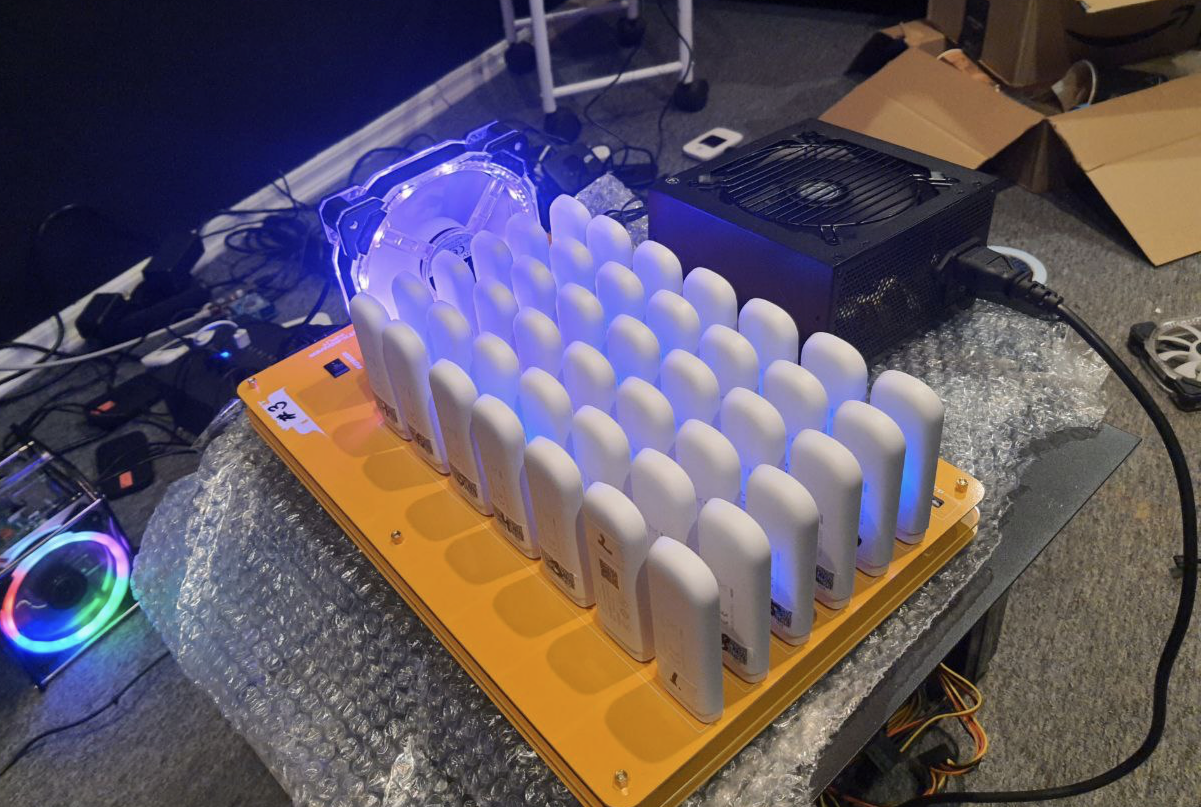
Don't do experiments with custom hubs as I did:

image.png

This is BAD. While this hub is very cool because it works from a regular PSU, has a lot of slots with good spacing between for good airflow, this is where I learned the hard truth about what USB controllers are and how they work. With this setup on medium to high load speed per dongle decreased to glorious 1 Mbit/s and latency went up to 1000ms.

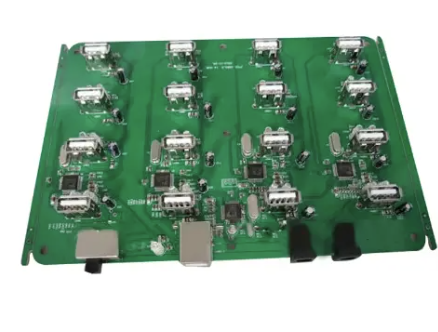
Now I'm working to switch setup on boards like these which I haven't seen others using.

image.png


While they still have 1.5A and 5V output to support dongle on high load, there is only 16 2.0 ports, with good spacing for ideal airflow and double power slots for fault tolerance.

For Mikrotik I switched to RB4011iGS+5HacQ2HnD-IN. I kinda don't like it has passive cooling but specs/price ratio is very good and it has built in wireless which makes things easier when you want to quickly go to site, do some maintenance and be on your way. Before I used more regular mikrotik router boards.

300x400


Right now I have around 1000 modems hosted in multiple countries,
I have tried it all, this is my approx history of upgrades:

- started with a single PC, Orico hubs and Huawei modems
- changed standalone PC setup for XU4
- started using mikrotik's router boards
- changed Huawei Dongles for ZTE(lifechanging experience)
- experimented with $1000 worth of various hubs to find what works best
- for reasons unclear even to myself I changed some XU4 to a single PC approach again hosting 80-100 dongles per PC
- only couple power outages and hardware faults did show that single PC approach is bad for high uptime requirements
- now I'm switching back to SBC approach and using vim4 from Khadas, it's like XU4 on steroids.


Because commonly advised is hobbyist experiment on a proof of concept level, it will work but you wont be able to run more than 4-6 dongles per rpi. I dont know why, never had interest to investigate why it's so, either it comes from rpi chipset limits or software, i dont know, dont care, XU4 is cheaper and way more powerful. That said XU4 is soon to be discontinued, so will need to look for other options.


- Both are more cost effective as I get my ZTE for less than $20 per dongle with pretty much unlimited supply.
- ZTE has never frozen on me, Huawei had tendency to freeze and stop responding and only hard reset did help.
- ZTE vs Huawei i got better speeds for some carriers. I never experimented much with it but i did notice about 20% difference.
- XU4 uses eMMC where rpi uses microSD. Yes yes, you can probably upgrade rpi with all sorts of stuff to support SSD etc, don't care.


What's significant traffic? Why you want to run big traffic, you need to skip any static resources in your bot from being proxied, it will decrease the use a lot. Unless you plan to use real android phones, then it's another story, and a deep one too haha. But even there optimizations are possible to handle big loads properly.


And here starts the rabbit hole,
USB Controller chipset endpoint limits.

I will try to simplify as much as I can.
- Every USB chipset has limits on how many USB devices can be connected to it.
- With USB 2.0(white color) you will be able to connect 20-40 devices, with USB 3.0(blue color) you will be able to connect only 16 devices
- Max supported device count comes from how many endpoints USB device uses, technically USB 2.0 supports 127 devices but you will have bad time trying to do so
- ZTE/Huawei dongles are USB 2.0, so it doesn't matter if you use USB 3.0 hubs or 3.0 ports on your m/b, it will go backward compatibility to USB 2.0
- USB 2.0 is half-duplex, which means data travels one way at a time, which means it's slow. If you add more than -N devices to the USB controller, it will become slower with each additional device if they are all on high load.

So to run on PC you will need good USB PCIe card with separate channels per port to get most of your setup.

All the above is only about hardware. You will need software to manage it all too. For inhouse use simple node.js script that generates 3proxy config will be enough.

My coffee got cold writing this. Will come back later if I will remember to add something here.
Besides hardware, are there any software knowledge requirements or any guides you would recommend or YouTube channels, for someone who wants to get into the business?

Would you need a background in IT? If so could you point me in the right direction to educate myself

I just ordered 1 odroid xu4, 2 mf79u, and a 4 port USB hub to familiarize myself on a small scale. A mini project.

I also have a small army of mobile phones (from an older project) but not exactly sure how I want to use them in regards to selling proxies. (I did create some android proxies using some GitHub Mobile app to get a feel for it)
 
Last edited:
Besides hardware, are there any software knowledge requirements or any guides you would recommend or YouTube channels, for someone who wants to get into the business?

Would you need a background in IT? If so could you point me in the right direction to educate myself

I just ordered 1 odroid xu4, 2 mf79u, and a 4 port USB hub to familiarize myself on a small scale. A mini project.

I also have a small army of mobile phones (from an older project) but not exactly sure how I want to use them in regards to selling proxies. (I did create some android proxies using some GitHub Mobile app to get a feel for it)

Hey nice to see someone else at roughly the same point as me. I also have 1 proxy running on a phone and was playing around with a Raspberry Pi and Huawei Stick before.

But now decided to order 1 Odroid XU4 and 6mf79u (got 2 Sim cards right now, but should be easy to get another 4 I believe), I already have a USB hub with it's own power supply.
Right now I'm pretty busy with my day-job but will probably work on setting some stuff up whenever I have time. If you want to connect feel free to message me @The0ry and maybe we can solve some issues that come up together.

Somewhere else I saw @lucky.sparks and other recommend Proxysmart and I gotta say this looks like a really promising project. Personally I will also look into building a whitelist though to at least somewhat cover my ass when it comes to legal aspects
 
Sure. I would recommend sticking with the idea of having more small clusters of mini PC's or SBC's than one large one just because of fault tolerance. But this depends on whether you will be around them or not and how good uptime you want to reach. If only for your botting setup and you plan to be around it so you can do maintenance I would recommend going with a good tower PC.

Right now my tower specs are:
- Intel, Core i5-12500
- Thermaltake, Core V1 Snow Edition / Black edition. Because it looks dope.
- motherboard Gigabyte, H610I
- cheapest ddr4 RAM and cheapest/smallest SSD

With these specs it shows 3k connections open to this box
# ss -o state established | wc -l
3044

and it's practically sleeping in terms of CPU load.

View attachment 324463

This is what it looks like:
image.png


So you really dont need a powerful box to run 100 dongles on a single PC.

For hubs just go with orico or sipolar USB hubs.

Don't do experiments with custom hubs as I did:

image.png

This is BAD. While this hub is very cool because it works from a regular PSU, has a lot of slots with good spacing between for good airflow, this is where I learned the hard truth about what USB controllers are and how they work. With this setup on medium to high load speed per dongle decreased to glorious 1 Mbit/s and latency went up to 1000ms.

Now I'm working to switch setup on boards like these which I haven't seen others using.

image.png


While they still have 1.5A and 5V output to support dongle on high load, there is only 16 2.0 ports, with good spacing for ideal airflow and double power slots for fault tolerance.

For Mikrotik I switched to RB4011iGS+5HacQ2HnD-IN. I kinda don't like it has passive cooling but specs/price ratio is very good and it has built in wireless which makes things easier when you want to quickly go to site, do some maintenance and be on your way. Before I used more regular mikrotik router boards.

300x400


Right now I have around 1000 modems hosted in multiple countries,
I have tried it all, this is my approx history of upgrades:

- started with a single PC, Orico hubs and Huawei modems
- changed standalone PC setup for XU4
- started using mikrotik's router boards
- changed Huawei Dongles for ZTE(lifechanging experience)
- experimented with $1000 worth of various hubs to find what works best
- for reasons unclear even to myself I changed some XU4 to a single PC approach again hosting 80-100 dongles per PC
- only couple power outages and hardware faults did show that single PC approach is bad for high uptime requirements
- now I'm switching back to SBC approach and using vim4 from Khadas, it's like XU4 on steroids.


Because commonly advised is hobbyist experiment on a proof of concept level, it will work but you wont be able to run more than 4-6 dongles per rpi. I dont know why, never had interest to investigate why it's so, either it comes from rpi chipset limits or software, i dont know, dont care, XU4 is cheaper and way more powerful. That said XU4 is soon to be discontinued, so will need to look for other options.


- Both are more cost effective as I get my ZTE for less than $20 per dongle with pretty much unlimited supply.
- ZTE has never frozen on me, Huawei had tendency to freeze and stop responding and only hard reset did help.
- ZTE vs Huawei i got better speeds for some carriers. I never experimented much with it but i did notice about 20% difference.
- XU4 uses eMMC where rpi uses microSD. Yes yes, you can probably upgrade rpi with all sorts of stuff to support SSD etc, don't care.


What's significant traffic? Why you want to run big traffic, you need to skip any static resources in your bot from being proxied, it will decrease the use a lot. Unless you plan to use real android phones, then it's another story, and a deep one too haha. But even there optimizations are possible to handle big loads properly.


And here starts the rabbit hole,
USB Controller chipset endpoint limits.

I will try to simplify as much as I can.
- Every USB chipset has limits on how many USB devices can be connected to it.
- With USB 2.0(white color) you will be able to connect 20-40 devices, with USB 3.0(blue color) you will be able to connect only 16 devices
- Max supported device count comes from how many endpoints USB device uses, technically USB 2.0 supports 127 devices but you will have bad time trying to do so
- ZTE/Huawei dongles are USB 2.0, so it doesn't matter if you use USB 3.0 hubs or 3.0 ports on your m/b, it will go backward compatibility to USB 2.0
- USB 2.0 is half-duplex, which means data travels one way at a time, which means it's slow. If you add more than -N devices to the USB controller, it will become slower with each additional device if they are all on high load.

So to run on PC you will need good USB PCIe card with separate channels per port to get most of your setup.

All the above is only about hardware. You will need software to manage it all too. For inhouse use simple node.js script that generates 3proxy config will be enough.

My coffee got cold writing this. Will come back later if I will remember to add something here.
did you switch back to a pc from XU4 because proxysmart require 64 bits OS ? or you are using your own software to manage your proxies.
tried to run proxysmart on ubuntu with XU4 but failed to install.
 
An i5 mini computer like an optiplex 5050 with 8-16GB of memory would work fine.
 
Sure. I would recommend sticking with the idea of having more small clusters of mini PC's or SBC's than one large one just because of fault tolerance. But this depends on whether you will be around them or not and how good uptime you want to reach. If only for your botting setup and you plan to be around it so you can do maintenance I would recommend going with a good tower PC.

Right now my tower specs are:
- Intel, Core i5-12500
- Thermaltake, Core V1 Snow Edition / Black edition. Because it looks dope.
- motherboard Gigabyte, H610I
- cheapest ddr4 RAM and cheapest/smallest SSD

With these specs it shows 3k connections open to this box
# ss -o state established | wc -l
3044

and it's practically sleeping in terms of CPU load.

View attachment 324463

This is what it looks like:
image.png


So you really dont need a powerful box to run 100 dongles on a single PC.

For hubs just go with orico or sipolar USB hubs.

Don't do experiments with custom hubs as I did:

image.png

This is BAD. While this hub is very cool because it works from a regular PSU, has a lot of slots with good spacing between for good airflow, this is where I learned the hard truth about what USB controllers are and how they work. With this setup on medium to high load speed per dongle decreased to glorious 1 Mbit/s and latency went up to 1000ms.

Now I'm working to switch setup on boards like these which I haven't seen others using.

image.png


While they still have 1.5A and 5V output to support dongle on high load, there is only 16 2.0 ports, with good spacing for ideal airflow and double power slots for fault tolerance.

For Mikrotik I switched to RB4011iGS+5HacQ2HnD-IN. I kinda don't like it has passive cooling but specs/price ratio is very good and it has built in wireless which makes things easier when you want to quickly go to site, do some maintenance and be on your way. Before I used more regular mikrotik router boards.

300x400


Right now I have around 1000 modems hosted in multiple countries,
I have tried it all, this is my approx history of upgrades:

- started with a single PC, Orico hubs and Huawei modems
- changed standalone PC setup for XU4
- started using mikrotik's router boards
- changed Huawei Dongles for ZTE(lifechanging experience)
- experimented with $1000 worth of various hubs to find what works best
- for reasons unclear even to myself I changed some XU4 to a single PC approach again hosting 80-100 dongles per PC
- only couple power outages and hardware faults did show that single PC approach is bad for high uptime requirements
- now I'm switching back to SBC approach and using vim4 from Khadas, it's like XU4 on steroids.


Because commonly advised is hobbyist experiment on a proof of concept level, it will work but you wont be able to run more than 4-6 dongles per rpi. I dont know why, never had interest to investigate why it's so, either it comes from rpi chipset limits or software, i dont know, dont care, XU4 is cheaper and way more powerful. That said XU4 is soon to be discontinued, so will need to look for other options.


- Both are more cost effective as I get my ZTE for less than $20 per dongle with pretty much unlimited supply.
- ZTE has never frozen on me, Huawei had tendency to freeze and stop responding and only hard reset did help.
- ZTE vs Huawei i got better speeds for some carriers. I never experimented much with it but i did notice about 20% difference.
- XU4 uses eMMC where rpi uses microSD. Yes yes, you can probably upgrade rpi with all sorts of stuff to support SSD etc, don't care.


What's significant traffic? Why you want to run big traffic, you need to skip any static resources in your bot from being proxied, it will decrease the use a lot. Unless you plan to use real android phones, then it's another story, and a deep one too haha. But even there optimizations are possible to handle big loads properly.


And here starts the rabbit hole,
USB Controller chipset endpoint limits.

I will try to simplify as much as I can.
- Every USB chipset has limits on how many USB devices can be connected to it.
- With USB 2.0(white color) you will be able to connect 20-40 devices, with USB 3.0(blue color) you will be able to connect only 16 devices
- Max supported device count comes from how many endpoints USB device uses, technically USB 2.0 supports 127 devices but you will have bad time trying to do so
- ZTE/Huawei dongles are USB 2.0, so it doesn't matter if you use USB 3.0 hubs or 3.0 ports on your m/b, it will go backward compatibility to USB 2.0
- USB 2.0 is half-duplex, which means data travels one way at a time, which means it's slow. If you add more than -N devices to the USB controller, it will become slower with each additional device if they are all on high load.

So to run on PC you will need good USB PCIe card with separate channels per port to get most of your setup.

All the above is only about hardware. You will need software to manage it all too. For inhouse use simple node.js script that generates 3proxy config will be enough.

My coffee got cold writing this. Will come back later if I will remember to add something here.
"Now I'm working to switch setup on boards like these which I haven't seen others using."
which one is this ? which provide good spacing and double power slots.
 
Back
Top