- May 29, 2018
- 6,337
- 7,054
I am sorry, that's a bit of clickbait (kinda), but since you've already clicked, why not read on to understand more about what mobile proxies are and how you can benefit from them in your business?
Hello, lads and gents. I've noticed a lot of questions lately about mobile proxies: what they are, how they work, why some are better than others, where to buy them, what to consider when purchasing, and other industry-related topics. So, let's get started. This guide is aimed at beginners, but even seasoned professionals will find useful tricks, so stick around.
Mobile Proxies Overview
When discussing proxies, it's important to understand what a server is, because mobile proxies are essentially "mini" servers that act as intermediaries (hence the term "proxy") between your device and the internet. In simple terms, a server can be a machine, device, phone, PC, virtual machine, or software. This is a simplified definition, of course, as I don't intend to turn you into an MIT graduate with this article.
Consider the image below:

A server connection exists to fulfill any requests from the user/client (that's you) and the internet. For example, suppose you have a server connection (we'll discuss how to achieve this later) on your latest model of a fake iPhone/Android, and you want to access PornHub (because you want to stay broke) without being detected by your ISP (Internet Service Provider). In this scenario, you're using Wi-Fi on your phone, but all the traffic goes through the proxy connection, effectively masking your Wi-Fi usage. The Wi-Fi provides the internet, but it can't see what you're using it for because of the proxy connection. All the Wi-Fi network detects is that you're consuming data. You're safe, nobody knows that you're looking at stupid things that fuc*s up your brain and makes you even more (broke and stupid) eager to learn how to make money.
I'll teach you later how to use mobile proxies to make money, so stay tuned!
What Makes Mobile Proxies Unique (Compared to Residential, Data Center, etc.)?
Mobile proxies are distinguished by their use of mobile data connections, typically 3G, 4G, or 5G networks, to route your internet traffic. This means your online activities appear to be originating from a mobile device, making it extremely difficult for websites to track or block you. Mobile IPs are constantly changing and are shared by many users.
For instance, you have a data subscription with AT&T, Orange, or Vodafone, and you want to connect to the Instagram app. Your phone connects to the nearest cell tower using radio waves and starts transmitting data: "Hey, I want to check my Instagram to see the latest posts." The tower receives this data and sends it to AT&T's data center, which then forwards your request to Instagram's servers. Instagram then connects you to their servers, allowing you to browse or perform actions. However, due to your cell tower connection, Instagram can pinpoint your exact geographic location (with some degree of accuracy). If you use a proxy connection, Instagram sees the location of the proxy, not yours, simple as that.
An IP, or Internet Protocol address, is a crucial element when you activate mobile data on your phone (not Wi-Fi) and the phone receives a 3G/4G/5G signal. AT&T, for example, assigns a unique registration number to your phone, which is the IP address. To access the internet, you need this registration number or IP. Every mobile data provider has a pool of IPs, some larger, some smaller. Every time you connect to a 3G/4G/5G signal, you receive an IP, even if you're not actively browsing the internet. Your IP changes every time your phone dies and you reboot it, or when you toggle airplane mode on and off. This is known as the rotation feature of IPs. With mobile proxies, you can have this IP address automatically change at intervals that suit your needs, or even control it manually through an API (more details on this later).
G/2G/3G/4G/5G refers to the "generation" of mobile network technology, marking the transition from landline to wireless phones using mobile networks.
The differences between G/2G/3G/4G/5G primarily concern internet connectivity and speed. 1G (now obsolete) and 2G don't support internet connectivity, whereas 3G, 4G, and 5G do. When you connect to the internet, the speed of your connection is a factor, measured as latency. The higher the "G," the faster the speed and the lower the latency: 5G is faster than 4G, which is faster than 3G.
This speed depends on the infrastructure of the mobile network and the ISP. For example, in Romania (where I am from), 3G can be faster than 4G in countries like France, Italy, or Germany. This is due to a higher number of cell towers, better data servers, and overall superior infrastructure for consumer services. (This is one reason why Andrew Tate moved here with his business operations.)
A not-so-fun fact
If a government wants to track your location, they can do so through triangulation. This means that when you connect to the internet via a cell tower, your phone isn't limited to connecting to just one tower. In fact, it often connects to more than one. If you move away from the first tower you were connected to, you might expect to lose the signal and disconnect from the internet. However, because you're also connected to a second or third tower, your connection remains stable. The phone continuously searches for additional nearby towers to connect to. The government can track all these cell towers to which you're connected (knowing their exact geographic locations) and deduce your approximate location. But, if you're using a proxy connection, say a Romanian one, while you're actually in Las Palma de Mallorca enjoying a cold beer on the beach, the Romanian government might think you're at Andrew Tate's house enjoying a Jerry's Pizza. Let them think that!
Yeah, but what makes mobile proxies so special then residential/dedicated/data-center/IP6 etc?
Mobile proxies are particularly special compared to residential, dedicated, data-center, or IPv6 proxies primarily due to one key feature: NAT (Network Address Translation).
Definition: NAT is a technique used by routers to convert one set of IP addresses into another. It was initially developed as a temporary solution to the problem of IPv4 address exhaustion.
How It Works: In simple terms, NAT alters the network address information in the IP header of packets as they pass through a traffic routing device. This process allows multiple devices on a local network to share a single public IP address for internet access.
Translation: NAT conveys to platforms like Instagram that you are connected with IPs equipped with NAT technology, which essentially makes them unbannable. Yes, that's correct – IPs with NAT technology are generally not subject to bans (in 99% of cases). For example, suppose you want to give 2,000 likes in a day to your favorite OnlyFans creator's posts on Instagram, exceeding the platform's daily like limit. If Instagram detects this and decides to ban the IP address, NAT technology intervenes. It informs Instagram that these are mobile IPs rotating among various users, making it unfair and impractical to ban the IP. Instead, Instagram might opt for other measures like account bans or requiring email/phone verification. They might temporarily flag the IP, but if subsequent activities from that IP are normal, the flag is usually removed. In extreme cases, if abuse is detected, they might ban an entire subnet (a range of IPs), but this is rare.
Why some mobile proxies are better than others (and better than the rest of other types of proxies)?
The quality of mobile proxies can vary significantly based on the infrastructure of the mobile network in a particular country. Let's imagine that you are living on a country that's the second poorest country in Europe, BUT it has the fastest internet speed in the world, I don't say that, Wikipedia says it (at least at this date I am writing this article), and for sure I haven't pay a $2k to forge a wiki page just to brag with this (you will find the sellers in the #marketplace) https://en.wikipedia.org/wiki/List_of_sovereign_states_by_Internet_connection_speeds
And, leaving the brag aside (if it's true then is still a brag?!?), we have lots of ISP providers around here that are providing stellar service: great signal coverage, 100% uptime, like I can't remember one time they had the network slow or down and the thing is that these are the attributes that describes a very good quality working proxy:
- Speed: You need to be able to run a 8k Youtube video without any question, period!
- Uptime: >99,99% without any questions. Out of a month of service, you need to have a maximum 10 minutes downtime, that's it. What's over that is not good for your money and not good for your business as well.
- How good and clean is the subnet of the IPs - Have the subnet been abused previously? Do the provider have them unlocked for all websites? Is there a limitation in place to assure a healthy use of the IPs pool so that is maintained a high trust score of the IPs?
- Country internet infrastructure: Are they invested in quality or quantity? Do they maintain a high level of service, or they just grab the money and people suffer?
- Diversity: Are there enough ISP providers for a healthy competition in the market that makes them battle for quality to make the customers buy from them?
- IP Reputation: Best IP reputation for all world wide web!
- Uniqueness: They can't be unique due to the fact that they rotate and they just randomly exit and enter the pool.
That's what makes some mobile proxies better than the other. Some sellers have a stellar service providing very good proxies but their website is looking good but it can be improved a lot, and some others have a great usability website but their proxy is lower on quality/speed/uptime. Given this example, I would rather choose the first service even if I need to work a bit to manage the proxy, because the quality will be far more better than the second. In the second option, the seller has no fault whatsoever, is that he doesn't have control of the attributes mentioned above and his service have lower specs than others.
Now, why mobile proxies are better than the other types of proxies (and more pricey for that matter)?
Let's take social networks: Instagram, Tiktok, Facebook, Badoo, Tinder, X (Twitter) and even LinkedIn. These are companies that relies heavily on mobile usage that means their main traffic source comes from people that uses the apps on their mobile (Android - Iphone doesn't matter) phone. When you as a user open Instagram on your phone, the Instagram algorithm EXPECTS to see a mobile connection and the fact is that they can read the type of internet connection you are using. Is that simple. Even if you use an automation software, they still wants to see that you are using a mobile connection? Why? They love you when you grab your phone 100 times a day and check your feed, they simply love that. If you come from a pc with a broadband connection for example, they don't like it. Why? Because you can't have the PC all the time with you, but the phone you can. So they favor the mobile connection in opposition to other types of internet connection. That's the main factor! They are pricey because a seller that provides unlimited bandwidth, has to have an unlimited subscription with his ISP and that's more expensive than a regular unlimited internet subscription that can be used residentially. On top of that, the hardware/software used to build the proxies are expensive as well, so those costs needs to be included in the price in order to maintain a high quality service for you, the client.
Mobile Proxies Format, Types and Layers of Security:
1. Format
Explanation (the proxy above is just for example purposes, is not real)
IP: Usually comes as this form: "1.234.5678.9" and represents the IP address of the PROXY Server (not the IP you get after you use this connection)
Port: Usually comes as this form: "00000" or "0000"
Username: "iamnotbroke"
Password: "00000"
The username and the password are a layer of security that will make your proxy safe to be used only by you. Usually you should be able to request any "Username" and "Password" for your proxy, but not all the sellers have this feature available and that is not something important.
2. Types:
HTTP / HTTPS / SOCKS4 / SOCKS5/UDP
First 2 works at the application level and are used more in the social media and web browsing, (HTTPS uses encryption which encrypts data and provides more security for data used such as login info, password, card details etc.) and the last 2 SOCKS4 and 5 used more for online gaming tools/software. All are good for social media, but HTTP/HTTPS are more common so the automation software uses it more. UDP it's a type that is not required that much, but might be in the future as websites starting to require more and more.
3. Layers of Security:
HTTPS already mentioned but that is only for the typology. However a proper security must have these attributes:
1. Username and Password Authentication: The user needs to receive the ability to use username and password and more over to be able to request custom username and password for the proxy. This feature reduces the risk of unauthorized access and potential misuse.
2. IP Authentication: IP authentication is a method used by proxies to grant access to their services based on the verification of the user's IP address and on top of that the proxy is locked to be used only for your IP. Usually I recommend using a static IP to make it possible to the proxy to use that IP as authentication. If your IP rotates (home router), then every time it rotates, you need to add it to the proxy otherwise it won't work.
3. Geographic Limitation - Some sellers provide the ability to restrict the proxy to be used only in specific: areas, county, city, country etc.
4. Website Limitation - Not all proxies are allowed to be used entirely for all your activities, some of them are restricted to be used only on Social Media websites for example. That is a good layer of security to have in place, because mostly, when a subnet is banned/blacklisted that means in 99% that it was abused with mailing campaigns, and that is not the main usability that mobile proxies should be used for.
5. IP Rotation: This is more like an extra service, but having a more natural IP rotation when you use the proxy in social media for example that ensures you use the subnet in a healthy way to take advantage of the whole subnet.
Let's see forward how we can use proxies safe and what are the best practices when you use it for day to day browsing / social media automation or whatever's usability you want to do.
Resources
How to use on Windows:
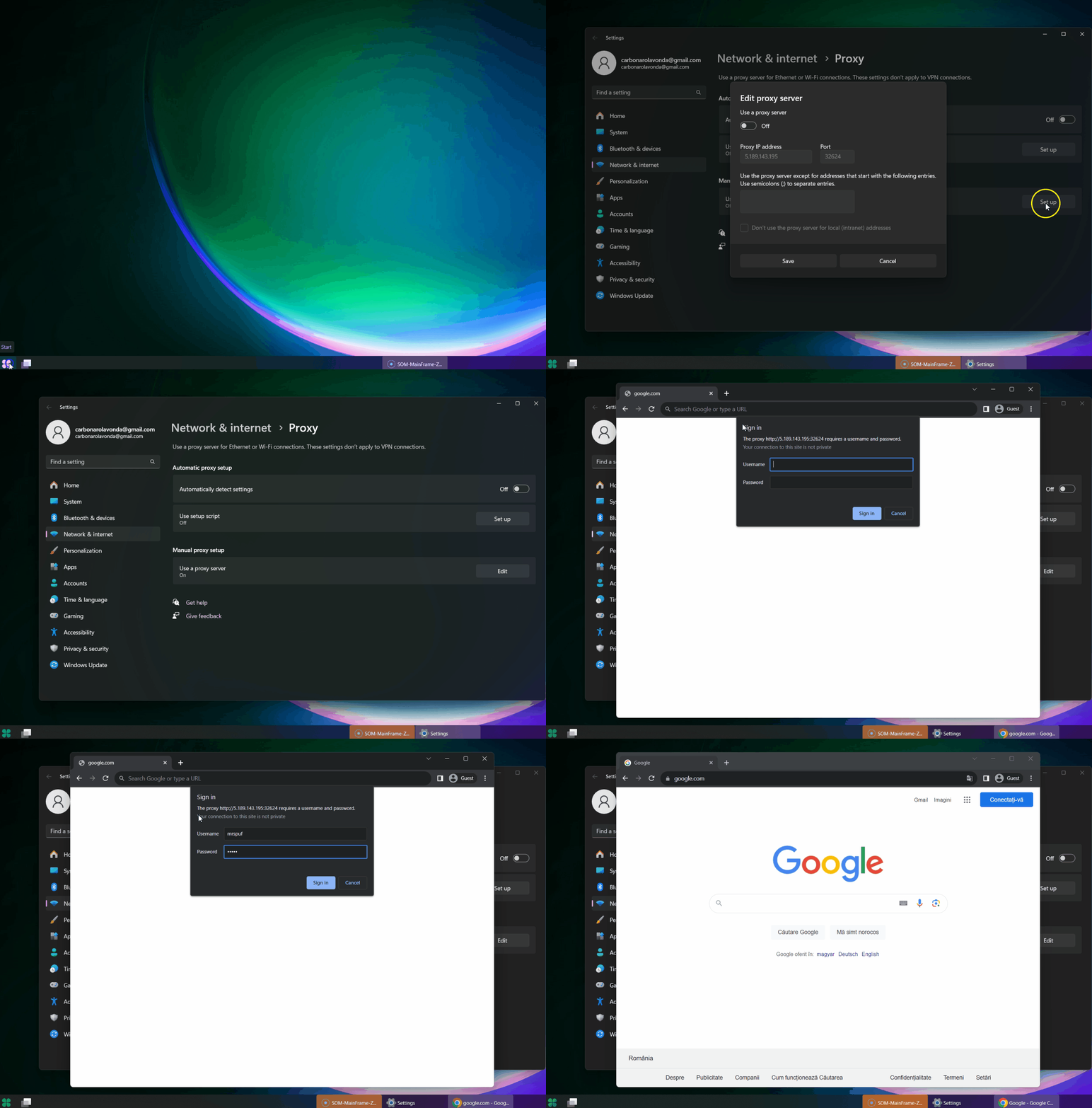
Windows 8,10,11 have implemented a nice feature to add the proxy within your system and it will force all connections to go through the proxy. Here's how you add a proxy within your PC, for these example we will be using a proxy that have this format:
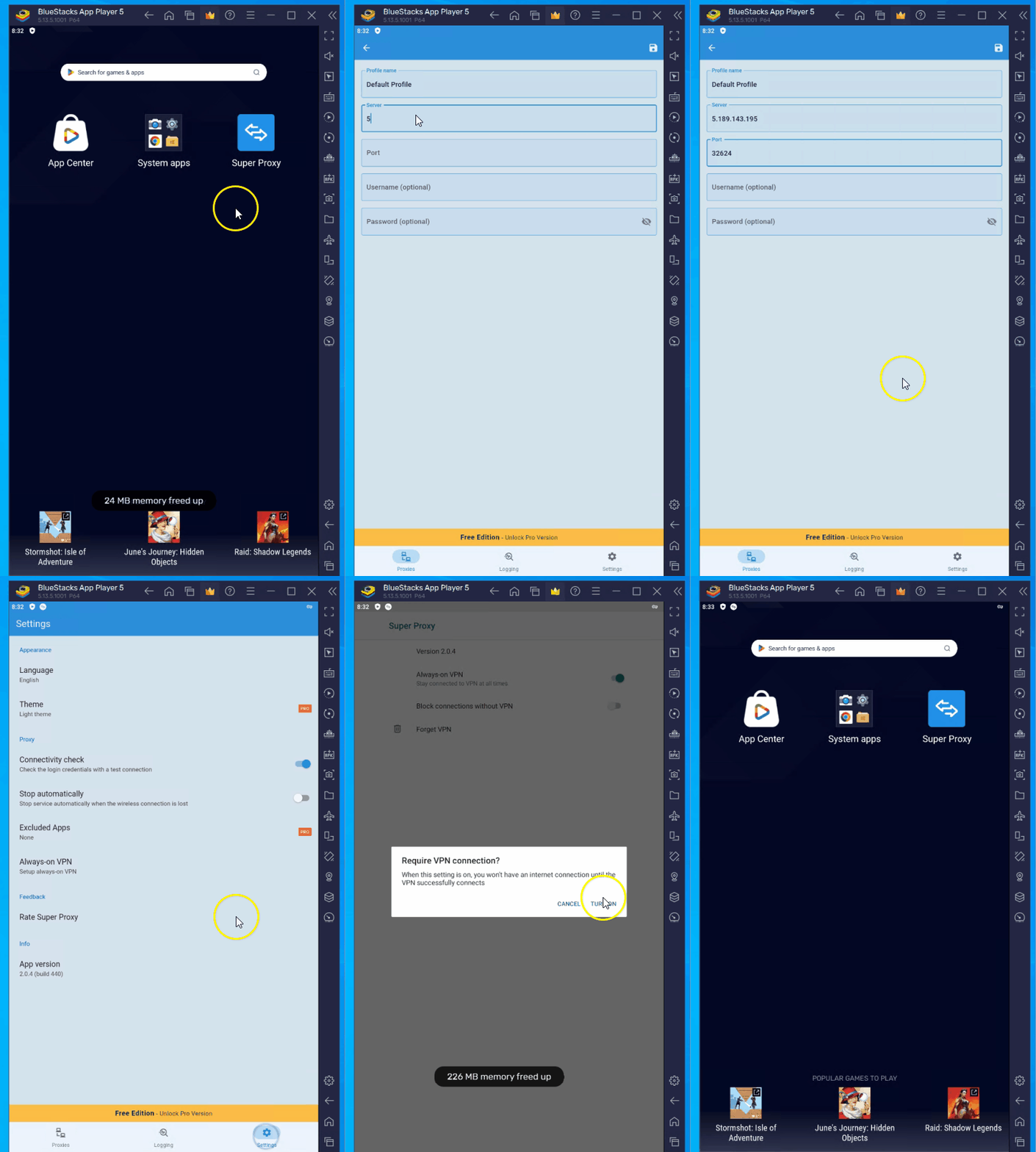
-> 5.189.143.195:32624:mrspuf:12345 (don't bother to copy it, I've already reset the port  . *If you have also an username and password, just keep it at hand because after you enable the proxy you will get a small window where you can input the username and password after you hit save
How to use mobile proxy in Windows 10/11
Go to "Start" button -> Search -> "Proxy Settings" and follow the steps in the video bellow
How to use mobile proxy in Chrome
Download Proxy SwitchyOmega -> then follow the steps bellow
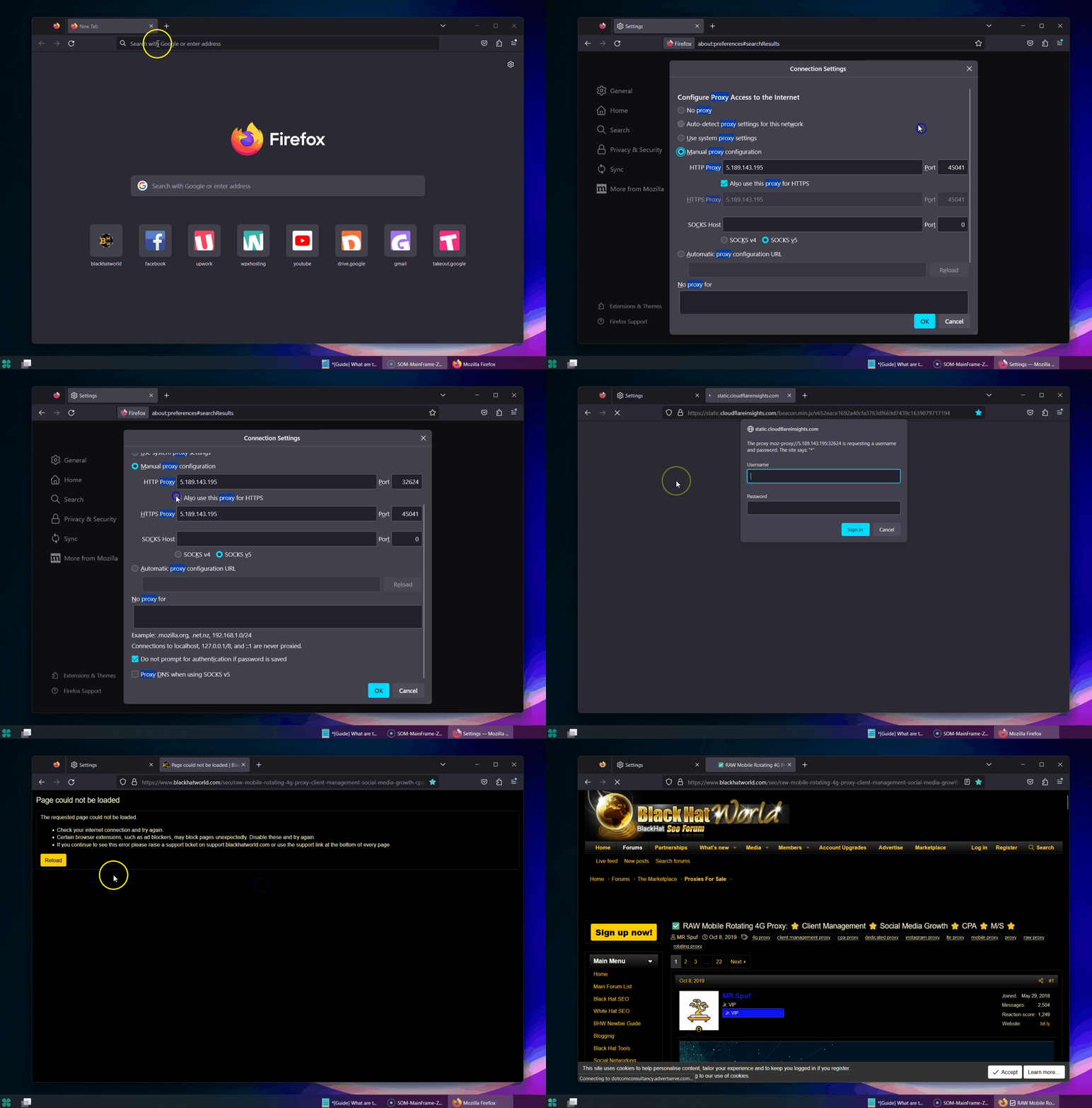
How to use mobile proxy in Firefox
Open a new window page, go to "Settings" -> Search -> type "proxy" then press "Settings" and follow the steps bellow (User Manual proxy configuration)
How to use mobile proxy in Brave and Edge - same as "How to use Proxy in Windows 10/11"
How to use mobile proxy in Android Phone
Install from Google Play: "Super Proxy" - Scheler Software - I found this software is the best for bypassing proxy to your phone and not leaking your device's IP when you are login in to various Social Media apps: Instagram, Facebook etc. I am using Bluestacks Android Emulator but works as fine.
How to check your internet IP safely using your browser - IMPORTANT - Avoid any web checking IP service: Read this article from @lucky.sparks: Why you should never test your proxy via score sites
Open your favorite browser and type in:
How to check your internet IP safely within your browser (Windows 11)
Open Command Prompt (Open Start -> search "Command Prompt" into your search box and open it)
Type this code (just copy-paste it):
And the result should look like this:
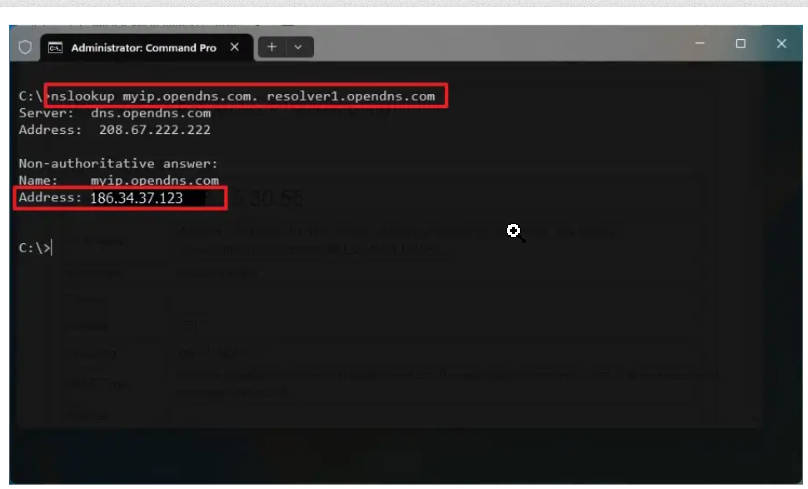
The IP address you find using these methods is your public IP address, which is how your device communicates on the internet. It's different from your local IP address, which is used on your local network.
How to check your internet IP within your Android Phone
Install from Google Play the app called "Network Analyzer" by Jiri Techet and after you open you will see something like this:

That's your Internet IP
How to choose the best mobile proxy for your needs
Step 1. Decide what you need the proxy for: browsing, scraping, social media automation, account creation, etc. and make a list with those activities
Step 2. Make a list with different providers that fits your needs. Look, I know Google is your friend but don't be a moron, the Marketplace in this forum, especially for proxy it's so large and bulked up that you don't need to go and start searching on Google and waste lots of time getting through of all those websites. Check proxies marketplace: https://www.blackhatworld.com/forums/proxies-for-sale.112/ and make a list with different providers that will fit in Step 1.
Step 3. I can't stress this enough for the love of GOD: Ask questions! Every provider will want to sell its product so start asking question's (after you read his selling thread) about his product: Does he allow unlimited website usage? Does he provides unlimited bandwidth? How large is his IPs pool? Given your needs, what is his best recommendations to use his proxy? And so on, read first his selling thread promotion than if you don't find what you're looking for, just go and ask it. You will eliminate a lot of troubles asking the right question's and you will save money too buying something that doesn't fit your needs.
Step 4. Most important: Only buy if they offer trial, period. Why would you buy something that you haven't tested first? Like why would you do that? Ask for trial, test it properly, and if it fits your needs, buy it! That's why you test it right?
That's it, you found out how to choose the best mobile proxy, now, go get it and explode your business
I know, I know, I promised that I will teach you how to make money with mobile proxy, and yes I will, but don't think you will get spoon-fed, the most successful people made it when they said: "Fuck it, I'll find it myself!"
First of all I speak here from experience and not feeding you guru bullshit, there are only 2 ways of making money with proxies:
1. Producing and selling it - The mobile proxy market is still an untapped market and in terms of demand and offer, the demand is hig hhttps://prnt.sc/A0eNSYqtmUVJ so there is lots of space to start your business and provide this service. It's not an easy business, in terms of "know how" because it requires an ecosystem of technical abilities to put together the software needed and the hardware. The people that are selling solutions with high price range are offering this combo together: the hardware + the software. Don't fall for it, no need to pay thousands of dollars for something that if you dig deeper you will find it yourself. The most important thing you will need is the script for the proxy, and once you find that the rest will fall into place. You can find that searching it, asking providers to share the source or try to bribe them. Or if you have money, you can try to build that yourself and then sell it too.
2. Reselling it - Easy: find most reliable providers that are willing to provide discounts on larger volume and start selling it too. HOW, where?
Buy a JrVip subscription here, open a BST and bank hard! You know are a solopreneur that found a niche where he can make easy 10k/month. You need a bit of traction at first, but if you're willing to put in the hours, the moneys will come.
That's it, I am not a copywriter by any means, and this article is the longest I've written in my life, but I loved to share this small compressed info with you. Don't be shy, if you want to ask something just send me a private message, and if you ask something that needs more clarification, I will be very happy to help.
This is the last advice how you make money: Find something that people wants and solve a problem, build a solution then sell it!
See you around the forum!
Hello, lads and gents. I've noticed a lot of questions lately about mobile proxies: what they are, how they work, why some are better than others, where to buy them, what to consider when purchasing, and other industry-related topics. So, let's get started. This guide is aimed at beginners, but even seasoned professionals will find useful tricks, so stick around.
Mobile Proxies Overview
When discussing proxies, it's important to understand what a server is, because mobile proxies are essentially "mini" servers that act as intermediaries (hence the term "proxy") between your device and the internet. In simple terms, a server can be a machine, device, phone, PC, virtual machine, or software. This is a simplified definition, of course, as I don't intend to turn you into an MIT graduate with this article.
Consider the image below:
A server connection exists to fulfill any requests from the user/client (that's you) and the internet. For example, suppose you have a server connection (we'll discuss how to achieve this later) on your latest model of a fake iPhone/Android, and you want to access PornHub (because you want to stay broke) without being detected by your ISP (Internet Service Provider). In this scenario, you're using Wi-Fi on your phone, but all the traffic goes through the proxy connection, effectively masking your Wi-Fi usage. The Wi-Fi provides the internet, but it can't see what you're using it for because of the proxy connection. All the Wi-Fi network detects is that you're consuming data. You're safe, nobody knows that you're looking at stupid things that fuc*s up your brain and makes you even more (broke and stupid) eager to learn how to make money.
I'll teach you later how to use mobile proxies to make money, so stay tuned!
What Makes Mobile Proxies Unique (Compared to Residential, Data Center, etc.)?
Mobile proxies are distinguished by their use of mobile data connections, typically 3G, 4G, or 5G networks, to route your internet traffic. This means your online activities appear to be originating from a mobile device, making it extremely difficult for websites to track or block you. Mobile IPs are constantly changing and are shared by many users.
For instance, you have a data subscription with AT&T, Orange, or Vodafone, and you want to connect to the Instagram app. Your phone connects to the nearest cell tower using radio waves and starts transmitting data: "Hey, I want to check my Instagram to see the latest posts." The tower receives this data and sends it to AT&T's data center, which then forwards your request to Instagram's servers. Instagram then connects you to their servers, allowing you to browse or perform actions. However, due to your cell tower connection, Instagram can pinpoint your exact geographic location (with some degree of accuracy). If you use a proxy connection, Instagram sees the location of the proxy, not yours, simple as that.
An IP, or Internet Protocol address, is a crucial element when you activate mobile data on your phone (not Wi-Fi) and the phone receives a 3G/4G/5G signal. AT&T, for example, assigns a unique registration number to your phone, which is the IP address. To access the internet, you need this registration number or IP. Every mobile data provider has a pool of IPs, some larger, some smaller. Every time you connect to a 3G/4G/5G signal, you receive an IP, even if you're not actively browsing the internet. Your IP changes every time your phone dies and you reboot it, or when you toggle airplane mode on and off. This is known as the rotation feature of IPs. With mobile proxies, you can have this IP address automatically change at intervals that suit your needs, or even control it manually through an API (more details on this later).
G/2G/3G/4G/5G refers to the "generation" of mobile network technology, marking the transition from landline to wireless phones using mobile networks.
The differences between G/2G/3G/4G/5G primarily concern internet connectivity and speed. 1G (now obsolete) and 2G don't support internet connectivity, whereas 3G, 4G, and 5G do. When you connect to the internet, the speed of your connection is a factor, measured as latency. The higher the "G," the faster the speed and the lower the latency: 5G is faster than 4G, which is faster than 3G.
This speed depends on the infrastructure of the mobile network and the ISP. For example, in Romania (where I am from), 3G can be faster than 4G in countries like France, Italy, or Germany. This is due to a higher number of cell towers, better data servers, and overall superior infrastructure for consumer services. (This is one reason why Andrew Tate moved here with his business operations.)
A not-so-fun fact
If a government wants to track your location, they can do so through triangulation. This means that when you connect to the internet via a cell tower, your phone isn't limited to connecting to just one tower. In fact, it often connects to more than one. If you move away from the first tower you were connected to, you might expect to lose the signal and disconnect from the internet. However, because you're also connected to a second or third tower, your connection remains stable. The phone continuously searches for additional nearby towers to connect to. The government can track all these cell towers to which you're connected (knowing their exact geographic locations) and deduce your approximate location. But, if you're using a proxy connection, say a Romanian one, while you're actually in Las Palma de Mallorca enjoying a cold beer on the beach, the Romanian government might think you're at Andrew Tate's house enjoying a Jerry's Pizza. Let them think that!
Yeah, but what makes mobile proxies so special then residential/dedicated/data-center/IP6 etc?
Mobile proxies are particularly special compared to residential, dedicated, data-center, or IPv6 proxies primarily due to one key feature: NAT (Network Address Translation).
Definition: NAT is a technique used by routers to convert one set of IP addresses into another. It was initially developed as a temporary solution to the problem of IPv4 address exhaustion.
How It Works: In simple terms, NAT alters the network address information in the IP header of packets as they pass through a traffic routing device. This process allows multiple devices on a local network to share a single public IP address for internet access.
Translation: NAT conveys to platforms like Instagram that you are connected with IPs equipped with NAT technology, which essentially makes them unbannable. Yes, that's correct – IPs with NAT technology are generally not subject to bans (in 99% of cases). For example, suppose you want to give 2,000 likes in a day to your favorite OnlyFans creator's posts on Instagram, exceeding the platform's daily like limit. If Instagram detects this and decides to ban the IP address, NAT technology intervenes. It informs Instagram that these are mobile IPs rotating among various users, making it unfair and impractical to ban the IP. Instead, Instagram might opt for other measures like account bans or requiring email/phone verification. They might temporarily flag the IP, but if subsequent activities from that IP are normal, the flag is usually removed. In extreme cases, if abuse is detected, they might ban an entire subnet (a range of IPs), but this is rare.
Why some mobile proxies are better than others (and better than the rest of other types of proxies)?
The quality of mobile proxies can vary significantly based on the infrastructure of the mobile network in a particular country. Let's imagine that you are living on a country that's the second poorest country in Europe, BUT it has the fastest internet speed in the world, I don't say that, Wikipedia says it (at least at this date I am writing this article), and for sure I haven't pay a $2k to forge a wiki page just to brag with this (you will find the sellers in the #marketplace) https://en.wikipedia.org/wiki/List_of_sovereign_states_by_Internet_connection_speeds
And, leaving the brag aside (if it's true then is still a brag?!?), we have lots of ISP providers around here that are providing stellar service: great signal coverage, 100% uptime, like I can't remember one time they had the network slow or down and the thing is that these are the attributes that describes a very good quality working proxy:
- Speed: You need to be able to run a 8k Youtube video without any question, period!
- Uptime: >99,99% without any questions. Out of a month of service, you need to have a maximum 10 minutes downtime, that's it. What's over that is not good for your money and not good for your business as well.
- How good and clean is the subnet of the IPs - Have the subnet been abused previously? Do the provider have them unlocked for all websites? Is there a limitation in place to assure a healthy use of the IPs pool so that is maintained a high trust score of the IPs?
- Country internet infrastructure: Are they invested in quality or quantity? Do they maintain a high level of service, or they just grab the money and people suffer?
- Diversity: Are there enough ISP providers for a healthy competition in the market that makes them battle for quality to make the customers buy from them?
- IP Reputation: Best IP reputation for all world wide web!
- Uniqueness: They can't be unique due to the fact that they rotate and they just randomly exit and enter the pool.
That's what makes some mobile proxies better than the other. Some sellers have a stellar service providing very good proxies but their website is looking good but it can be improved a lot, and some others have a great usability website but their proxy is lower on quality/speed/uptime. Given this example, I would rather choose the first service even if I need to work a bit to manage the proxy, because the quality will be far more better than the second. In the second option, the seller has no fault whatsoever, is that he doesn't have control of the attributes mentioned above and his service have lower specs than others.
Now, why mobile proxies are better than the other types of proxies (and more pricey for that matter)?
Let's take social networks: Instagram, Tiktok, Facebook, Badoo, Tinder, X (Twitter) and even LinkedIn. These are companies that relies heavily on mobile usage that means their main traffic source comes from people that uses the apps on their mobile (Android - Iphone doesn't matter) phone. When you as a user open Instagram on your phone, the Instagram algorithm EXPECTS to see a mobile connection and the fact is that they can read the type of internet connection you are using. Is that simple. Even if you use an automation software, they still wants to see that you are using a mobile connection? Why? They love you when you grab your phone 100 times a day and check your feed, they simply love that. If you come from a pc with a broadband connection for example, they don't like it. Why? Because you can't have the PC all the time with you, but the phone you can. So they favor the mobile connection in opposition to other types of internet connection. That's the main factor! They are pricey because a seller that provides unlimited bandwidth, has to have an unlimited subscription with his ISP and that's more expensive than a regular unlimited internet subscription that can be used residentially. On top of that, the hardware/software used to build the proxies are expensive as well, so those costs needs to be included in the price in order to maintain a high quality service for you, the client.
Mobile Proxies Format, Types and Layers of Security:
1. Format
Code:
IP:PORT:USERNAME:PASSWORD as in: 1.234.5678.9:00000:imnotbroke:$$$$$IP: Usually comes as this form: "1.234.5678.9" and represents the IP address of the PROXY Server (not the IP you get after you use this connection)
Port: Usually comes as this form: "00000" or "0000"
Username: "iamnotbroke"
Password: "00000"
The username and the password are a layer of security that will make your proxy safe to be used only by you. Usually you should be able to request any "Username" and "Password" for your proxy, but not all the sellers have this feature available and that is not something important.
2. Types:
HTTP / HTTPS / SOCKS4 / SOCKS5/UDP
First 2 works at the application level and are used more in the social media and web browsing, (HTTPS uses encryption which encrypts data and provides more security for data used such as login info, password, card details etc.) and the last 2 SOCKS4 and 5 used more for online gaming tools/software. All are good for social media, but HTTP/HTTPS are more common so the automation software uses it more. UDP it's a type that is not required that much, but might be in the future as websites starting to require more and more.
3. Layers of Security:
HTTPS already mentioned but that is only for the typology. However a proper security must have these attributes:
1. Username and Password Authentication: The user needs to receive the ability to use username and password and more over to be able to request custom username and password for the proxy. This feature reduces the risk of unauthorized access and potential misuse.
2. IP Authentication: IP authentication is a method used by proxies to grant access to their services based on the verification of the user's IP address and on top of that the proxy is locked to be used only for your IP. Usually I recommend using a static IP to make it possible to the proxy to use that IP as authentication. If your IP rotates (home router), then every time it rotates, you need to add it to the proxy otherwise it won't work.
3. Geographic Limitation - Some sellers provide the ability to restrict the proxy to be used only in specific: areas, county, city, country etc.
4. Website Limitation - Not all proxies are allowed to be used entirely for all your activities, some of them are restricted to be used only on Social Media websites for example. That is a good layer of security to have in place, because mostly, when a subnet is banned/blacklisted that means in 99% that it was abused with mailing campaigns, and that is not the main usability that mobile proxies should be used for.
5. IP Rotation: This is more like an extra service, but having a more natural IP rotation when you use the proxy in social media for example that ensures you use the subnet in a healthy way to take advantage of the whole subnet.
Let's see forward how we can use proxies safe and what are the best practices when you use it for day to day browsing / social media automation or whatever's usability you want to do.
Resources
(For the following resources, I am NOT affiliated with any of these services, nor do I hold any responsibility if you download it and it fails to work on your end)
Windows 8,10,11 have implemented a nice feature to add the proxy within your system and it will force all connections to go through the proxy. Here's how you add a proxy within your PC, for these example we will be using a proxy that have this format:
Code:
IP:PORT:USERNAME:PASSWORDHow to use mobile proxy in Windows 10/11
Go to "Start" button -> Search -> "Proxy Settings" and follow the steps in the video bellow
How to use mobile proxy in Chrome
Download Proxy SwitchyOmega -> then follow the steps bellow
How to use mobile proxy in Firefox
Open a new window page, go to "Settings" -> Search -> type "proxy" then press "Settings" and follow the steps bellow (User Manual proxy configuration)
How to use mobile proxy in Brave and Edge - same as "How to use Proxy in Windows 10/11"
How to use mobile proxy in Android Phone
Install from Google Play: "Super Proxy" - Scheler Software - I found this software is the best for bypassing proxy to your phone and not leaking your device's IP when you are login in to various Social Media apps: Instagram, Facebook etc. I am using Bluestacks Android Emulator but works as fine.
How to check your internet IP safely using your browser - IMPORTANT - Avoid any web checking IP service: Read this article from @lucky.sparks: Why you should never test your proxy via score sites
Open your favorite browser and type in:
Code:
https://www.myip.com/
https://ifconfig.me/
How to check your internet IP safely within your browser (Windows 11)
Open Command Prompt (Open Start -> search "Command Prompt" into your search box and open it)
Type this code (just copy-paste it):
Code:
nslookup myip.opendns.com. resolver1.opendns.comAnd the result should look like this:
The IP address you find using these methods is your public IP address, which is how your device communicates on the internet. It's different from your local IP address, which is used on your local network.
How to check your internet IP within your Android Phone
Install from Google Play the app called "Network Analyzer" by Jiri Techet and after you open you will see something like this:
That's your Internet IP
How to choose the best mobile proxy for your needs
Step 1. Decide what you need the proxy for: browsing, scraping, social media automation, account creation, etc. and make a list with those activities
Step 2. Make a list with different providers that fits your needs. Look, I know Google is your friend but don't be a moron, the Marketplace in this forum, especially for proxy it's so large and bulked up that you don't need to go and start searching on Google and waste lots of time getting through of all those websites. Check proxies marketplace: https://www.blackhatworld.com/forums/proxies-for-sale.112/ and make a list with different providers that will fit in Step 1.
Step 3. I can't stress this enough for the love of GOD: Ask questions! Every provider will want to sell its product so start asking question's (after you read his selling thread) about his product: Does he allow unlimited website usage? Does he provides unlimited bandwidth? How large is his IPs pool? Given your needs, what is his best recommendations to use his proxy? And so on, read first his selling thread promotion than if you don't find what you're looking for, just go and ask it. You will eliminate a lot of troubles asking the right question's and you will save money too buying something that doesn't fit your needs.
Step 4. Most important: Only buy if they offer trial, period. Why would you buy something that you haven't tested first? Like why would you do that? Ask for trial, test it properly, and if it fits your needs, buy it! That's why you test it right?
That's it, you found out how to choose the best mobile proxy, now, go get it and explode your business
I know, I know, I promised that I will teach you how to make money with mobile proxy, and yes I will, but don't think you will get spoon-fed, the most successful people made it when they said: "Fuck it, I'll find it myself!"
First of all I speak here from experience and not feeding you guru bullshit, there are only 2 ways of making money with proxies:
1. Producing and selling it - The mobile proxy market is still an untapped market and in terms of demand and offer, the demand is hig hhttps://prnt.sc/A0eNSYqtmUVJ so there is lots of space to start your business and provide this service. It's not an easy business, in terms of "know how" because it requires an ecosystem of technical abilities to put together the software needed and the hardware. The people that are selling solutions with high price range are offering this combo together: the hardware + the software. Don't fall for it, no need to pay thousands of dollars for something that if you dig deeper you will find it yourself. The most important thing you will need is the script for the proxy, and once you find that the rest will fall into place. You can find that searching it, asking providers to share the source or try to bribe them. Or if you have money, you can try to build that yourself and then sell it too.
2. Reselling it - Easy: find most reliable providers that are willing to provide discounts on larger volume and start selling it too. HOW, where?
Buy a JrVip subscription here, open a BST and bank hard! You know are a solopreneur that found a niche where he can make easy 10k/month. You need a bit of traction at first, but if you're willing to put in the hours, the moneys will come.
That's it, I am not a copywriter by any means, and this article is the longest I've written in my life, but I loved to share this small compressed info with you. Don't be shy, if you want to ask something just send me a private message, and if you ask something that needs more clarification, I will be very happy to help.
This is the last advice how you make money: Find something that people wants and solve a problem, build a solution then sell it!
See you around the forum!