

Gebb
Senior Member
- Jul 12, 2021
- 851
- 647
I don't want to make this a long thread as it doesn't need to be, [EDIT i messed up and made a long thread damn] basically the whole guide is this:
In the part "NicheKeyword" you put a common word in your niche or some technical/niche term, idk. I guess you have to know the niche somehow but it really depends on a single-case basis from what I've seen doing that (you probably won't find ALL the subreddits that can be relevant and can give you a place where you can crosspost as not necessarily every crosspost use relevant keywords obviously. I planned to use this for NSFW stuff where the NicheKeywords would be... uhm nevermind you don't want to know that, spoiler: definitely not something that you want to say in public settings).
No need for adding a specific subreddit as it would only limit the search, doing something like the string below:
Would only limit the search to a single subreddit, I don't think that it can be useful as my goal was finding subreddits that allow crosspost but maybe you can find some way for using this inside (like, searching all the crossposts in a subreddit for some specific reason).
You can also narrow the search even more and search only between the hot, new, rising and top section of a subreddit (just type the name of the subreddit with /r/[subredditName] and then add the part that you want, reddit just add /new, /hot, /new and /rising when you choose how to visualize the posts.
EXAMPLE:
//[subredditname]/hot
in the end you have one of those basically
You can also even go deeper and search for a specific time frame in the TOP visualisation (using the options that Reddit gives to you as a normal user, you can visualize for top for now, for this hour, for this day, for this week, for this month, for this year and top of all time).
Reddit modifies the URL with a "?t=" parameter and then the chosen timeframe.
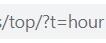
Just modify the previous search string in these specific ways:
First string above is for trending now section, 2nd for today, 3rd for this week, 4rd for this month, 5th for this year and 6th (all) for top of all time.
Have a good search I guess (and good luck solving all the damn captchas that Google shove in your own searches when you keep searching advanced search operators, Google please stop doing that I'm not a robot).
Code:
site:https://www.reddit.com NicheKeyword intext:crossposted byIn the part "NicheKeyword" you put a common word in your niche or some technical/niche term, idk. I guess you have to know the niche somehow but it really depends on a single-case basis from what I've seen doing that (you probably won't find ALL the subreddits that can be relevant and can give you a place where you can crosspost as not necessarily every crosspost use relevant keywords obviously. I planned to use this for NSFW stuff where the NicheKeywords would be... uhm nevermind you don't want to know that, spoiler: definitely not something that you want to say in public settings).
No need for adding a specific subreddit as it would only limit the search, doing something like the string below:
Code:
site:https://www.reddit.com/r/[subredditname] NicheKeyword intext:crossposted byWould only limit the search to a single subreddit, I don't think that it can be useful as my goal was finding subreddits that allow crosspost but maybe you can find some way for using this inside (like, searching all the crossposts in a subreddit for some specific reason).
You can also narrow the search even more and search only between the hot, new, rising and top section of a subreddit (just type the name of the subreddit with /r/[subredditName] and then add the part that you want, reddit just add /new, /hot, /new and /rising when you choose how to visualize the posts.
EXAMPLE:
//[subredditname]/hot
in the end you have one of those basically
Code:
site:https://www.reddit.com/r/[subredditname]/new NicheKeyword intext:crossposted by
site:https://www.reddit.com/r/[subredditname]/hot NicheKeyword intext:crossposted by
site:https://www.reddit.com/r/[subredditname]/rising NicheKeyword intext:crossposted by
site:https://www.reddit.com/r/[subredditname]/top NicheKeyword intext:crossposted by
You can also even go deeper and search for a specific time frame in the TOP visualisation (using the options that Reddit gives to you as a normal user, you can visualize for top for now, for this hour, for this day, for this week, for this month, for this year and top of all time).
Reddit modifies the URL with a "?t=" parameter and then the chosen timeframe.
Just modify the previous search string in these specific ways:
Code:
site:https://www.reddit.com/r/[subredditname]/top/?t=hour NicheKeyword intext:crossposted by
site:https://www.reddit.com/r/[subredditname]/top/?t=day NicheKeyword intext:crossposted by
site:https://www.reddit.com/r/[subredditname]/top/?t=week NicheKeyword intext:crossposted by
site:https://www.reddit.com/r/[subredditname]/top/?t=month NicheKeyword intext:crossposted by
site:https://www.reddit.com/r/[subredditname]/top/?t=year NicheKeyword intext:crossposted by
site:https://www.reddit.com/r/[subredditname]/top/?t=all NicheKeyword intext:crossposted byHave a good search I guess (and good luck solving all the damn captchas that Google shove in your own searches when you keep searching advanced search operators, Google please stop doing that I'm not a robot).

