

- Oct 28, 2020
- 11,663
- 14,617
Hey, guys!
I think I've made a stupid last night when I played with the settings of my Nvidia panel and now my youtube vids flicker black whenever I watch them and I don't know which Nvidia setting is the culprit so I can revert it and there are tons of settings in there.
Can someone please point me in the right direction? I did randomly revert some of the settings (the ones that I remember changing, but AFAIK I messed up with all of the settings in there) that I could remember, but the vids still flicker
Just give a ballpark estimate of which menu item in the Nvidia panel could cause the flickering and I'll go and manually toy with that setting until I get it right. Also, is it rebooting the computer necessary in order for the new settings to kick in, or is the "apply" button enough for this?
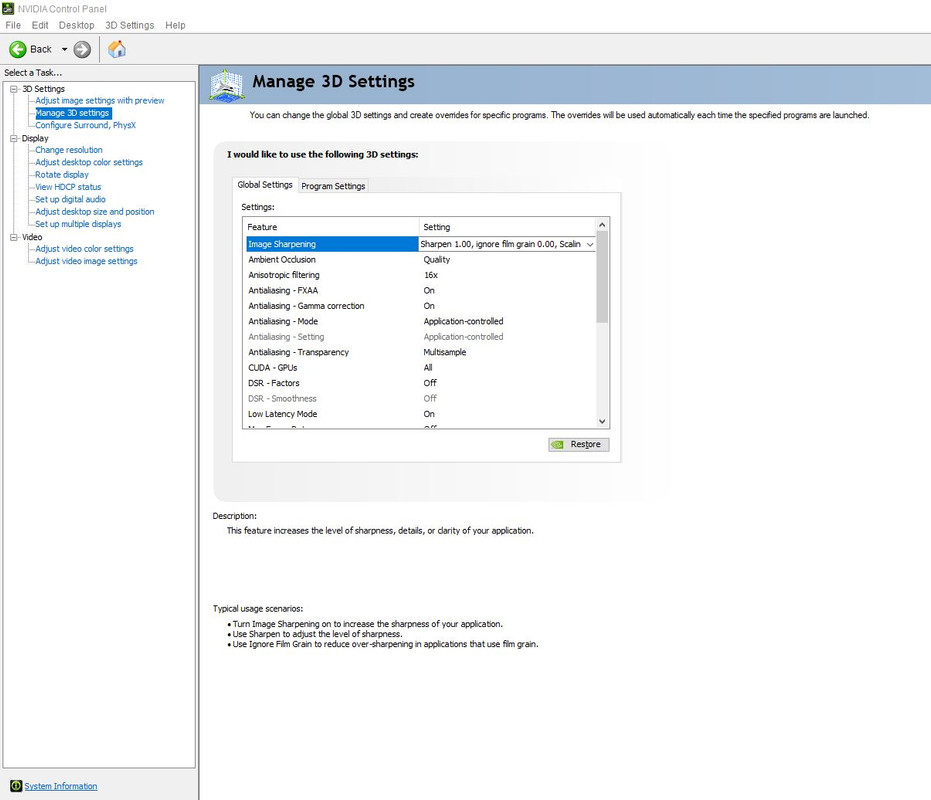
Here's a screenshot of my Nvidia panel for my GTX 660 GPU in case you need to see the links on the left handside of the panel so you can point me to the right one:
I think I've made a stupid last night when I played with the settings of my Nvidia panel and now my youtube vids flicker black whenever I watch them and I don't know which Nvidia setting is the culprit so I can revert it and there are tons of settings in there.
Can someone please point me in the right direction? I did randomly revert some of the settings (the ones that I remember changing, but AFAIK I messed up with all of the settings in there) that I could remember, but the vids still flicker
Just give a ballpark estimate of which menu item in the Nvidia panel could cause the flickering and I'll go and manually toy with that setting until I get it right. Also, is it rebooting the computer necessary in order for the new settings to kick in, or is the "apply" button enough for this?
Here's a screenshot of my Nvidia panel for my GTX 660 GPU in case you need to see the links on the left handside of the panel so you can point me to the right one:

