

coolsheet
Senior Member
- Mar 28, 2014
- 1,179
- 1,179
I have 2 things I hate in life. GMB posting and bad drivers. There's nothing I can do about bad drivers, so I started a method a year ago that I've now circled back to thats working better than ever. Really it's due to me understanding a little more about NLP, entities, and how to give commands to AI to get the output you want.
The Process
First organize an excel document however you want, but you need to organize your data. First choose a theme for your Google posts. You need to be post stacking. I'll touch on this a little but not going to get too in depth in how to stack your posts. Thats not what this thread is about. But when I stack posts, I usually do 4 posts at a time. 4 posts will focus on 1 keyword/theme. So for example, if I'm ranking a spine surgeon their keywords/posts theme might be:
Sciatica Treatment
Herniated Disc Treatment
Spine Surgeon
Back Pain Treatment
I'm going to create 4 posts per stack.
So I tell Jasper to create 4 posts and give it a command. Here's an example of what I ran for Sciatica Treatment.
What is your Paragraph about?
Sciatica can be treated with minimally invasive spine surgery
Keywords
supporting keyword = spine surgeon
Location = houston
Primary Keyword = sciatica (treatment)
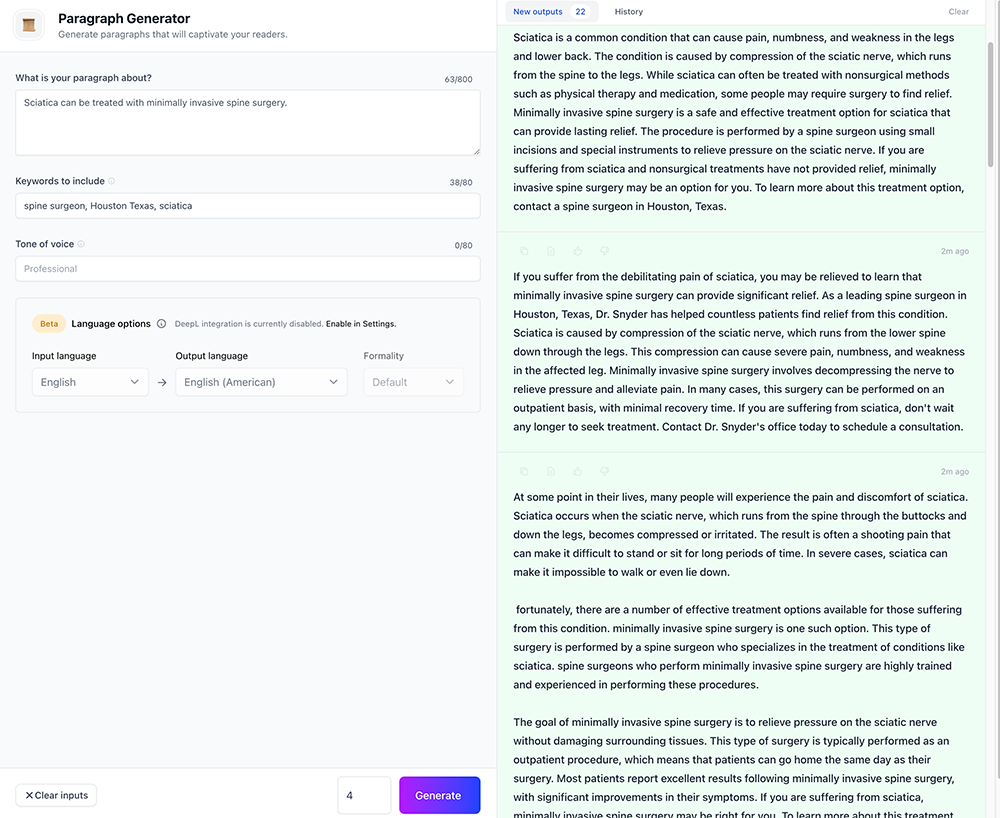
These posts are good enough for me and it took me 60-120 seconds to do.
Now what if I sprinkle some words that Google recognizes as natural language? Let's do it.
So now we go to google maps. With spine surgeons, they don't do a lot of Google posting, I just gave this example because I've worked with a few and it was on my mind. So with Spine surgeon we're going to have to rely on the reviews for our natural language.
My primary keyword "sciatica treatment" isn't going to be highlighted by Google. But you could see how the primary keyword of your post stack would produce results if you were a plumber and your keyword was something like "Clogged Drain". This is probably going to get mentioned in the reviews and in their GMB posts if they're posting consistently. The key here is to find a trend in the natural language being used around the primary keyword or in place of the primary keyword.
For example if your keyword is "cheap [service]" but notice in the reviews and posts theres more usage of the word "affordable", then you would replace "cheap" with "affordable" in your keywords.
Let's use "spine surgeon" for example. When I search I always set it for a large city like Los Angeles. So "spine surgeon los angeles" is my query in maps. If you're in a home service niche than you can probably find some really good GMB posts where Google highlights the keyword in the post. You really want to pull out the natural language in these posts.
A hack for pulling natural language would be to go to companies reviews and look at the bubbles at the top.

I see a ton in this one companies reviews. Back, MRI, herniated disc, pain management
So lets add those to Jasper in the keywords. I removed herniated disc, because I've been using jarvis long enough to know this will throw it off. It will say that sciatica is caused by bulging disc. Either way, when you're using Jarvis, a few edits will always need to be made. Here's an output using some NLP

So with a couple minutes of edits on each post, maybe excluding the first post, these are pretty good for my Sciatica themed post stacks.
IMAGES
For images it depends on the client and what's needed.
The easiest would be to just post an Image, however for valued clients I create about 16 templates in Canva (takes about 5-10 minutes per template) and reuse the same 16. I always rename them when I use them for a new post. But if the client has images, then only using images is fine. I only care about the exif data, Google isn't looking at my GMB post image with AI eyes.
Since I'm scheduling my posts with Local Viking, I use the exif editor in Local Viking to really optimize my images with keywords and location data. But there are various ways to add exif data. I don't like bulk editing the data because I like each image to have unique exif data for keywords, title and description. I keep location the same. So Local Viking works for me.
POST STACKS
I do this a very specific way that I would need a whole post for, but basically you're just linking one post to the previous one. Local Viking has a feature where you can insert spintax when youre scheduling your posts out to insert the previous post URL. It would be ideal if they could implement the spintax in the CTA button, but unfortunately you can only do it in the actual post for now. I have noticed a difference linking to the previous post via the button vs inserting a link into the post, so for now I do go back and change the links in the button of the pending post once the previous post is published.
Thats it. Hopefully this improved some of your workflows. And for those of you that want to nitpick the content, I don't give 2 rat booty cheeks what you think of the content. Guaranteed I'll make edits, post it anyway, and outwork you 10x doing it this way. As said it only took an hour to schedule 16 posts out. That's create the posts, upload and schedule them all through Local Viking, whilst editing the exif data for each photo. In an hour. Now I have time to optimize them in other areas or spend time doing what at I want. And I can guarantee you, Google does not give a shit that my GMB posts are AI.
Obviously I only messed with the input a little here in this thread. But I could've added and edited my command and keywords to give different outputs. With clients I make sure the command includes the name of the company so it doesn't throw random company names in there. Whatever you see in the content you don't like, can be fixed by altering your input.
Work well
The Process
First organize an excel document however you want, but you need to organize your data. First choose a theme for your Google posts. You need to be post stacking. I'll touch on this a little but not going to get too in depth in how to stack your posts. Thats not what this thread is about. But when I stack posts, I usually do 4 posts at a time. 4 posts will focus on 1 keyword/theme. So for example, if I'm ranking a spine surgeon their keywords/posts theme might be:
Sciatica Treatment
Herniated Disc Treatment
Spine Surgeon
Back Pain Treatment
I'm going to create 4 posts per stack.
So I tell Jasper to create 4 posts and give it a command. Here's an example of what I ran for Sciatica Treatment.
What is your Paragraph about?
Sciatica can be treated with minimally invasive spine surgery
Keywords
supporting keyword = spine surgeon
Location = houston
Primary Keyword = sciatica (treatment)
These posts are good enough for me and it took me 60-120 seconds to do.
Now what if I sprinkle some words that Google recognizes as natural language? Let's do it.
So now we go to google maps. With spine surgeons, they don't do a lot of Google posting, I just gave this example because I've worked with a few and it was on my mind. So with Spine surgeon we're going to have to rely on the reviews for our natural language.
My primary keyword "sciatica treatment" isn't going to be highlighted by Google. But you could see how the primary keyword of your post stack would produce results if you were a plumber and your keyword was something like "Clogged Drain". This is probably going to get mentioned in the reviews and in their GMB posts if they're posting consistently. The key here is to find a trend in the natural language being used around the primary keyword or in place of the primary keyword.
For example if your keyword is "cheap [service]" but notice in the reviews and posts theres more usage of the word "affordable", then you would replace "cheap" with "affordable" in your keywords.
Let's use "spine surgeon" for example. When I search I always set it for a large city like Los Angeles. So "spine surgeon los angeles" is my query in maps. If you're in a home service niche than you can probably find some really good GMB posts where Google highlights the keyword in the post. You really want to pull out the natural language in these posts.
A hack for pulling natural language would be to go to companies reviews and look at the bubbles at the top.
I see a ton in this one companies reviews. Back, MRI, herniated disc, pain management
So lets add those to Jasper in the keywords. I removed herniated disc, because I've been using jarvis long enough to know this will throw it off. It will say that sciatica is caused by bulging disc. Either way, when you're using Jarvis, a few edits will always need to be made. Here's an output using some NLP
So with a couple minutes of edits on each post, maybe excluding the first post, these are pretty good for my Sciatica themed post stacks.
IMAGES
For images it depends on the client and what's needed.
The easiest would be to just post an Image, however for valued clients I create about 16 templates in Canva (takes about 5-10 minutes per template) and reuse the same 16. I always rename them when I use them for a new post. But if the client has images, then only using images is fine. I only care about the exif data, Google isn't looking at my GMB post image with AI eyes.
Since I'm scheduling my posts with Local Viking, I use the exif editor in Local Viking to really optimize my images with keywords and location data. But there are various ways to add exif data. I don't like bulk editing the data because I like each image to have unique exif data for keywords, title and description. I keep location the same. So Local Viking works for me.
POST STACKS
I do this a very specific way that I would need a whole post for, but basically you're just linking one post to the previous one. Local Viking has a feature where you can insert spintax when youre scheduling your posts out to insert the previous post URL. It would be ideal if they could implement the spintax in the CTA button, but unfortunately you can only do it in the actual post for now. I have noticed a difference linking to the previous post via the button vs inserting a link into the post, so for now I do go back and change the links in the button of the pending post once the previous post is published.
Thats it. Hopefully this improved some of your workflows. And for those of you that want to nitpick the content, I don't give 2 rat booty cheeks what you think of the content. Guaranteed I'll make edits, post it anyway, and outwork you 10x doing it this way. As said it only took an hour to schedule 16 posts out. That's create the posts, upload and schedule them all through Local Viking, whilst editing the exif data for each photo. In an hour. Now I have time to optimize them in other areas or spend time doing what at I want.
And I can guarantee you, Google does not give a shit that my GMB posts are AI.Obviously I only messed with the input a little here in this thread. But I could've added and edited my command and keywords to give different outputs. With clients I make sure the command includes the name of the company so it doesn't throw random company names in there. Whatever you see in the content you don't like, can be fixed by altering your input.
Work well
Last edited:


