Is there a newbie guide to proxies?

mase1234

Junior Member
Joined
May 2, 2021
Messages
113
Reaction score
31
Hi BHW!

Is there something like a "newbie guide to proxies" or "proxies for dummies"? I'd like to dig deeper in this topic but my current knowledge of technical stuff about proxies is limited. Is there some practical guide or course that could help me to better understand how and for what purpose are proxies used in internet marketing?
 
Mate, you'll find a ton of articles on Google, Tutorials on YT to get yourself started on the learning curve. So make use of those platforms. You can use the keywords like 'Introduction to' etc and you'll surely find what you seek.
 
I think this is the best post I saw,
bestproxyreviews.com/proxy-server/

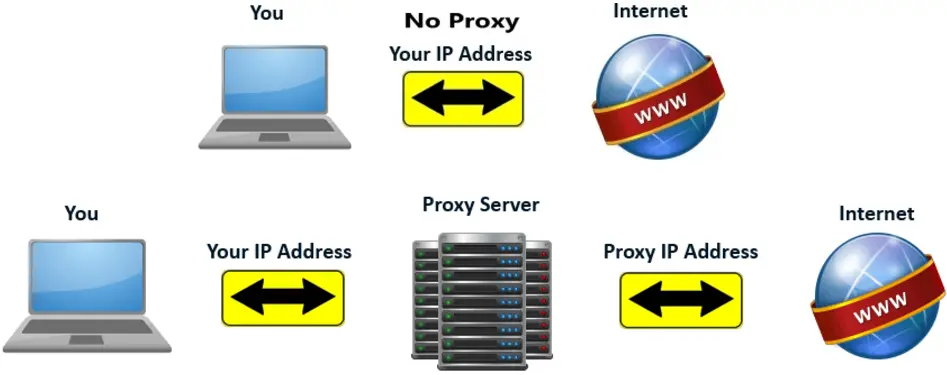
Frankly, maybe a picture will how proxy servers work for dummies...
How-proxy-server-works.png.webp
 
Well, what exactly are you wanting to accomplish with proxies? I think that'll help us direct you/inform you about what to research. If not. Then the posts above help a lot
 
Atleast research the dif types of proxies and what they are good for. Some proxies are not good for certain purposes, etc.
 
Crash course
Every device has an IP
Websites always log accounts IPs
A lot of bad actions from IP? - Block/limit the IP and accounts associated with it

Proxies you will see being for sale:
- 4G proxies one of the most popular nowadays, when using mobile internet not every user gets an unique IP, instead many users are NATed through smaller pools of IPs
See the issue that websites encounter with 4G? They can no longer say, well this IP is definitely bad - let's block it, because there are literally millions of people using it over time ( many users using it at the same time, and over time users moving from one IP to another)
There will be several variations, like 'private' meaning you get a modem all to yourself, 'shared' where many people are using the same modem at the same time, and some services offer you the ability jo use any modem in their owned pool.

- Datacenter IPV4 - Sellers would have a server with IP subnets rented out, and just route the traffic through them.
Advantages - Speed, price
Disadvantages- The whole subnets can be blocked, and they usually are. Websites know that you are using a DC proxy (real users never do)

- Datacenter IPV6 - Because IPV4 was invented with an inbuilt limit of about 4B addresses ( There's no chance we would eeever need that many. right...?)
That didn't age too well, and if you've read what I wrote about 4G proxies, you know that we are forced to use NAT because there's not enough unique IPs for each user.
IPV6 has so many addresses that I don't have a fucking clue what's the number called, it's fucking a lot. So now each little shit can have it's own unique IPV6 address.
Pros- There's A LOT of them, speed (just like ipv4 dc), price
Cons - Not many websites support it, means that you couldn't even access most of the websites through it
Harder to get accounts 'trust' on them (it's like visiting a jewish bar with a swastika on your forehead), websites know what's up.
Many sellers scamming users with the pricing, sellers can set up billions of proxies on a /64 ipv6 subnet, and websites would treat it as one IP address.
I know it looks tempting to buy 1000 proxies for 10$ , but always remember what looks too good to be true - often is.

- Residential IPV4/MOBILE - The highest quality and the most expensive proxies, can also be ipv4 or ipv4 addresses, now that you know the difference between the two let me tell you where the traffic actually comes from and why it is so HQ.
There are 2 types of residential proxies
1) Illegal botnets - Hackers spread their viruses to take control of the machines, let it be windows computers, phones or your fridge - and forwards traffic through it.
2) Legal botnets - Think Luminati or Oxylabs. Ever wondered why the hell is nordVpn(oxy) or HolaVpn(luminati) (I believe they are called brighdata now, and probably the VPN name has changed as well so don't quote me on this)
Well, hackers have to break in to the machines to gain the access, and VPNs are installed by the users themselves , with some smart wording in the TOS you yourself accept to them tunneling the traffic through your device. Sketchy, I know, but it's a very lucrative business so they are okay with defending in courts.
There are some other apps that do tell you clearly 'share your internet and earn money' example - honeygain. I would say these are more ethical, but in the end - the users really don't understand what they are signing up for.
Cons- Slow, expensive
Pros - Targeting by country/city, highest IP pools. Highest quality 'trust' of the IPs
until they get spammed to death,

Ohh and also Backconnect proxiez
Basically, they are ipv4 DC proxies, sometimes mixed with some free proxies. You get 1 proxy to connect through, and the seller does all the 'magic', checking if the proxies are alive, the load balancing etc. and your request just shoots out to the website you requested.

Ohhhh, and also the last but not the least... Free proxies :eek:
Sometimes on the forums you will see 'free proxies list' being shared, or a proxy scraper. There are 2 types of proxy scrapers
1) A scraper that uses a predefined list of known proxy websites (other aggregators share it on their websites), with a combination of google dorks. So you are basically searching in google for proxies that someone has shared, and many people are already using
2) A scanner that can scan all the internet rather quickly, but most of the time they are only monitoring the known VPS IP ranges like vultr or AWS, and just waiting for someone to make a mistake in their firewall... Give it a go, set up squid or 3proxy and leave 3128 or 8080 open, you'll start seeing some funny traffic real quick. That's what some people do actually, and it's called 'honeypots' , so the 'scanners' actually become victims. Honeypots are usually left for monitoring, tracking scanners, but some guys just hunt your cookies through MITM


To sum it up, this would be a very rough example
IPV4 dc - Downloading stuff, managing several already trusted accounts
IPV6 dc - Managing spam accounts, scraping
4G - Social media account management (you are a real user based on IP)
Residential - Account creation
 
Last edited:
proxies are pretty simple
No proxy used
your device (client) <-----------------------> website (server)
Proxy used
your device (client) <------------- some other device (proxy) -----------------> website (server)
basically when using proxy there is another device between requests that makes a site feel that it is not your device that is requesting the data but some other device.
Now proxies can be divided into these categories based on protocol
http type
socks4 type
socks5 type
are they difference ofcourse but most of the times you don't have to worry about choosing a protocol because most programs will support all three types and most providers will also support atleast http and socks5 proxies

We can also categorize proxies based on if the proxy is
mobile
residential
datacenter
there are more but this will give you a general idea
mobile, residential proxies are preferred for botting why? because Residential Proxy IPs are provided by a real ISP, it makes them look real and legitimate. Whereas Datacenter Proxies, as mentioned earlier, are created in bulk and come from data centers and cloud server providers, so they can be easily detected and blacklisted if buying from an untrusted provider

------------------------------------

When you make a request to a website (which basically some files stored on a computer) what you are actually doing is requesting data from a computer who is listening to your request (basically any request sent to it) when it receives the request it processes it and sends a response back to you.
Now lets say you send request this url
www.somesite.com\register
it will simply send you the registration page

what starts happening is you start sending request to this url
www.somesite.com\register
multiple times, the computer will notice that the same device (you) are sending multiple request to the same url so it might block you or ask you to wait 2 hours before trying again.

but when you use a proxy

what you are doing is you are asking another device (proxy) to send a request to the url
www.somesite.com\register
now the device when receives a response, it will send it to you. Now you can keep switching proxy and keep on sending request to
www.somesite.com\register and the computer listening to the request will that all the request are being made from different devices.

Note: Whenever I am saying computer listening to request i actually mean the server or the website host
 
How safe it is to use proxies for YouTube channel creation from a single device.
How many proxies/account i can use from a single device.

Please help me on this topic.
Right now i visit cyber Cafes and use different pc's to create account, upload videos. Too much hassle
 
How safe it is to use proxies for YouTube channel creation from a single device.
How many proxies/account i can use from a single device.

Please help me on this topic.
Right now i visit cyber Cafes and use different pc's to create account, upload videos. Too much hassle
almost a year ago i was doing a experiment with youtube shorts (program scraped data and used them to make videos less than 30 sec), i was running upto 10 yt channels without proxies and the fun part is bot made the videos and uploaded them too. None of the channels got banned so shorts got upto 10k views too. So i am quite sure you can run a lot of youtube channels without getting any account banned
 
you can run a lot of youtube channels
Thank you for your advice.
But i m more into Monetization of YouTube channels ,
My videos are longer and I can't take that much risk.
My previous phone was some how blacklisted, as when i applied few channels were not accepted
 
proxies are pretty simple
No proxy used
your device (client) <-----------------------> website (server)
Proxy used
your device (client) <------------- some other device (proxy) -----------------> website (server)
basically when using proxy there is another device between requests that makes a site feel that it is not your device that is requesting the data but some other device.
Now proxies can be divided into these categories based on protocol
http type
socks4 type
socks5 type
are they difference ofcourse but most of the times you don't have to worry about choosing a protocol because most programs will support all three types and most providers will also support atleast http and socks5 proxies

We can also categorize proxies based on if the proxy is
mobile
residential
datacenter
there are more but this will give you a general idea
mobile, residential proxies are preferred for botting why? because Residential Proxy IPs are provided by a real ISP, it makes them look real and legitimate. Whereas Datacenter Proxies, as mentioned earlier, are created in bulk and come from data centers and cloud server providers, so they can be easily detected and blacklisted if buying from an untrusted provider

------------------------------------

When you make a request to a website (which basically some files stored on a computer) what you are actually doing is requesting data from a computer who is listening to your request (basically any request sent to it) when it receives the request it processes it and sends a response back to you.
Now lets say you send request this url
www.somesite.com\register
it will simply send you the registration page

what starts happening is you start sending request to this url
www.somesite.com\register
multiple times, the computer will notice that the same device (you) are sending multiple request to the same url so it might block you or ask you to wait 2 hours before trying again.

but when you use a proxy

what you are doing is you are asking another device (proxy) to send a request to the url
www.somesite.com\register
now the device when receives a response, it will send it to you. Now you can keep switching proxy and keep on sending request to
www.somesite.com\register and the computer listening to the request will that all the request are being made from different devices.

Note: Whenever I am saying computer listening to request i actually mean the server or the website host
Crash course
Every device has an IP
Websites always log accounts IPs
A lot of bad actions from IP? - Block/limit the IP and accounts associated with it

Proxies you will see being for sale:
- 4G proxies one of the most popular nowadays, when using mobile internet not every user gets an unique IP, instead many users are NATed through smaller pools of IPs
See the issue that websites encounter with 4G? They can no longer say, well this IP is definitely bad - let's block it, because there are literally millions of people using it over time ( many users using it at the same time, and over time users moving from one IP to another)
There will be several variations, like 'private' meaning you get a modem all to yourself, 'shared' where many people are using the same modem at the same time, and some services offer you the ability jo use any modem in their owned pool.

- Datacenter IPV4 - Sellers would have a server with IP subnets rented out, and just route the traffic through them.
Advantages - Speed, price
Disadvantages- The whole subnets can be blocked, and they usually are. Websites know that you are using a DC proxy (real users never do)

- Datacenter IPV6 - Because IPV4 was invented with an inbuilt limit of about 4B addresses ( There's no chance we would eeever need that many. right...?)
That didn't age too well, and if you've read what I wrote about 4G proxies, you know that we are forced to use NAT because there's not enough unique IPs for each user.
IPV6 has so many addresses that I don't have a fucking clue what's the number called, it's fucking a lot. So now each little shit can have it's own unique IPV6 address.
Pros- There's A LOT of them, speed (just like ipv4 dc), price
Cons - Not many websites support it, means that you couldn't even access most of the websites through it
Harder to get accounts 'trust' on them (it's like visiting a jewish bar with a swastika on your forehead), websites know what's up.
Many sellers scamming users with the pricing, sellers can set up billions of proxies on a /64 ipv6 subnet, and websites would treat it as one IP address.
I know it looks tempting to buy 1000 proxies for 10$ , but always remember what looks too good to be true - often is.

- Residential IPV4/MOBILE - The highest quality and the most expensive proxies, can also be ipv4 or ipv4 addresses, now that you know the difference between the two let me tell you where the traffic actually comes from and why it is so HQ.
There are 2 types of residential proxies
1) Illegal botnets - Hackers spread their viruses to take control of the machines, let it be windows computers, phones or your fridge - and forwards traffic through it.
2) Legal botnets - Think Luminati or Oxylabs. Ever wondered why the hell is nordVpn(oxy) or HolaVpn(luminati) (I believe they are called brighdata now, and probably the VPN name has changed as well so don't quote me on this)
Well, hackers have to break in to the machines to gain the access, and VPNs are installed by the users themselves , with some smart wording in the TOS you yourself accept to them tunneling the traffic through your device. Sketchy, I know, but it's a very lucrative business so they are okay with defending in courts.
There are some other apps that do tell you clearly 'share your internet and earn money' example - honeygain. I would say these are more ethical, but in the end - the users really don't understand what they are signing up for.
Cons- Slow, expensive
Pros - Targeting by country/city, highest IP pools. Highest quality 'trust' of the IPs
until they get spammed to death,

Ohh and also Backconnect proxiez
Basically, they are ipv4 DC proxies, sometimes mixed with some free proxies. You get 1 proxy to connect through, and the seller does all the 'magic', checking if the proxies are alive, the load balancing etc. and your request just shoots out to the website you requested.

Ohhhh, and also the last but not the least... Free proxies :eek:
Sometimes on the forums you will see 'free proxies list' being shared, or a proxy scraper. There are 2 types of proxy scrapers
1) A scraper that uses a predefined list of known proxy websites (other aggregators share it on their websites), with a combination of google dorks. So you are basically searching in google for proxies that someone has shared, and many people are already using
2) A scanner that can scan all the internet rather quickly, but most of the time they are only monitoring the known VPS IP ranges like vultr or AWS, and just waiting for someone to make a mistake in their firewall... Give it a go, set up squid or 3proxy and leave 3128 or 8080 open, you'll start seeing some funny traffic real quick. That's what some people do actually, and it's called 'honeypots' , so the 'scanners' actually become victims. Honeypots are usually left for monitoring, tracking scanners, but some guys just hunt your cookies through MITM


To sum it up, this would be a very rough example
IPV4 dc - Downloading stuff, managing several already trusted accounts
IPV6 dc - Managing spam accounts, scraping
4G - Social media account management (you are a real user based on IP)
Residential - Account creation

This is golden guys, thank you so much!
 
What exactly would you like to know? General knowledge? Or you want to create your own?
 
Crash course
Every device has an IP
Websites always log accounts IPs
A lot of bad actions from IP? - Block/limit the IP and accounts associated with it

Proxies you will see being for sale:
- 4G proxies one of the most popular nowadays, when using mobile internet not every user gets an unique IP, instead many users are NATed through smaller pools of IPs
See the issue that websites encounter with 4G? They can no longer say, well this IP is definitely bad - let's block it, because there are literally millions of people using it over time ( many users using it at the same time, and over time users moving from one IP to another)
There will be several variations, like 'private' meaning you get a modem all to yourself, 'shared' where many people are using the same modem at the same time, and some services offer you the ability jo use any modem in their owned pool.

- Datacenter IPV4 - Sellers would have a server with IP subnets rented out, and just route the traffic through them.
Advantages - Speed, price
Disadvantages- The whole subnets can be blocked, and they usually are. Websites know that you are using a DC proxy (real users never do)

- Datacenter IPV6 - Because IPV4 was invented with an inbuilt limit of about 4B addresses ( There's no chance we would eeever need that many. right...?)
That didn't age too well, and if you've read what I wrote about 4G proxies, you know that we are forced to use NAT because there's not enough unique IPs for each user.
IPV6 has so many addresses that I don't have a fucking clue what's the number called, it's fucking a lot. So now each little shit can have it's own unique IPV6 address.
Pros- There's A LOT of them, speed (just like ipv4 dc), price
Cons - Not many websites support it, means that you couldn't even access most of the websites through it
Harder to get accounts 'trust' on them (it's like visiting a jewish bar with a swastika on your forehead), websites know what's up.
Many sellers scamming users with the pricing, sellers can set up billions of proxies on a /64 ipv6 subnet, and websites would treat it as one IP address.
I know it looks tempting to buy 1000 proxies for 10$ , but always remember what looks too good to be true - often is.

- Residential IPV4/MOBILE - The highest quality and the most expensive proxies, can also be ipv4 or ipv4 addresses, now that you know the difference between the two let me tell you where the traffic actually comes from and why it is so HQ.
There are 2 types of residential proxies
1) Illegal botnets - Hackers spread their viruses to take control of the machines, let it be windows computers, phones or your fridge - and forwards traffic through it.
2) Legal botnets - Think Luminati or Oxylabs. Ever wondered why the hell is nordVpn(oxy) or HolaVpn(luminati) (I believe they are called brighdata now, and probably the VPN name has changed as well so don't quote me on this)
Well, hackers have to break in to the machines to gain the access, and VPNs are installed by the users themselves , with some smart wording in the TOS you yourself accept to them tunneling the traffic through your device. Sketchy, I know, but it's a very lucrative business so they are okay with defending in courts.
There are some other apps that do tell you clearly 'share your internet and earn money' example - honeygain. I would say these are more ethical, but in the end - the users really don't understand what they are signing up for.
Cons- Slow, expensive
Pros - Targeting by country/city, highest IP pools. Highest quality 'trust' of the IPs
until they get spammed to death,

Ohh and also Backconnect proxiez
Basically, they are ipv4 DC proxies, sometimes mixed with some free proxies. You get 1 proxy to connect through, and the seller does all the 'magic', checking if the proxies are alive, the load balancing etc. and your request just shoots out to the website you requested.

Ohhhh, and also the last but not the least... Free proxies :eek:
Sometimes on the forums you will see 'free proxies list' being shared, or a proxy scraper. There are 2 types of proxy scrapers
1) A scraper that uses a predefined list of known proxy websites (other aggregators share it on their websites), with a combination of google dorks. So you are basically searching in google for proxies that someone has shared, and many people are already using
2) A scanner that can scan all the internet rather quickly, but most of the time they are only monitoring the known VPS IP ranges like vultr or AWS, and just waiting for someone to make a mistake in their firewall... Give it a go, set up squid or 3proxy and leave 3128 or 8080 open, you'll start seeing some funny traffic real quick. That's what some people do actually, and it's called 'honeypots' , so the 'scanners' actually become victims. Honeypots are usually left for monitoring, tracking scanners, but some guys just hunt your cookies through MITM


To sum it up, this would be a very rough example
IPV4 dc - Downloading stuff, managing several already trusted accounts
IPV6 dc - Managing spam accounts, scraping
4G - Social media account management (you are a real user based on IP)
Residential - Account creation
Really helpful thanks
 
A proxy server and a virtual private network (VPN) are both tools that can be used to protect your privacy and security online. However, they work in different ways and offer different levels of protection.

A proxy server is a server that acts as an intermediary between your computer and the internet. When you connect to a proxy server, your computer's traffic is routed through the proxy server before it reaches the internet. This means that the websites you visit will see the proxy server's IP address, not yours.

A VPN is a private network that is created over a public network. When you connect to a VPN, your computer's traffic is encrypted and routed through a VPN server. This means that your internet traffic is protected from prying eyes, and your real IP address is hidden.
 
Back
Top