
You are using an out of date browser. It may not display this or other websites correctly.
You should upgrade or use an alternative browser.
You should upgrade or use an alternative browser.
[GUIDE] Get DR85 Do-Follow Link from Web.app
- Thread starter Rachmaninoff
- Start date

D
Deleted member 1075483
Guest
this still works?

syslay288
Regular Member
- Apr 2, 2013
- 384
- 230
Use several URL + PARAMETER redirect and you'll be able to index your links.Hi bro... Can I ask a question? How do you index your backlink?


LgnG
Junior Member
- Oct 16, 2019
- 130
- 49
I made no effort to get it indexed. My guess is google indexed fast it since its a google property.Hi bro... Can I ask a question? How do you index your backlink?

Ramdash85
Newbie
- Oct 26, 2021
- 2
- 0
I tried all steps in the end I got hosting issue. Dunno where I was made a mistake.Are you looking for a link opportunity to diversify your link profile?
Are you looking for a parasite to bring you a decent traffic to your moneysite/apps?
Are you on a tight budget and looking for a free hosting for a static page, or perhaps to host your CPA landing pages?
Would you like to save $20 for a single web.app link on Fiverr?
If the answer is yes, then you came to the right place! And no, this is not a sales page LOL. I've seen a few people mentioning firebase, but nobody has shared the guide yet, so here I am now.
Web.app DR85

Disclaimer: This guide takes about 5-10 minutes to go through, and if you can’t stand with something technical then this might not be for you. No pain, no gain.
1. First, install NodeJs on your computer.Code:https://nodejs.org/en/download/
2. Go to this linkand Create a project. Enter your project name. Click Continue twice. Select an account / create a new account of Google Analytics. Accept the terms and Create project.Code:https://console.firebase.google.com/project/_/overview?purchaseBillingPlan=free
3. Click the Web icon.

4. Name your web app. Select “Also set up Firebase Hosting for this app”. Drop down the list, and select Create a new site. This is going to be the URL of your static page/parasite. Depends on what you want to rank for, you may use your site’s brand if you want to rank your personal/company brand, or use a long tail keyword if you want to rank an EMD.
5. Click register app and click Next.
For Windows users, you can follow the next tutorial on this video (minute 2:19). In case you have a problem deploying multiple sites, see point no.14 below.
For Mac/Linux users, follow the guide below.
6. Open your Terminal. Install Firebase CLI with the command below
Code:curl -sL https://firebase.tools | bash
7. Once installed, login to your firebase with command
Type Y and enter. You’ll be redirected to google’s page where you can login to your google account.Code:firebase login
8. Once logged in, create a new folder named “firstproject” into your Documents folder. Then create another folder named "public" inside "firstproject" folder so google can access it. Then create an index.html page with TextEdit or CotEditor or whatever app you like. The index.html is going to be your static page where your article/content is stored. In case you already have the static page and other stuff, just copy your files into public folder.
9. Back to the Terminal, connect to your folder with commandCode:cd documents/firstproject/public
10. Then initialize it with commandIn my case, my folder’s name is doggo, so please don’t be confused. Doggo is such a good booiii.Code:firebase init

11. Then press the down arrow key and select Hosting: configure blablabla and hit the space button. Select Use an existing project. Choose your Firebase project. Hit enter.
12. On Terminal, hit enter when asked What do you want to use as your public directory?
Type N when asked Set up automatic builds and deploys with GitHub?
Then type N when asked Configure as a singlepage app?
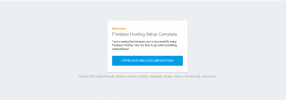
Type N again when asked to Overwrite your file. You will see this image below once the initialization completed.

13. Deploy your first web app with commandCode:firebase deploy
You will see the image below once the deploy is completed.

Copy the hosting URL into your browser to see the result.
Live sample to see a good boiiiiCode:https://ouiouibaguette.web.app/
14. In case you have multiple sites under one project. You need to add your site name into firebase.json. It's located on your project's folder (or just use the search function). Open it and add your site name into the line and save it.

On Terminal, deploy your site with commandReplace mysecondsite with your site name and hit enter.Code:firebase deploy --only hosting:mysecondsite
That's it!
Since this is a web2.0 link, you should build a few tier2 links to it and social signals to get some link juices and to get the page indexed.
How well this link perform as a parasite? just type "random anime generator" on google/ahrefs and you'll see it ranked a bunch of low-med keywords competition on top 3 google promoting a playstore app.
I hope you found this guide useful. If you’re facing any issues, leave a comment below.
Attachments

worldfamouslover
Newbie
- Jun 30, 2021
- 15
- 1

GoogleAlchemist
Regular Member
- Nov 25, 2009
- 320
- 45
I managed to get a live site going but cant figure out how to make additional ones w/o overwriting what I just did....
In your youtube video around the 4:20 mark you switch to E: drive where you have your website files hosted...that's where I get lost
My files are just in the regular default C: drive but I can't figure out how to copy/paste the file path to direct it to
I cant figure out how to change directories or projects to make additional separate websites/pages...it just keeps overwriting what I already created.
After logging in, what would I put in that line if my file path looks like this
C:\Users\newbi\public
and my command prompt is set at
C:\Users\newbi>
Do I need to create a separate folder in C:\Users\newbi\NEWFOLDER or what am I missing here?
Thanks
In your youtube video around the 4:20 mark you switch to E: drive where you have your website files hosted...that's where I get lost
My files are just in the regular default C: drive but I can't figure out how to copy/paste the file path to direct it to
I cant figure out how to change directories or projects to make additional separate websites/pages...it just keeps overwriting what I already created.
After logging in, what would I put in that line if my file path looks like this
C:\Users\newbi\public
and my command prompt is set at
C:\Users\newbi>
Do I need to create a separate folder in C:\Users\newbi\NEWFOLDER or what am I missing here?
Thanks
GoogleAlchemist
Regular Member
- Nov 25, 2009
- 320
- 45
I've been messing with this all day...I thought I managed to switch to the other directory where my new website html files are for a new site, but when i run the firebase init command it seems to revert me back to the base folder where my initial files are. What am I missing here? Thanks

newslinkseo
Banned - Spam posting
- Feb 17, 2022
- 73
- 31
This link is worthless and a total waste of time. Here is why.
This is creating a sub-domain. While the link may show as DR85 ahrefs it's being read from the root. Ahrefs and moz cannot determine a link between and sub-domain and a root domain.
What you are actually getting here is a useless DR0 link. It might as well be spammy blog comment link on blogger.com
No value here in terms of SERP. This does nothing more than make your DR score look a little higher. In terms of Google it's "Nothing" link with zero authority
I suggest if you are actually trying to rank a website. Don't waste your time on this. Spam a blog comment somewhere you might be get more value
This is creating a sub-domain. While the link may show as DR85 ahrefs it's being read from the root. Ahrefs and moz cannot determine a link between and sub-domain and a root domain.
What you are actually getting here is a useless DR0 link. It might as well be spammy blog comment link on blogger.com
No value here in terms of SERP. This does nothing more than make your DR score look a little higher. In terms of Google it's "Nothing" link with zero authority
I suggest if you are actually trying to rank a website. Don't waste your time on this. Spam a blog comment somewhere you might be get more value
Last edited:

sam55
Power Member
- Dec 5, 2013
- 578
- 892
I've been messing with this all day...I thought I managed to switch to the other directory where my new website html files are for a new site, but when i run the firebase init command it seems to revert me back to the base folder where my initial files are. What am I missing here? Thanks
View attachment 203973
Every time you need a new site, create a new folder in your pc and start command from there.
In order to create a completely new site follow these steps
1. Create a new project on firebase console.
2. Create a new folder on your computer somewhere. like E drive > New Folder > New Firebase Site > Public
3. Inside the public folder paste your static site contents. index, css, js, images. Go back.
4. Now connect this folder in command. Just type cmd in the address bar of the firebase folder you just created.
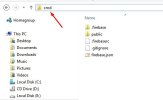
5. Type firebase init
6. Chose hosting only. up down arrow to move, spacebar to select, enter to proceed
7. Select existing project.
8. Choose the firebase project you just created
9. Public directory is public. Press enter
10. configure as a single page app? NO. press n and enter
11. build and deploy with github? NO
12. Replace index.html? NO
13. Init complete.
14. Type firebase deploy
15. Deploy complete. Go to firebase console and check the site web.app link.

Rachmaninoff
Elite Member
- Jan 19, 2011
- 3,634
- 5,427
This link is worthless and a total waste of time. Here is why.
This is creating a sub-domain. While the link may show as DR85 ahrefs it's being read from the root. Ahrefs and moz cannot determine a link between and sub-domain and a root domain.
What you are actually getting here is a useless DR0 link. It might as well be spammy blog comment link on blogger.com
No value here in terms of SERP. This does nothing more than make your DR score look a little higher. In terms of Google it's "Nothing" link with zero authority
I suggest if you are actually trying to rank a website. Don't waste your time on this. Spam a blog comment somewhere you might be get more value
Ayayayayy your comment is actually more worthless than the actual thread.
I've mentioned it in the first post:
Since this is a web2.0 link, you should build a few tier2 links to it and social signals to get some link juices and to get the page indexed.
How well this link perform as a parasite? just type "random anime generator" on google/ahrefs and you'll see it ranked a bunch of low-med keywords competition on top 3 google promoting a playstore app.
If you still don't understand how web2.0 works, why we should build tier2 links to it, and why it is meant for diversity. Then I'll rest my case here.
newslinkseo
Banned - Spam posting
- Feb 17, 2022
- 73
- 31
Ayayayayy your comment is actually more worthless than the actual thread.
I've mentioned it in the first post:
If you still don't understand how web2.0 works, why we should build tier2 links to it, and why it is meant for diversity. Then I'll rest my case here.
Well actually. My comment has more value than the original post. My technical analysis still stands correct.
This is useless link. It counts as a DR0 /DA0 link on a sub-domain.
Ahrefs does not understand the difference and still displays this link as being DR85
But GOOGLE (Which is the only thing that matters) see's this as having ZERO authority.
Web 2.0 are useless.. You would need to build large amounts of QUALITY second tier links to make them worth anything. So why would anyone be stupid enough to spend and waste time building links to someone else's web property when you can just build them directly to your own website......
My comment stands technically correct.. This link is WORTHLESS
Creating this link can be used for nothing more as a "Buffer Link" which people usually spend time sending junk and worthless 2nd tier links to anyway. You would have to use HIGH QUALITY editorial in content authority links on the second tier for this work . But why would anyone be stupid enough to create actual real links to crappy web 2.0 buffer link. You are better off sending the qualoty links directly to your own website. Why waste them on the second tier of a crappy zero authority web 2.0. If you think that sending thousands of spammy blog comment to the web 2.0 is going to have some kind of "effect" you are very misinformed.
Some people just have no idea what they are talking about.
The only thing this useless link does it make it look like you have DR85 link in ahrefs. As for it's "Real world value" its a ZERO authority link.
Diversity-------
Spend time on building diversified links that are actually WORTH SOMETHING
Last edited:

- Mar 26, 2019
- 3,520
- 1,800
Why you don't share some worthy links to communityWell actually. My comment has more value than the original post. My technical analysis still stands correct.
This is useless link. It counts as a DR0 /DA0 link on a sub-domain.
Ahrefs does not understand the difference and still displays this link as being DR85
But GOOGLE (Which is the only thing that matters) see's this as having ZERO authority.
Web 2.0 are useless.. You would need to build large amounts of QUALITY second tier links to make them worth anything. So why would anyone be stupid enough to spend and waste time building links to someone else's web property when you can just build them directly to your own website......
My comment stands technically correct.. This link is WORTHLESS
newslinkseo
Banned - Spam posting
- Feb 17, 2022
- 73
- 31
Why you don't share some worthy links to community
Why don't I share?
Okay mate. Well. If your looking for links. You can work out how to earn them yourself.
It would be a little stupid to give years of hard work and research away for "FREE" when most people are basically "Link Scabs" and "Spammers"
Why would I publish some great places to get some great free links here when all you people do is SPAM THEM TO DEATH and not leave any actual value behind in return for the site linking to you.
Yeah???
So your after a free link yeah? Okay ill share one with you. Here. Forbes.com
All you have to do is "Work Hard And Submit A Great Story" "Earn your link"
It will get published for free.........
There you go!
Last edited:
newslinkseo
Banned - Spam posting
- Feb 17, 2022
- 73
- 31
So your ranking expert are you?
Please share what you "Rank"
Surly as you are a "Ranking Expert" you would have your own website that you "Ranked" just like a expert would right?
Could you share your "Personal site" As a "Ranking Expert" it would have amazing rankings, heaps of actual organic search traffic and a great service running on it right?
Please share what you "Rank"
Surly as you are a "Ranking Expert" you would have your own website that you "Ranked" just like a expert would right?
Could you share your "Personal site" As a "Ranking Expert" it would have amazing rankings, heaps of actual organic search traffic and a great service running on it right?
Rachmaninoff
Elite Member
- Jan 19, 2011
- 3,634
- 5,427
Why you don't share some worthy links to community
because he doesn't like web2.0 in general and would say Wordpress, Medium, Tumblr, Wix, Weebly and the likes as worthless diversity links. I get it.
- Mar 26, 2019
- 3,520
- 1,800
Visit my threads and you can check rankings there also you are not my friend or anything, so i share my personal sites with you. There are too many copycats in market, i hope you can understandSo your ranking expert are you?
Please share what you "Rank"
Surly as you are a "Ranking Expert" you would have your own website that you "Ranked" just like a expert would right?
Could you share your "Personal site" As a "Ranking Expert" it would have amazing rankings, heaps of actual organic search traffic and a great service running on it right?