

- Mar 22, 2013
- 9,192
- 10,496
So I'm trying to make the search bar on my Palemoon (think old Firefox) browser look a certain way.
My current CSS:
This is how it looks now:

I had an issue when I would search for something and Nothing is found, this would happen:

And when that text appears it moves everything to the right of it further to the right, hiding the X close button off page. So I put display:none in the CSS above for this selector ".findbar-find-fast.findbar-find-status", and now we're good:

But when I search for something and Something is found, then this happens:

And again it moves everything to the right, hiding my close button. I don't want to hide that text with display:none, I want it to appear. What I tried doing is playing with position:absolute and position:relative and margin and padding, to try and leave empty space there so that when that text does appear it just takes up empty space and doesn't move the elements to the right of it. But I didn't manage to get it working.
Here is how the, um, html? code? Here is how the code looks:
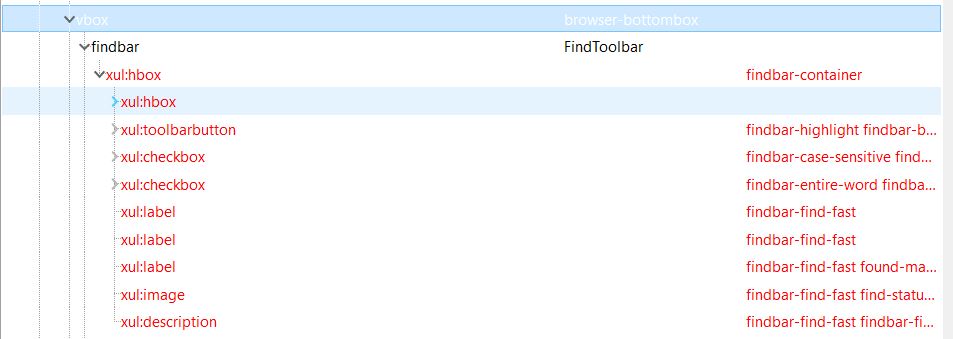
Any ideas how to leave an empty space for that text so that when it appears it doesn't affect/move the elements to the right of it?
My current CSS:
CSS:
[anonid="findbar-textbox-wrapper"] { -moz-box-ordinal-group: 4 !important; margin-left: 30px !important; }
.findbar-closebutton { -moz-box-ordinal-group: 2 !important; margin-left: 880px !important;}
.findbar-highlight { -moz-box-ordinal-group: 1 !important; }
.findbar-case-sensitive { -moz-box-ordinal-group: 0 !important; }
.findbar-entire-word { -moz-box-ordinal-group: 0 !important; }
.findbar-find-fast.find-status-icon { -moz-box-ordinal-group: 2 !important; display:none !important; }
.findbar-find-fast.found-matches { -moz-box-ordinal-group: 3 !important; }
.findbar-find-fast.findbar-find-status { display: none !important; }
This is how it looks now:
I had an issue when I would search for something and Nothing is found, this would happen:
And when that text appears it moves everything to the right of it further to the right, hiding the X close button off page. So I put display:none in the CSS above for this selector ".findbar-find-fast.findbar-find-status", and now we're good:
But when I search for something and Something is found, then this happens:
And again it moves everything to the right, hiding my close button. I don't want to hide that text with display:none, I want it to appear. What I tried doing is playing with position:absolute and position:relative and margin and padding, to try and leave empty space there so that when that text does appear it just takes up empty space and doesn't move the elements to the right of it. But I didn't manage to get it working.
Here is how the, um, html? code? Here is how the code looks:
Any ideas how to leave an empty space for that text so that when it appears it doesn't affect/move the elements to the right of it?


