
You are using an out of date browser. It may not display this or other websites correctly.
You should upgrade or use an alternative browser.
You should upgrade or use an alternative browser.
Instagram Chatbot
- Thread starter koowyy
- Start date

DunderMannen
Elite Member
- Sep 11, 2019
- 2,135
- 1,986
If you want a chatbot on Instagram, I think that'd be do-able with the official API. Also as far as I know there are 0 restrictions on how many DMs you can reply to per day. But sending to new people is very restricted.

zouakbadri
Registered Member
- Jul 14, 2016
- 75
- 23
You can use jarvee instagram

koowyy
Junior Member
- Jun 18, 2018
- 172
- 53
If you want a chatbot on Instagram, I think that'd be do-able with the official API. Also as far as I know there are 0 restrictions on how many DMs you can reply to per day. But sending to new people is very restricted.
I do not send messages to new users, but i reply to their messages (pending requests).
zouakbadri
Registered Member
- Jul 14, 2016
- 75
- 23
look at "AutoResponder for Instagram - Auto Reply Bot" in google play
I think you should send them to an external bot
like messenger bot
I think you should send them to an external bot
like messenger bot
koowyy
Junior Member
- Jun 18, 2018
- 172
- 53
Externa
Yea it can be done through external link, like messenger bot but it's not what i'm looking for, i mean can it be done only through instagram ?
look at "AutoResponder for Instagram - Auto Reply Bot" in google play
I think you should send them to an external bot
like messenger bot
Yea it can be done through external link, like messenger bot but it's not what i'm looking for, i mean can it be done only through instagram ?


saanvi_mehta
Newbie
- Oct 14, 2020
- 3
- 0
Jarvee has a lot bugs.You can use jarvee instagram

bianyanxiao
Junior Member
- Feb 15, 2021
- 135
- 24
Take a look at this function and process below, is it what you are looking for?
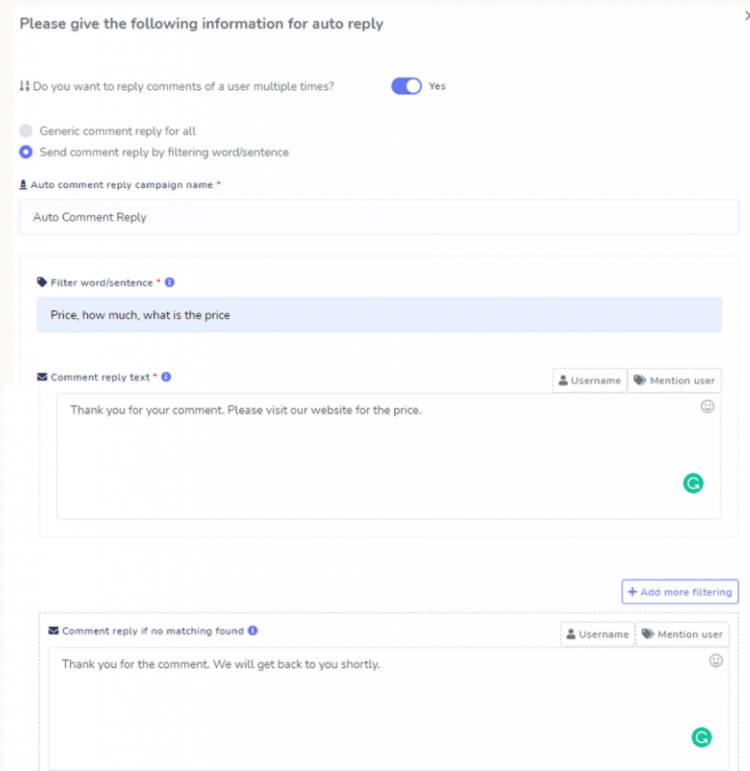
Generic Reply Template will be used to reply to any comments. And the other one will filter the comment with keywords to reply.
Give a name for the Reply template. Select your desired Reply Template type, Put keywords and the Reply text, and also a Reply text when no keyword matches. And then click on save.
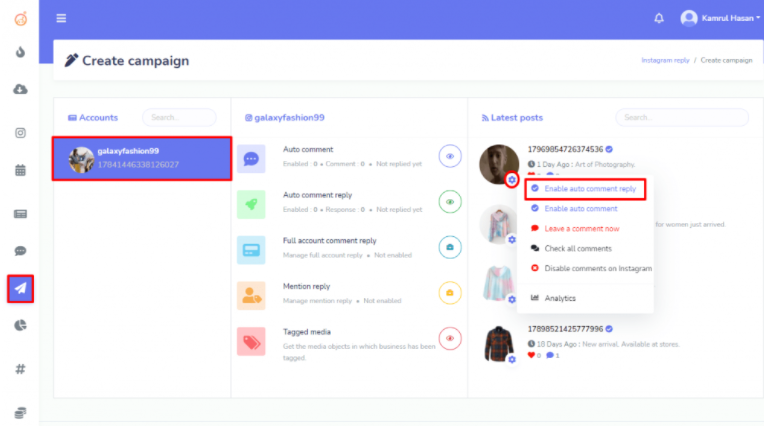
Now again go to the Create Campaign from the left navigation menu and select your Instagram account and click on the Settings button of the post you want to set the comment reply. Click on the “Enable Auto Comment Reply”.
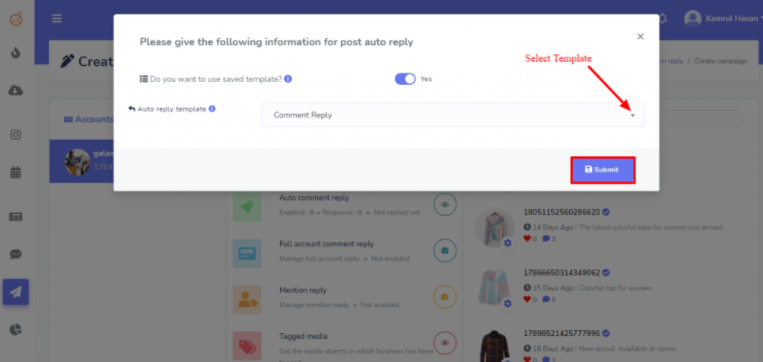
Now select the Template from the dropdown list and save the campaign.
Auto Comment Reply:
Creating “Auto Comment Reply” campaign is almost similar to “Auto Comment” Campaign. First, we need to create a Comment Reply Template and then create the campaign for Auto Comment Reply. Click on the Reply Template from the navigation menu. Then click on the “Create new template”. We can create 2 types of Comment reply: Generic Reply Template and other one is Filtering words or sentence.Generic Reply Template will be used to reply to any comments. And the other one will filter the comment with keywords to reply.
Give a name for the Reply template. Select your desired Reply Template type, Put keywords and the Reply text, and also a Reply text when no keyword matches. And then click on save.
Now again go to the Create Campaign from the left navigation menu and select your Instagram account and click on the Settings button of the post you want to set the comment reply. Click on the “Enable Auto Comment Reply”.
Now select the Template from the dropdown list and save the campaign.

kivaule
Junior Member
- Nov 1, 2021
- 116
- 26
haven't you had any problem with that bot?You can use socinator i am using that currently