
rafark
Elite Member
- Jan 15, 2013
- 3,249
- 1,979
Executive VIP member surely!
I agree, there are a couple of members here who have been Sharing a lot lately, they deserve at least a JR Executive VIP but I haven't seen people been promoted in a while.

Executive VIP member surely!

I agree, there are a couple of members here who have been Sharing a lot lately, they deserve at least a JR Executive VIP but I haven't seen people been promoted in a while.

thx a lot, i will chaeck it out
Quick question IF you had to choose between Ahrefs and SEMrush which would you choose
AND
as regards backlinks Ahrefs is still the largest database

thanks for sharing
Quality thread,Good luck on your journey
Good one mate
★Great guide bro....thanks for share★

Super cool notes, I will follow your other tutorials as well. Learning here is best because of information people like you share. Thanks again!
thanks for the share
Thanks for the guide its really helpful and Pro
Hi there FT. I'm brand new, I'm starting by leaning into the YouTube creating videos space. Which do you think would be better for me starting out and in that particular area? Or would something else be more helpful?No problem, hope it helps.
Ahrefs is still the best, as it has the largest database (by a mile) and has some really cool reporting. However, there are lots of things I would miss from Semrush that Ahrefs simply does not do, or does really badly.
HTH

Your rocking dudeI posted Part 1 of the SEMrush Hacks Guide a couple of weeks ago, so thought it was about time to give you something else pretty cool to get your teeth in to.
** Reminder **
Remember that we all get a FREE 30 day trial of SEMrush from BHW. So if you have not signed up yet, get on with it and be sure to checkout Part 1 of this series, you will not regret it!
** Reminder End **
- BHW 30 day SEMrush trial signup
- Already used it? You can find LOTS of free trials with a simple Google search and a new email address.... just saying
I have a few more SEMrush Hacks to share and will try and post something new for you soon, so if you like what you see, be sure to check back for more.
If you missed any of my previous guides over the last couple of months, you can follow the links below to catch up.
- Ahrefs Hacks Part 1 - Pinterest
- Ahrefs Hacks Part 2 - Quora
- Ahrefs Hacks Part 3 - Twitter
- Ahrefs - Bonus Tip
- Semrush Hacks (this one is free...)
- You've been hit by, you've been struck by a Google Update - How to Find if a Google Update Hit Your Site? (100% free - no tools required)
Part 2 - Social Media Manager
Social media is a huge part of a successful IM strategy and I have been banging on about it quite a bit recently as Google is being a bit of a git with everyones rankings. But with all the platforms you NEED to be using, it can become a bit of a nightmare.
So, if you feel a bit like perky Jessica above, strap in and prepare to make your life a whole lot easier!
1. Create a Project for your money site, if you have not done so already.
2. From the SEO Dashboard, click on the Setup Button in the Social Media Poster section.
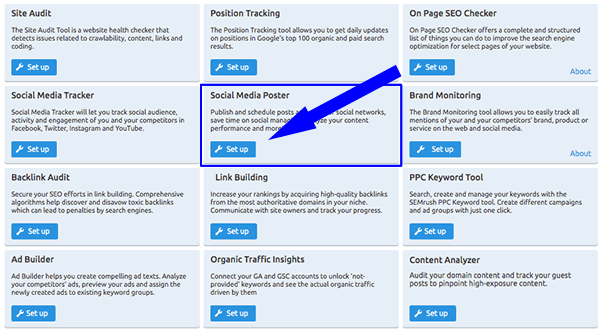
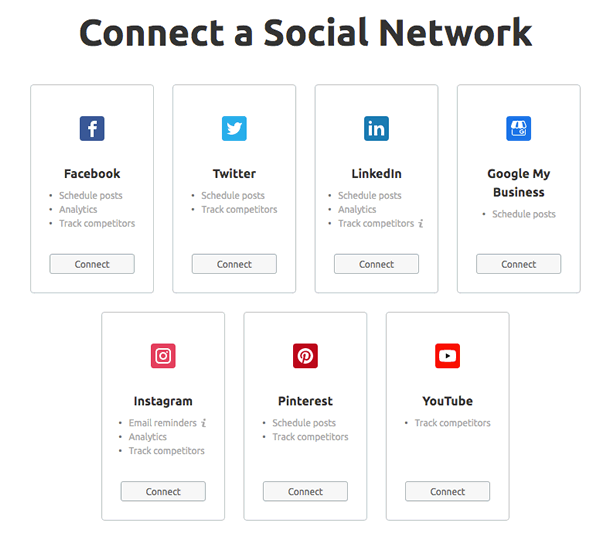
3. Connect all of your social media accounts for this project
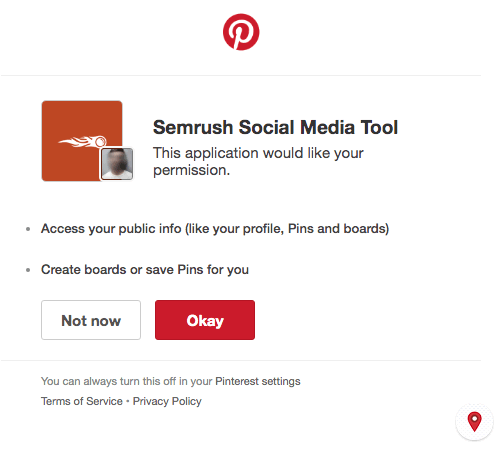
4. Approve SEMrush access to your social media accounts (below example is Pinterest)
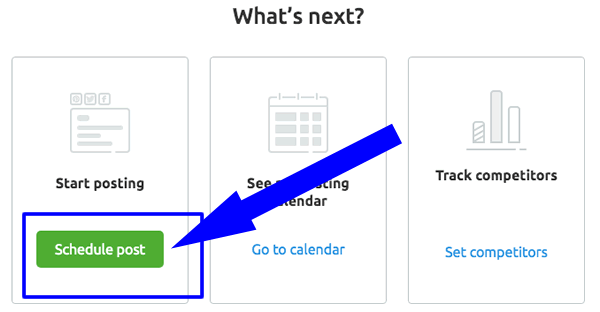
5. Click on Schedule Post and away you go.
Why should I manage my social media platforms in SEMrush?
Because it is easy, really powerful, and you are already using SEMrush anyway, so the question is, why not?
Take a look at a few of the things it can do, and how clean the interface is.
Schedule Posts
Insights & Analytics
Track competitors
Boost Posts
Bonus Tip 1 - Adding posts individually is a pain, especially for us manipulators of social media. So one of the cool features that this tool has is the ability to Bulk Add up to 100 posts from a CSV file at a time. Nice!
1. Simply click on the Bulk Post icon.

2. Upload your CSV file.

Bonus Tip 2 - There is also a Chrome Extension to make converting content from your money site even easier.
1. Click on the Chrome Extension button.

2. Add the Extension.

3. Click on the icon on your toolbar to Connect to Semrush.
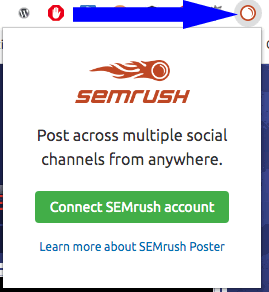
4. Click on an image, highlight text on a page and right click and send it straight to Semrush for publishing.

By the way, the baseball bat guide in the above example is one of the best guides I have ever read, full stop. If you want an example of how to create great content, take a look at this!
Conclusion
Yes there are tools out there dedicated to social media management, but they are likely overkill for a lot of us + the good ones cost you. Having this ability in SEMrush is a really cool feature and one which is lacking from other SEO tools.
I have only scratched the surface of what you can do, so do yourself a favour and take a proper look!
Let me know what you think and if this is something you want more of? If so, I will show you a few other methods and guides which will help streamline your workflow.
↓↓ This guide has been brought to you by ↓↓
Hi there FT. I'm brand new, I'm starting by leaning into the YouTube creating videos space. Which do you think would be better for me starting out and in that particular area? Or would something else be more helpful?
Both have areas they are unique and great in and once things are rolling I'd think running both would be the way to go. Information is King and if it's worth it it's worth it, bottom line.
Thanks Buddy,
Q-Tip
Your rocking dude

can u help with this? I can't find any working methodA quick search on BHW will show you how to get around any card checks...


