Help Please to bypass this fuc*ing torrent vpn block[solved]

MgicalaEarner

Elite Member
Joined
Jul 8, 2017
Messages
3,749
Reaction score
4,861
i am trying to download this movie from torrent, i was able to download yesterday movies from 1377x.to
but now its asking to download vpn(not free need to pay )
0u7E9Hi

can anyone help me to bypass
thanks
 
Last edited:
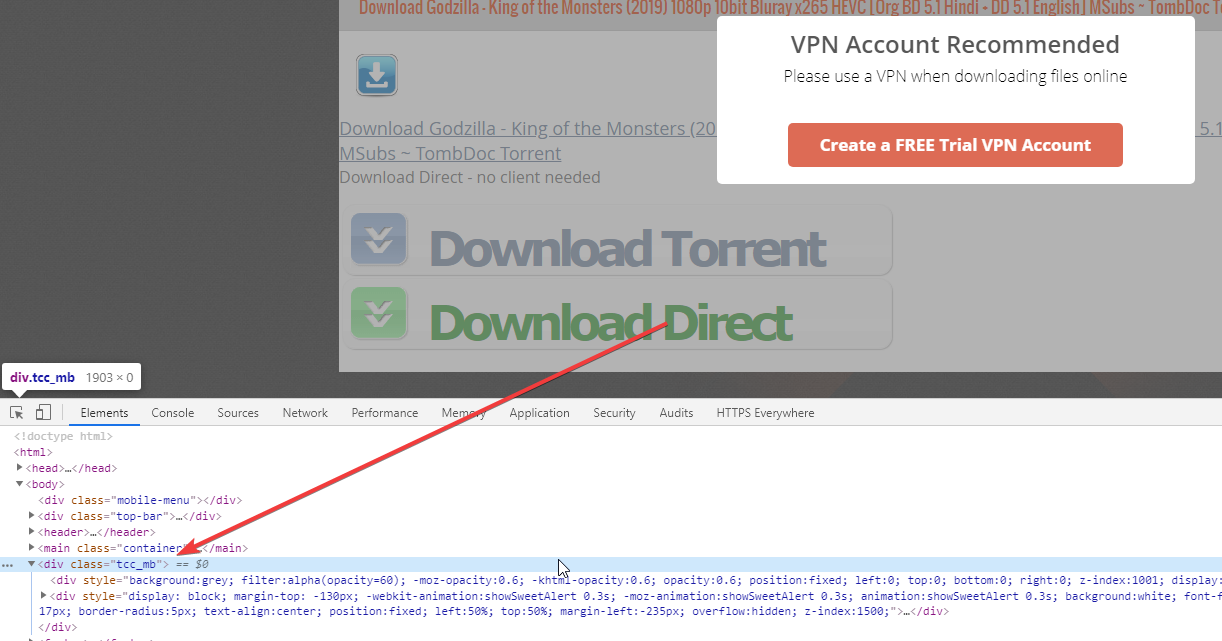
you can remove such Overlay via Inspect Element
 
damn
Here you go:

magnet:?xt=urn:btih:C5B2748ED768CDD755C39963A376AEF907EE4511&dn=Godzilla+-+King+of+the+Monsters+%282019%29+1080p+10bit+Bluray+x265+HEVC+%5BOrg+BD+5.1+Hindi+%2B+DD+5.1+English%5D+MSubs+%7E+TombDoc&tr=udp%3A%2F%2Ftracker.coppersurfer.tk%3A6969%2Fannounce&tr=udp%3A%2F%2F9.rarbg.to%3A2710%2Fannounce&tr=udp%3A%2F%2F9.rarbg.me%3A2710%2Fannounce&tr=udp%3A%2F%2Ftracker.openbittorrent.com%3A80%2Fannounce&tr=udp%3A%2F%2Ftracker.opentrackr.org%3A1337%2Fannounce&tr=udp%3A%2F%2Ftracker.internetwarriors.net%3A1337%2Fannounce&tr=udp%3A%2F%2Ftracker.leechers-paradise.org%3A6969%2Fannounce&tr=udp%3A%2F%2Fexodus.desync.com%3A6969%2Fannounce&tr=udp%3A%2F%2Fretracker.lanta-net.ru%3A2710%2Fannounce&tr=udp%3A%2F%2Fopen.demonii.si%3A1337%2Fannounce&tr=udp%3A%2F%2Ftracker.tiny-vps.com%3A6969%2Fannounce&tr=udp%3A%2F%2Fbt.xxx-tracker.com%3A2710%2Fannounce&tr=udp%3A%2F%2Ftracker4.itzmx.com%3A2710%2Fannounce&tr=udp%3A%2F%2Ftracker.cyberia.is%3A6969%2Fannounce&tr=udp%3A%2F%2Ftracker.zer0day.to%3A1337%2Fannounce&tr=udp%3A%2F%2Ftracker.leechers-paradise.org%3A6969%2Fannounce&tr=udp%3A%2F%2Fcoppersurfer.tk%3A6969%2Fannounce
i appreciate that bro but can you tell me how
 
damn

i appreciate that bro but can you tell me how

Delete this Element, and it will dissapear. You can also forever block this popup with uBlock origin, so you dont have to do it by yourself all the time

G3ZN1dM
 
tha
Delete this Element, and it will dissapear. You can also forever block this popup with uBlock origin, so you dont have to do it by yourself all the time
thank you so much bro and i tried and its working
lots of love on your way <3
 
im getting this.

Secure Connection Failed
An error occurred during a connection to www.1377x.to. SSL received a record that exceeded the
maximum permissible length. Error code: SSL_ERROR_RX_RECORD_TOO_LONG
no its working fine from my side
 
If you can't seem to get rid of the overlay, there are other trackers. For that specific movie: https://torrentz2.eu/search?f=Sathuran+2019

I can't recall having any issue with that site though. I assume, you're clicking on the wrong button. Avoid the big and shiny download buttons and click on the top one.
 
Hi There
I am not sure if I am able to post on a thread that is solved, but it seems that 1337X.to has had a DDOS attack and thereafer the same weird popup comes up asking the user to download a free VPN account recommended, like in case of the previous user.
When I tried the inspect element fix recommended above by Mgicalaearner, it does not seem to be there.
I have been using 1337x.to thru the Opera Browser with my built in VPN on and it has worked so far.
Please help.
 

Attachments

  • Capture.PNG
    Capture.PNG
    193.2 KB · Views: 2
use other torrent site , use rabg or extra torrents best one is pirate bay
 
Hi There
I am not sure if I am able to post on a thread that is solved, but it seems that 1337X.to has had a DDOS attack and thereafer the same weird popup comes up asking the user to download a free VPN account recommended, like in case of the previous user.
When I tried the inspect element fix recommended above by Mgicalaearner, it does not seem to be there.
I have been using 1337x.to thru the Opera Browser with my built in VPN on and it has worked so far.
Please help.
You're seeing this because you're not using an Ad Blocker.

What you're seeing is an Advertisement.

If you install uBlock Origin (Chrome - FF) for example, this Popup is gone.

Additionally, you don't have to click on "TORRENT DOWNLOAD" but rather just Right click on the "MAGNET DOWNLOAD" and then Copy the Link (Magnet url) to your Torrent client.
 
Hi LilMosey,
Bless your heart. I downloaded uBlock Origin and added it on to my Chrome browser. I also added it to my Opera browser which I use to surf 1337 (because of the built in VPN). It worked and the annoying pop up vanished for now.
I have a stupid question: will the UBlock Origin add on in any way affect my stored PW on my bank accounts, mobile phone provider site or other sites that have my CC Details? Just wondering....
Thanks for the suggestions Anne-Maree and puzilo. Appreciated all help.
 
Back
Top