

RealDaddy
Repeatedly violating rules
- Jun 30, 2018
- 9,011
- 11,299
Hello BHW,
Youtube is a goldmine for buyer intent traffic.
But, you need to know the process to transition that searcher into a buyer.
Requirements:-
1. Video Script.
2. Google Slide.
3. Screen Recorder.
step:1-
Let's assume that your keyword is "how to cure toenail fungus at home".
Search this topic on Google.
You will see something like this-
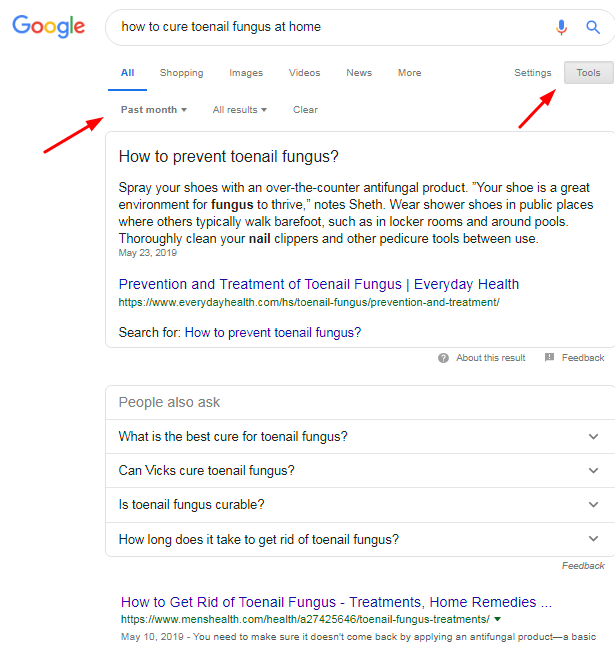
Sort the search results by clicking on tools --> Any time --> past month.
# Reason - You need to share the most relevant and fresh knowledge [the reason why people will watch your video]
Disclaimer - We will not copy the article, we are doing this for extracting the core knowledge.
Now open the 1st result.
When you will do that, You will very often find that - the articles on the # position always have some type of summary given at the start. That is what we are looking for.
I found this -

Now, you can do these things with this piece of content -
# Change some words and use it as your video script.
# Get it rewritten and after people have watched your video, redirect them to the rewritten article on your website, then collect the emails by giving away something of value.
step:2-
Open Google Slides.

Start with a Blank Slide.
Create something similar to this or anything that you find fit with your niche.
example -

Create 10 to 15 slides like these.
step:3-
For recording your screen, Use https://chrome.google.com/webstore/detail/loom-video-recorder-scree/liecbddmkiiihnedobmlmillhodjkdmb [ no association or affiliation]
Because we will be recording the slides, so we will need a screen recorder which can work with Google Chrome.
It's a neat little extension, which will do most of our work.

Conclusion:-
#1 Get the video script/content from Google.
#2 Summarize the article and also rewrite it to collect leads.
#3 Use Google slides for creating the video.
#4 Use Loom for Recording the video.
Edit:- It's a basic guide. If you think I missed something, please add that by commenting below. This way everyone can gain knowledge.
Hope this helps.
Thanks,
@Dwivedi 98
Youtube is a goldmine for buyer intent traffic.
But, you need to know the process to transition that searcher into a buyer.
Requirements:-
1. Video Script.
2. Google Slide.
3. Screen Recorder.
step:1-
Let's assume that your keyword is "how to cure toenail fungus at home".
Search this topic on Google.
You will see something like this-
# Reason - You need to share the most relevant and fresh knowledge [the reason why people will watch your video]
Disclaimer - We will not copy the article, we are doing this for extracting the core knowledge.
Now open the 1st result.
When you will do that, You will very often find that - the articles on the # position always have some type of summary given at the start. That is what we are looking for.
I found this -
# Change some words and use it as your video script.
# Get it rewritten and after people have watched your video, redirect them to the rewritten article on your website, then collect the emails by giving away something of value.
step:2-
Open Google Slides.
Create something similar to this or anything that you find fit with your niche.
example -
step:3-
For recording your screen, Use https://chrome.google.com/webstore/detail/loom-video-recorder-scree/liecbddmkiiihnedobmlmillhodjkdmb [ no association or affiliation]
Because we will be recording the slides, so we will need a screen recorder which can work with Google Chrome.
It's a neat little extension, which will do most of our work.
#1 Get the video script/content from Google.
#2 Summarize the article and also rewrite it to collect leads.
#3 Use Google slides for creating the video.
#4 Use Loom for Recording the video.
Edit:- It's a basic guide. If you think I missed something, please add that by commenting below. This way everyone can gain knowledge.
Hope this helps.
Thanks,
@Dwivedi 98
Last edited:


