

- Nov 8, 2005
- 157
- 580
2.0 Update!
Once you've reached that golden number of 15 posts (that are of excellent quality and contributing top-notch stuff to the forum) you will be able to start direct messages with other members.
There are a couple of ways you can do this.
First off, you can start a direct message from your inbox. To get to your inbox, you can double click on the envelope icon in the top right menu (circled below). Once you're there, click 'Send Direct Message':

You will be taken to the direct message composer:

In the 'Participants' box, start typing the username of the person (or people) you want to have a direct message with. The system will bring up a list of suggestions as you type. If you are adding multiple participants, separate their names with a comma.
Then, type something useful in the 'Title...' box, and type your message into the main text editor. You can decide whether other people in the PM can invite more members into the direct message, or whether you want to lock it, by ticking the boxes at the very bottom of the editor.
When you are happy with the direct message, click 'Send Direct Message' and it will be sent to the other participants. This direct message will also appear in your inbox.
The other way you can start a direct message is particularly useful if you decide to PM someone while you're browsing threads.
You can click on any members name, whenever they post, to see this pop-up menu:
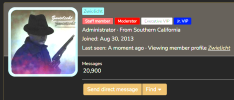
Click 'Send Direct Message' and you will be taken to the same direct message composer, but this time, the participant field will be pre-populated. You can then create your direct message in exactly the same way as above.
It's worth noting that you must leave at least 30 seconds between each PM you send - the system will not let you send more than one message in any 30 second window. This is an attempt to prevent PM spam.
Last edited by a moderator:


