How to: start a direct message

BlackHat World

Administrator
Staff member
Moderator
Joined
Nov 8, 2005
Messages
157
Reaction score
580
2.0 Update!


Once you've reached that golden number of 15 posts (that are of excellent quality and contributing top-notch stuff to the forum) you will be able to start direct messages with other members.

There are a couple of ways you can do this.

First off, you can start a direct message from your inbox. To get to your inbox, you can double click on the envelope icon in the top right menu (circled below). Once you're there, click 'Send Direct Message':

Screenshot 2024-10-14 103735.png

You will be taken to the direct message composer:

Screenshot 2024-10-14 103756.png

In the 'Participants' box, start typing the username of the person (or people) you want to have a direct message with. The system will bring up a list of suggestions as you type. If you are adding multiple participants, separate their names with a comma.

Then, type something useful in the 'Title...' box, and type your message into the main text editor. You can decide whether other people in the PM can invite more members into the direct message, or whether you want to lock it, by ticking the boxes at the very bottom of the editor.

When you are happy with the direct message, click 'Send Direct Message' and it will be sent to the other participants. This direct message will also appear in your inbox.

The other way you can start a direct message is particularly useful if you decide to PM someone while you're browsing threads.

You can click on any members name, whenever they post, to see this pop-up menu:
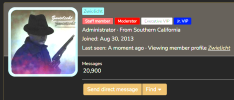
Screenshot 2024-10-14 103822.png

Click 'Send Direct Message' and you will be taken to the same direct message composer, but this time, the participant field will be pre-populated. You can then create your direct message in exactly the same way as above.

It's worth noting that you must leave at least 30 seconds between each PM you send - the system will not let you send more than one message in any 30 second window. This is an attempt to prevent PM spam.
 
Last edited by a moderator:
I have write 15 msgs and haven't aloved to start conversation, why?

It can sometimes take a while for the system to recognise you have 15 posts, which is why you can't send any messages yet.

However, you haven't read our rules fully, because we specifically tell members that they aren't allowed to spam their way to 15 posts to send PMs, like you were clearly doing:
33546b25c5f58ca9782787cdd6cfebf2.png


Your spammed posts have been deleted. If you need to contact a member but you can't PM, posting on their profile is always helpful, which you appear to have figured out now.
https://www.blackhatworld.com/members/rsocks.798290/#profile-post-33181
 
hello i think i have about 17 posts why am i not a newbie plus yet :(
 
I have been a member since 2009, but I admit I was distracted. Glad to be back. I guess I have to start over from scratch again now. Thanks for providing this info.

Once you've reached that golden number of 15 posts (that are of excellent quality and contributing top-notch stuff to the forum) you will be able to start conversations (also known as PMs) with other members.

There are a couple of ways you can do this.

First off, you can go to your inbox and click 'Start a New Conversation':

View attachment 105439
You will be taken to the Conversation composer:

View attachment 105444

In the 'Participants' box, start typing the username of the person (or people) you want to have a conversation with. The system will bring up a list of suggestions as you type. If you are adding multiple participants, separate their names with a comma.

Then, type something useful in the 'Conversation Title...' box, and type your message into the main text editor. You can decide whether other people in the PM can invite more members into the conversation, or whether you want to lock the conversation, by ticking the boxes at the very bottom of the editor.

When you are happy with the conversation, click 'Start a Conversation' and it will be sent to the other participants. This conversation will also appear in your inbox.

The other way you can start a conversation is particularly useful if you decide to PM someone while you're browsing threads.

You can click on any members name, whenever they post, to see this pop-up menu:

lQm9MQj


Click 'Start a Conversation' and you will be taken to the same conversation composer, but this time, the participant field will be pre-populated. You can then create your conversation in exactly the same way as above.

It's worth noting that you must leave at least 30 seconds between each PM you send - the system will not let you send more than one message in any 30 second window. This is an attempt to prevent PM spam.

I do have another question. I tried to change my location from Kentucky to Seattle and it would not do it. Do I have to have 15 posts before I can change that too?
 
Last edited by a moderator:
I do have another question. I tried to change my location from Kentucky to Seattle and it would not do it. Do I have to have 15 posts before I can change that too?
You should be able to change the location without any requirements. Do you get any particular error message when you try to update/save the profile changes?
 
I did get an error message the first time. I am going to try again. I had gotten a message that my password was compromised the moment I signed in! LOL!! So I changed it. My computer security caught it immediately. I will let you know if I am able to switch from Kentucky to Washington State and will get back to you. Thanks my friend.

I just did it!!! Whoo-hoo! I guess saying anything in the ABOUT ME section is considered spam now. So,. I guess I am not allowed to have anything there any longer, and the old about me no longer fit, so I removed it all. So now I am just a blank space. That works. LOL! Total anonymity is cool beans with me. It adds an air of mystery. LOL! I like it! ha ha! Thanks for you assistance. I appreciate.
 
Last edited by a moderator:
Being able to PM other members is really important, especially if you want to ask more detailed questions from the OP. I've been away for a few years working too much overtime at my day job and getting burned out. It's time to get serious with IM and spending time here I think will benefit me greatly.
 
Being able to PM other members is really important, especially if you want to ask more detailed questions from the OP. I've been away for a few years working too much overtime at my day job and getting burned out. It's time to get serious with IM and spending time here I think will benefit me greatly.

Six posts in 11+ years? Don't overextend yourself now.
 
I know, I deserved that! I was a newbie lurker that 1st year and as I mentioned earlier, too much overtime and doing a complete remodel on my house, in addition.
 
Back
Top