Help with site bounce rate and load time.

Ali008

Regular Member
Joined
Nov 29, 2015
Messages
334
Reaction score
61
The problem is that I have a high bounce rate, my bounce rate is 75% and I think it is because of the slow load time.

My site load time started with 3.5 seconds. I then went trough some optimization steps like I read online and got it decreased down to around 2.8 seconds. Now my site is sitting at 4+ seconds for over a week. I have changed nothing on the site itself.
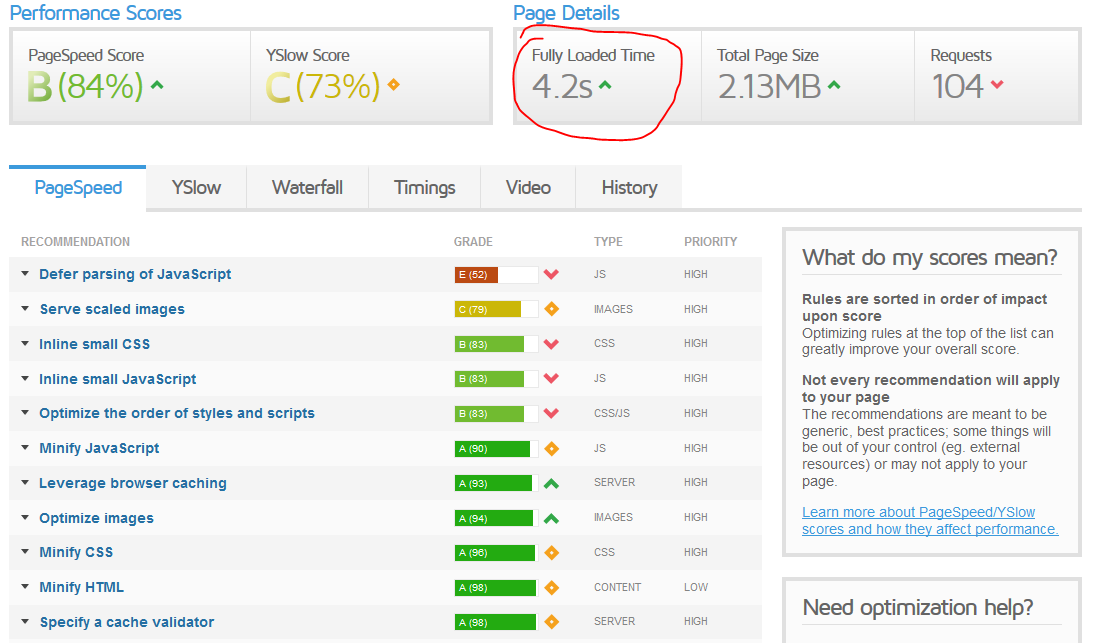
evr7fqu


I am starting to think that it is because I am using shared hosting. Will changing to a dedicated server solve my problem?
 
I see the image is not working, see here https://imgur.com/a/jvccsHR
 
That's not a terrible load time. I would say it's your content.
 
The load time you just showed is unacceptable, to be honest. Have you tried contacting your host?
 
If you are using a WP site, you may try installing a cache plugin and see if that helps with the page's load time respectively - this would be the most basic troubleshooting step.
Otherwise, if you have access to WHM/Cpanel, there is an option where you can activate page compression mode, where when this option is activated, it will send all your web pages in compressed mode to any web requests - compressed pages = smaller files, thus faster loading time and imo it uses a little bit lesser of your server's processor time as well.
If you are using a shared host, the shared host may be congested - try monitoring this and see if your server is congested with traffic, as that could also slowdown your load time.
If your web hosting has SSD hard drives -- these would improve load time considerably, as these are extremely speedy disk storage solution.
 
change the theme if using WP/ check the plugins and del the inactive once
 
If you are using a WP site, you may try installing a cache plugin and see if that helps with the page's load time respectively - this would be the most basic troubleshooting step.
Otherwise, if you have access to WHM/Cpanel, there is an option where you can activate page compression mode, where when this option is activated, it will send all your web pages in compressed mode to any web requests - compressed pages = smaller files, thus faster loading time and imo it uses a little bit lesser of your server's processor time as well.
If you are using a shared host, the shared host may be congested - try monitoring this and see if your server is congested with traffic, as that could also slowdown your load time.
If your web hosting has SSD hard drives -- these would improve load time considerably, as these are extremely speedy disk storage solution.

I am already using cache, compressed the site, made images smaller and that is my speed after doing all that.

I have contacted my host and they have told me that an upgrade to dedicated hosting would make no difference (which I doubt) and suggested me to further optimize my page which I have already done. What do you think should I upgrade the server anyway?
 
I believe that the web hosting server may be overloaded, as they would need to squeeze those shared hosting to remain profitable per server. I'm sure there are instances where your 'neighbors' could be using a little bit more bandwidth and CPU time than expected, which would slow down the server in serving the requests respectively.
Well the dedicated hosting could be too extreme I suppose - if you are hosting less than 10 sites, I do not think the dedicated server would be a wise choice as you'd be paying too much for hosting.
Maybe just a VPS would do - the VPS would have better resource allocation for your usage, and you should be able to monitor the server through your WHM panel and see if the CPU cores are overloaded or not (which rarely aren't), but for sure, the VPS would be a much better choice that a shared web hosting.
Otherwise, I'd just get a budget web server if you know how to set that up - it's a money saver + can offer you dedicated performances, just that the setup process is very tedious indeed.
 
These are my server statistics. Looks like everything is fine?

https://imgur.com/a/ybJBexG
 
hi, theme and plugins are also the culprit behind this. before changing theme, try to disable first your plugins and check which one is slowing down your site.

cheers!
 
You can not see the actual situation from your screenshot.
In your 4 seconds, scripts that are not relevant to users as analytics etc. are also calculated.
My page loads for 2.8 seconds but in reality it is loaded in 0.8 seconds.
Believe me, every day I see pages that load for 1 second and when you're going to check it in the gtmetrix, the time to complete all the action is 25 seconds.
If I were you I would not bother too much with it.
 
Back
Top