- Oct 24, 2011
- 3,227
- 3,630

What is Keyword Research? - PART 1
Wikipedia states that it's a practice that "search engine optimization (SEO) professionals use to find and research alternative search terms that people enter into search engines while looking for a similar subject".
Moz says it's "a core SEO task that involves identifying popular words and phrases people enter into search engines", and "in an attempt to figure out what to rank for".
Alternatively, Conductor.com suggests that it "is the process by which you research popular search terms people type into search engines like Google, and include them strategically in your content so that your content appears higher on a search engine results page (SERP)".
Each of these responses touch on the same basic concepts, but each offers a slightly different angle.
So what is it?
Simply put, all three.
Ergo, let's combine them to see what we can come up with. Can we agree to have this as our new definition?
What is Keyword Research?
"Keyword research is the core process that requires the research and identification of both popular, unpopular, and/or future search terms, their alternatives, and related phrases that people input into the textbox search bars that search engines use to bring end users to their respective
Search Engine Results Pages (SERPs)." -- @Tosmekop

So now that we know what it is, how do we do it?
Step 1: Determine your niche. For beginners, this is often the hardest part, when starting from scratch and building a new affiliate site, blog, eCommerce business, ad revenue site, or what have you.
Here is a trick that I sometimes use: *
Feel free to test a few of these. I'll just select the first result that shows for me, which is this.

As you click the "Generate Random Words" button, you'll see words appearing. Keep pressing the button until you come across one that stands out to you, and for any reason. As you can see, I landed on "eyebrow". Now I've got a starting point!
Step 2: Determine your competition. The next thing I'd generally do, is hop on over to Keysearch, to run a search for "eyebrow", and from there, I'll be able to see all sorts of interesting fun facts, such as:
- MOZ PA (Page Authority) of the top 10 competitors.
- MOZ DA (Domain Authority) of the top 10 competitors.
- MOZ mRank (MOZ Page Rank) of the top 10 competitors.
- MOZ mDom (Domain-Level MozRank (or DmR) ) of the top 10 competitors.
- Generic Quantity of Backlinks for the top 10 competitors.
- Meta Title Optimized (SERP Title) of the top 10 competitors.
- Meta Description Optimized (SERP Description) of the top 10 competitors.
- Meta URL Optimized (SERP URL) of the top 10 competitors.
- Top-Level Domain Extension availability.
- And so much more..
***PLEASE NOTE: MOZ is not a property owned by Google, Yahoo, or Microsoft. The MOZ metrics should not be seen as anything more than an estimation of difficulty of your competition. There are so many more factors to examine. Just keep in mind that when you see these metrics, they are not metrics that any of us can confirm that Google actually utilizes within their algorithms. We can only guess and theorize. That being said, these metrics CAN offer us a basic level of insight as to what type of competition we're dealing with.***
Check it out:


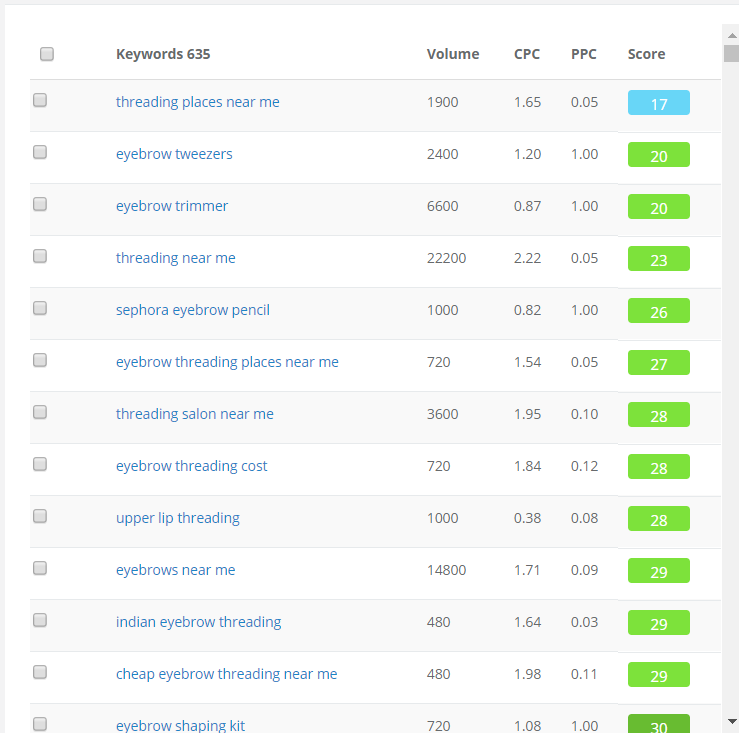
From this point, there are several keywords I could choose from, for further examination. If my intention was to make a small, micro-niche authority site, I'm sure I could build an entire site that focuses on "eyebrow tweezers".
Keysearch is a paid tool, by the way. It's not needed, but it does save lots of time.
There is a BST that you can visit, where this tool is sold on BHW. Check it out.
I don't want to focus too much on using paid tools, as when you're first starting out, it's encouraged to first learn the process. Once you've got an understanding of the process, you'll better understand which steps need to be either automated or simplified. That is when you can begin to search for tools that will make your life easier. You won't know which tools you'll need, until you first understand what tedious steps need to be mitigated to streamline your process.
As you continue on with your journey, you're going to come across many different paid tools. Many of which, are not necessarily the standard tools you'll always hear about. There are some of the more hidden gems, such as this rank tracking software, so that you can not only know where you rank for the keywords you know about, but also, the ones you don't. There are more expensive ones that work even better, but this is a cost-effective solution for those of you that may be on a budget. It'll help you find the keywords you rank for, that you may not even be aware of.
Let's get back to the free stuff!
Google has a keyword research tool that's now called the Google Keyword Planner.
Microsoft has a keyword research tool that's called the Bing Keyword Planner.
Fortunately these two companies' Keyword Planner platforms are virtually identical! This means that if you know how to use one, you'll be default know how to use the other. This is great news, because it means you really only need to learn one platform, and you can then apply your knowledge in 2 places!
Step 3: Maximize your playing field. According to a 2015 study conducted by SearchEngineLand, it's been stated that Google controls 65% of internet search, while Bing controls 33%.

Let's do some very simple math...
33% is basically half of 65%, right? I mean, I know it's not exactly half, but I'm ready to get into some keyword research.
I just want you to consider something.
If Google = 65% while Bing = 33%, then isn't it safe to assume that if Google is processing 40,000 search queries per second, Bing is processing 20,000?
Fair enough?
Well, that's a lot of traffic.
Step 4: Gather your LSIs. So what I like to do, is to first find my competition strength for the Google SERPs, and then recheck that data against Bing. Also, once you find your desired keyword(s), the search engines are designed to help you find other keywords that are closely related to the target keyword. These related keywords have a technical name. They're known as Latent Semantic Indexing (LSI) keywords.
After Google search of, "eyebrow tweezers":


After Bing search of, "eyebrow tweezers":


THE SEARCH ENGINES ARE LITERALLY TELLING YOU WHAT TO WRITE ABOUT!
- eyebrow tweezers walmart
- eyebrow tweezers target
- eyebrow tweezers amazon
- eyebrow tweezers cvs
- eyebrow tweezers scissors
- eyebrow tweezers with light
- eyebrow tweezers reviews
- eyebrow tweezers with scissor handles
- eyebrow tweezers nz
- best eyebrow tweezers reviews
- eyebrow plucker price
- eyebrow plucker machine
- revlon eyebrow tweezers
- eyebrow plucker online
- eyebrow tweezers with led light
- eyebrow tweezers with handles
- eyebrow tweezers best
- eyebrow tweezers made in germany
- best tweezers for eyebrows
- professional eyebrow tweezers top five
- best tweezers for facial hair
- best tweezers on the market
- la crosse eyebrow tweezers
- long tweezers walmart
With all these closely related keywords, an authority site or silo about eyebrow tweezers shouldn't be difficult to create. Now if you want even less competition, then while using these keywords as Main Keywords and LSI Keywords, you may also use them as Seed Keywords, much like how we did with the previously found Seed, "eyebrow tweezers".
In Part 2 of this guide, we're going to jump into effectively using the Keyword Planner platform.
Stay tuned...