

Trakajavia
Junior Member
- May 7, 2019
- 123
- 67
Hello everyone,
I am starting a new affiliate website and I was looking for a nice easy and free Wordpress plugin to build tables.
I tried quite a lot of plugins, one of them I really liked was Table Maker but the problem is it didn't get any update since 2 years so there was some code error or what making it useless (impossible to create a table).
I don't really know what I am speaking about or doing but it worked for me ahah.
On the plugin support, I have found some good guys saying how to fix it, because from what I understood the plugin uses "Rows" in the PHPMyAdmin but it is a reserved name and that messes up the creation of a new table. (I'm not a professional don't hesitate to correct me)
Download Table Maker on Wordpress activate it and everything.
Then go to phpmyadmin, login, then click on you DB a take note of the prefix all the tables take.
Below when you copy-paste the code: on the first line after CREATE TABLE change "wp_" prefix to the on phpmyadmin uses.
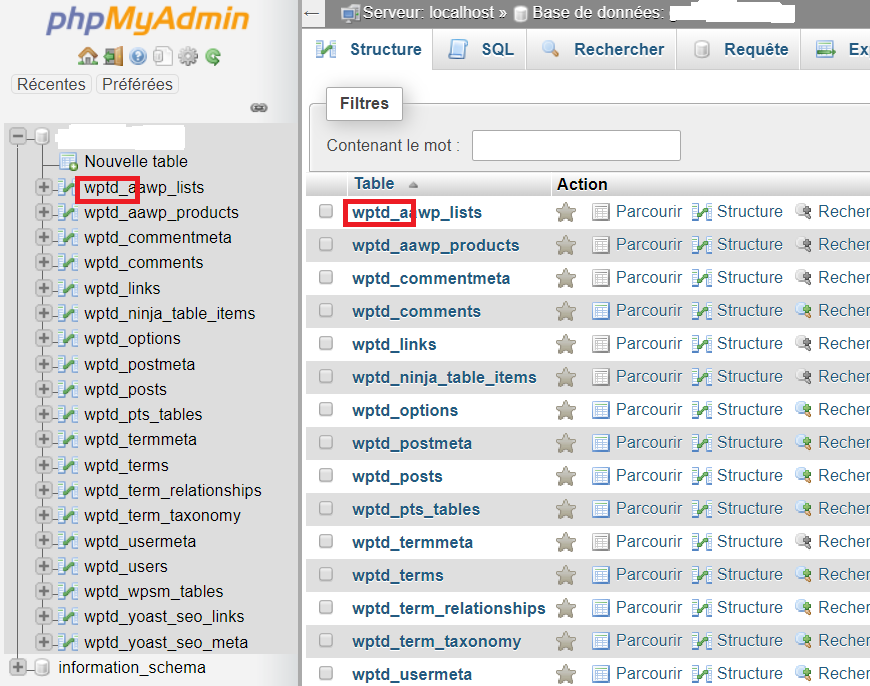
For example if all your tables start with wpds_xxxxx then change it to CREATE TABLE wptd_wpsm_tables.
Clic on SQL tab and copy past this:
CREATE TABLE wp_wpsm_tables (
id MEDIUMINT(9) NOT NULL AUTO_INCREMENT,
name TINYTEXT NOT NULL,
rows1 MEDIUMINT(9) NOT NULL,
cols MEDIUMINT(9) NOT NULL,
subs TINYTEXT NOT NULL,
color TINYTEXT NOT NULL,
responsive tinyint(1) NOT NULL,
tvalues LONGTEXT NOT NULL,
UNIQUE KEY id (id)
);
Everything should be green.
Now go to the table you have just created with the code above:
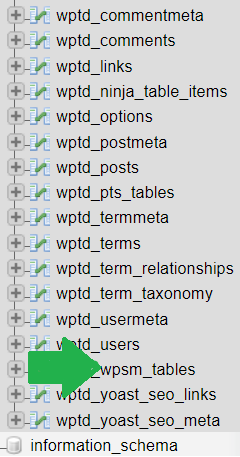
then click on Structure Tab, select Rows1 and click on Modify, here change its name to Rows, save and a message should pop up saying the name is reserved, click OK.
Go to the Table Maker plugin and voilaa it should work fine!
I am starting a new affiliate website and I was looking for a nice easy and free Wordpress plugin to build tables.
I tried quite a lot of plugins, one of them I really liked was Table Maker but the problem is it didn't get any update since 2 years so there was some code error or what making it useless (impossible to create a table).
I don't really know what I am speaking about or doing but it worked for me ahah.
On the plugin support, I have found some good guys saying how to fix it, because from what I understood the plugin uses "Rows" in the PHPMyAdmin but it is a reserved name and that messes up the creation of a new table. (I'm not a professional don't hesitate to correct me)
Download Table Maker on Wordpress activate it and everything.
Then go to phpmyadmin, login, then click on you DB a take note of the prefix all the tables take.
Below when you copy-paste the code: on the first line after CREATE TABLE change "wp_" prefix to the on phpmyadmin uses.
For example if all your tables start with wpds_xxxxx then change it to CREATE TABLE wptd_wpsm_tables.
Clic on SQL tab and copy past this:
CREATE TABLE wp_wpsm_tables (
id MEDIUMINT(9) NOT NULL AUTO_INCREMENT,
name TINYTEXT NOT NULL,
rows1 MEDIUMINT(9) NOT NULL,
cols MEDIUMINT(9) NOT NULL,
subs TINYTEXT NOT NULL,
color TINYTEXT NOT NULL,
responsive tinyint(1) NOT NULL,
tvalues LONGTEXT NOT NULL,
UNIQUE KEY id (id)
);
Everything should be green.
Now go to the table you have just created with the code above:
then click on Structure Tab, select Rows1 and click on Modify, here change its name to Rows, save and a message should pop up saying the name is reserved, click OK.
Go to the Table Maker plugin and voilaa it should work fine!