
FatBee
Elite Member
- Apr 4, 2015
- 3,146
- 3,058
You did them wrong.I have updated both queries in the wp-posts table .

You did them wrong.I have updated both queries in the wp-posts table .

I have copied your text and paste it. Did you recommend to do again?You did them wrong.
Yes. Do it again. But make it right now.I have copied your text and paste it. Did you recommend to do again?

 . mobiles speed reduce up to 75-80 .... so can you give me the idea to use adsense code without drop page speed in mobile?
Its normal with adsence.FatBee
i was got a good results every time after applied wp rocket and few other plugins.. i got mobile 95 speed and pc 98 speed all the time.. but the matter is when i place my adsense ad code into the site, my page speed score going down
This is optimization thread, not a frontend dev thread.How can i create this anyone have a idea in wordpress
that box and below that a download link in post
Wprocket? Nitro?Could you guide me which one is best cache plugin using without CDN? Present I am using WP Fastest cache (free) but did not get good result at gtmetrix. It gave me last result (today)
PageSpeed Score > 11%
Yslow Score > 55%
Full loaded Time > 5.2s
Total Pase Size > 4.95MB
Requests > 160
I think it is a very bad result. Is there any guidance. I am eagerly awaiting for some valuable guidance. Thanks in advance.

Let´s see if I find you in a good mood today.- Serve static content from a subdomain. AKA cookie-free domain!
This will greatly reduce the service time of your static content there for the load time will gain boost!
This is a bit technical and I strongly advise to make a backup before proceeding to this.
Let's start with the cPanel (aka subdomain creation)
1. Go to your cPanel > Subdomains > Create a Subdomain
2. I will name the subdomain as static (static.website.tld)
3. Change Document Root to public_html/wp-content
4. if you are using Cloudflare go to your Cloudflare dashboard and add new record A, name it static and point it to your IP.
View attachment 134673
5. Now, look for wp-config.php and insert the following lines
Code:/** Cookie-Free Domain. */ define("WP_CONTENT_URL", "https://static.website.tld"); define('COOKIE_DOMAIN', $_SERVER['HTTP_HOST'] );
I guess I don't need to tell you to change "website.tld" to your domain name.
6. Now you must redirect all the posts to the new subdomain. Simply, run the following command in the SQL Database via phpMyAdmin.
Code:UPDATE wp_posts SET guid = REPLACE(guid,'website.tld/wp-content/','static.website.tld/')View attachment 134679Code:UPDATE wp_posts SET post_content = REPLACE(post_content,'website.tld/wp-content/','static.website.tld/')
7. After completing all of these steps, go to your page and refresh it. See if there is any error.
EXPECTED ERROR: Problem loading web fonts, FontAwesome, etc. due to CORS policies
8. (Fix) I'm using RankMath for this one. But you can edit it directly or with any other plugin that can do it.
Go to your .httaccess file and add the following on the top line.
Code:#CORS FIX <IfModule mod_headers.c> <IfModule mod_rewrite.c> SetEnvIf Origin "http(s)?://(.+\.)?(static.website\.com|website\.com)(:\d{1,5})?$" CORS=$0 Header set Access-Control-Allow-Origin "%{CORS}e" env=CORS Header merge Vary "Origin" </IfModule> </IfModule> #CORS FIX END
Note: Change "website" to your domain name and ".com" to your own TLD.
This is assuming the site´s files are actually stored on public_html/wp-content, right?3. Change Document Root to public_html/wp-content
Yup, you got it right!Let´s see if I find you in a good mood today.
I have a question specifically to point #3...
This is assuming the site´s files are actually stored on public_html/wp-content, right?
Or that´s something that has nothing to do with this step?
Because, when installing WordPress on a 3rd site on my hosting, it didn´t install on that path but rather on /home/mycpanelusername/
I guess I am!Explanation for dummys
The query needs to run on the wpel_posts table?6. Now you must redirect all the posts to the new subdomain. Simply, run the following command in the SQL Database via phpMyAdmin.
You don't need it, you have a CDN.how does one set up a cookie-free domain alongside a CDN?
I am having issues with this step. I am pasting and running the query on that table but I am getting an error. On the guide, you don´t specify on what table inside our MySQL we need to run it.The query needs to run on the wpel_posts table?
WebPageTest and Pingdom will do this for you.prefetch.xyz is not working any other option? I did not find out another option. Please provide.
Thats why i have an option if you are lazy or you have no clue what to do. Its in front of you.I am having issues with this step. I am pasting and running the query on that table but I am getting an error. On the guide, you don´t specify on what table inside our MySQL we need to run it.
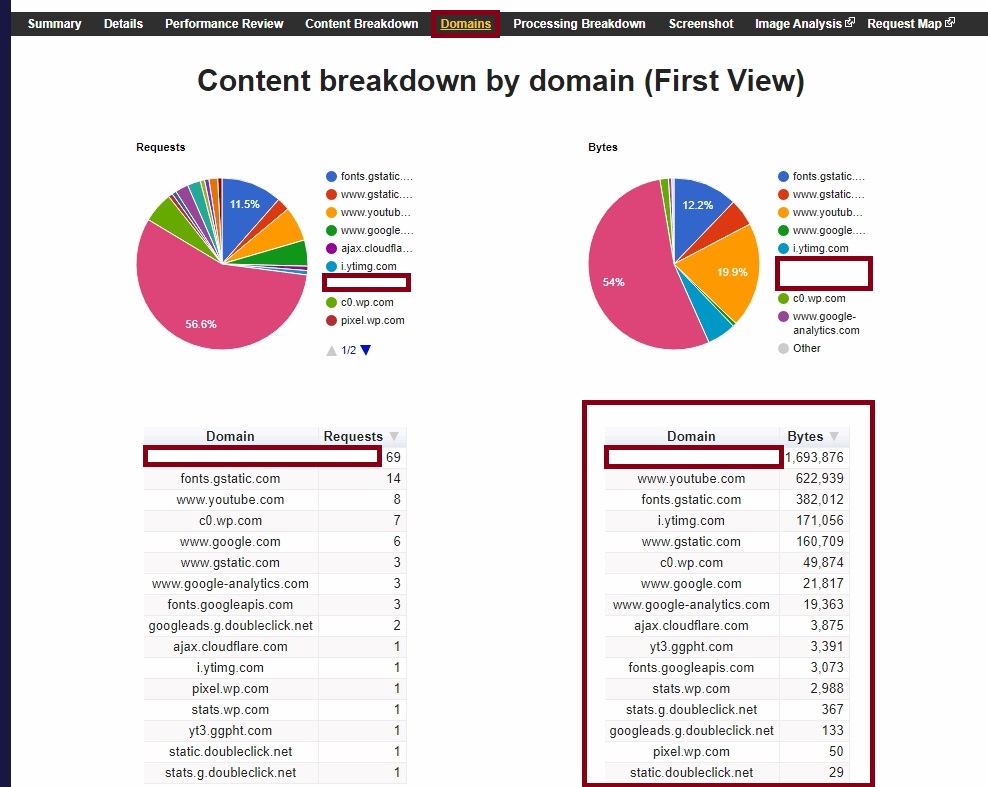
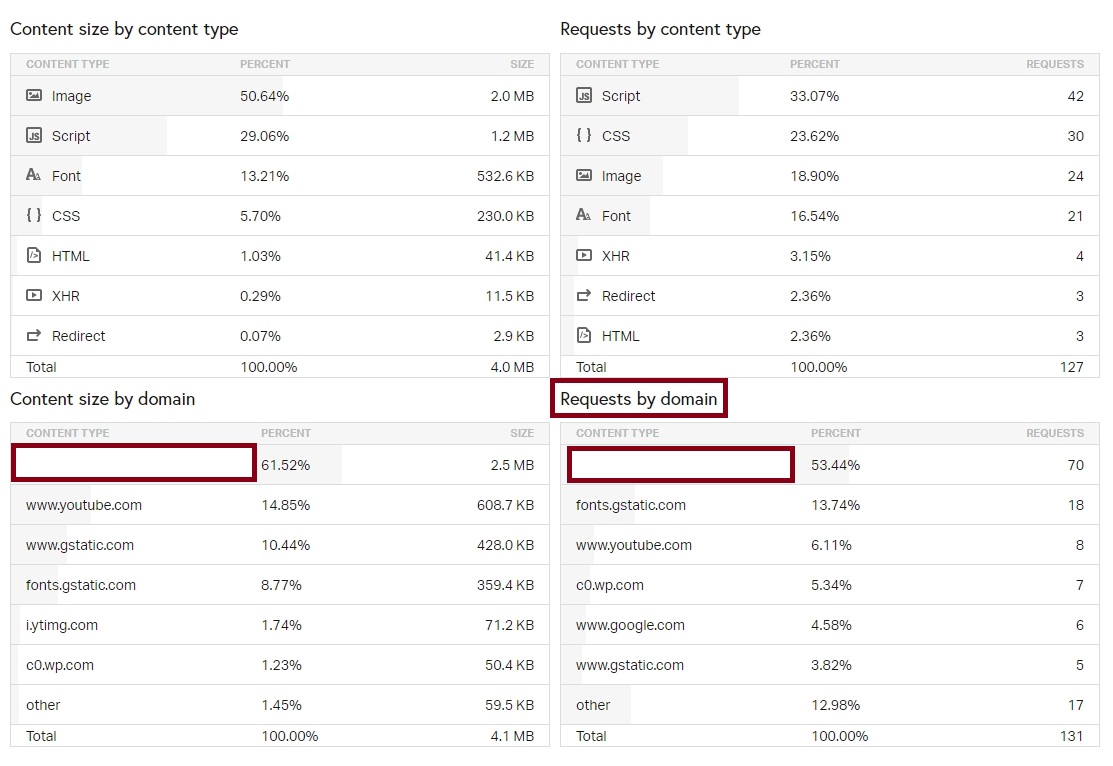
WebPageTest and Pingdom will do this for you.
On WebPageTest, head over to the DOMAIN tab and check the Content breakdown by domain, at the bottom-right, you will see the info you´re looking for...
And, on Pingdom, you can scroll a bit down and check on the bottom-right, a box called "Requests by domain", there, you will also see all external resources being requested by your site.
Cheers!


