✅WORDPRESS OPTIMIZATION GUIDE! FROM 3 TO 1 SECOND LOAD-TIME❗❗

I will try to keep this simple and quick as possible. So let's go!


5. Now, look for wp-config.php and insert the following lines

Code:
define("WP_CONTENT_URL", "https://static.website.tld");
define("COOKIE_DOMAIN", "https://website.tld");

Code:
UPDATE wp_posts SET guid = REPLACE(guid,'website.tld/wp-content/','static.website.tld/')

After editing my wp-config file, i get "Server returned HTTP status 500" error on my website. I dont use cloudflare, is that a problem?
 
After editing my wp-config file, i get "Server returned HTTP status 500" error on my website. I dont use cloudflare, is that a problem?
Not at all, dis you maybe by mistake added they sql query inside the config?. Post a screenshot of what you put inside your wp-config please
 
Not at all, dis you maybe by mistake added they sql query inside the config?. Post a screenshot of what you put inside your wp-config please

You need to edit your main post, other people are going to make this mistake too.
Removing the query fixed inside config.php removed the problem!
 
You need to edit your main post, other people are going to make this mistake too.
Removing the query fixed inside config.php removed the problem!
I cant edit the post sadly. Reported for editing 30 mins after posting
 
Damn, this is exactly what I was needing.

@FatBee Thanks a million for taking the time to do this. I almost give up in this regard. I got tired of browsing the web trying to find these practices. Perhaps, I did find it, but since I am not good (yet) with HTML, CSS, JS, or web development in general, I just missed reading through the recommendation and actually understand the poster/instructor advise.

I am learning HTML, CSS, and JS from the ground up so I can be able to 1) improve a site page loading speed and, 2) Add some small customization to a WP site.

There are other GTMetrix and Google PageSpeed Insights issues that come along very frequently that I would like to know how you tackle them.

Can I post them here?
 
Damn, this is exactly what I was needing.

@FatBee Thanks a million for taking the time to do this. I almost give up in this regard. I got tired of browsing the web trying to find these practices. Perhaps, I did find it, but since I am not good (yet) with HTML, CSS, JS, or web development in general, I just missed reading through the recommendation and actually understand the poster/instructor advise.

I am learning HTML, CSS, and JS from the ground up so I can be able to 1) improve a site page loading speed and, 2) Add some small customization to a WP site.

There are other GTMetrix and Google PageSpeed Insights issues that come along very frequently that I would like to know how you tackle them.

Can I post them here?
Sure!
 
Cool guide but I don't get why you suggest to use webP format for the images. This format is NOT supported on Safari browsers. As you can see here Safari has 30% of the internet usage so you already loose 30% of your visitors https://www.stetic.com/market-share/browser/
Imigify provides reverse compatwbility. My website works perfectly fine on Safari and png format is loaded insted
 
If you don't want to go into technical stuff and you are using a lot of plugins then use Asset Clean up plugin. With that, you can remove some plugins from specific pages from WP dashboard.
My 2 cents.
Great guide buddy!;)
This is interesting, thanks for the share!
Great guide, very easy to do - and it does provide results... I did a lot of at the end of April, shame your guide wasn't done then - would had saved me a few days of work and research! One thing I couldn't fathom out is with Google Speed Insights -- the warning with unused CSS appears on mobile. Any ideas on locating and rectifying this issue?
Since using Elementor, this unused CSS it´s also a thing I am currently struggling with.

I mean, I can go to the DevTool on Chrome and determine what resources are filled with unused CSS but, after that, I don´t know what to do with the info.

I tried removing these unused lines of code by copy/pasting the lines into this tool that "clean up" the code, then, through VSC I edit by copy/pasting the "clean" code into my theme file but I always got an error.

How you get around this issue?
As i said, remove the sql query
Ok, I found my notes on "Page Loading Speed Improvements" :D :p

You mention on the OR about prefetching but, I also found preloading and prerendering. Do these matter at all? Do they have a major impact on a page loading speed? Or, with prefetching is more than enough?
 
This is interesting, thanks for the share!

Since using Elementor, this unused CSS it´s also a thing I am currently struggling with.

I mean, I can go to the DevTool on Chrome and determine what resources are filled with unused CSS but, after that, I don´t know what to do with the info.

I tried removing these unused lines of code by copy/pasting the lines into this tool that "clean up" the code, then, through VSC I edit by copy/pasting the "clean" code into my theme file but I always got an error.

How you get around this issue?

Ok, I found my notes on "Page Loading Speed Improvements" :D :p

You mention on the OR about prefetching but, I also found preloading and prerendering. Do these matter at all? Do they have a major impact on a page loading speed? Or, with prefetching is more than enough?
Preloading sometimes make the site looks slow. Preferching is just fine!
 
Nice guide mate. A few things in there new to me as well, so I'll have to look at implementing those on my sites also.

One thing to add as well - sorry if you mentioned it but I didn't notice - get your site on a decent hosting provider. I had a few performance issues recently even though I had implemented most of the things you've mentioned and after I still wasn't getting the speeds that I wanted, I upgraded to a better hosting plan (semi-dedicated instead of shared hosting) and the performance improvement was massive - a little bit better as far as the stats were concerned but noticeably faster to the naked eye as well.
 
And regarding the unused CSS issue I comment above? How you deal with it?
This is what I am pretty much doing...


But when removing those likes of codes that appear on red from the respective file and save it, I always get an error. So, don´t know if I am missing something or skipped a step.
 
Autoptimize + WP Fastest Cache + Smush

Combination of these 3 plugins works perfectly for me.
 
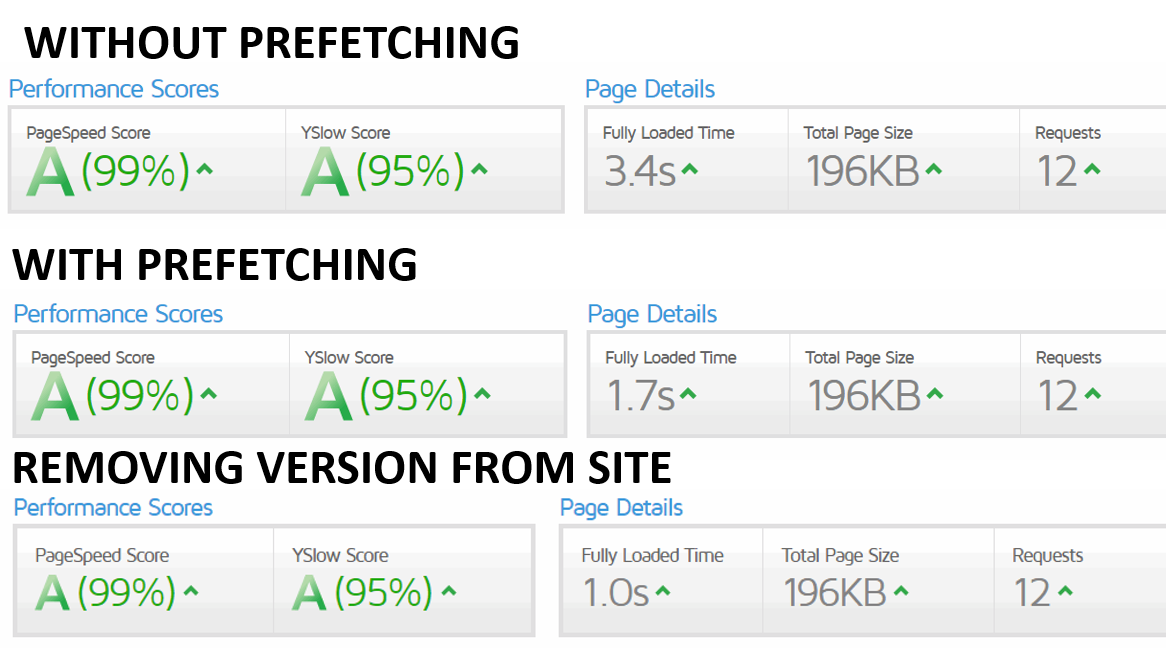
I got these results following the prefetching and removing version from site steps delined here.

b6297a47e4efab24e111084cda62eae8.png

I didn´t apply the SERVE STATIC CONTENT FROM A SUBDOMAIN. AKA COOKIE-FREE DOMAIN steps because it was a bit too technical for me and, wanted to try without it first.
 
Back
Top