WordPress Hacked! How to resolve?

FabioSelau

Senior Member
Joined
Oct 19, 2018
Messages
813
Reaction score
451
Hello, I remembered an old project of mine, but it was still online at Webmaster.
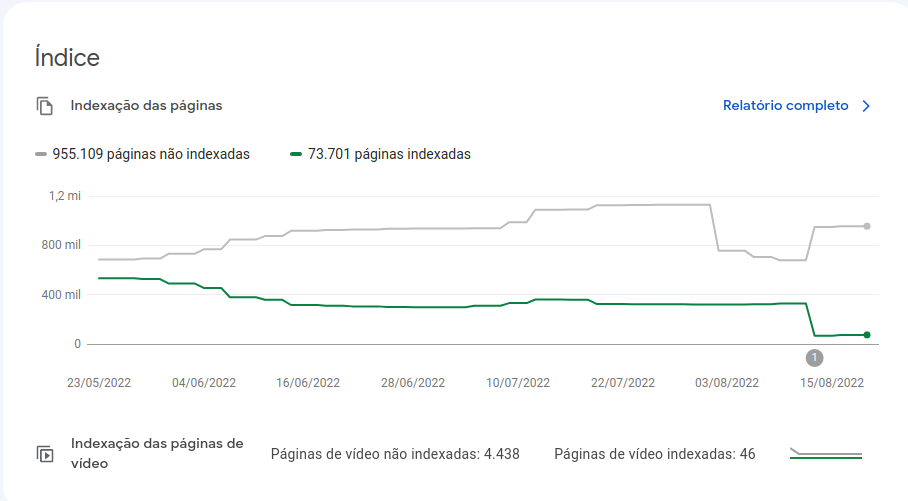
But when I accessed it, it gave me a big fright: 70k of indexed pages and 955k not indexed.
I got scared and went to check out the top rankings on Google.
Then I realized that I was the target of a hacker attack on my WordPress.
I went into the files and noticed some .php files that were added and others from wordpress that were edited.

At the same time I deleted the complete host and created it again by uploading a backup that I had saved before the invasion.
After that I installed a security plugin that changes the WordPress admin url, blocks it by IP on incorrect login, updated WordPress and themes/plugins.

However, in the Webmaster, everything is still with these numbers of indexed and not indexed, in the SERP it still contains pages that were from the spam that I removed.

How to solve this? Is there any way to tell Google to delete all the indexed URLs and only index the new ones that are in the sitemap?
1661205259689.png
 
If you were a target of a hacker's attack, I would recommend to use a htaccess file to block access to the /admin dictionary. Even if you have a login block on wrong password set, there's proxy packages that have millions of IP's for $1000 a month. You never know how far the hacker is willing to go.

Also on the sidenote, that's just my 2 cents, I don't really know how to de-index pages from Google :D But still wanted to help lol
 
You would rather had up to date backup. Plus additional protection kit against hackers.
Also you'd better investigate the case and find out the holes in your app/server.
 
If you were a target of a hacker's attack, I would recommend to use a htaccess file to block access to the /admin dictionary. Even if you have a login block on wrong password set, there's proxy packages that have millions of IP's for $1000 a month. You never know how far the hacker is willing to go.

Also on the sidenote, that's just my 2 cents, I don't really know how to de-index pages from Google :D But still wanted to help lol
Agree with you.
 
After that I installed a security plugin that changes the WordPress admin url, blocks it by IP on incorrect login, updated WordPress and themes/plugins.
Which security plugin did you install?
 
Google will reindex your pages automatically.. Just delete pages that hacker did and redirect.

What to do?
Reduce your plugins usage, don't overuse plugins in your Wordpress
Don't use Theme or Plugins nulled this increase your risk of being hacked or exposed.
Clean install or using a backup before hacking, disabling plugins, changing password to other strong password.
Changing URL of WP-Admin.
Checking what causes the hacking (logs) if is shared hosting contact them.
Check for viruses in your computer and hosting (ask your hosting provider to run it for you)

That's all. Wordpress can be hacked when you use a lot of plugins and themes nulled or with vulnerabilities.
Outdated plugins or themes is too risky.

You can install any security plugin, it won't block 100% of you being hacked. You can still being hacked even with security or firewall plugin... ;)
YOU NEED TO DISCOVER the root of the cause which they explored to hack your website.
Then FIX IT, and move on.
 
Last edited by a moderator:
They put encrypted code on your theme files, widgets and core files. Check your databases too.
Check if your homepage redirect to another website.

Look for this kind of code
maliciours-redirect-code-at-header.png
 
Im not an affiliate of this sites product but I can tell you he gives a lot of free advice clear instructions and the version he just upgraded from is free.
https://perishablepress.com/7g-firewall/He lays out the proper way to generate from scratch or just improve the base htaccess file but I was happy and had no issue using ver 6 he has now created ver 7 for sale and also accepts donations.
 
Google will re index you "new" website eventually but you can make the process faster by requesting indexing through search console. It is very helpful for things like this.
 
Which security plugin did you install?
Wordfence is the plugin that does this. Even in free version it is powerful enough keep hackers at bay and it will also notify you by email when a hacker deactivates it, usually the first step of getting hacked because it will not allow hackers to upload malware when it is active.
 
Using nulled themes and plugins, aren’t ya?
I once had a brand new website hacked on its first day of existence with all plugins and theme up to date. I think that sometimes a plugin may just have a vulnerability even when it is up to date.
 
Check the cron jobs + cron users as well. Looks like "php injected".

You can delete pages from GSC.
 
I once had a brand new website hacked on its first day of existence with all plugins and theme up to date. I think that sometimes a plugin may just have a vulnerability even when it is up to date.

But were these nulled?
 
Back
Top