
You are using an out of date browser. It may not display this or other websites correctly.
You should upgrade or use an alternative browser.
You should upgrade or use an alternative browser.
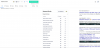
Why the heck is this happening?
- Thread starter myfault
- Start date


myfault
Senior Member
- Sep 21, 2012
- 970
- 242
Maybe it's your google chrome extension messing up with the search results page?
Only using keyword surfer and moz.

R4v3nbl4ck
Senior Member
- Sep 29, 2020
- 1,071
- 1,313
Try disabling one of them at a time and see if it helps.Only using keyword surfer and moz.
If not, do a search in incognito mode. If the SERP appears normal, then you just have to clear your browser cache.
If none of these work, right click on the empty space, click on inspect and try to figure out what element is causing the issue (you would need basic HTML knowledge).

- Apr 20, 2018
- 5,090
- 2,961
yeah i also had the same issue lately, try to reinsntall k.surfer extension, it works for me.
people also reported the same problem, k.surfer didn't show any results in SERPs, check k.surfer reviews on web store, they said the devs already fixed that issue, waiting for Chrome Store's approval.
people also reported the same problem, k.surfer didn't show any results in SERPs, check k.surfer reviews on web store, they said the devs already fixed that issue, waiting for Chrome Store's approval.