What does this mean

p0is0nd4rt

Registered Member
Joined
Oct 11, 2019
Messages
90
Reaction score
50
What does this message from bing mean
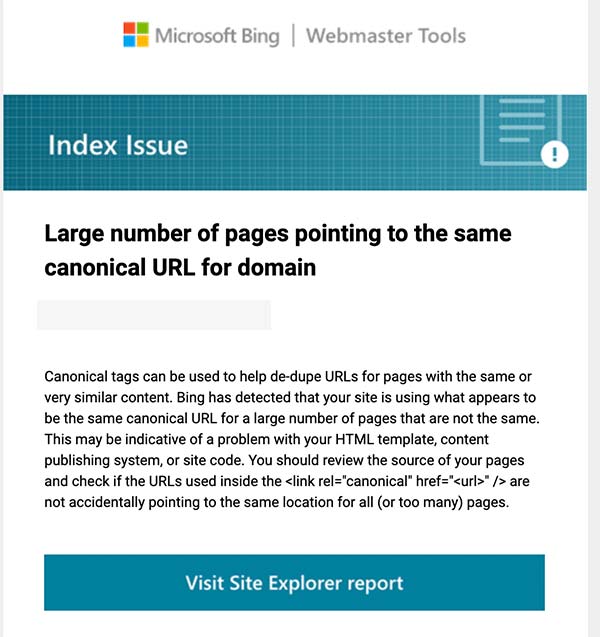

bing_03.jpg


I don't know what the message means and the report doesn't show anything.

I'm trying to figure out if it's related to backlinks I have pointing to my homepage - 16k of them are ALL FROM JUST ONE SITE.

Spoke to another SEO who says that this completely screws the backlink profile, as the next largest number from the next site is 250.
 
try checking your websites settings, or check with googles url inspection tool . maybe all your webpages are marked as canonicals?
 
It says that the pages have no or same canonical URLs. If you have Yoast or rank math, you can manually change them. And if you didn't, google and bing are not going to like it.
 
Ok.

I'm on Magento 2 with Pearl theme.

Canonical urls on every page.

So for example a category with 2 pages has the same canonical url:

<link rel="canonical" href="https://mysite.com/parent-category/category-1.html">

Doesn't matter whether user is on page 1 or 2, the canonical url is the same.

Is this incorrect?

I have Mageworx seo module installed which as far as I can tell is adding the same canonical url to the head of the page:

"Our extension adds rel=canonical tag in the <head> section of a given page. This tag is designed to inform the search bots which URL is the most reliable (canonical) version of the page being displayed. It helps to prevent any duplicate content issues."

Which is the correct way of doing it?
 
Ok.

I'm on Magento 2 with Pearl theme.

Canonical urls on every page.

So for example a category with 2 pages has the same canonical url:

<link rel="canonical" href="https://mysite.com/parent-category/category-1.html">

Doesn't matter whether user is on page 1 or 2, the canonical url is the same.

Is this incorrect?

I have Mageworx seo module installed which as far as I can tell is adding the same canonical url to the head of the page:

"Our extension adds rel=canonical tag in the <head> section of a given page. This tag is designed to inform the search bots which URL is the most reliable (canonical) version of the page being displayed. It helps to prevent any duplicate content issues."

Which is the correct way of doing it?
each page canonical should be pointing into the same page,
you have change this one
 
Canonical URL is a way of communicating to search engines which page represents the "original" page for content. A Canonical URL points to the original source, while still allowing you to specify other URLs on your site that are considered duplicates or similar variations.

For example, let's say you have three pages of content that are very similar:


Homepage > Article 1 > http://www.example.com/article1 <-- This is your canonical url of this article

Article 2 > http://www.example.com/article2 <-- This is NOT your canonical url of this article because it does not point back to the homepage!

Article 3 > http://www.example.com/article3 <-- This is NOT your canonical url of this article because it does not point back to the homepage!

Hope this help
 
Back
Top