
You are using an out of date browser. It may not display this or other websites correctly.
You should upgrade or use an alternative browser.
You should upgrade or use an alternative browser.
wechat?
- Thread starter asimovgxj
- Start date

sashablack
Elite Member
- Jan 8, 2010
- 3,686
- 1,980
yes this was spoken I believe a while ago when they first were launching  Another opportunity for someone to bank from this
Another opportunity for someone to bank from this 
Commoner
Supreme Member
- Dec 8, 2013
- 1,364
- 391
Agree.
I realized that SouthEast Asia is using WeChat but a pity, my country of residence need to pay?! Yes, it is a pay-now channel as compared to a year ago which is free of course. This is quite a sad case as its popularity evolves into money-making scheme when this funky app has yet to have a stable platform.
I realized that SouthEast Asia is using WeChat but a pity, my country of residence need to pay?! Yes, it is a pay-now channel as compared to a year ago which is free of course. This is quite a sad case as its popularity evolves into money-making scheme when this funky app has yet to have a stable platform.

craigdoctor
Registered Member
- Jun 5, 2014
- 54
- 10
I've used it but not for too long. Wasn't wechat bought by a huge company already? Or was that Line?


J1mb0
Junior Member
- Jun 18, 2009
- 159
- 25
I can help with message verification numbers for WeChat, Kenyan Numbers
This verification thing is super annoying... anyone knows how I "Activate" my account ... i am on +44.

websitegeek
Junior Member
- Dec 22, 2011
- 103
- 14
In the west WhatsApp prevails. I think wechat currently only used in China and southeast asia
principleofmotion
Newbie
- Mar 4, 2019
- 21
- 4
Wechat (international version of Weixin) actually has a completely separate user base from Weixin. International users can see Weixin content / users but Weixin users often can't see international content because international content doesn't comply with PRC regulations. This trend seems to be accelerating as Tiktok and Douyin are two entirely separate platforms without even the limited user inter-operability of Wechat.

mylastvacation
Supreme Member
- Apr 26, 2018
- 1,353
- 1,470
I've been using wechat for more than 6 years, it has almost infinite potential for marketing, because of their function to find nearby people, you can send any message you want to all the people near you, instantly, for free.

Many of you will buy a new mobile phone in two years or less. What will happen when you try to log in to WeChat with your new device?Security Verification! The most frustrating thing about WeChat!So, I will show you 4 ways to verify WeChat on new device. Actually,there’s only 4 ways to verify your identity.
NOTE:If you want to verify identity without SMS verification code, password,Ask for help, then I strongly recommend you to enable voiceprint.
Why WeChat always ask for Security Verification? I think It would be very helpful for WeChat account security. However, it’s so inconvenient for us to use it, especially for newbies. That’s why I write this hope this will be helpful for you. If you have any questions, please comment below.
I will not show you how to log in to your WeChat account. When you try to log in your WeChat account with your new device, it shows” This is the first time logging in from this device. For your account’s safety, verify your Identity first.” You can start your verification by clicking [Start to verify] icon.
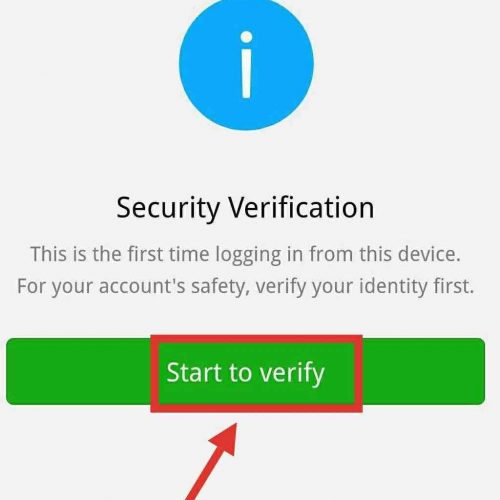
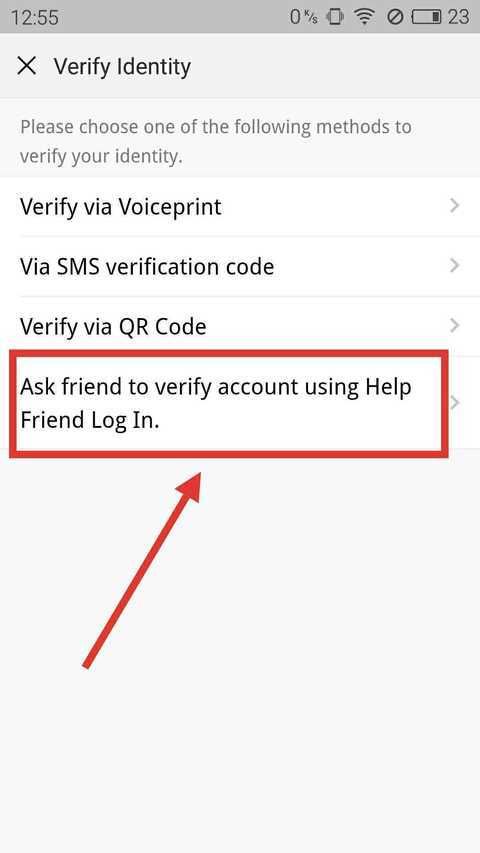
After clicking that button,then you will see there’re four methods to verify your identity. I will show you every method step by step.
Method 1:Ask your WeChat friend to verify account using Help Friend Log in.
This method is for people who have lost their phone or changed their phone and the old one is not by your side right now.
1. Tap [Ask friend to verify account using Help Friend Log in].
2. Ask your WeChat friends to send temporary code to your WeChat.
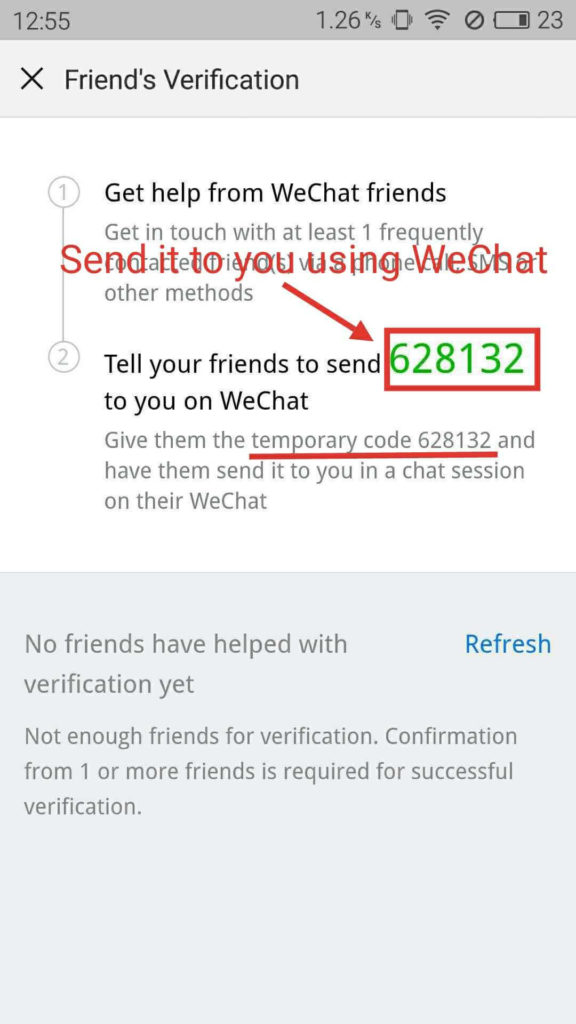
How to let them know your temporary code? You can do whatever you can to let them know, via phone call, SMS, Email or other methods. But, if you don’t know any other contact info about your WeChat friends and you can’t contact them without WeChat, then you need to use other methods to verify.
3. Let your friends contact you via WeChat and send you a message(only temporary code).

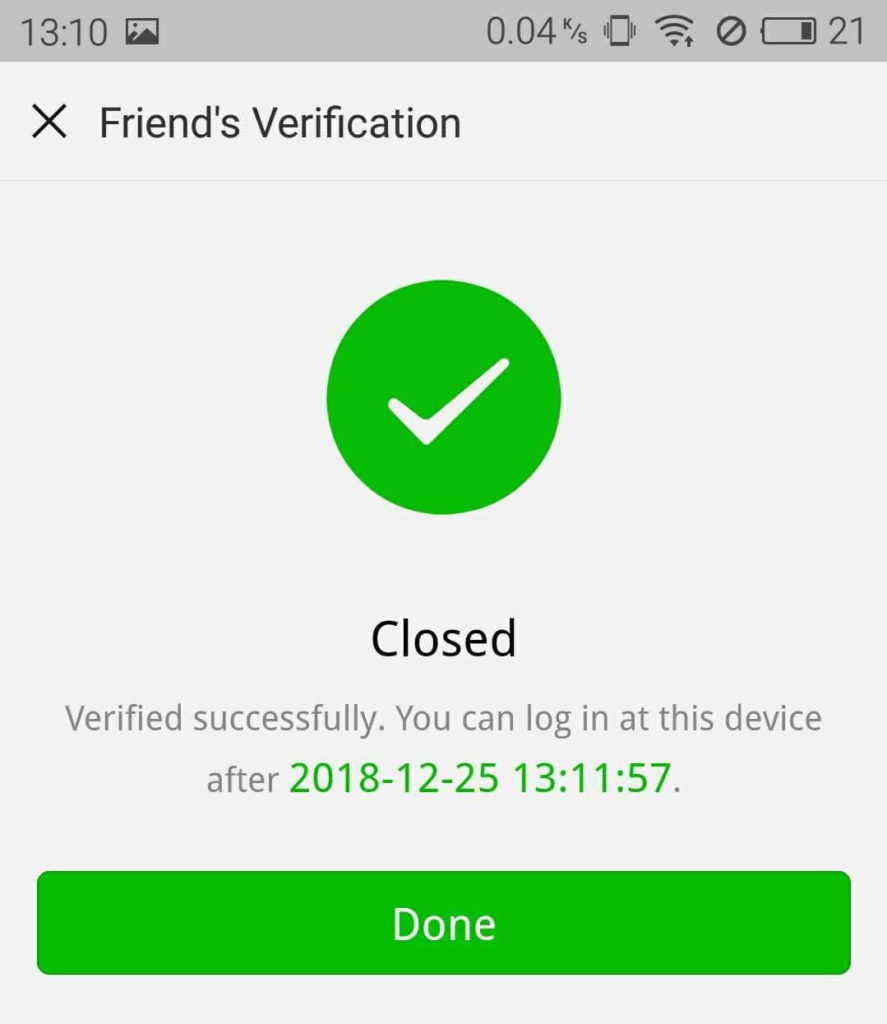
4. Check out how many friends have helped with verification by tapping [Refresh].
If you need more than one friend to help you, then you need to ask more friends to help you until the number meet the requirement. After that, you will be verified successfully.
Method 2:Verify via QR code.
This method is for people who have the old mobile phone by your side right now. Or you can ask somebody to help you to scanning QR code using your old mobile phone. The old mobile phone is that the last time your WeChat has logged in to.
1. Tap [Ask friend to verify account using Help Friend Log in].
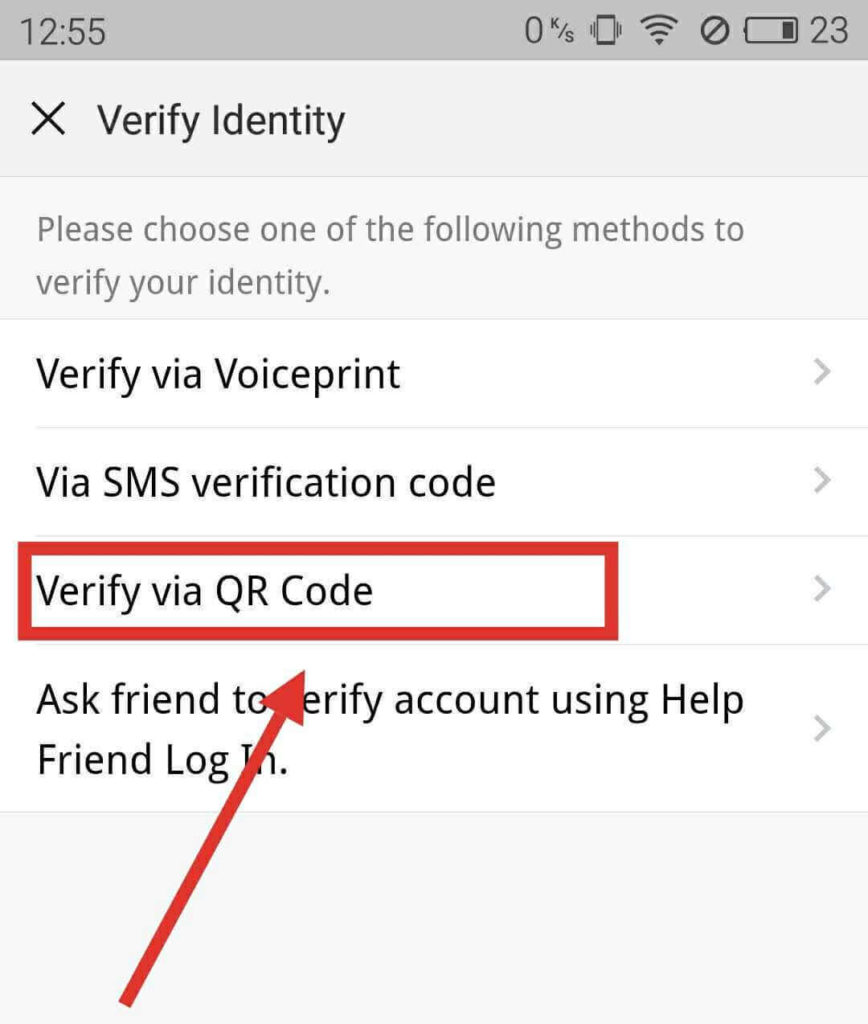
2 Scan QR code.
You need to use the original phone to scan this QR code. What’s original phone mean? The original phone should be the last time your WeChat have logged in to that. In other words, it’s the old phone device and your WeChat logged in on that.
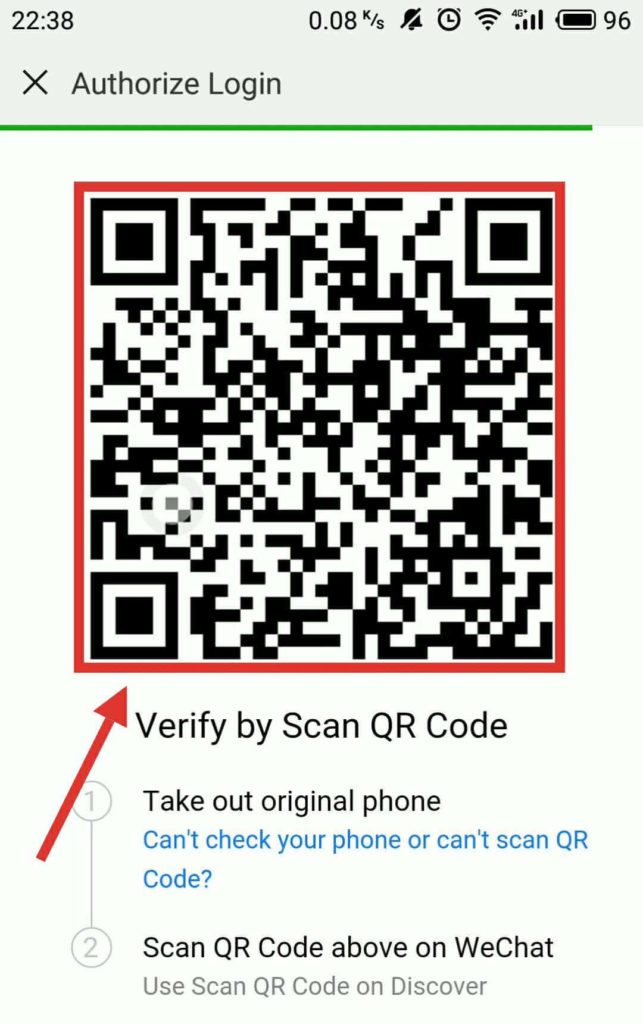
How to scan QR code on WeChat?
Some people might not know how to scan QR code on WeChat, So, this step will show you how. If you’ve already known,you can skip to next step.
Click [+] button on the top right of screen.
Then tap [Scan] icon on your phone.
Using your old mobile phone to point your phone camera at the QR code and have it within the guidelines.NOTE: If QR Code expired, you need to refresh it(Click Refresh icon).
If you need more details about how to scan QR code,
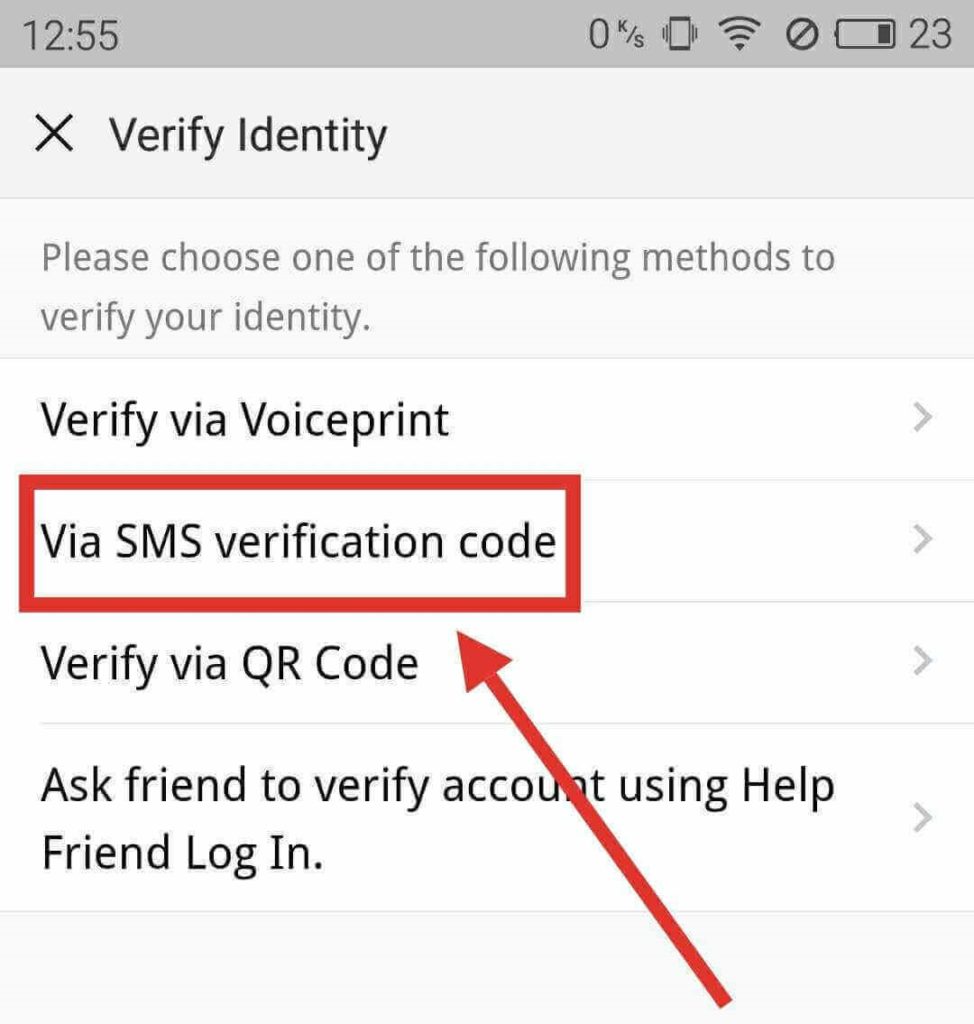
Method 3:Verify via SMS verification code.
If your WeChat was signed up by phone number or you have linked your phone number to your WeChat, Then you should consider this method because it will be more convenient to verify.
Tap [Via SMS verification code].
And then, an SMS verication code will be sent to your phone. If don’t receive SMS code, you need to request agian.
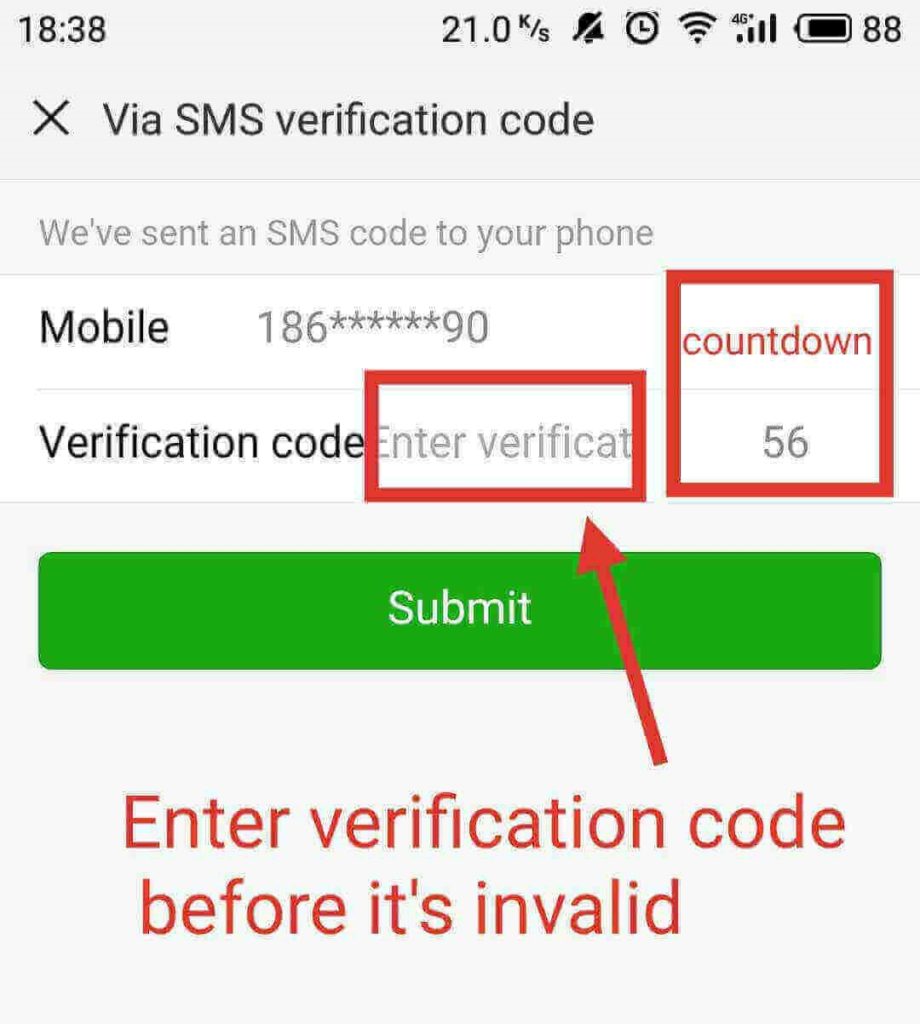
2. Enter the Verification code before it’s invalid.
You need to request verification code again if it’s invalid.
Method 4: verify via Voiceprint. (strongly recommended!)
There’s no need to ask someone to help you with verification if you use this method and you can verify without your old phone. In other words, it’s a piece of cake to verify WeChat identity when you login WeChat on new device.
How to enable voiceprint feature on WeChat?
Before you use this method you need to update WeChat to the latest version and open this feature. You can check and update your WeChat version as follow steps
Update WeChat to the latest version. If your WeChat has updated to the latest version(At least,version 6.62) then you can skip this step.Open and logged in to your WeChat. Tap [Me] icon >> Tap [Settings]>>[About]>> [Check for Updates].
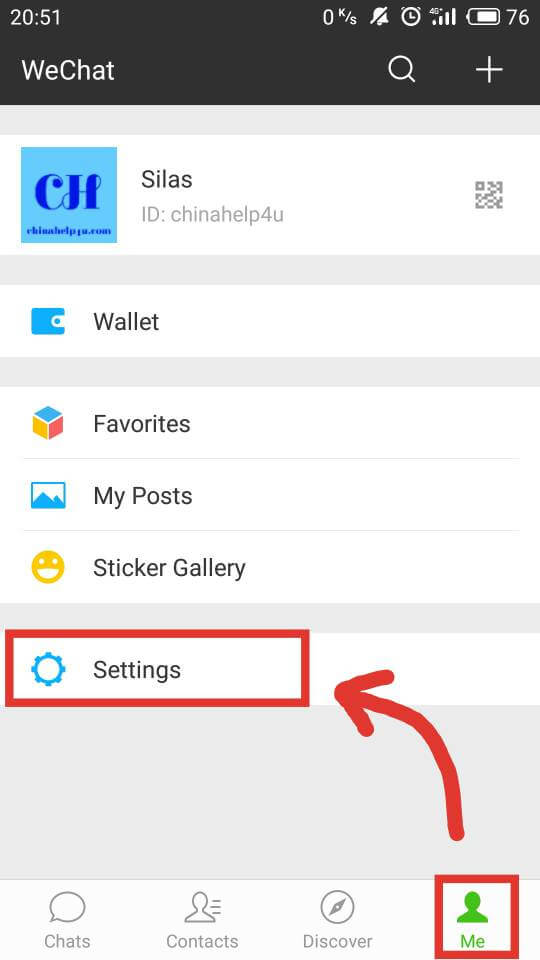


Enable Voiceprint feature.
Tap [Me] on the bottom of the screen.
Click [Settings] icon.
And thenTap [Account Security]

Click [Create] icon to create voiceprint.

Make sure that you are in a quiet environment and then hold button and read digits.
If failed,you need to try again.

Once step 1 completed, you will be asked to proceed with the next step by Clicking [Next] button.
Hold button and read digits again and then your voiceprint created.
You can log in to WeChat via voiceprint.

The last step is testing your current voiceprint by tapping [Test current Voiceprint].
Hold button and read digits again as the previous step.


I have shown you that 4 ways to verify WeChat on a new device. As I said, I recommend you to enable Voiceprint feature in case you changed mobile phone or forgot the password. Especially for someone lost their phone.
Note: There’s a limit for logging in WeChat via voiceprint. You’re allowed to log in via Voiceprint up to six times per day. When this limit is reached, you can log in with password or other methods, or you can log in via Voiceprint again after 24 hours.
NOTE:If you want to verify identity without SMS verification code, password,Ask for help, then I strongly recommend you to enable voiceprint.
Why WeChat always ask for Security Verification? I think It would be very helpful for WeChat account security. However, it’s so inconvenient for us to use it, especially for newbies. That’s why I write this hope this will be helpful for you. If you have any questions, please comment below.
I will not show you how to log in to your WeChat account. When you try to log in your WeChat account with your new device, it shows” This is the first time logging in from this device. For your account’s safety, verify your Identity first.” You can start your verification by clicking [Start to verify] icon.
After clicking that button,then you will see there’re four methods to verify your identity. I will show you every method step by step.
Method 1:Ask your WeChat friend to verify account using Help Friend Log in.
This method is for people who have lost their phone or changed their phone and the old one is not by your side right now.
1. Tap [Ask friend to verify account using Help Friend Log in].
2. Ask your WeChat friends to send temporary code to your WeChat.
How to let them know your temporary code? You can do whatever you can to let them know, via phone call, SMS, Email or other methods. But, if you don’t know any other contact info about your WeChat friends and you can’t contact them without WeChat, then you need to use other methods to verify.
3. Let your friends contact you via WeChat and send you a message(only temporary code).
4. Check out how many friends have helped with verification by tapping [Refresh].
If you need more than one friend to help you, then you need to ask more friends to help you until the number meet the requirement. After that, you will be verified successfully.
Method 2:Verify via QR code.
This method is for people who have the old mobile phone by your side right now. Or you can ask somebody to help you to scanning QR code using your old mobile phone. The old mobile phone is that the last time your WeChat has logged in to.
1. Tap [Ask friend to verify account using Help Friend Log in].
2 Scan QR code.
You need to use the original phone to scan this QR code. What’s original phone mean? The original phone should be the last time your WeChat have logged in to that. In other words, it’s the old phone device and your WeChat logged in on that.
How to scan QR code on WeChat?
Some people might not know how to scan QR code on WeChat, So, this step will show you how. If you’ve already known,you can skip to next step.
Click [+] button on the top right of screen.
Then tap [Scan] icon on your phone.
Using your old mobile phone to point your phone camera at the QR code and have it within the guidelines.NOTE: If QR Code expired, you need to refresh it(Click Refresh icon).
If you need more details about how to scan QR code,
Method 3:Verify via SMS verification code.
If your WeChat was signed up by phone number or you have linked your phone number to your WeChat, Then you should consider this method because it will be more convenient to verify.
Tap [Via SMS verification code].
And then, an SMS verication code will be sent to your phone. If don’t receive SMS code, you need to request agian.
2. Enter the Verification code before it’s invalid.
You need to request verification code again if it’s invalid.
Method 4: verify via Voiceprint. (strongly recommended!)
There’s no need to ask someone to help you with verification if you use this method and you can verify without your old phone. In other words, it’s a piece of cake to verify WeChat identity when you login WeChat on new device.
How to enable voiceprint feature on WeChat?
Before you use this method you need to update WeChat to the latest version and open this feature. You can check and update your WeChat version as follow steps
Update WeChat to the latest version. If your WeChat has updated to the latest version(At least,version 6.62) then you can skip this step.Open and logged in to your WeChat. Tap [Me] icon >> Tap [Settings]>>[About]>> [Check for Updates].
Enable Voiceprint feature.
Tap [Me] on the bottom of the screen.
Click [Settings] icon.
And thenTap [Account Security]
Click [Create] icon to create voiceprint.
Make sure that you are in a quiet environment and then hold button and read digits.
If failed,you need to try again.
Once step 1 completed, you will be asked to proceed with the next step by Clicking [Next] button.
Hold button and read digits again and then your voiceprint created.
You can log in to WeChat via voiceprint.
The last step is testing your current voiceprint by tapping [Test current Voiceprint].
Hold button and read digits again as the previous step.
I have shown you that 4 ways to verify WeChat on a new device. As I said, I recommend you to enable Voiceprint feature in case you changed mobile phone or forgot the password. Especially for someone lost their phone.
Note: There’s a limit for logging in WeChat via voiceprint. You’re allowed to log in via Voiceprint up to six times per day. When this limit is reached, you can log in with password or other methods, or you can log in via Voiceprint again after 24 hours.
Last edited by a moderator: